Upload an Invoice, Want Structured Data ? Parse using AI in n8n via PDF4me
Upload an invoice PDF to PDF4me, then run it through the AI-Invoice Parser. Two nodes. You get a processInvoiceModel with vendor name, invoice number, totals, line items, bill-to details—everything in a structured format you can map to databases, spreadsheets, or the next workflow step. n8n gives you Schema, Table, and JSON views so you can inspect the output however you like.
In a nutshell: Manual trigger → Upload file to PDF4me (hosts the PDF) → AI-Invoice Parser (uses documentUrl from Upload). Output: processInvoiceModel with invoiceNumber, vendorName, total, lineItems, and more. One credit per invoice.
What You’ll Get
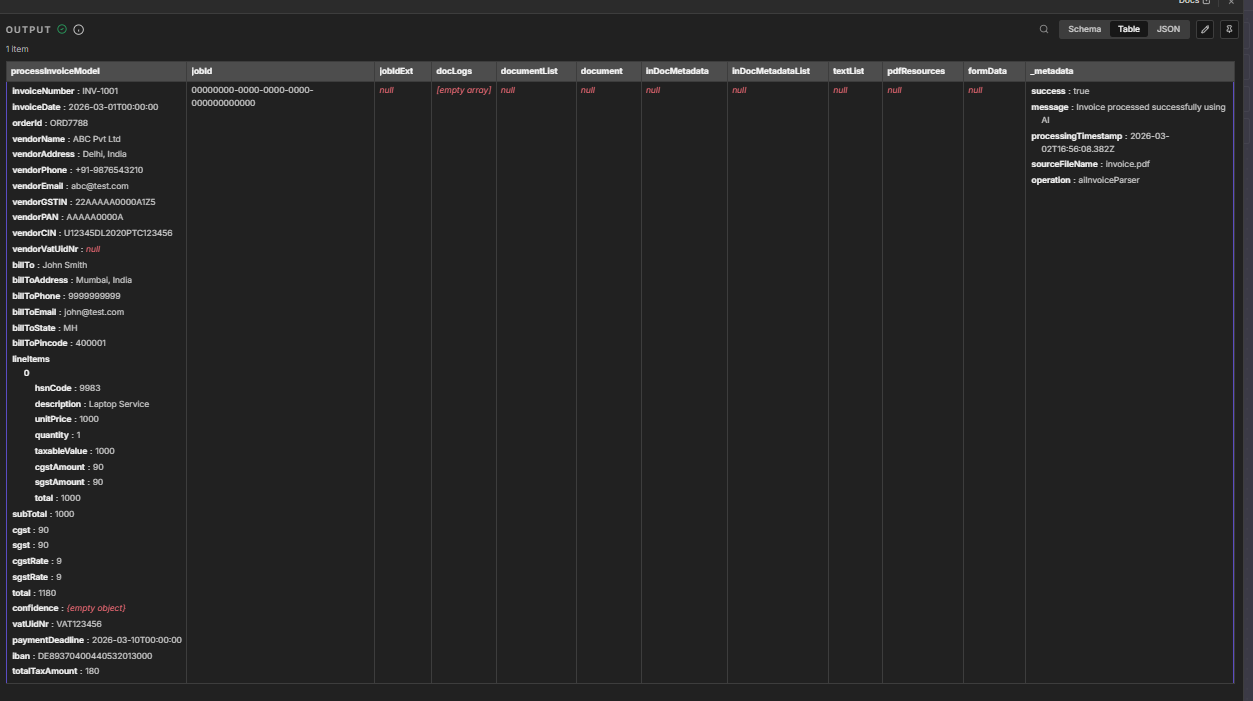
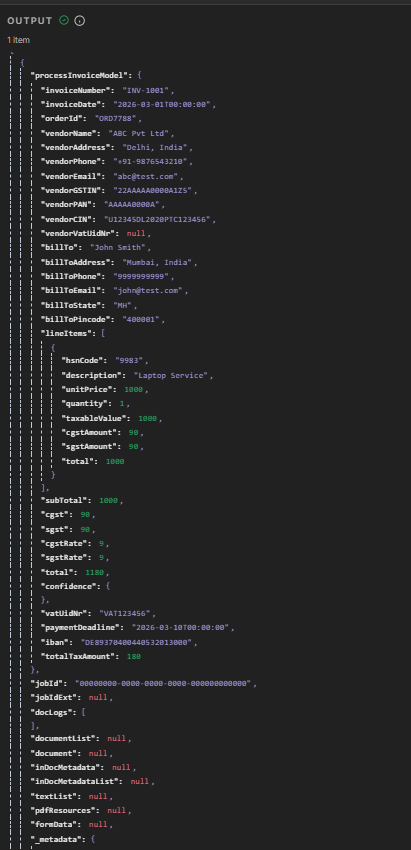
Input: An invoice PDF (e.g. invoice.pdf). Output: A structured object with invoiceNumber (INV-1001), vendorName (ABC Pvt Ltd), invoiceDate, orderId, billTo, lineItems (description, unitPrice, quantity, cgst, sgst), subTotal, total (1180), paymentDeadline, iban, and more. Switch between Schema, Table, and JSON in the output panel to explore the data.
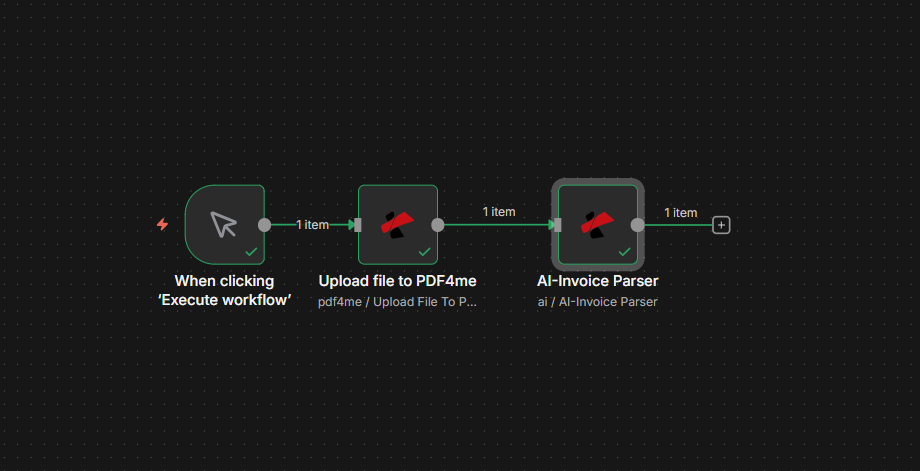
Workflow: manual trigger, then Upload and AI-Invoice Parser. Each node processes 1 item.
What You Need
- n8n — n8n instance. New workflow with a manual trigger.
- PDF4me API key — Get your API key. Add a PDF4me Connection credential when you add the first PDF4me node. First time? See Connect PDF4me to n8n.
The Workflow in 2 Nodes
- Upload file to PDF4me — Sends your PDF (Base64 or binary) to PDF4me and returns a
documentUrl. That URL is what the parser needs. - AI-Invoice Parser — Takes the
documentUrlfrom Upload, runs AI extraction, and returns theprocessInvoiceModel.
Step 1: Upload file to PDF4me
Workflow so far: Trigger → Upload.
- Add a trigger — Manual / When clicking 'Execute workflow' (or use a file trigger from Google Drive, Dropbox, etc.).
- Add PDF4me node — Resource: PDF4me → PDF4me Operations: Upload File To PDF4me.
- Credential — PDF4me Connection.
- Input Data Type — Base64 String or Binary Data (depending on your trigger).
- Base64 File Content — Map the PDF from your trigger. For a manual run, use Read Binary File or an expression.
- File Retention Hours —
2(or your preference). The parser uses the URL before it expires.
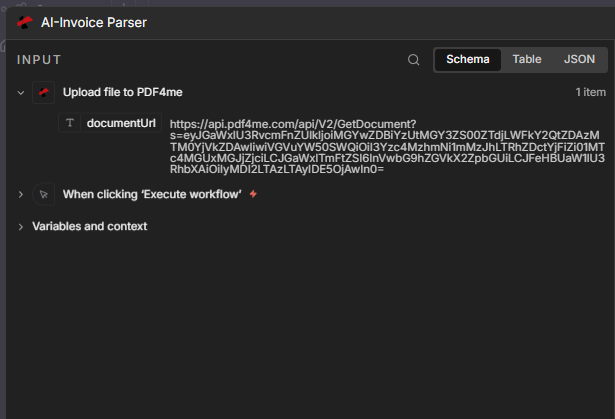
The node outputs documentUrl — a URL like https://api.pdf4me.com/api/V2/GetDocument?s=.... The AI-Invoice Parser uses this to fetch and process the PDF.
Step 2: AI-Invoice Parser
Workflow so far: Trigger → Upload → AI-Invoice Parser.
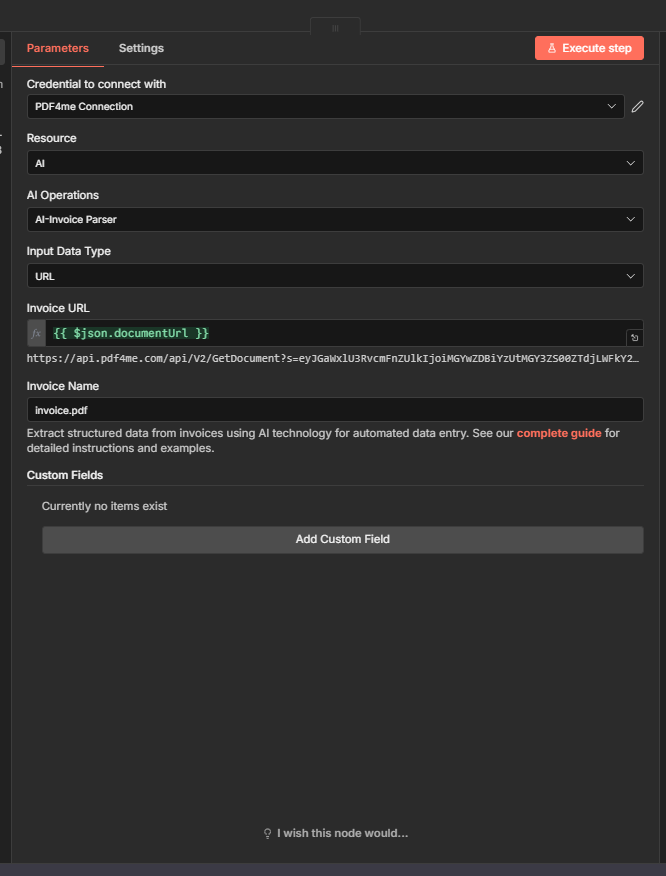
- Add another PDF4me node — Resource: AI → AI Operations: AI-Invoice Parser.
- Credential — PDF4me Connection.
- Input Data Type — URL.
- Invoice URL — Map
{{ $json.documentUrl }}from the Upload node. - Invoice Name —
invoice.pdf(or map from your trigger). - Custom Fields — Optional. Use Add Custom Field to extract extra fields beyond the standard schema.
Input wiring
The parser receives the Upload node’s output. The key field is documentUrl:
Output: Schema, Table, and JSON
The AI-Invoice Parser returns a single item with processInvoiceModel, _metadata, and other fields. n8n lets you view the output in three formats.
Schema view — Field-by-field structure with types:
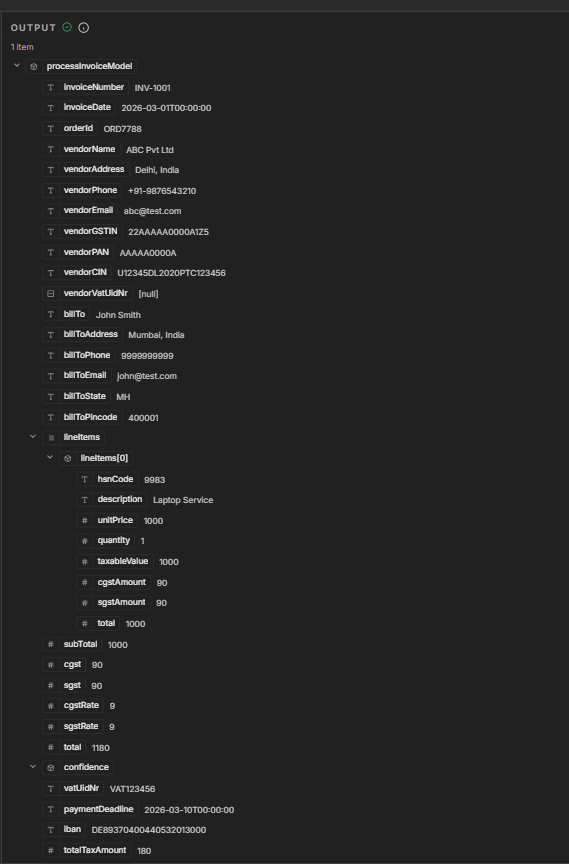
Table view — Spreadsheet-style layout:
JSON view — Raw response for mapping and debugging:
What’s inside processInvoiceModel
| Field | Example | Notes |
|---|---|---|
| invoiceNumber | INV-1001 | Invoice reference |
| invoiceDate | 2026-03-01T00:00:00 | Issue date |
| orderId | ORD7788 | Order reference |
| vendorName | ABC Pvt Ltd | Supplier |
| vendorAddress | Delhi, India | Full address |
| vendorEmail | [email protected] | Contact |
| billTo | John Smith | Customer name |
| billToAddress | Mumbai, India | Billing address |
| lineItems | [description, unitPrice, quantity, …] | Line items array |
| subTotal | 1000 | Before tax |
| cgst, sgst | 90, 90 | Tax amounts |
| total | 1180 | Grand total |
| paymentDeadline | 2026-03-10T00:00:00 | Due date |
| iban | DE89370400440532013000 | Bank details |
_metadata includes success, message (e.g. "Invoice processed successfully using AI"), sourceFileName, and processingTimestamp.
What’s Next?
- Map
processInvoiceModelinto Google Sheets, Airtable, or a database with a follow-up node. - Replace the manual trigger with Google Drive or Dropbox "new file" to run on every new invoice.
- Use Set or Code to pick specific fields before sending to your system.
- Same pattern in Make, Zapier, or Power Automate if you prefer.
Troubleshooting
Ensure the Upload node runs first. Use {{ $json.documentUrl }} in the Invoice URL field, or pick it from the expression editor.
Check that the Upload node returns a valid documentUrl. If the file expired (retention hours passed), re-run the Upload step.
PDF4me Troubleshooting covers 401 (API key), 402 (credits), and more.