Validate PDF/A (Zapier)
Validate PDFA reads a PDF and tells you whether it conforms to PDF/A (ISO 19005). It returns Conformance, IsConforming, and IsPdfA so your Zap can branch with Paths, Filters, or later steps. The file itself is not converted or repaired here. If something fails, route to Create PDF/A or fix the source, then validate again.
What are you building?
A quality gate between “we have a PDF” and “we may store or publish it.” Typical placements: after Dropbox or Drive download, after Create PDF/A or Create ZUGFeRD Invoice, or before emailing a regulator, customer, or archive bucket. Zapier exposes Configure fields for File, optional File URL, and File Name so the engine knows which bytes and what to call them in logs.
Who is this page for?
Teams that must prove PDF/A readiness for records management, legal retention, finance packs, or EU-oriented document policies (often referencing ISO-style archival practice). Replace our screenshot with your Zap if you publish internally so field numbers and app names match production.
Connect PDF4me
Sign in when Zapier prompts you, or add an API key from the PDF4me dashboard. After mapping fields, run Test on this step before you rely on branching logic.
Use File when a previous step hands you an actual attachment object (for example “2. File”). Use File URL when all you have is a download link to the PDF. You usually fill one of those inputs, not both filled with unrelated sources. Pair it with File Name so the step can trace the run cleanly.
Configure the PDF4me step
Open the Configure tab. Use Refresh fields if you renamed earlier steps so sample data lines up.
The screenshot below maps File from step 2 and builds File Name from File Name plus File Ext tokens. Adjust step numbers to match your Zap.
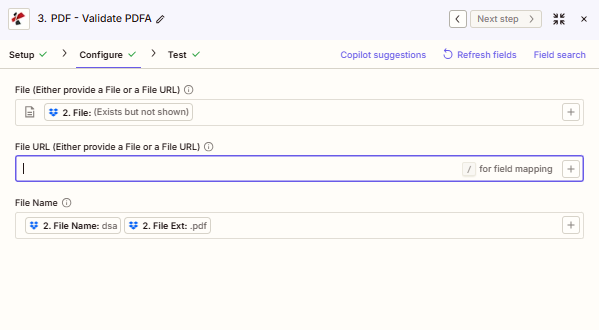
Point File at the PDF object from the step that produced it. Leave File URL empty when you use File. Build File Name from name and extension fields when your trigger splits them.
Quick reminders
Map File from a step that returns the document, not just a title or link row, unless you intentionally use File URL with a fetchable PDF.
Read Conformance (for example PDF/A-1b) together with IsPdfA and IsConforming. Branch on booleans first; use Conformance for logging or human-readable alerts.
This action does not repair PDFs. Send failures to Create PDF/A or back to authoring, then run Validate PDFA again on the new file.
Field reference
| Parameter | Usually | Purpose | Example map |
|---|---|---|---|
| File | Often used | Binary PDF from a prior Zap step when you have a file object. | `2. File` |
| File URL | Optional | Public or signed URL to the PDF when you are not passing a File object. | n/a |
| File Name | Recommended | Name with extension, or combine name plus extension fields. | `2. File Name` + `2. File Ext` |
Note: Labels in Zapier may show “Either provide a File or a File URL” next to File and File URL. Treat that as a hint to pick one delivery style per run so the connector receives unambiguous input.
Output
After a successful test or live run, inspect this step’s output for Conformance, IsConforming, and IsPdfA. A typical JSON-shaped body looks like:
{
  "Conformance": "PDF/A-1b",
  "IsConforming": true,
  "IsPdfA": true
}
| Field | Meaning |
|---|---|
Conformance | Detected or declared PDF/A level (for example PDF/A-1b). |
IsConforming | True when the file satisfies checks for that level. |
IsPdfA | True when the document is treated as PDF/A overall. |
Simple routing ideas
- IsPdfA and IsConforming both true: continue to archive, email, or handoff.
- IsPdfA true but IsConforming false: remediation (fonts, transparency, attachments), then validate again.
- IsPdfA false: run Create PDF/A if policy allows conversion, then validate the converted file.
Common questions
Does Validate PDFA change my PDF? No. It only analyzes and returns flags.
Should I use File or File URL? Use File when a prior step gives you the attachment. Use File URL when you only have a direct link to the PDF bytes.
Why map File Name if Zap already has the file? It keeps runs traceable and matches how PDF4me logs the job. Combine name and extension when your trigger splits them.
Does this replace legal advice on retention? No. It checks format conformance. Retention rules stay with your counsel and records team.
First Zap checklist
- Add PDF4me and choose Validate PDFA (exact label can vary slightly by app version).
- Connect your account under Setup if needed.
- On Configure, map File or File URL, and set File Name sensibly.
- Run Test. Open the output and confirm Conformance and the booleans.
- Add a Path or Filter on IsConforming (and IsPdfA if you want stricter gates).
- Turn the Zap on when samples look right!
Which patterns show up in real Zaps?Examples only; swap apps to match your stack.
- New file in Dropbox, Google Drive, or email trigger.
- Download or attach the PDF to File.
- Validate PDF/A, then route pass or fail to folders or Slack.
- Run Create PDF/A on a working PDF.
- Pass the resulting file into Validate PDFA.
- Only upload to archive when IsConforming is true.
- Create a hybrid invoice with Create ZUGFeRD Invoice.
- If policy demands PDF/A archival, validate the PDF before cold storage.
- Notify finance or compliance from the Pass path.
Where do teams use this?Typical contexts, not legal advice.
Packaging monthly or quarterly PDFs where teams want a machine-readable pass signal before SharePoint or ECM upload.
Guarding legal hold or disclosure folders so non-archival PDFs surface early instead of years later.
Supporting preservation-oriented formats when buyers or regulators expect durable electronic documents alongside structured invoicing work.
Related PDF4me actions
Same task on other platforms
Power Automate: Validate PDFA. Make: Validate PDFA.