Create Zugferd Invoice (Latest) in n8n
What this node does
Create Zugferd Invoice builds ZUGFeRD-compliant invoices from XML, JSON, or CSV invoice data. You can output XML with PDF (hybrid invoice) and control key compliance settings like Conformance Level, Zugferd Version, and invoice rendering behavior.
Authentication
Use your PDF4ME account credential in the node.
Node Screens (Latest)
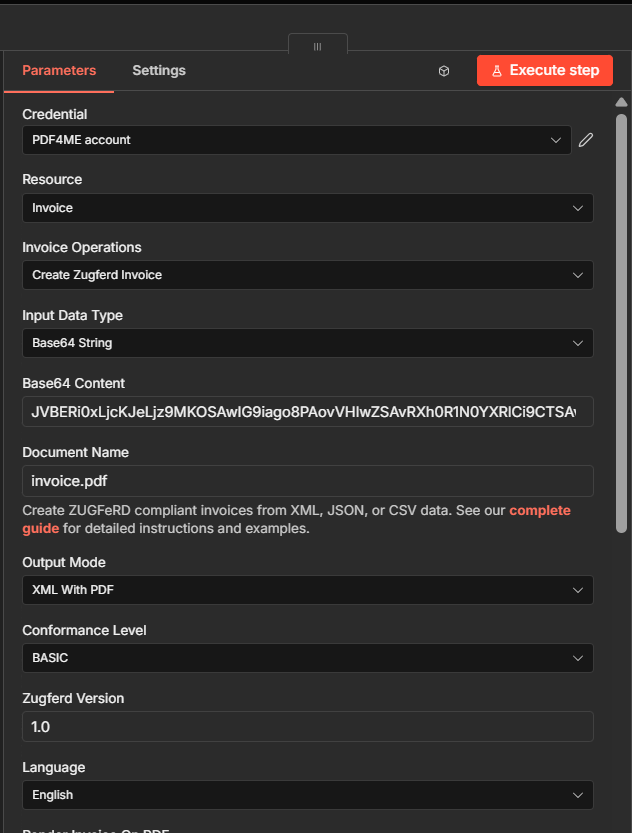
Main node setup: credential, operation, input type, output mode, conformance, version, and language.
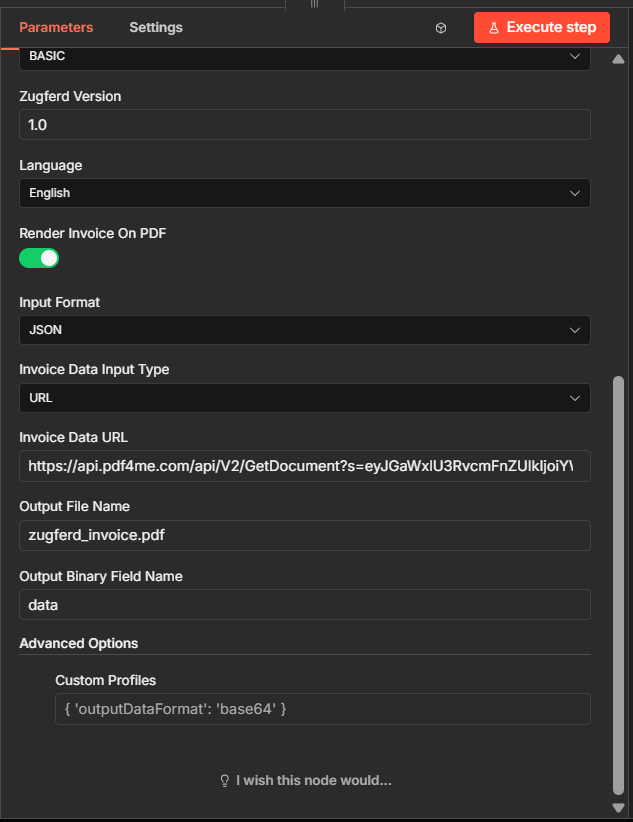
Advanced setup: JSON input via URL, output file naming, binary field mapping, and custom profile format.
Important Facts You Should Not Miss
Use Resource = Invoice and Invoice Operations = Create Zugferd Invoice to access this node behavior.
You can provide content as node binary/base64 and also choose invoice payload format/input path like JSON via URL.
Configure output naming and binary field settings. Advanced profiles like { 'outputDataFormat': 'base64' } help downstream integrations.
Latest UI Configuration (from current node)
| Field | Example shown | Why it matters |
|---|---|---|
| Credential | PDF4ME account | Authenticates n8n node calls |
| Resource | Invoice | Selects invoice action family |
| Invoice Operations | Create Zugferd Invoice | Runs ZUGFeRD generation |
| Input Data Type | Base64 String | Controls how source data is provided |
| Base64 Content | ...base64 value... | Document payload for processing |
| Document Name | invoice.pdf | Source/output traceability |
| Output Mode | XML With PDF | Hybrid result mode |
| Conformance Level | BASIC | Compliance profile behavior |
| Zugferd Version | 1.0 | Specification version target |
| Language | English | Language selection in node |
| Render Invoice On PDF | Enabled | Controls rendering on PDF |
| Input Format | JSON | Invoice payload format |
| Invoice Data Input Type | URL | Where invoice data is fetched from |
| Invoice Data URL | https://api.pdf4me.com/... | Invoice payload endpoint |
| Output File Name | zugferd_invoice.pdf | Result file naming |
| Output Binary Field Name | data | Binary key for downstream nodes |
| Custom Profiles | { 'outputDataFormat': 'base64' } | Advanced output shaping |
Quick Setup
- Add PDF4me node in n8n.
- Set Resource = Invoice.
- Set Invoice Operations = Create Zugferd Invoice.
- Configure Input Data Type and provide your source content.
- Choose Output Mode, Conformance Level, and Zugferd Version.
- Set invoice payload mapping with Input Format and Invoice Data Input Type.
- Optionally configure Output Binary Field Name and Custom Profiles.
- Execute node and pass output to storage, email, or ERP steps.
Workflow Examples
Workflow ExamplesOpens by default — practical automation patterns for latest n8n setup.
- Receive order payload via webhook.
- Fetch invoice JSON from URL.
- Run Create Zugferd Invoice with XML With PDF.
- Upload result to storage and notify via email.
- Get invoice source from ERP API.
- Generate ZUGFeRD invoice using BASIC profile.
- Return binary field
datafor downstream n8n nodes. - Store in records folder and push metadata to ERP.