Validate PDF/A in Power Automate
What this action does
PDF4me Validate PDFA checks whether a PDF meets PDF/A rules (ISO 19005) and returns three decision fields: Conformance, IsConforming, and IsPdfA. Use it as a gate before long-term archive, legal holds, or any policy that requires verifiable, preservation-friendly PDFs—without modifying the file.
Authenticating Your API Request
To access the PDF4me Web API through Power Automate, every request must include proper authentication credentials. Authentication ensures secure communication and validates your identity as an authorized user, enabling seamless integration between your Power Automate flows and PDF4me services.
Important Facts You Should Not Miss
File Content must be binary from Get file content (or equivalent). Metadata-only references break validation or return misleading results.
Conformance names the level (e.g. PDF/A-1b). Use IsPdfA and IsConforming together for routing—do not rely on a single flag.
This action does not repair PDFs. If validation fails, route to conversion or remediation, then validate again.
At a Glance: Inputs and Outputs
Binary PDF from SharePoint, OneDrive, Outlook, or a previous action.
Original filename with extension, e.g. Test.pdf.
Conformance, IsConforming, IsPdfA for conditions and approvals.
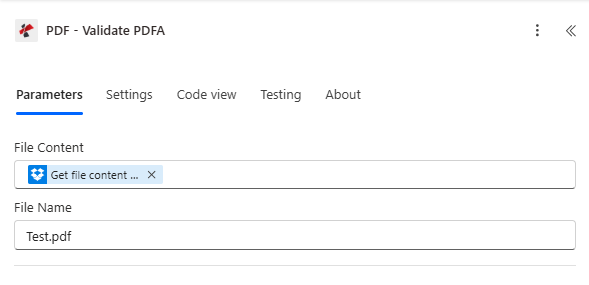
Map File Content and File Name from a step that returns full file bytes.
Key Features
- PDF/A conformance check aligned with preservation-oriented PDF (ISO 19005 family)
- Structured boolean outputs for Power Automate conditions and approvals
- Non-destructive: analysis only; source PDF is not rewritten
- Microsoft 365–friendly: works with SharePoint, OneDrive, and Outlook attachments
- Pipeline-ready: pair with conversion or ZUGFeRD generation steps in the same flow
Parameters
Required: both File Content and File Name must be set for every run.
| Parameter | Required | Type | What it does | Example |
|---|---|---|---|---|
| File Content | Yes | Binary | PDF bytes from the previous action. | Get file content |
| File Name | Yes | String | Filename with extension for logging and tracing. | Test.pdf |
Output
The connector returns Conformance, IsConforming, and IsPdfA (see your run history or API response body). Typical successful validation returns HTTP 200 with a JSON body like:
{
  "Conformance": "PDF/A-1b",
  "IsConforming": true,
  "IsPdfA": true
}
| Field | Type | Meaning |
|---|---|---|
Conformance | String | Detected or declared PDF/A level (e.g. PDF/A-1b) |
IsConforming | Boolean | true if the file conforms to that level |
IsPdfA | Boolean | true if the document is PDF/A |
Flow decision logic (typical)
- IsPdfA = true and IsConforming = true → allow archive or downstream publish
- IsPdfA = true and IsConforming = false → remediation (fonts, transparency, attachments) before archive
- IsPdfA = false → convert to PDF/A if policy requires, then run this action again
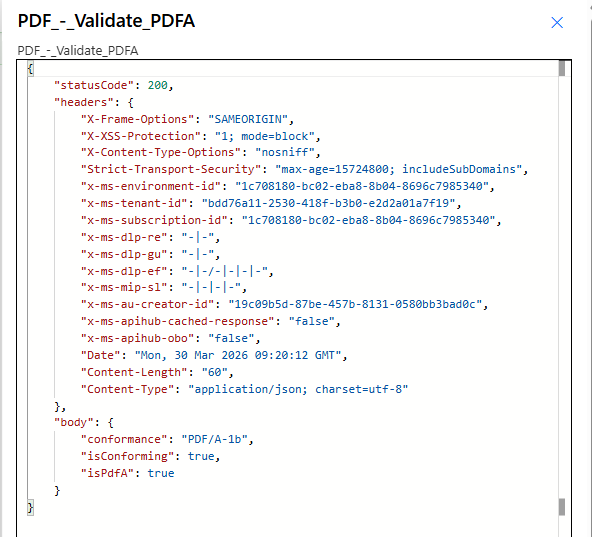
Example response body with Conformance, IsConforming, and IsPdfA.
Quick Setup (Power Automate)
- Add PDF – Validate PDFA after Get file content (or equivalent).
- Map File Content and File Name from that step.
- Add a Condition on IsConforming (and optionally IsPdfA).
- Branch to archive, notify compliance, or trigger conversion.
- Log outcomes to Dataverse, SharePoint metadata, or a ticketing system if required.
Workflow Examples
Workflow ExamplesOpens by default — four PDF/A patterns in a 2×2 grid. Collapse anytime.
- Trigger when a file lands in an “intake” library.
- Get file content for the PDF.
- Run Validate PDFA.
- If
IsConforming, copy to the records library; else notify records.
Impact: Only compliant PDFs reach long-term storage.
- Trigger after PDF generation from ERP or template.
- Validate PDF/A before customer or regulator-facing publish.
- On failure, create a task or return to authoring.
- On success, publish and stamp approval metadata.
Impact: Compliance checks become part of release, not an afterthought.
- Ingest a “normal” PDF not meant for archive yet.
- Run your Create PDF/A (or equivalent) conversion step.
- Validate PDF/A on the converted file.
- Store only when
IsConformingis true.
Impact: Closed loop for governance teams: convert → prove → store.
- Generate a hybrid invoice PDF (e.g. Create ZUGFeRD Invoice).
- Pass output bytes into Validate PDFA if policy requires PDF/A archival.
- Route pass/fail to finance or compliance queues.
- Keep audit fields (invoice id, run id) in SharePoint columns.
Impact: End-to-end traceability from generation to verified archive readiness.
Industry Use Cases & Applications
Industry Use Cases & ApplicationsExpand to see legal, finance, healthcare, and public-sector scenarios.
- Matter files — gate PDFs before legal hold or export
- eDiscovery — reject non-archival PDFs early
- Retention policies — align with internal ISO-style documentation rules
- Policy documents — validate before customer-visible publish
- Claims PDFs — archive-ready submissions
- Reporting packs — batch-check before board or regulator packages
- Clinical PDFs — verify format before long-term EMR archive
- Quality docs — automated QC in controlled workflows
- Audit support — machine-readable pass/fail in the flow run
- Permanent records — PDF/A as a preservation-oriented format
- FOI / disclosure — consistent format for released documents
- Digital mailrooms — validate inbound PDFs before filing
Troubleshooting
Confirm the mapped field is true binary file content. Re-test with a known valid PDF/A sample.
The file may claim PDF/A but fail strict checks. Route to remediation before archiving.
Use IsPdfA and IsConforming together with Conformance for clear branching.