Create ZUGFeRD Invoice in Power Automate
What this action does
PDF4me Create ZUGFeRD Invoice builds hybrid e-invoices (human-readable PDF + machine-readable XML) aligned with ZUGFeRD / Factur-X conventions used in Germany and the EU. Use Pdf With Xml for a single file you can hand to customers and auditors, or Xml Only when your ERP or clearing platform consumes XML directly.
Authenticating Your API Request
To access the PDF4me Web API through Power Automate, every request must include proper authentication credentials. Authentication ensures secure communication and validates your identity as an authorized user, enabling seamless integration between your Power Automate flows and PDF4me document services.
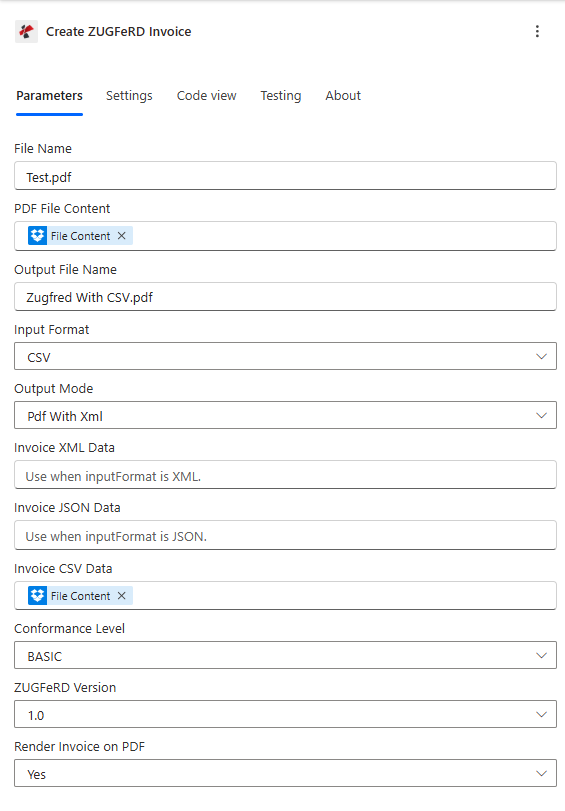
Power Automate configuration for Create ZUGFeRD Invoice.
Important Facts You Should Not Miss
In Pdf With Xml, map both invoice data and source PDF content. In Xml Only, invoice data is enough; PDF bytes are not required.
Pick one source format (XML, JSON, or CSV) and map only the matching field. Mixed mapping is the most common cause of validation failures.
Start with BASIC for broad compatibility. Move to COMFORT or EXTENDED when your buyer, ERP, or regulator requires richer invoice content (often discussed alongside EN 16931 semantic models).
Key Features
- Hybrid PDF output: One file with embedded invoice XML (
Pdf With Xml) for customers and auditors - XML-only path: Feed clearing houses or ERPs that ingest XML without a PDF shell
- Flexible input: Use existing XML, structured JSON, or CSV invoice data
- Conformance profiles:
BASIC,COMFORT,EXTENDEDto match receiver expectations - Optional rendering: Control whether invoice data is drawn on the PDF visually
- Power Automate–native: Map SharePoint, OneDrive, Outlook, or Dataverse file content directly
Parameters
Required core settings: Input Format, Output Mode, Conformance Level, ZUGFeRD Version. Map PDF File Content when using Pdf With Xml.
| Parameter | Required | Type | What it does | Example |
|---|---|---|---|---|
| File Name | Yes | String | Source PDF filename with extension (for Pdf With Xml). | Test.pdf |
| PDF File Content | Conditional | Binary | Required when Output Mode is Pdf With Xml. Map full file bytes. | Get file content |
| Output File Name | Recommended | String | Name of the generated file (Pdf With Xml output). | Zugferd-output.pdf |
| Input Format | Yes | Option | Invoice payload shape: XML, JSON, or CSV. | CSV |
| Output Mode | Yes | Option | Pdf With Xml = hybrid PDF; Xml Only = XML invoice. | Pdf With Xml |
| Invoice XML Data | Conditional | String | Use when Input Format = XML. | XML payload |
| Invoice JSON Data | Conditional | String | Use when Input Format = JSON. | JSON payload |
| Invoice CSV Data | Conditional | String | Use when Input Format = CSV. | CSV payload |
| Conformance Level | Yes | Option | Profile: BASIC, COMFORT, or EXTENDED. | BASIC |
| ZUGFeRD Version | Yes | Option | Specification version exposed in the connector. | 1.0 |
| Render Invoice on PDF | No | Boolean | Draw invoice data on PDF pages (Pdf With Xml). | Yes |
| Language | No | String | Optional locale for labels (e.g. de, en, fr). | de |
Input and Output Decision Matrix
| If you select | Then map | You get |
|---|---|---|
| Input Format = XML | Invoice XML Data | ZUGFeRD XML output path per Output Mode |
| Input Format = JSON | Invoice JSON Data | Same, from JSON source data |
| Input Format = CSV | Invoice CSV Data | Same, from CSV source data |
| Output Mode = Pdf With Xml | PDF File Content + File Name | PDF with embedded invoice XML |
| Output Mode = Xml Only | Invoice data only (no PDF bytes) | Standalone invoice XML |
Quick Setup (Power Automate)
- Add Create ZUGFeRD Invoice to your flow.
- Map File Name and Output File Name for traceability.
- Set Input Format to
XML,JSON, orCSV. - Map only the matching invoice data field (XML, JSON, or CSV).
- Set Output Mode — for
Pdf With Xml, map PDF File Content; forXml Only, skip PDF content. - Set Conformance Level and ZUGFeRD Version to match your receiver.
- Store or email the result; optionally chain Validate PDF/A before archive.
Output
The action returns generated file content and metadata your flow can pass to SharePoint, Outlook, or ERP.
| Output | Type | Description |
|---|---|---|
| File Content | Binary | Generated PDF (Pdf With Xml) or XML (Xml Only) |
| FileName (header) | String | Suggested output filename |
| PageCount (header) | String | Page count when PDF is returned |
Pdf With Xml returns a PDF with embedded ZUGFeRD/Factur-X invoice XML. Xml Only returns invoice XML for systems that do not need a PDF.
Troubleshooting
If Input Format is CSV, map only Invoice CSV Data. Do not populate XML/JSON fields in the same run.
PDF File Content must come from a step that returns complete file bytes, not metadata-only references.
Start with BASIC for compatibility tests. Upgrade to COMFORT or EXTENDED only when your receiving system confirms support.
Workflow Examples
Workflow ExamplesOpens by default — four ZUGFeRD patterns in a 2×2 grid. Collapse anytime.
- Trigger when invoice is approved in ERP or Dataverse.
- Get PDF layout and invoice JSON/XML/CSV from prior steps.
- Run Create ZUGFeRD Invoice with
Pdf With Xml. - Save to SharePoint records library; optionally run Validate PDF/A.
Impact: One file for humans and machines—strong fit for audit and long-term storage.
- Trigger on new file in a “staging” folder.
- Read CSV file content for invoice lines.
- Set Input Format
CSVand mapInvoice CSV Data. - Output
Pdf With Xmland route to “approved invoices” library.
Impact: Repeatable batch generation without manual desktop tools.
- Upstream system produces invoice XML or JSON.
- Set
Xml Onlyand map the correct data field. - POST the returned XML to your ERP import or middleware.
- Log correlation IDs for support traceability.
Impact: Clean handoff when the PDF shell is generated elsewhere.
- Finalize invoice in your billing system.
- Generate ZUGFeRD PDF with embedded XML.
- Attach to Outlook or upload to customer portal.
- Store metadata (invoice number, amount) in SharePoint columns.
Impact: Self-service download and fewer “wrong format” support tickets.
Industry Use Cases & Applications
Industry Use Cases & ApplicationsExpand to see manufacturing, finance, public sector, and SaaS scenarios.
- Supplier invoices — hybrid PDF/XML for buyers with strict AP rules
- Order-to-cash — automate invoice packages from ERP events
- Audit trail — one artifact per shipment or milestone
- Accounts receivable — compliant outbound e-invoices
- Month-end — batch XML or PDF+XML from consolidated data
- Archival — pair with PDF/A validation before records retention
- Structured exchange — XML-only for mandated clearing
- Transparency — embedded XML supports verification workflows
- Retention — align with internal records policies
- Billing exports — generate ZUGFeRD from JSON/CSV you already emit
- Multi-tenant — separate invoice JSON/XML/CSV or templates per customer in your flow
- Customer success — fewer manual “send invoice again” loops