PDF - Delete Hyperlinks - Link Removal for Zapier
PDF4me PDF - Delete Hyperlinks action removes clickable links from PDF pages in Zapier. Specify which pages to process with Page Sequence (e.g. 1-2 for pages 1 and 2). Essential for sanitizing documents before external sharing, removing internal links from client-facing versions, complying with archival policies, or preventing accidental navigation from archived PDFs.
Key Features
- Selective Removal: Target specific pages (1, 2, 1-5) or process all
- Link Sanitization: Strip URLs for secure external sharing
- Archival Compliance: Produce link-free versions for long-term storage
- Client-Ready Output: Remove internal or sensitive links before client delivery
- Simple Configuration: PDF File, File Name, and optional Page Sequence only
Authenticating Your API Request
To access the PDF4me Web API through Zapier, every request must include proper authentication credentials.
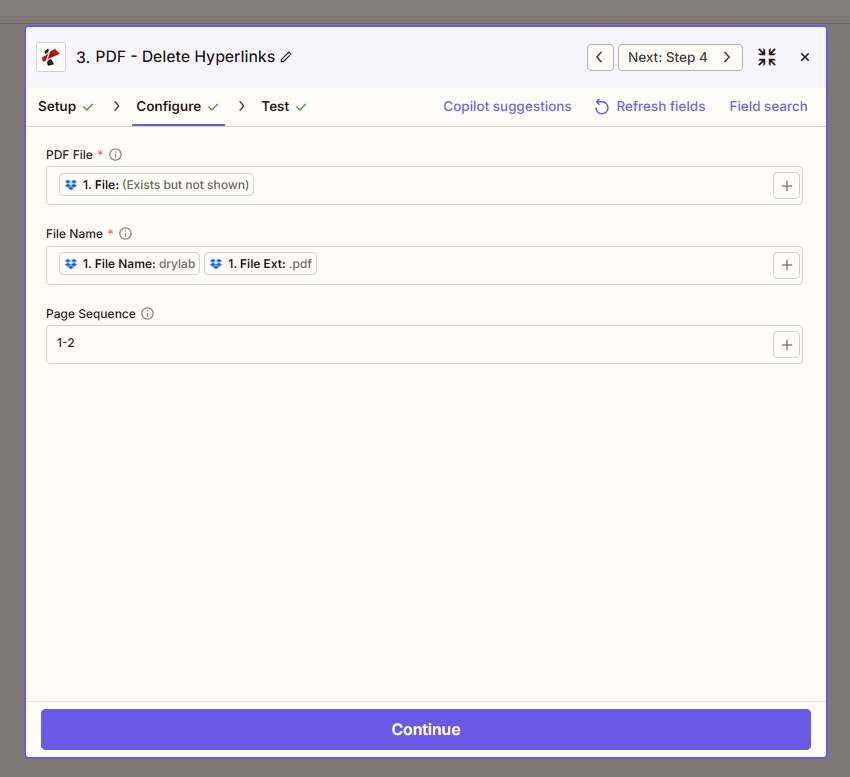
Configure step: PDF File, File Name (drylab.pdf), Page Sequence (1-2).
Configuration Fields (Fact-Checked)
Important: Parameters marked with an asterisk (*) are required.
| Parameter | Type | Required | Description | Example from UI |
|---|---|---|---|---|
| PDF File * | File | Yes | Input PDF from previous step | 1. File: (Exists but not shown) |
| File Name * | String | Yes | Output file name. Map 1. File Name and 1. File Ext | 1. File Name: drylab + 1. File Ext: .pdf |
| Page Sequence | Text | No | Pages where hyperlinks are removed. Use 1, 2, 1-3, or all | 1-2 |
Troubleshooting
Use comma-separated pages (1,2,3) or ranges (1-5). Leave empty or use all to process every page. Example: 1-2 removes links only from pages 1 and 2.
Map 1. File Name: drylab and 1. File Ext: .pdf from the trigger or previous step to preserve original naming. Add a suffix (e.g. _nohyperlinks) if you need distinct output names.
Output
The PDF4me PDF - Delete Hyperlinks action returns the PDF with links removed. Map File Url or File Content to the next step.
- Table
- Workflow Usage
| Parameter | Type | Description |
|---|---|---|
| File Content | Binary | PDF with hyperlinks removed |
| File Url | String | Direct URL to access the sanitized PDF |
| File Name | String | Output filename without extension |
| Full File Name | String | Complete filename with .pdf extension |
- External Sharing: Send sanitized PDFs to clients, partners, or regulators
- Archiving: Store link-free versions in document management systems
- Compliance: Meet policies that restrict external links in records
- Print: Prevent accidental QR/link scanning from printed copies
Workflow Examples
- Client Delivery
- Archival Preparation
- Selective Sanitization
Client Delivery Without Internal Links
- Trigger: Contract or report ready for client
- Delete Hyperlinks: Page Sequence = all (or specific pages)
- Upload or Email: Send sanitized version
Benefit: Clients see content only; no internal or sensitive URLs.
Archival Preparation
- Trigger: Document approved for archival
- Delete Hyperlinks: Remove all links for long-term storage
- Store: Save to archive (SharePoint, legal hold, etc.)
Benefit: Compliant with link-free archival policies.
Selective Page Sanitization
- Trigger: Multi-page document (e.g. cover + appendices)
- Delete Hyperlinks: Page Sequence = 1-2 (cover and intro only)
- Merge or Distribute: Keep links in technical appendix, remove from intro
Benefit: Granular control; links only where needed.
Industry Use Cases
- Legal
- Healthcare
- Government
- Finance
- Education
Legal
Law firms and legal departments share contracts, opinions, and discovery documents with clients and opposing counsel. Internal drafts often contain links to case management systems, internal wikis, or privileged resources. Delete Hyperlinks removes these before external delivery—ensuring clients receive content-only versions without accidental exposure of internal URLs. Supports page-specific removal when only certain sections (e.g. cover letter) need sanitization. Essential for privilege protection and professional delivery standards.
Healthcare
Healthcare organizations share patient summaries, referrals, and reports with external providers, insurers, or patients. Documents may include links to internal EHR systems, portals, or staff directories. Delete Hyperlinks sanitizes PDFs before sharing—preventing accidental clicks to internal systems and protecting patient privacy. Meets HIPAA and data-sharing policies that restrict external links in shared health information. Use page ranges when only specific sections (e.g. cover pages) require link removal.
Government
Government agencies publish reports, FOIA responses, and public records. Archival and disclosure policies often require link-free documents—external URLs may break, change, or point to non-public resources over time. Delete Hyperlinks prepares documents for long-term storage and public release. Ensures compliance with record-retention standards, reduces maintenance burden of broken links, and produces stable archival copies suitable for legal and historical reference.
Finance
Banks, insurers, and financial advisors send statements, reports, and disclosures to customers and regulators. Internal links to dashboards, portals, or analyst tools must be removed before external distribution. Delete Hyperlinks strips all links from outgoing documents—protecting internal systems, preventing confusion from non-accessible URLs, and meeting compliance requirements for customer-facing materials. Supports selective removal when only certain pages (e.g. cover letters) contain internal references.
Education
Schools and universities distribute syllabi, handouts, and course materials for printing or offline use. Links to LMS, library systems, or campus portals may be irrelevant or inaccessible to students printing at home. Delete Hyperlinks produces link-free versions for print distribution, reducing clutter and avoiding "click here" references that don't work on paper. Use page ranges to remove links from cover or summary pages while preserving linked references in appendices if needed.
Related Actions
- Create Hyperlinks in PDF — Add links to PDFs
- Extract Hyperlinks from PDF — Audit links before deletion
- Update Hyperlinks Annotation — Modify link destinations instead of removing