AI-Process Order - Order Document Automation for Make
PDF4me AI-Process Order module extracts structured data from order documents using AI-powered machine learning within Make scenarios. Process purchase orders, sales orders, or order PDFs/images via Make triggers, binary data, base64 strings, or public URLs to automatically extract order numbers, line items, quantities, pricing, customer details, shipping information, and key order data with high accuracy and intelligent field recognition. This solution is ideal for order processing automation, purchase order digitization, order fulfillment workflows, inventory reconciliation, and automated order data entry that requires AI-powered extraction with structured output and seamless integration.
Authenticating Your API Request
To access the PDF4me Web API through Make, every request must include proper authentication credentials. Authentication ensures secure communication and validates your identity as an authorized user, enabling seamless integration between your Make scenarios and PDF4me's powerful AI order processing services.
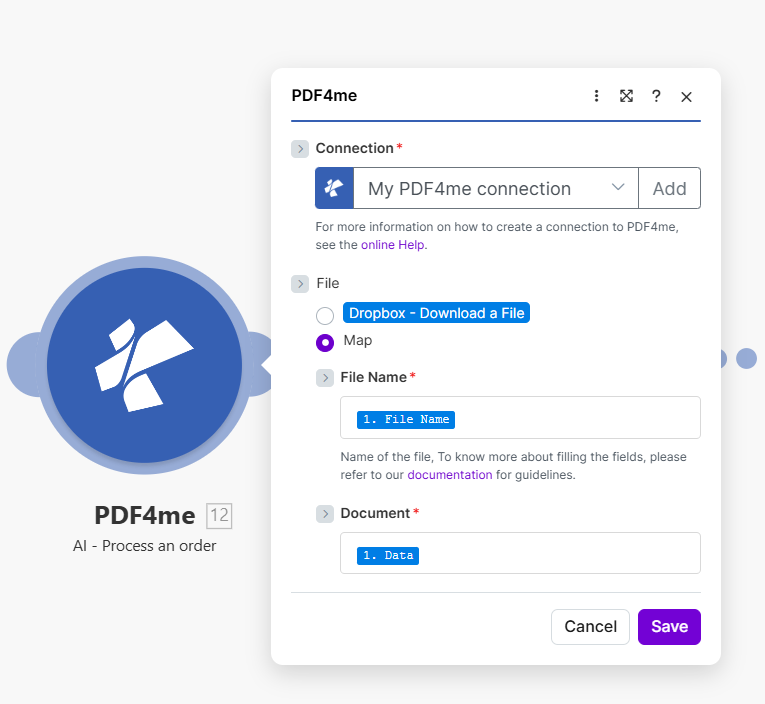
Configuration in Make
The module configuration panel includes these sections (as shown in the screenshot above):
| Section | Required | Options / Description |
|---|---|---|
| Connection | Yes | Select "My PDF4me connection" or add a new connection. See online Help for creating a PDF4me connection. |
| File | No | Dropbox - Download a File — use file from a Dropbox trigger; Map — map file or binary data from a previous module. |
| File Name | Yes | Map the filename (e.g., from a previous module's output). See documentation for field mapping guidelines. |
| Document | Yes | Map the document binary data or content from a previous module. |
Key Features
- Order Data Extraction: Automatically extract order numbers, dates, and reference information
- Line Item Analysis: Extract product details, quantities, unit prices, and totals
- Customer & Vendor Details: Extract customer and vendor information from order documents
- Multi-Format Support: Process PDF, PNG, JPG, and JPEG order document formats
- Structured Output: Receive clean, structured data for downstream automation
Parameters
Complete list of parameters for the AI-Process Order module. Configure these parameters to control order processing.
Important: Parameters marked with an asterisk (***) are required and must be provided for the module to function correctly.
| Parameter | Type | Description | Example |
|---|---|---|---|
| Input Data Type*** | Enum | Order Input Format Selection • Binary Data - Process order from binary file buffer • Base64 String - Process order from base64 encoded string • URL - Process order from public URL • Choose based on your data source format | Binary Data |
| Input Binary Field*** | Buffer | Binary Order File Input (Required if Binary Data) • Map order file buffer from previous module • Source from Dropbox, Google Drive, HTTP request • Supports .pdf, .png, .jpg, .jpeg formats • Required when Input Data Type is "Binary Data" | [Buffer from Get File] |
| Base64 Order Content*** | String | Base64 Encoded Order Input (Required if Base64 String) • Provide order content as base64 encoded string • Supports .pdf, .png, .jpg, .jpeg formats • Secure transmission method • Required when Input Data Type is "Base64 String" | JVBERi0xLjQKJ... |
| Order URL*** | String | Public Order URL Input (Required if URL) • Provide public/open permission URL to order file • Supports .pdf, .png, .jpg, .jpeg formats • PDF4me downloads and processes from URL • Required when Input Data Type is "URL" | https://example.com/order.pdf |
| Order Name*** | String | Order Input Filename • Specify filename with proper extension • Used for format detection and AI processing optimization • Supports dynamic naming from scenario variables | order.pdf |
Output
The PDF4me AI-Process Order module returns comprehensive output data for seamless Make scenario integration:
- Table
- JSON
- Scenario Integration
Table View
Response data in a structured table format:
| Parameter | Type | Description |
|---|---|---|
| orderNumber | String | Extracted order number or reference identifier |
| orderDate | String | Order date (ISO 8601 format) |
| customerName | String | Customer or vendor name |
| lineItems | Array | Array of line items with product, quantity, price, total |
| subTotal | Number | Subtotal amount before taxes |
| total | Number | Final total amount |
| currency | String | Currency code (ISO 4217) |
| shippingAddress | String | Shipping or delivery address |
| success | Boolean | Extraction status indicator |
| message | String | Status message |
JSON Response Format
The raw JSON response from the module:
{
  "orderNumber": "PO-2024-001",
  "orderDate": "2024-01-15",
  "customerName": "Acme Corporation",
  "lineItems": [
    {
      "description": "Product A",
      "quantity": 10,
      "unitPrice": 25.00,
      "total": 250.00
    }
  ],
  "subTotal": 250.00,
  "total": 275.00,
  "currency": "USD",
  "shippingAddress": "123 Business St, New York, NY 10001",
  "jobId": "12345678-1234-1234-1234-123456789012",
  "success": true,
  "message": "Order data extracted successfully using AI technology"
}
Make Scenario Usage
Use extracted order data in subsequent modules:
- Order Management: Create or update orders in ERP or order management systems
- Inventory Reconciliation: Sync order data with inventory systems
- Fulfillment Automation: Trigger shipping and fulfillment workflows
- Database Storage: Store order data in databases or spreadsheets
- Approval Workflows: Route orders for approval based on extracted amounts
- Notifications: Send order confirmation or status alerts
Scenario Examples
The PDF4me AI-Process Order module in Make provides comprehensive scenario templates for order processing automation:
- Purchase Order Processing
- Order Fulfillment
Automated Purchase Order Data Entry Scenario
Transform your purchase order processing with automated data extraction:
Complete Scenario Steps:
- Trigger: New purchase order received via email
- Get Order File: Download order PDF from email attachment
- AI-Process Order: Extract order details, line items, and vendor info
- Create PO Record: Add purchase order to procurement system
- Update Inventory: Sync line items with inventory system
- Route for Approval: Send for approval if amount exceeds threshold
- Notify Purchasing: Email order summary to purchasing team
Business Benefits:
- Processes 200+ purchase orders monthly automatically
- Eliminates manual order data entry saving 10 hours weekly
- Ensures accurate order information capture
- Accelerates procurement cycle by 60%
Automated Order Fulfillment Scenario
Streamline your order fulfillment with automated order processing:
Complete Scenario Steps:
- Trigger: Order document uploaded to Dropbox
- Get Order: Retrieve order file from Dropbox
- AI-Process Order: Extract order details and line items
- Create Fulfillment: Create fulfillment record in system
- Check Inventory: Verify stock availability for each line item
- Generate Pick List: Create pick list for warehouse
- Update Status: Mark order as processed
Business Benefits:
- Fulfills 300+ orders monthly automatically
- Reduces order processing time by 75%
- Ensures accurate order-to-fulfillment mapping
- Minimizes fulfillment errors
Industry Use Cases & Applications
- Procurement & Purchasing
- E-Commerce & Retail
- Business Operations
- Purchase Order Processing: Automate PO data entry and validation
- Vendor Management: Track and sync order data with vendor systems
- Spend Analysis: Aggregate order data for spend analytics
- Approval Workflows: Route orders based on extracted amounts
- Sales Order Processing: Process incoming sales orders automatically
- Order Fulfillment: Trigger fulfillment from extracted order data
- Inventory Sync: Reconcile orders with inventory systems
- Customer Data: Extract customer details from order documents
- Order Management: Centralize order data across systems
- Data Migration: Migrate historical orders to new systems
- Reporting: Generate order analytics and reports
- Compliance: Maintain order documentation and audit trails