Image - Rotate by EXIF Data - Auto Orientation for Make
PDF4me Rotate by EXIF Data module delivers automated image rotation based on EXIF orientation metadata within Make scenarios. This essential orientation correction service reads the EXIF Orientation tag from images (common with smartphone and camera photos) and applies the correct rotation—enabling proper photo display, print preparation, web publishing, and automated orientation correction workflows across cloud storage platforms and business applications.
Authenticating Your API Request
To access the PDF4me Web API through Make, every request must include proper authentication credentials. Authentication ensures secure communication and validates your identity as an authorized user, enabling seamless integration between your Make scenarios and PDF4me's powerful image rotation services.
Key Features
- EXIF-Based Rotation: Automatically rotate images based on EXIF Orientation tag
- Smartphone Photo Correction: Fix orientation for photos from phones and cameras
- No Manual Angles: No need to specify rotation—EXIF determines correct orientation
- Proper Display: Ensure images display correctly in all viewers
- Print Preparation: Prepare photos for correct print orientation
- Batch Processing: Process multiple images with iterators
Parameters
Complete list of parameters for the Rotate by EXIF Data module.
Important: Parameters marked with an asterisk (***) are required and must be provided for the module to function correctly.
| Parameter | Type | Description | Example |
|---|---|---|---|
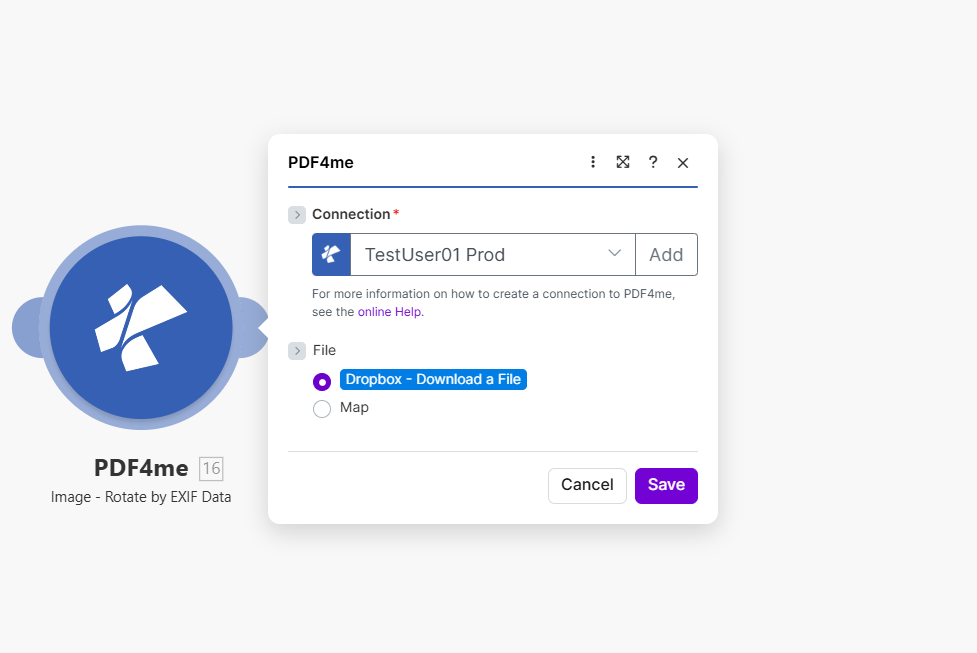
| Connection*** | String | PDF4me API Connection • Select or add your PDF4me connection • Required for API authentication | - |
| File*** | Binary/Map | Source Image File • Dropbox - Download a File or Map from previous module • JPG or PNG image with EXIF orientation data • Source from Dropbox, Google Drive, HTTP | - |
| Image File Name*** | String | Image Filename • Specify filename with extension (.jpg, .jpeg, .png) • Map from previous module output | photo.jpg |
| Image Type*** | String | Image Format • JPG - JPEG image format • PNG - PNG image format • Must match actual image type | JPG |
Output
The PDF4me Rotate by EXIF Data module returns the corrected image for seamless Make scenario integration:
- Table
- JSON
- Scenario Integration
Table View
Response data in a structured table format:
| Parameter | Type | Description |
|---|---|---|
| Image Name | String | Output image filename with corrected orientation |
| Image Data | Buffer | Image with EXIF-based rotation applied |
JSON Response Format
The raw JSON response from the module:
{
  "Name": "photo_corrected.jpg",
  "Image Data": "[Buffer Data - Orientation Corrected]"
}
Make Scenario Usage
Use corrected images in subsequent modules:
- Photo Galleries: Ensure correct display in web galleries
- Print Services: Prepare photos for correct print orientation
- Document Processing: Correct images before PDF creation
- Social Media: Ensure proper orientation for sharing
- Archive: Store correctly oriented photo versions
Scenario Examples
The PDF4me Rotate by EXIF Data module in Make provides comprehensive scenario templates for automatic orientation correction:
- Photo Library
- Web Publishing
Automated Photo Orientation Correction Scenario
Fix photo orientation in your image library:
Complete Scenario Steps:
- Trigger: New photos uploaded to Dropbox
- Get Photos: Download images from upload folder
- Iterator: Process each image
- Rotate by EXIF: Apply EXIF-based orientation correction
- Upload Corrected: Save to photo library
- Update Index: Refresh photo catalog
Business Benefits:
- Corrects 500+ photos monthly automatically
- Ensures proper display across all platforms
- Eliminates manual rotation of smartphone photos
- Improves photo library quality
Automated Web-Ready Image Preparation Scenario
Prepare images for web with correct orientation:
Complete Scenario Steps:
- Trigger: Product photos uploaded for website
- Get Images: Download from upload folder
- Rotate by EXIF: Correct orientation from EXIF
- Compress: Optional image optimization
- Upload to CDN: Save to web asset storage
- Update Product Records: Link corrected images
Business Benefits:
- Prepares 200+ product images monthly
- Ensures correct display on e-commerce sites
- Reduces support tickets for "upside down" images
- Improves product presentation quality
Industry Use Cases & Applications
- Photography & Media
- E-Commerce & Retail
- Real Estate & Property
- Document Processing
- Photo Libraries: Correct orientation in photo collections
- Stock Photos: Prepare images for stock libraries
- Event Photography: Fix orientation in event photo batches
- Portrait Correction: Ensure correct portrait orientation
- Product Photos: Correct product image orientation
- Catalog Images: Prepare images for catalogs
- Listing Photos: Fix orientation for marketplace listings
- Gallery Images: Ensure correct display in galleries
- Property Photos: Correct listing photo orientation
- Virtual Tours: Fix tour image orientation
- Inspection Photos: Prepare inspection images
- Marketing Materials: Correct marketing photo orientation
- PDF Creation: Correct images before PDF embedding
- Report Images: Fix orientation in report graphics
- Presentation Graphics: Prepare images for presentations
- Documentation: Correct screenshots and diagrams