Read Barcode from Image - Scanner for Make
PDF4me Read Barcode from Image module delivers automated barcode detection and decoding from image files within Make scenarios. This versatile recognition service reads the barcode or QR code in a photo or scanned image and returns its content as text, enabling inventory tracking, product identification, automated data capture, and mobile scanning workflows across cloud storage platforms and business applications.
Authenticating Your API Request
To access the PDF4me Web API through Make, every request must include proper authentication credentials. Authentication ensures secure communication and validates your identity as an authorized user, enabling seamless integration between your Make scenarios and PDF4me's powerful barcode reading services.
Key Features
- Multi-Format Support: Read barcodes and QR codes from image files
- Automatic Detection: Finds and decodes the barcode in the image
- Mobile Scanning: Process photos from mobile devices
- Batch Processing: Scan multiple images with iterators
- Data Extraction: Retrieve the barcode content as text
Parameters
Complete list of parameters for the Read Barcode from Image module.
Important: Parameters marked with an asterisk (***) are required and must be provided for the module to function correctly.
| Parameter | Type | Description | Example |
|---|---|---|---|
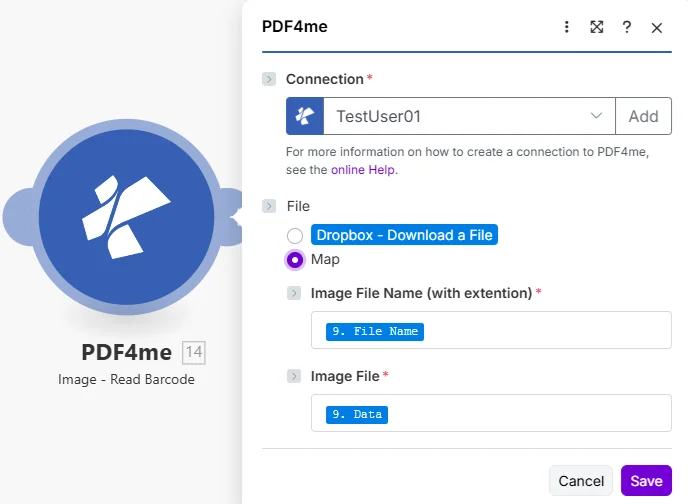
| File*** | Radio | How the Source Image Reaches the Module • The radio lists your connected storage actions (for example Dropbox - Download a File) and Map • Choose Map to wire the fields below from earlier modules • Image File Name (with extention) and Image File only appear once Map is selected | Map |
| Image File Name (with extention)*** | File name | Image Filename • Filename with extension, as the field is labelled in Make | product_scan.jpg |
| Image File*** | File (binary data) | Image Content | [Image Buffer] |
Output
The PDF4me Read Barcode from Image module returns the decoded barcode content.
| Field | Type | What it contains |
|---|---|---|
| Barcode | Text | Text encoded in the barcode or QR code found in the image. |
PDF4me may process the request as a background job, and Make waits for the result before the next module runs.