Image - Replace Text With Image - Content Swap for Make
PDF4me Replace Text With Image module delivers automated text-to-image replacement in PDF documents within Make scenarios. This intelligent substitution service replaces text placeholders with images—logos, signatures, stamps, and graphics—with precise width and height control, enabling document customization, automated branding, template personalization, and visual element workflows across cloud storage platforms and business applications.
Authenticating Your API Request
To access the PDF4me Web API through Make, every request must include proper authentication credentials. Authentication ensures secure communication and validates your identity as an authorized user, enabling seamless integration between your Make scenarios and PDF4me's powerful PDF image replacement services.
Key Features
- Text-to-Image Replacement: Replace text placeholders with images in PDFs
- Precise Sizing: Control image width and height (max 500px each)
- Page Targeting: Apply to specific pages or all pages
- Logo & Signature Insertion: Insert logos, signatures, stamps dynamically
- Template Processing: Automate placeholder replacement in templates
Parameters
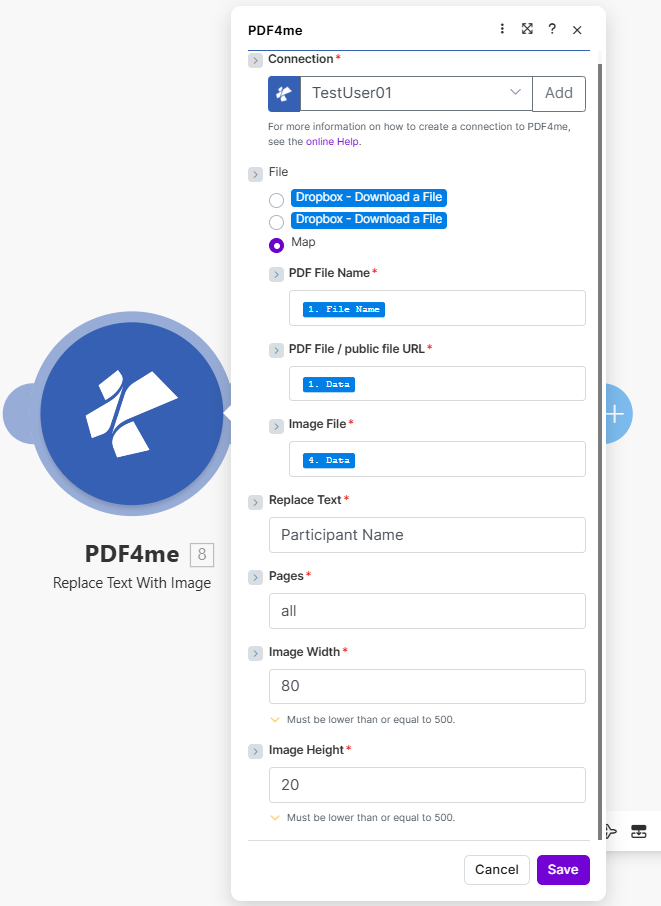
Complete list of parameters for the Replace Text With Image module. Configure these parameters based on the Make module configuration shown in the image.
Important: Parameters marked with an asterisk (***) are required and must be provided for the module to function correctly.
| Parameter | Type | Description | Example |
|---|---|---|---|
| Connection*** | String | PDF4me API Connection • Select or add your PDF4me connection • Required for API authentication | TestUser01 |
| File*** | Binary/Map | Source PDF File • Dropbox - Download a File or Map from previous module • PDF document containing text to replace | Map |
| PDF File Name*** | String | PDF Filename • Map from previous module (e.g., 1. File Name) • Source PDF document name | - |
| PDF File / public file URL*** | Binary | PDF Content • Map from previous module (e.g., 1. Data) • PDF file content or public URL | - |
| Image File*** | Binary | Replacement Image • Map from previous module (e.g., 4. Data) • Image to replace text with (logo, signature, etc.) | - |
| Replace Text*** | String | Text to Replace • Text placeholder to find and replace with image • Case-sensitive search | Participant Name |
| Pages*** | String | Page Selection • Specify pages: 1 or 1,2,3 or 2-4 or all• Pages where replacement occurs | all |
| Image Width*** | Number | Image Width in Pixels • Width of replacement image • Must be 500 or lower | 80 |
| Image Height*** | Number | Image Height in Pixels • Height of replacement image • Must be 500 or lower | 20 |
Output
The PDF4me Replace Text With Image module returns the modified PDF for seamless Make scenario integration:
- Table
- JSON
- Scenario Integration
Table View
Response data in a structured table format:
| Parameter | Type | Description |
|---|---|---|
| Document Name | String | Output PDF filename with images inserted |
| Document Data | Buffer | PDF with text replaced by images |
JSON Response Format
The raw JSON response from the module:
{
  "Name": "document_with_images.pdf",
  "Doc Data": "[Buffer Data - Text Replaced with Images]"
}
Make Scenario Usage
Use the customized PDF in subsequent modules:
- Document Distribution: Share personalized documents
- Cloud Storage: Store in Dropbox/Google Drive
- Email: Send customized PDFs to recipients
- Further Processing: Apply additional PDF operations
Scenario Examples
The PDF4me Replace Text With Image module in Make provides comprehensive scenario templates for automated document customization:
- Certificate Generation
- Logo Insertion
Automated Certificate Personalization Scenario
Replace participant names with images in certificates:
Complete Scenario Steps:
- Trigger: New certificate request
- Get Template: Download PDF certificate template
- Get Participant Data: Retrieve participant name/image
- Replace Text With Image: Replace "Participant Name" with photo (80x20)
- Upload Certificate: Save personalized certificate
- Email to Recipient: Send completed certificate
Business Benefits:
- Personalizes 200+ certificates monthly
- Inserts participant photos at placeholders
- Ensures consistent branding
- Reduces manual editing time by 90%
Automated Logo Placeholder Replacement Scenario
Replace logo placeholders in documents:
Complete Scenario Steps:
- Trigger: Document ready for branding
- Get PDF: Download document with [LOGO] placeholder
- Get Logo: Retrieve company logo image
- Replace Text With Image: Replace placeholder with logo
- Set Dimensions: Image Width 80, Height 20 (or appropriate size)
- Upload Branded: Save to branded documents folder
Business Benefits:
- Brands 100+ documents monthly automatically
- Maintains consistent logo placement
- Supports multiple document types
- Streamlines branding workflow
Industry Use Cases & Applications
- Document Customization
- Legal & Contracts
- Marketing & Communications
- Certificate Generation: Insert participant photos/names
- Template Processing: Replace placeholders with images
- Branding: Insert logos in documents
- Personalization: Add recipient-specific images
- Signature Insertion: Replace signature placeholders
- Stamp Placement: Insert approval stamps
- Seal Addition: Add official seals to documents
- Witness Photos: Insert witness photographs
- Campaign Materials: Insert dynamic images in templates
- Brochures: Replace placeholder graphics
- Reports: Insert charts and graphics
- Presentations: Add custom graphics