Image - Extract Metadata - EXIF Data for Make
PDF4me Image Extract Metadata module delivers automated EXIF metadata and property extraction from image files within Make scenarios. This comprehensive metadata service retrieves camera settings, GPS coordinates, timestamps, dimensions, format information, and technical data—enabling image cataloging, organization, geolocation workflows, and automated image management across cloud storage platforms and business applications.
Authenticating Your API Request
To access the PDF4me Web API through Make, every request must include proper authentication credentials. Authentication ensures secure communication and validates your identity as an authorized user, enabling seamless integration between your Make scenarios and PDF4me's powerful image metadata services.
Key Features
- EXIF Data Extraction: Retrieve complete EXIF metadata from images
- GPS Coordinates: Extract geolocation data from photos
- Camera Settings: Get camera model, settings, and parameters
- Timestamp Data: Retrieve capture date and time information
- Technical Properties: Extract dimensions, format, color space
Parameters
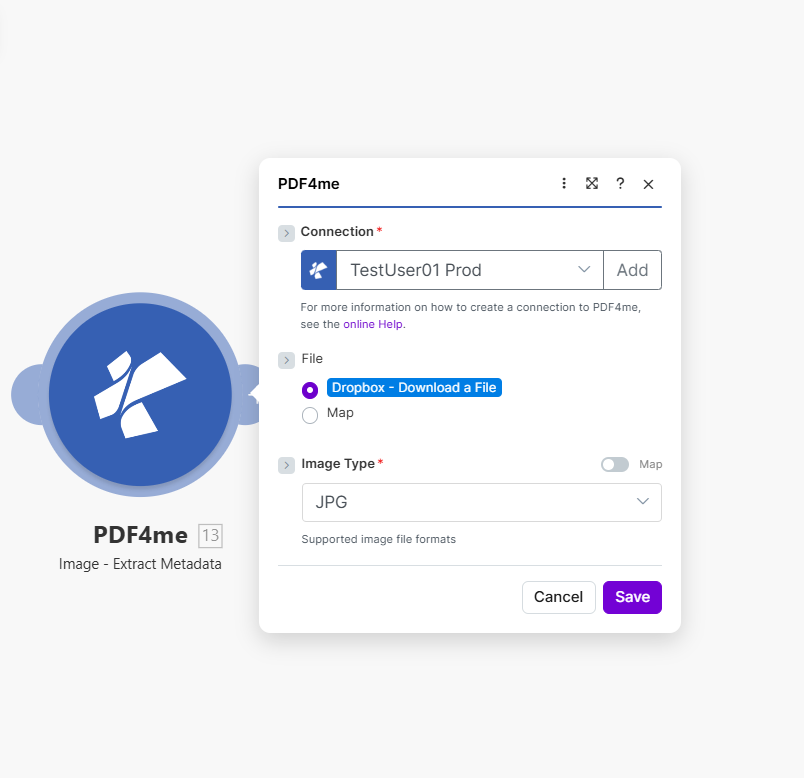
Complete list of parameters for the Image Extract Metadata module. Configure these parameters based on the Make module configuration shown in the image.
Important: Parameters marked with an asterisk (***) are required and must be provided for the module to function correctly.
| Parameter | Type | Description | Example |
|---|---|---|---|
| Connection*** | String | PDF4me API Connection • Select or add your PDF4me connection • Required for API authentication | TestUser01 Prod |
| File*** | Binary/Map | Source Image File • Dropbox - Download a File or Map from previous module • Image file from which metadata will be extracted | Dropbox - Download a File |
| Image Type*** | String | Image Format • JPG - JPEG image format • PNG - PNG image format • Supported image file formats | JPG |
Output
The PDF4me Image Extract Metadata module returns comprehensive metadata for seamless Make scenario integration:
- Table
- JSON
- Scenario Integration
Table View
Response data in a structured table format:
| Parameter | Type | Description |
|---|---|---|
| Metadata | JSON Object | Complete EXIF and image metadata |
| Width | Integer | Image width in pixels |
| Height | Integer | Image height in pixels |
| Format | String | Image file format |
| Camera Make | String | Camera manufacturer |
| Camera Model | String | Camera model name |
| DateTime | String | Capture date and time |
| GPS Latitude | String | Latitude coordinates |
| GPS Longitude | String | Longitude coordinates |
JSON Response Format
The raw JSON response from the module:
{
  "Metadata": {
    "Width": 4032,
    "Height": 3024,
    "Format": "JPEG",
    "CameraMake": "Canon",
    "CameraModel": "EOS 5D Mark IV",
    "DateTime": "2024:01:15 14:30:22",
    "GPSLatitude": "40.7128 N",
    "GPSLongitude": "74.0060 W",
    "ISO": 400,
    "FNumber": 5.6,
    "ExposureTime": "1/250"
  }
}
Make Scenario Usage
Use extracted metadata in subsequent modules:
- Database Tagging: Store metadata with image records
- Geolocation: Plot GPS coordinates on maps
- Organization: Organize images by camera, date, location
- Search Indexing: Index images with metadata for search
- Quality Control: Filter by camera settings or quality
- Copyright: Extract photographer and copyright info
Scenario Examples
The PDF4me Image Extract Metadata module in Make provides comprehensive scenario templates for metadata extraction automation:
- Photo Organization
- Asset Cataloging
Automated Photo Library Organization by Metadata Scenario
Transform your photo management with automated metadata-based organization:
Complete Scenario Steps:
- Trigger: Watch Dropbox for new photo uploads
- Get Photo: Download image file
- Extract Metadata: Retrieve all EXIF data
- Parse Date: Get capture date from metadata
- Organize by Date: Move to year/month folder structure
- Tag with Location: Add GPS location tags if available
- Update Database: Log photo with metadata in catalog
- Generate Thumbnail: Create preview with metadata
Business Benefits:
- Organizes 1000+ photos monthly automatically by metadata
- Maintains systematic photo library structure
- Enables search by date, location, camera
- Reduces photo organization time by 95%
Automated Image Asset Cataloging Scenario
Streamline your asset management with automated metadata cataloging:
Complete Scenario Steps:
- Trigger: New marketing image uploaded
- Get Image: Download image file
- Extract Metadata: Get dimensions, format, creation date
- Check Dimensions: Validate minimum resolution requirements
- Create Asset Record: Insert into asset management database
- Tag Keywords: Add searchable tags from metadata
- Upload to DAM: Save to digital asset management system
- Index for Search: Enable full-text metadata search
Business Benefits:
- Catalogs 200+ marketing images monthly automatically
- Maintains searchable image asset database
- Validates image quality with metadata checks
- Improves asset discoverability by 85%
Industry Use Cases & Applications
- Photography & Media
- Real Estate & Property
- Field Services & Operations
- E-Commerce & Retail
- Photo Library: Organize photos by metadata
- Asset Management: Catalog images with EXIF data
- Copyright Tracking: Extract photographer information
- Geolocation: Map photos by GPS coordinates
- Property Photos: Extract GPS location from listings
- Photo Timestamps: Track when photos were taken
- Virtual Tours: Organize tour images by metadata
- Inspection Photos: Catalog inspection images with data
- Field Photos: Extract GPS from site visit photos
- Inspection Documentation: Track inspection photo metadata
- Equipment Photos: Catalog asset photos with details
- Service Photos: Organize service call images
- Product Photos: Validate product image quality
- Image Standards: Ensure metadata meets requirements
- Catalog Images: Organize catalog photos by properties
- Quality Control: Validate image specifications