Get Shared File - Document Retrieval for Zapier
PDF4me Get Shared File action retrieves a file from a PDF4me shared URL in Zapier. Pass the File Url from a previous step (e.g. output of another PDF4me action), optionally set File Name and Days for sharing duration. Use it to fetch processed PDFs from PDF4me actions, download files for storage or email, or bridge multi-step workflows where one action outputs a URL and the next needs file content.
Key Features
- URL-Based Retrieval: Fetch file content from PDF4me shared URLs
- Workflow Bridge: Connect actions that output URLs with steps that need file content
- Configurable Duration: Set Days for how long the shared link remains valid
- Output Naming: Specify File Name for downstream steps
- Storage & Email Ready: Retrieved file can be uploaded to Drive, Dropbox, or sent via email
Authenticating Your API Request
To access the PDF4me Web API through Zapier, every request must include proper authentication credentials.
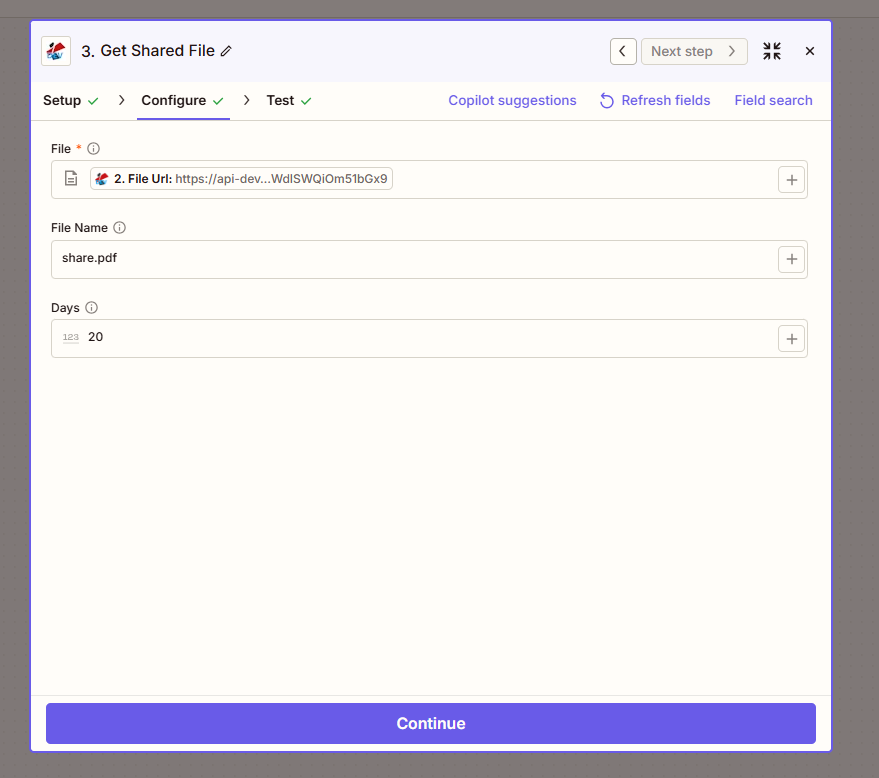
Configure step: File (File Url), File Name (share.pdf), Days (20).
Configuration Fields (Fact-Checked)
Important: Parameters marked with an asterisk (*) are required.
| Parameter | Type | Required | Description | Example from UI |
|---|---|---|---|---|
| File * | URL | Yes | PDF4me shared file URL. Map from previous step (e.g. 2. File Url) | https://api-dev... |
| File Name | Text | No | Output file name for the retrieved file | share.pdf |
| Days | Number | No | Duration in days for the shared file link | 20 |
Troubleshooting
Map the File Url from a PDF4me action that returns processed files (e.g. Add HTML Header/Footer, Create Hyperlinks, Crop PDF). The URL is typically returned as 2. File Url or similar.
Indicates how long the shared file remains available. Use the + button to map a dynamic value from forms or spreadsheets for variable retention.
Output
The PDF4me Get Shared File action returns the retrieved file content. Map File or File Url to the next step.
- Table
- Workflow Usage
| Parameter | Type | Description |
|---|---|---|
| File | Binary | Retrieved file content for download or processing |
| File Url | String | URL of the shared file (if applicable) |
| File Name | String | Output filename for downstream steps |
- Upload: Save to Google Drive, Dropbox, OneDrive, SharePoint
- Email: Attach to Gmail, Outlook, or transactional email
- Further Processing: Chain with another PDF4me action
- CRM/Database: Store file reference in Airtable, Salesforce
- Webhook: Pass file to custom API for processing
Workflow Examples
- Process → Store
- Email Processed Doc
- Multi-Step Pipeline
Process → Share → Store
- Trigger: New PDF in folder
- PDF4me Action: e.g. Add Watermark, Crop PDF, Compress PDF
- Get Shared File: Map 2. File Url from step 2
- Upload File: Save to Dropbox or Google Drive
Benefit: Retrieves processed file for storage when the previous action returns a URL.
Email Processed Document
- Trigger: Form submission with document
- PDF4me Action: Process document (e.g. Merge, Add Header)
- Get Shared File: Retrieve from File Url
- Gmail / Outlook: Attach and send to recipient
Benefit: Ensures email receives actual file content, not just a link.
Multi-Step Document Pipeline
- Trigger: Invoice generated
- Add HTML Header/Footer: Brand the PDF
- Get Shared File: Fetch branded PDF
- Convert to PDF/A or Compress: Further processing
- Upload or Archive: Final storage
Benefit: Bridges URL-output actions with binary-input actions.
Industry Use Cases
- Document Processing
- Client Delivery
- Archiving
- Integration
- Automation
Document Processing
PDF4me actions like Add Watermark, Crop PDF, Compress PDF, and Create Hyperlinks often return a File Url rather than raw file content. Get Shared File retrieves the actual file from that URL so you can upload it to Google Drive, Dropbox, SharePoint, or other storage. When your Zap processes a document and the next step requires file content (e.g. Upload File, Send Email attachment), Get Shared File bridges the gap. Essential for end-to-end automation where processed documents must land in storage, portals, or distribution channels.
Client Delivery
When delivering processed documents to clients—branded reports, merged contracts, or watermarked PDFs—you need the actual file to attach to emails or upload to client portals. PDF4me processing actions output File Url; Get Shared File fetches the content for Gmail, Outlook, or portal upload steps. Ensures clients receive the file directly rather than a temporary link, supports attachment size limits, and enables delivery through any Zapier email or storage app. Use the Days parameter to control how long the shared file remains accessible.
Archiving
Long-term archival requires storing the actual file, not a URL that may expire. When documents are processed (compressed, converted, or branded) and approved for archive, Get Shared File retrieves the final version and the Zap uploads it to document management, legal hold, or compliance systems. Ensures archives contain complete file content, supports audit requirements for permanent retention, and decouples archival storage from PDF4me's temporary URL lifecycle. Integrates with SharePoint, Box, and enterprise DMS platforms.
Integration
Many Zapier apps (email, storage, CRM) expect file content or binary data, not URLs. Get Shared File converts PDF4me File Url output into retrievable file content that can be mapped to these apps. Use it when chaining multiple PDF4me actions (e.g. Merge → Get Shared File → Compress) or when the next app in your workflow cannot consume a URL directly. Acts as a universal adapter between PDF4me's URL-based output and binary-input requirements across the Zapier ecosystem.
Automation
Complex document pipelines—invoice generation, contract assembly, report branding—often involve multiple PDF4me steps. Intermediate actions output File Url; downstream steps may need the file for further processing or distribution. Get Shared File completes the pipeline by fetching content at the right stage. Enables multi-step workflows that would otherwise stall at URL-output steps, supports conditional branching (fetch only when certain criteria are met), and ensures automation reaches completion with files in the correct final destination.
Related Actions
- Send Document to PDF4me-Workflow — Trigger multi-step workflows
- Add HTML Header Footer to PDF — Often outputs File Url for Get Shared File
- Merge Multiple PDFs — Merge then retrieve merged file