Extract Text From Word - Document Content for Zapier
PDF4me Extract Text From Word action pulls text from Microsoft Word documents (.docx) in Zapier. Configure page range (Start/End), optionally strip comments, headers/footers, and accept tracked changes for clean content extraction. Ideal for content analysis, AI processing, search indexing, data migration, or feeding document text into CRM, spreadsheets, or automation tools.
Key Features
- Page Range Control: Extract from Start Page to End Page; use
-1for last page - Clean Output: Remove comments, headers, footers for body-text-only extraction
- Tracked Changes: Accept or exclude tracked changes in output
- Dynamic Input: Map Word files from Dropbox, Google Drive, forms, or email
- Downstream Ready: Output flows to Sheets, Airtable, AI, search, or webhooks
Authenticating Your API Request
To access the PDF4me Web API through Zapier, every request must include proper authentication credentials.
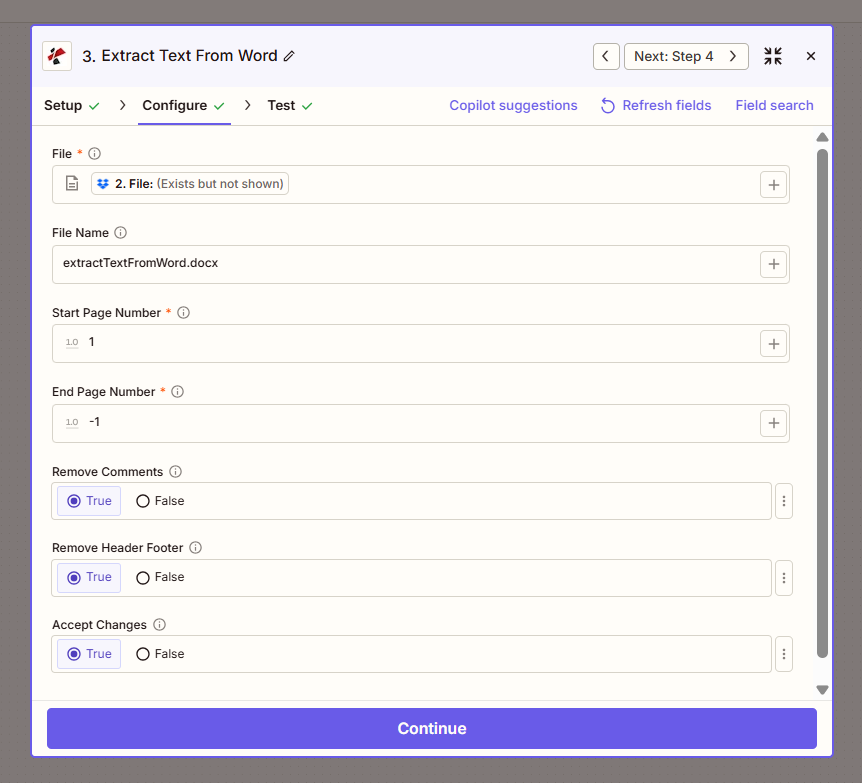
Configure step: File, page range, Remove Comments, Remove Header Footer, Accept Changes.
Configuration Fields (Fact-Checked)
Important: Parameters marked with an asterisk (*) are required.
Required Fields
| Parameter | Type | Required | Description | Example from UI |
|---|---|---|---|---|
| File * | File | Yes | Input Word (.docx) from previous step | 2. File: (Exists but not shown) |
| Start Page Number * | Number | Yes | First page to extract (1-based) | 1 |
| End Page Number * | Number | Yes | Last page. Use -1 for document end | -1 |
Optional Fields
| Parameter | Type | Required | Description | Example from UI |
|---|---|---|---|---|
| File Name | String | No | Output identifier | extractTextFromWord.docx |
| Remove Comments | Boolean | No | Exclude comments from extracted text | True |
| Remove Header Footer | Boolean | No | Exclude headers and footers | True |
| Accept Changes | Boolean | No | Include accepted tracked changes in output | True |
Troubleshooting
-1 means "last page"—extract from Start Page to the end of the document. Use explicit numbers (e.g. 5) to limit extraction to specific pages.
Set to True for clean body text (e.g. for search, analysis, or AI). Set to False if you need full document content including metadata.
Map the extracted text to Google Sheets, Airtable, email, or AI tools. Combine with OCR for scanned content—use Convert to PDF then Extract Text from PDF for image-based docs.
Output
The PDF4me Extract Text From Word action returns the extracted text. Map it to the next step for analysis, storage, or processing.
- Table
- Workflow Usage
| Parameter | Type | Description |
|---|---|---|
| Extracted Text | String | Full text content from the configured page range |
| File Name | String | Source document identifier |
- Google Sheets / Airtable: Store document content for search or audit
- AI / LLM: Feed text to ChatGPT, Claude, or custom AI for analysis
- Search: Index content in search engines or internal search
- Email: Include extracted text in notifications or reports
- CRM: Add document summary or content to contact/account records
- Webhook: Send text to custom APIs for processing
Workflow Examples
- Content to Sheets
- AI Analysis
- CMS Migration
Content to Google Sheets for Search
- Trigger: New Word doc in folder (proposals, contracts)
- Extract Text From Word: Start 1, End -1, Remove Comments/Header/Footer = True
- Google Sheets: Add row with filename + extracted text
- Optional: Use for search, duplicate detection, or analysis
Benefit: Searchable document registry; no manual copy-paste.
AI Analysis of Incoming Documents
- Trigger: Word doc attached to form or email
- Extract Text From Word: Full document
- OpenAI / AI: Send text for summarization, classification, or extraction
- CRM or Database: Store AI output with document reference
Benefit: Automated document intelligence; faster triage.
Migrate Content to CMS or Wiki
- Trigger: Word files in folder (legacy content)
- Extract Text From Word: Page range as needed
- Formatter: Clean or structure text
- CMS / Confluence / Notion: Create page with extracted content
Benefit: Bulk migration; reduce manual conversion.
Industry Use Cases
- Legal
- HR
- Publishing
- Education
- Consulting
Legal
Law firms and corporate legal teams extract text from contracts, amendments, and legal memoranda for clause comparison, due diligence, and contract analysis. Use Extract Text From Word to pull body content (with Remove Comments and Remove Header/Footer enabled) and feed it into AI tools for summarization, risk flagging, or clause extraction. Integrate with contract lifecycle management systems, build searchable contract repositories, or automate first-pass review workflows. Supports page-range extraction when only specific sections (e.g. exhibits) are needed.
HR
HR departments process job descriptions, policy documents, handbooks, and training materials. Extract Text From Word pulls content for search indexing, compliance checking, or AI-powered analysis. Build a searchable policy database, extract key terms for job-matching systems, or feed handbooks into chatbots for employee self-service. Remove headers/footers for clean body text; use page ranges to process only policy sections or appendices. Integrates with HRIS, intranets, and learning management systems.
Publishing
Publishers and content teams migrate manuscripts, articles, and legacy Word documents to CMS platforms (WordPress, Drupal), wikis (Confluence, Notion), or structured formats. Extract Text From Word provides raw content for import—use Formatter steps to clean markup, split by headings, or normalize structure before CMS upload. Supports bulk migration of back catalogs, conversion of author submissions to web format, and content syndication workflows. Use page ranges to exclude covers or appendices.
Education
Educators and instructional designers extract text from syllabi, course packs, and assignments for LMS import, plagiarism checking, or accessibility analysis. Pull content into learning management systems, feed assignments to originality tools, or analyze readability and structure. Remove headers/footers for clean extraction; use Start/End page to process only relevant sections. Supports curriculum digitization, course updates, and content reuse across multiple courses or institutions.
Consulting
Consultancies and professional services firms process proposals, reports, and deliverable documents. Extract Text From Word feeds content into AI for executive summaries, competitive analysis, or knowledge-base indexing. Build searchable proposal libraries, automate report summarization for client portals, or extract key metrics and recommendations for CRM integration. Remove tracked changes and comments for final-version extraction; use page ranges for section-specific processing.
Related Actions
- Extract Text from PDF — Extract from PDFs
- Convert to PDF — Convert Word to PDF first
- Parse Document — Structured data extraction from documents