Prepare for Print - Print Optimization for Zapier
PDF4me Prepare for Print action optimizes PDF documents for professional printing in Zapier. Configure paper size (A4, Letter, or custom), columns/rows for n-up printing (e.g. 2×2 handouts), and print profile (grayscale or color). Reduce print costs with grayscale, create training handouts with multi-page-per-sheet layout, or format for custom labels and posters.
Key Features
- Paper Size: A4, Letter, Legal, Ledger, or custom dimensions (mm)
- N-Up Printing: Multiple pages per sheet (e.g. 2×2, 3×3) for handouts
- Resize Content: Scale content to fit when using custom or n-up layout
- Print Profile: Grayscale for cost savings or color for final output
- Custom Dimensions: Page Height/Width in mm for labels, posters, or specialty sizes
Authenticating Your API Request
To access the PDF4me Web API through Zapier, every request must include proper authentication credentials.
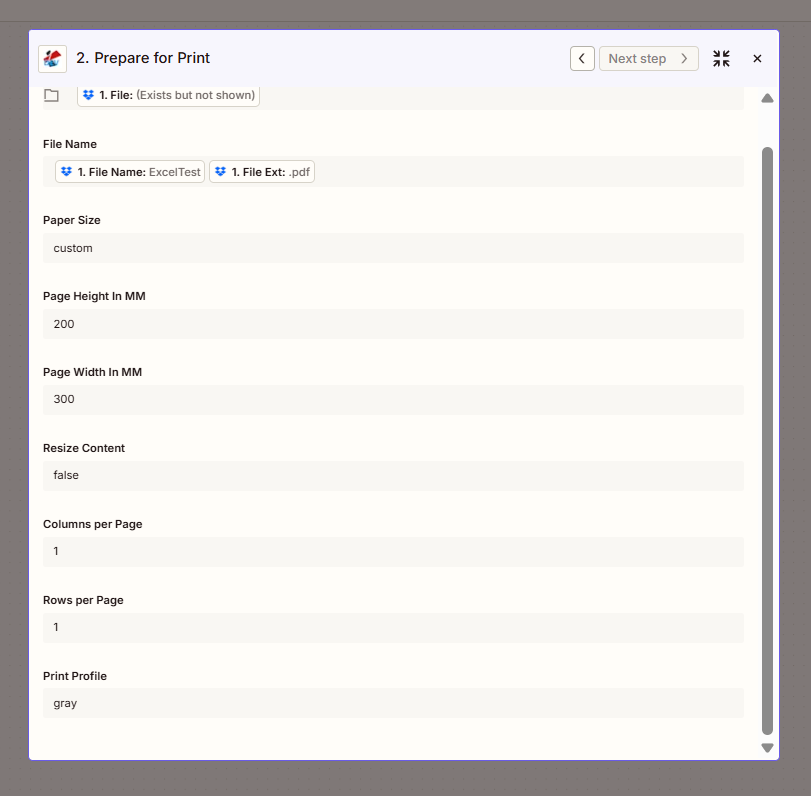
Configure step: Paper Size (custom), dimensions, layout, Print Profile.
Configuration Fields (Fact-Checked)
Important: Parameters marked with an asterisk (*) are required.
File Input
| Parameter | Type | Required | Description | Example from UI |
|---|---|---|---|---|
| File * | File | Yes | Input PDF from previous step | 1. File: (Exists but not shown) |
| File Name | String | No | Output identifier | 1. File Name: ExcelTest + 1. File Ext: .pdf |
Paper & Layout
| Parameter | Type | Required | Description | Example from UI |
|---|---|---|---|---|
| Paper Size | Option | No | A4, Letter, Legal, custom, etc. | custom |
| Page Height In MM | Number | If custom | Page height in millimeters | 200 |
| Page Width In MM | Number | If custom | Page width in millimeters | 300 |
| Resize Content | Boolean | No | Resize content to fit page | false |
| Columns per Page | Number | No | Columns for n-up layout | 1 |
| Rows per Page | Number | No | Rows for n-up layout | 1 |
| Print Profile | Option | No | gray (grayscale) or color | gray |
Troubleshooting
When Paper Size is custom, provide Page Height In MM and Page Width In MM. Example: 200×300 mm for a custom label or poster size.
Set Columns per Page and Rows per Page to values > 1 for handouts (e.g. 2×2 = 4 pages per sheet). Resize Content true scales content to fit.
Grayscale reduces printing costs and is suitable for drafts or internal documents. Use color for final, customer-facing materials.
Output
The PDF4me Prepare for Print action returns a print-optimized PDF. Map File Url or File Content to the next step.
- Table
- Workflow Usage
| Parameter | Type | Description |
|---|---|---|
| File Content | Binary | Print-optimized PDF ready for printing |
| File Url | String | Direct URL to access the optimized PDF |
| File Name | String | Output filename without extension |
| Full File Name | String | Complete filename with .pdf extension |
- Print Service: Send to network printer or print API
- Email: Attach handout or draft for review
- Storage: Save print-ready version for reprinting
- Distribution: Share optimized PDF for local printing
Workflow Examples
- Training Handout
- Grayscale Draft
- Custom Label
Training Handout (N-Up)
- Trigger: New training slides or manual in folder
- Prepare for Print: Columns 2, Rows 2 (4 pages per sheet), Paper A4, Print Profile gray
- Upload or Email: Distribute handout to attendees
Benefit: Cost-effective handouts; fewer pages per attendee.
Grayscale Draft for Review
- Trigger: Report or proposal ready for internal review
- Prepare for Print: Paper Letter, Print Profile gray
- Email: Send draft to reviewers
Benefit: Lower print cost for drafts; focus on content, not color.
Custom Label or Poster
- Trigger: Design PDF for label or poster
- Prepare for Print: Paper custom, Page Height 200mm, Page Width 300mm
- Upload or Print: Send to label printer or print service
Benefit: Fit exact label/poster dimensions.
Industry Use Cases
- Training
- Internal Review
- Print Shops
- Labels & Packaging
- Education
Training
Corporate trainers and L&D teams create cost-effective handouts from slide decks and manuals. Prepare for Print supports n-up layouts—2×2 (4 pages per sheet), 2×3 (6 pages), or 3×3 (9 pages)—reducing paper and toner usage for in-person sessions. Set Paper Size to A4 or Letter, Print Profile to grayscale for drafts, and Resize Content to true so slides scale to fit. When new training materials are published, the Zap produces handout-ready PDFs for distribution to attendees. Integrates with LMS, email, or print-on-demand for large cohorts.
Internal Review
Reports, proposals, and legal documents often go through internal review before final client delivery. Printing color drafts is expensive; Prepare for Print converts to grayscale for cost-effective circulation. Set Print Profile to gray, Paper Size to Letter or A4, and distribute via email or print. Reviewers focus on content rather than design; final color versions are produced only when approved. Reduces printing costs by 50–70% for draft cycles and supports sustainable document workflows in knowledge-intensive organizations.
Print Shops
Commercial print providers and in-house print rooms receive PDFs in varied formats. Prepare for Print standardizes incoming files to specific paper sizes (A4, Letter, Legal, Ledger), color profiles (grayscale for B&W jobs, color for full-color), and n-up layouts for booklet or handout production. When a print job is submitted, the Zap formats the file to the shop's specifications before sending to the press or print queue. Ensures consistent output, reduces prepress manual adjustments, and automates format conversion for high-volume print workflows.
Labels & Packaging
Product labels, shipping labels, and packaging inserts require exact dimensions—often non-standard (e.g. 200×300mm, 100×150mm). Prepare for Print supports custom Paper Size with Page Height and Page Width in millimeters. When a label design is finalized, the Zap formats the PDF to the exact dimensions for the label printer or print service. Resize Content can scale the design to fit; Columns/Rows support multi-label sheets. Integrates with product information systems, packaging workflows, and print-on-demand for labels and packaging.
Education
Schools and universities produce handouts, syllabi, and course packs for students. Prepare for Print creates n-up layouts (e.g. 2×2) to reduce paper use, converts to grayscale for budget-conscious printing, and standardizes to A4 or Letter for campus printers. When course materials are updated, the Zap produces print-ready versions for distribution or print-on-demand. Supports sustainability initiatives, reduces printing costs for high-enrollment courses, and ensures consistent formatting across departments and semesters.
Related Actions
- Resize PDF Page — Adjust page dimensions before print prep
- Crop PDF — Trim content before print layout
- Compress PDF — Reduce file size for storage or email