PDF - Extract Hyperlinks - Link Extraction for Zapier
PDF4me PDF-ExtractHyperlink action retrieves hyperlinks from PDF pages in Zapier. Use Pages to target specific pages (e.g. 2 for page 2 only). Ideal for link auditing, broken-link checking, URL extraction for databases, SEO analysis, or feeding URLs into webhooks, spreadsheets, or CRM systems.
Key Features
- URL Extraction: Retrieve all clickable link destinations from PDF pages
- Page Targeting: Extract from specific pages (1, 2) or ranges (1-10)
- Metadata: Get URLs with page numbers and link positions
- Audit Ready: Use output for broken-link audits, compliance checks, or migration
- Workflow Integration: Map extracted URLs to Google Sheets, Airtable, webhooks, or validation tools
Authenticating Your API Request
To access the PDF4me Web API through Zapier, every request must include proper authentication credentials.
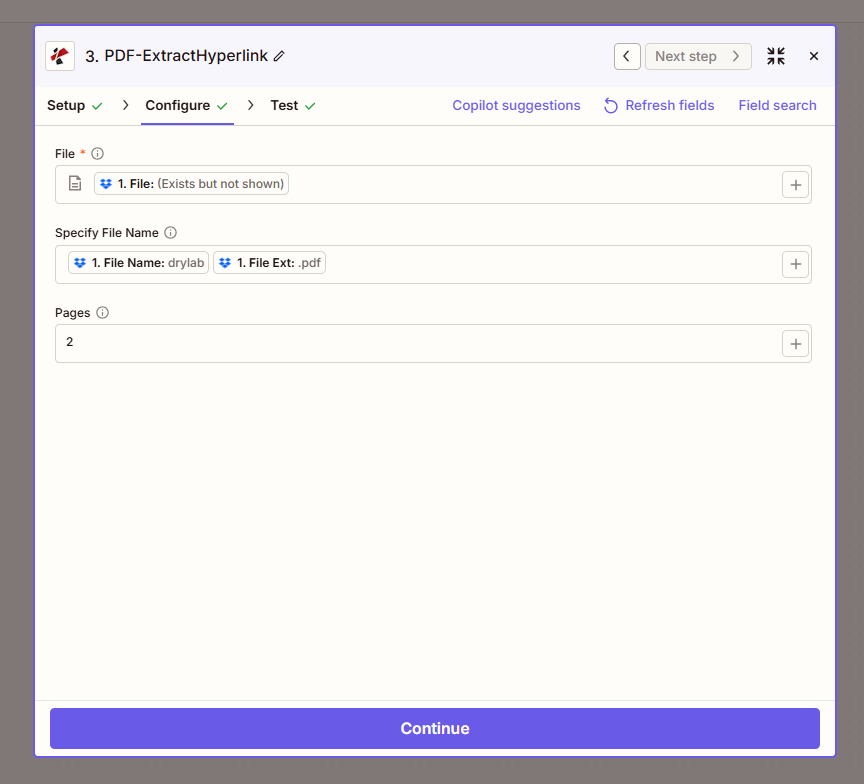
Configure step: File, Specify File Name (drylab.pdf), Pages (2).
Configuration Fields (Fact-Checked)
Important: Parameters marked with an asterisk (*) are required.
| Parameter | Type | Required | Description | Example from UI |
|---|---|---|---|---|
| File * | File | Yes | Input PDF from previous step | 1. File: (Exists but not shown) |
| Specify File Name | String | No | Output file identifier. Map 1. File Name and 1. File Ext | 1. File Name: drylab + 1. File Ext: .pdf |
| Pages | Text | No | Page(s) to extract links from. Use numbers or ranges | 2 |
Troubleshooting
The PDF may have no hyperlinks on the specified pages, or links may be in images/form fields. Ensure the PDF has selectable text links. Try all or a broader page range.
The action returns extracted URLs and link metadata. Map these outputs to Google Sheets, Airtable, or a webhook for link validation, archiving, or reporting.
Output
The PDF4me PDF-ExtractHyperlink action returns extracted hyperlink data. Use the output in Filters, Paths, or mapping to other apps.
- Table
- Workflow Usage
| Parameter | Type | Description |
|---|---|---|
| Links / Hyperlinks | Array/Object | Extracted URLs with page numbers and metadata |
| File | String | Source file identifier |
- Google Sheets / Airtable: Store URLs for audit trails or link databases
- Link Checker: Pass URLs to webhook or API for broken-link validation
- SEO: Extract and analyze links for content audits
- Migration: Collect URLs before updating or deleting links
- Filter/Paths: Branch workflow based on presence or count of links
Workflow Examples
- Link Audit
- URL Database
- SEO Audit
Link Audit Before Client Delivery
- Trigger: New PDF ready for client
- Extract Hyperlinks: Pages = all
- Google Sheets: Add row with document name + extracted URLs
- Filter: Only proceed if no internal/sensitive URLs
Benefit: Audit trail; prevent accidental link exposure.
URL Extraction for Database
- Trigger: New document in folder (contracts, reports)
- Extract Hyperlinks: Target specific pages (e.g. references section)
- Airtable or Database: Store document ID + URLs
- Link Validation: Run periodic check on stored URLs
Benefit: Centralized link registry; broken-link monitoring.
SEO or Content Audit
- Trigger: PDFs from website or content repository
- Extract Hyperlinks: All pages
- Spreadsheet: Document, URL, page number
- Analysis: Identify external links, anchor text, or outdated URLs
Benefit: Content audit data for SEO or migration planning.
Industry Use Cases
- Compliance
- Publishing
- Legal
- Education
- Marketing
Compliance
Organizations sharing PDFs externally must ensure no internal or sensitive URLs are exposed. Extract Hyperlinks provides an audit trail—extract all links before delivery, log them in a spreadsheet or database, and use a Filter step to block distribution if internal domains (e.g. intranet, CRM) are found. Supports compliance with data-handling policies, privilege protection in legal contexts, and security reviews for customer-facing materials. Run as a pre-delivery check in document-approval workflows.
Publishing
Publishers and content teams verify citations, references, and source links in manuscripts, white papers, and reports. Extract Hyperlinks pulls all URLs with page numbers for manual or automated verification. Check that cited sources are correct, accessible, and up to date before publication. Use the extracted list to build a reference database, run broken-link checks, or ensure citation consistency across multi-author documents. Essential for academic, technical, and reference publishing.
Legal
Legal teams catalog links in contracts, discovery documents, and exhibits for case management and e-discovery. Extract Hyperlinks produces a structured list of all URLs with page references—supporting link analysis, privilege review, and external reference tracking. Use the output to populate case databases, identify documents with specific external references, or prepare link summaries for court filings. Integrates with document management and litigation support systems.
Education
Educators and instructional designers extract resource links from course materials, textbooks, and syllabi. Use the output to maintain a link registry, verify that referenced resources are still available, or migrate links when course content moves to a new LMS. Supports accessibility reviews (ensuring linked resources are described), curriculum updates, and student support by identifying which materials link to external tools, videos, or readings.
Marketing
Marketing teams audit campaign PDFs—brochures, case studies, one-pagers—to verify tracking URLs, UTM parameters, and landing page links. Extract Hyperlinks provides a full link inventory for each asset. Validate that links point to the correct campaign pages, fix broken or outdated URLs before launch, and maintain a link map for multi-channel campaigns. Supports QA workflows and post-campaign link analysis.
Related Actions
- Create Hyperlinks in PDF — Add links to PDFs
- Delete Hyperlinks from PDF — Remove links
- Update Hyperlinks Annotation — Modify link destinations