Create EPC QR Code - SEPA Payment for Zapier
PDF4me Create EPC QR Code action in Zapier generates compliant European Payment Council (EPC) QR codes for SEPA payment initiation. The EPC QR standard enables customers across Europe to scan and pay invoices instantly via mobile banking apps—no manual data entry. Configure beneficiary details, IBAN, amount, and payment reference directly in the Zapier Configure step; all fields are fact-checked from the live Zapier interface. Connect with accounting apps, invoicing tools, and CRM systems to automate payment QR code generation for European invoices, subscriptions, and business transactions.
Key Features
- EPC Compliance: Follows European Payments Council QR code standards for SEPA Credit Transfer
- SEPA Integration: Compatible with SEPA payment schemes used across the Eurozone
- Version Support: Supports EPC QR V1 and V2 specifications—V2 recommended for new implementations
- Mobile Banking: Scannable by European mobile banking apps (Sparkasse, ING, N26, Revolut, etc.)
- Multi-Encoding: UTF8 and ISO character sets for international names and special characters
- Dynamic Data: Map beneficiary, amount, and reference from forms, CRM, or accounting systems
- Workflow Ready: Output integrates with Add Barcode to PDF, email, or storage actions
Authenticating Your API Request
To access the PDF4me Web API through Zapier, every request must include proper authentication credentials.
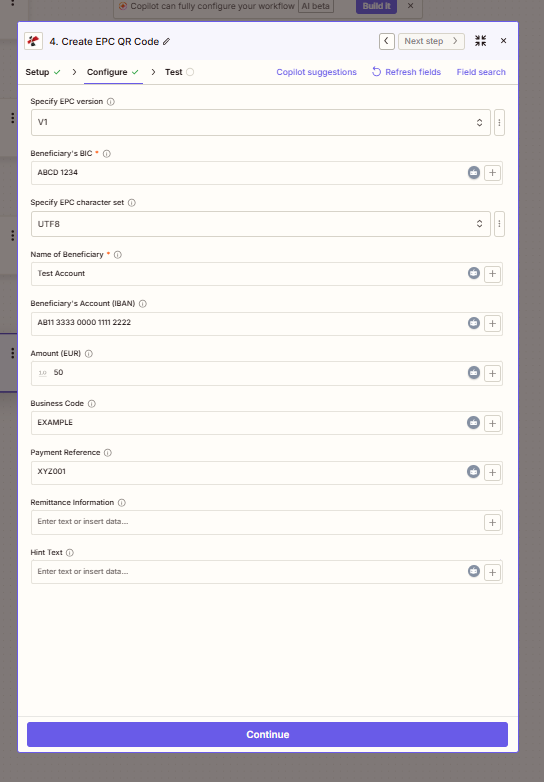
Configure step: EPC version, BIC, character set, beneficiary details, IBAN, amount, and optional fields.
Workflow Steps: Setup → Configure → Test
Zapier guides you through Setup (action selection), Configure (field mapping), and Test. Use Copilot suggestions, Refresh fields, or Field search when configuring. Each field has an ⓘ information icon for help.
Configuration Fields (Fact-Checked)
Important: Parameters marked with an asterisk (*) are required. Use the + (plus) button next to fields to map dynamic data from previous Zap steps.
Required Fields
| Parameter | Type | Description | Example from UI |
|---|---|---|---|
| Beneficiary's BIC * | Text | Bank Identifier Code (SWIFT) of beneficiary's bank | ABCD 1234 |
| Name of Beneficiary * | Text | Recipient or company name for the payment | Test Account |
EPC Settings
| Parameter | Type | Description | Example from UI |
|---|---|---|---|
| Specify EPC version | Dropdown | EPC QR specification version | V1 |
| Specify EPC character set | Dropdown | Character encoding for the QR code | UTF8 |
Payment Details
| Parameter | Type | Description | Example from UI |
|---|---|---|---|
| Beneficiary's Account (IBAN) | Text | International Bank Account Number | AB11 3333 0000 1111 2222 |
| Amount (EUR) | Numeric | Payment amount in euros | 10.50 |
| Business Code | Text | SEPA purpose code for the payment | EXAMPLE |
| Payment Reference | Text | Invoice or reference number | XYZ001 |
| Remittance Information | Text area | Payment description (max 140 chars) | Enter text or insert data... |
| Hint Text | Text area | Additional instructions for the payer | Enter text or insert data... |
Troubleshooting
BIC should be 8 or 11 characters. IBAN must be valid for the SEPA zone. Check spacing—some banks use grouped format (e.g. AB11 3333 0000 1111 2222).
Click the + button or magic wand icon next to any field to insert values from triggers or earlier actions—e.g. invoice amount from a form, beneficiary from CRM.
V2 is recommended for new implementations. V1 may require BIC in some cases. Use UTF8 character set for international names and special characters.
Output
The PDF4me Create EPC QR Code action returns output suitable for downstream workflow steps:
- Table
- Workflow Usage
Table View
| Parameter | Type | Description |
|---|---|---|
| File Content | Base64/Binary | EPC QR code image ready for embedding or storage |
| File Url | String | Direct URL to access the generated QR code (if applicable) |
| File Name | String | Output file identifier for downstream steps |
Downstream Integration
- Add Barcode to PDF: Embed the EPC QR into invoice PDFs before sending
- Email: Attach or embed in invoice emails via Gmail, Outlook, or Mailchimp
- Storage: Save to Google Drive, Dropbox, or SharePoint with invoice records
- CRM: Store with payment records in Salesforce, HubSpot, or Pipedrive
- Accounting: Link to invoices in Xero, QuickBooks, or Wave
- Webhooks: Pass QR data to custom payment portals or apps
Workflow Examples
- European Invoice
- Subscription Payment
- Donation
European Invoice with EPC QR
- Trigger: New invoice in accounting system or e-commerce platform
- Extract: Invoice amount, customer name, IBAN (if on file), reference number
- Create EPC QR Code: Map amount, beneficiary, IBAN, reference from step 2
- Add Barcode to PDF (optional): Embed QR into invoice PDF
- Send Email: Attach invoice with QR to customer
Benefit: Customers scan to pay in seconds—faster settlement, fewer payment errors.
Subscription or Recurring Payment
- Trigger: Subscription renewal or recurring billing event
- Get Customer Data: IBAN, name, amount from billing system
- Create EPC QR Code: Generate unique QR per payment
- Email or Portal: Send payment reminder with scannable QR
Benefit: Reduces manual payment entry; improves renewal completion rates.
Donation or Fundraising
- Trigger: New donor or campaign signup
- Create EPC QR Code: Fixed amount or variable from form
- Thank-You Email: Include QR for easy bank transfer
- CRM Update: Log QR sent for follow-up
Benefit: Streamlines bank transfer donations; fewer abandoned contributions.
Industry Use Cases
- Invoicing & Accounting
- E-commerce
- Subscription Services
- Professional Services
- Nonprofits
- Marketplaces
Invoicing & Accounting
European businesses can add compliant EPC QR codes to invoices for instant SEPA payment. When a new invoice is created in Xero, QuickBooks, or your accounting system, the Zap maps amount, beneficiary IBAN, and reference to Create EPC QR Code. The QR is embedded in the PDF or attached to the email—customers scan with their banking app and pay in seconds. Reduces payment friction, accelerates cash flow, and eliminates manual IBAN entry errors. Ideal for B2B invoicing, professional services billing, and any Eurozone business accepting bank transfers.
E-commerce
E-commerce platforms selling across Europe can generate payment QR codes for invoice-on-delivery, B2B orders, or manual payment flows. When an order is placed, the Zap pulls order total, customer details, and reference number to create a unique EPC QR. Include the QR in order confirmation emails, packing slips, or payment reminders. Buyers scan to pay via their preferred European bank—no credit card or PayPal required. Supports marketplaces, wholesale, and platforms where bank transfer is the primary payment method.
Subscription Services
SaaS companies, membership organizations, and recurring billing businesses use EPC QR for subscription renewals and dues. When a renewal or billing event fires, the Zap fetches customer data and amount from your billing system, generates a payment QR, and sends it via email or customer portal. Members and subscribers scan to pay—improving renewal completion rates and reducing churn from payment friction. Integrates with Stripe Billing, Chargebee, Recurly, or custom billing systems.
Professional Services
Consultancies, legal firms, agencies, and freelancers issue invoices across the Eurozone. Create EPC QR codes from invoice data (amount, client name, reference) and embed them in branded PDF invoices. Clients receive one-click payment instructions—no need to copy IBAN or reference manually. Speeds up collections for fixed-fee projects, retainers, and milestone payments. Works with practice management tools, spreadsheets, or CRM-based invoicing.
Nonprofits
Charities, associations, and nonprofits use EPC QR for donations and membership fees. Map campaign or membership amount from forms or CRM to Create EPC QR Code, then include the QR in thank-you emails, fundraising letters, or membership renewal notices. Donors scan to complete bank transfer—reducing abandonment and administrative follow-up. Supports one-time donations, recurring memberships, and event registration fees paid by transfer.
Marketplaces
Marketplaces connecting buyers and sellers in Europe can generate EPC QR codes for escrow releases, seller payouts, or buyer payment collection. When a transaction is confirmed, the Zap creates a QR with the correct amount and reference. Sellers receive payout instructions; buyers get payment links for manual settlement. Enables bank-transfer-based marketplace flows without custom payment infrastructure.
Related Actions
- Create SwissQR Bill — Swiss payment QR codes
- Add Barcode or QR Code to PDF — Embed QR into PDFs
- Generate Document Single — Invoice templates with dynamic QR