PDF - Save metadata for a PDF - Document Properties Editor for Make
PDF4me Save Metadata for a PDF module delivers automated PDF metadata editing within Make scenarios. This comprehensive document properties service sets title, author, creator, producer, subject, and keywords—enabling document cataloging, SEO optimization, metadata standardization, and automated document information management workflows across cloud storage platforms and business applications.
Authenticating Your API Request
To access the PDF4me Web API through Make, every request must include proper authentication credentials. Authentication ensures secure communication and validates your identity as an authorized user, enabling seamless integration between your Make scenarios and PDF4me's powerful metadata services.
Key Features
- Complete Metadata Control: Set all standard PDF metadata fields
- SEO-Oriented Fields: Title, Subject, and Keywords for search optimization
- Document Attribution: Author, Creator, Producer for proper attribution
- Catalog Integration: Prepare documents for catalog and search indexing
- Batch Metadata Updates: Process multiple documents with consistent metadata
Parameters
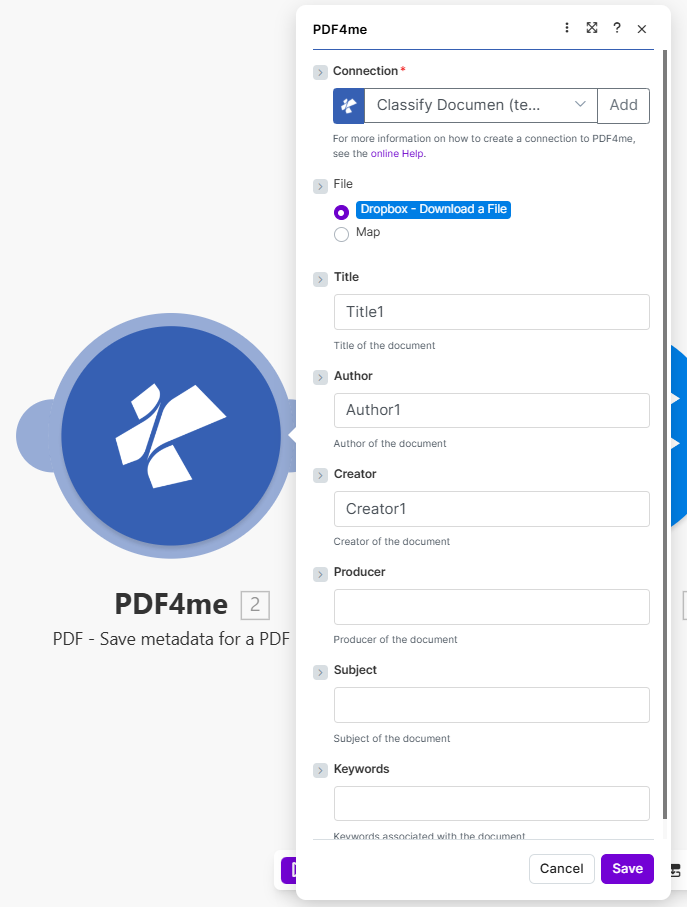
Complete list of parameters for the Save Metadata for a PDF module. Configure these parameters based on the Make module configuration shown in the image.
Important: Parameters marked with an asterisk (***) are required and must be provided for the module to function correctly.
| Parameter | Type | Description | Example |
|---|---|---|---|
| Connection*** | String | PDF4me API Connection • Select or add your PDF4me connection • Required for API authentication • Create connection via online Help if needed | - |
| File*** | Binary/Map | Source PDF File • Dropbox - Download a File or Map from previous module • PDF document to update metadata | Dropbox - Download a File |
| Title | String | Document Title • Title of the document • Used for search and cataloging | Title1 |
| Author | String | Document Author • Author of the document • Attribution and metadata | Author1 |
| Creator | String | Application Creator • Creator of the document • Original creating application | Creator1 |
| Producer | String | PDF Producer • Producer of the document • PDF conversion tool | - |
| Subject | String | Document Subject • Subject of the document • SEO and cataloging | - |
| Keywords | String | Document Keywords • Keywords associated with the document • Crucial for SEO and search indexing | - |
Output
The PDF4me Save Metadata for a PDF module returns comprehensive output data for seamless Make scenario integration:
- Table
- JSON
- Scenario Integration
Table View
Response data in a structured table format:
| Parameter | Type | Description |
|---|---|---|
| Document Name | String | Output PDF filename with updated metadata |
| Document Data | Buffer | PDF with new metadata in Buffer format |
JSON Response Format
The raw JSON response from the module:
{
  "Name": "document_with_metadata.pdf",
  "Doc Data": "[Buffer Data - Metadata Updated]"
}
Make Scenario Usage
Use PDF with updated metadata in subsequent modules:
- Catalog Indexing: Index documents with consistent metadata
- Search Optimization: Improve search with SEO keywords
- Archive Organization: Categorize by title, author, subject
- Document Distribution: Share with proper attribution
- Further Processing: Apply additional PDF operations
Scenario Examples
The PDF4me Save Metadata for a PDF module in Make provides comprehensive scenario templates for metadata management automation:
- Catalog Preparation
- SEO Optimization
Automated Document Catalog Metadata Scenario
Prepare documents for catalog with consistent metadata:
Complete Scenario Steps:
- Trigger: New PDF uploaded to document library
- Get PDF: Download document from Dropbox
- Extract Info: Get filename or source metadata
- Save Metadata: Set Title1, Author1, Creator1
- Add Keywords: Map keywords from taxonomy
- Upload Cataloged: Save to catalog folder
- Index Document: Add to search index
Business Benefits:
- Catalogs 300+ documents monthly with metadata
- Ensures consistent metadata across library
- Enables powerful search by title, author, keywords
- Reduces manual metadata entry by 95%
Automated PDF SEO Metadata Scenario
Optimize PDFs for search with metadata:
Complete Scenario Steps:
- Trigger: Report or whitepaper published
- Get Document: Download PDF
- Set Title: SEO-optimized document title
- Set Subject: Document subject for search
- Set Keywords: SEO keywords (comma-separated)
- Save Metadata: Update PDF properties
- Upload Optimized: Save for web distribution
Business Benefits:
- Optimizes 100+ PDFs monthly for search
- Improves PDF discoverability in search engines
- Maintains consistent SEO metadata
- Enhances document visibility and traffic
Industry Use Cases & Applications
- Document Management
- SEO & Web Publishing
- Compliance & Governance
- Catalog Indexing: Add metadata for document catalogs
- Library Management: Maintain consistent document properties
- Archive Organization: Categorize by metadata fields
- Search Optimization: Enable metadata-based search
- PDF SEO: Optimize PDFs for search engines with Title, Subject, Keywords
- Content Discovery: Improve discoverability with metadata
- Resource Attribution: Proper author and creator attribution
- Metadata Standards: Ensure compliant document metadata
- Metadata Standards: Enforce organizational metadata requirements
- Document Attribution: Track author and creator
- Audit Trails: Maintain document property history
- Retention Policies: Use metadata for retention decisions