PDF-Resize a PDF - Page Dimension Manager for Make
PDF4me Resize a PDF module delivers automated PDF page resizing within Make scenarios with standard paper sizes, custom dimensions, and padding control. This comprehensive resizing service converts pages to A4, Letter, Legal, or custom sizes—enabling format standardization, print preparation, document layout optimization, and automated dimension control workflows across cloud storage platforms and business applications.
Authenticating Your API Request
To access the PDF4me Web API through Make, every request must include proper authentication credentials. Authentication ensures secure communication and validates your identity as an authorized user, enabling seamless integration between your Make scenarios and PDF4me's powerful PDF resizing services.
Key Features
- Standard Paper Sizes: Convert to A0-A6, Letter, Legal, Ledger formats
- Custom Dimensions: Set exact width and height in millimeters
- Padding Control: Add top, bottom, left, and right padding margins
- Page Size vs. Padding: Choose between resizing page dimensions or adding padding
- Page Selection: Apply resizing to specific pages or all pages
Parameters
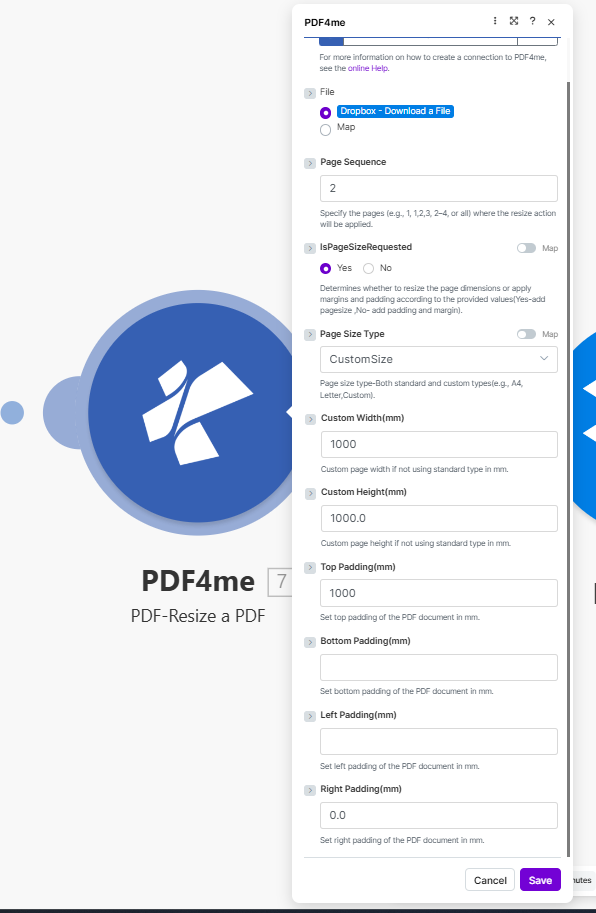
Complete list of parameters for the Resize a PDF module. Configure these parameters based on the Make module configuration shown in the image.
Important: Parameters marked with an asterisk (***) are required and must be provided for the module to function correctly.
| Parameter | Type | Description | Example |
|---|---|---|---|
| Connection*** | String | PDF4me API Connection • Select or add your PDF4me connection • Required for API authentication | - |
| File*** | Binary/Map | Source PDF File • Dropbox - Download a File or Map from previous module • PDF document to resize | Dropbox - Download a File |
| Page Sequence | String | Pages to Resize • Specify pages: 1 or 1,2,3 or 2-4 or all• Pages where resize action will be applied | 2 |
| IsPageSizeRequested | Boolean | Resize Mode • Yes - Resize page dimensions according to values • No - Add padding and margin according to values | Yes |
| Page Size Type | String | Target Paper Format • Standard types: A4, Letter, Legal, etc. • CustomSize - Use custom width/height | CustomSize |
| Custom Width(mm) | Number | Custom Page Width • Page width in millimeters when using CustomSize • Used when standard types don't fit | 1000 |
| Custom Height(mm) | Number | Custom Page Height • Page height in millimeters when using CustomSize • Used when standard types don't fit | 1000.0 |
| Top Padding(mm) | Number | Top Margin • Set top padding of the PDF document in mm | 1000 |
| Bottom Padding(mm) | Number | Bottom Margin • Set bottom padding of the PDF document in mm | - |
| Left Padding(mm) | Number | Left Margin • Set left padding of the PDF document in mm | - |
| Right Padding(mm) | Number | Right Margin • Set right padding of the PDF document in mm | 0.0 |
Output
The PDF4me Resize a PDF module returns comprehensive output data for seamless Make scenario integration:
- Table
- JSON
- Scenario Integration
Table View
Response data in a structured table format:
| Parameter | Type | Description |
|---|---|---|
| Document Name | String | Output PDF filename with resized pages |
| Document Data | Buffer | PDF with resized dimensions in Buffer format |
JSON Response Format
The raw JSON response from the module:
{
  "Name": "document_resized.pdf",
  "Doc Data": "[Buffer Data - Resized PDF]"
}
Make Scenario Usage
Use resized PDF in subsequent modules:
- Format Standardization: Standardize document formats for consistency
- Print Preparation: Prepare documents for specific print sizes
- Archive Storage: Store documents in standardized formats
- Email Distribution: Send formatted PDFs to recipients
- Cloud Storage: Save resized documents to Dropbox/Drive
- Further Processing: Apply additional PDF operations
Scenario Examples
The PDF4me Resize a PDF module in Make provides comprehensive scenario templates for PDF resizing automation:
- Format Standardization
- Print Optimization
Automated Document Format Standardization Scenario
Standardize your document formats automatically:
Complete Scenario Steps:
- Trigger: Document uploaded to Dropbox
- Get PDF: Download uploaded document
- Resize to Custom: Set CustomSize 1000x1000mm or use A4
- Add Padding: Configure top/bottom/left/right padding as needed
- Upload Standardized: Save to formatted folder
- Notify Team: Alert team of standardized document
Business Benefits:
- Standardizes 200+ documents monthly automatically
- Ensures consistent document formats across organization
- Reduces manual format conversion time by 90%
- Improves document consistency and professionalism
Automated Print Size Optimization Scenario
Prepare documents for standard printer sizes:
Complete Scenario Steps:
- Trigger: Document sent to print queue
- Get Document: Retrieve PDF from print folder
- Resize for Printer: Convert to Letter or A4 size
- Add Print Margins: Set padding for printer margins
- Validate Size: Confirm print-ready dimensions
- Upload Print Version: Save to print queue
Business Benefits:
- Optimizes 150+ print jobs monthly automatically
- Ensures documents fit standard printer sizes
- Prevents print errors from size mismatches
- Reduces print waste
Industry Use Cases & Applications
- Document Management
- Print & Publishing
- Corporate & Business
- Format Standardization: Standardize document formats across organization
- Archive Management: Store documents in consistent sizes
- Library Organization: Maintain uniform document dimensions
- Quality Control: Ensure document format compliance
- Print Preparation: Prepare documents for specific print sizes
- Report Formatting: Format business reports to standard sizes
- Catalog Layout: Standardize catalog page dimensions
- Brochure Sizing: Ensure brochure format consistency
- Report Standardization: Standardize report formats
- Document Templates: Ensure template dimension compliance
- Client Deliverables: Deliver consistently formatted documents
- Internal Documentation: Maintain document format standards