PDF - Extract Hyperlinks - Link Reader for Make
PDF4me Extract Hyperlinks module delivers automated hyperlink extraction from PDF documents within Make scenarios. This comprehensive link reading service retrieves URL destinations, link text, and page locations—enabling link auditing, SEO analysis, broken link detection, document analysis, and automated hyperlink cataloging workflows across cloud storage platforms and business applications.
Authenticating Your API Request
To access the PDF4me Web API through Make, every request must include proper authentication credentials. Authentication ensures secure communication and validates your identity as an authorized user, enabling seamless integration between your Make scenarios and PDF4me's powerful hyperlink extraction services.
Key Features
- Link Extraction: Retrieve all hyperlinks from PDF documents
- Page Targeting: Extract from specific pages or page ranges
- URL Cataloging: Build link inventories for auditing
- SEO Analysis: Analyze linked URLs for SEO optimization
- Broken Link Detection: Identify links for validation
Parameters
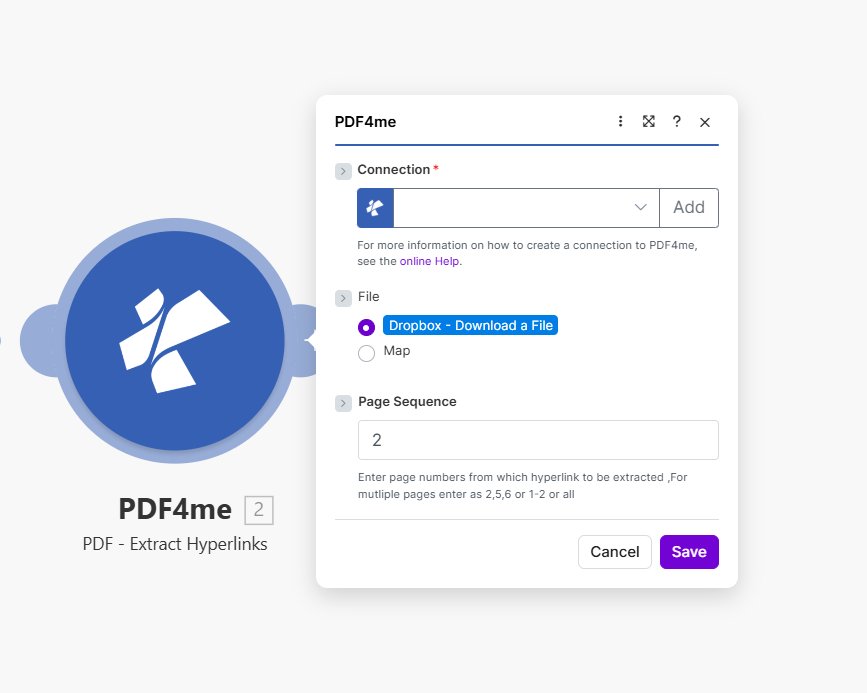
Complete list of parameters for the Extract Hyperlinks module. Configure these parameters based on the Make module configuration shown in the image.
Important: Parameters marked with an asterisk (***) are required and must be provided for the module to function correctly.
| Parameter | Type | Description | Example |
|---|---|---|---|
| Connection*** | String | PDF4me API Connection • Select or add your PDF4me connection • Required for API authentication • Create connection via online Help if needed | testvarun20_prod |
| File*** | Binary/Map | Source PDF File • Dropbox - Download a File or Map from previous module • PDF document from which hyperlinks will be extracted • Source from Dropbox, Google Drive, HTTP | Dropbox - Download a File |
| Page Sequence*** | String | Pages to Extract From • Enter page numbers: 2 for single page• Multiple pages: 2,5,6 or range 1-2 or all• Pages from which hyperlinks are extracted | 2 |
Output
The PDF4me Extract Hyperlinks module returns comprehensive link data for seamless Make scenario integration:
- Table
- JSON
- Scenario Integration
Table View
Response data in a structured table format:
| Parameter | Type | Description |
|---|---|---|
| Hyperlinks | Array | List of extracted hyperlink objects |
| URL | String | Link destination URL |
| Link Text | String | Visible text of the hyperlink |
| Page Number | Integer | Page where link was found |
JSON Response Format
The raw JSON response from the module:
{
  "Hyperlinks": [
    {
      "URL": "https://example.com/page",
      "LinkText": "Click here",
      "PageNumber": 2
    }
  ]
}
Make Scenario Usage
Use extracted hyperlinks in subsequent modules:
- Link Auditing: Validate extracted URLs
- Database Cataloging: Store links in Airtable/database
- Broken Link Check: Pass URLs to validation service
- SEO Analysis: Analyze link structure and destinations
- Report Generation: Create link inventory reports
Scenario Examples
The PDF4me Extract Hyperlinks module in Make provides comprehensive scenario templates for hyperlink extraction automation:
- Link Audit
- SEO Link Catalog
Automated PDF Link Audit Scenario
Audit all links in your PDF documents:
Complete Scenario Steps:
- Trigger: New PDF uploaded to document library
- Get PDF: Download document from Dropbox
- Extract Hyperlinks: Get all links (page: 2 or all)
- Iterator: Process each extracted link
- Validate URL: Check if link is accessible
- Log Results: Store link status in database
- Generate Report: Create audit report
- Notify Webmaster: Alert if broken links found
Business Benefits:
- Audits 100+ documents monthly automatically
- Identifies broken links proactively
- Maintains link quality across document library
- Reduces manual link checking time by 90%
Automated SEO Link Cataloging Scenario
Build a searchable link catalog from PDFs:
Complete Scenario Steps:
- Trigger: Marketing PDFs updated
- Get Documents: Download PDF collection
- Iterator: Process each PDF
- Extract Hyperlinks: Get all links from each
- Parse URLs: Extract domain and path
- Create Catalog: Insert into SEO database
- Index for Search: Enable link search
- Update Dashboard: Refresh SEO metrics
Business Benefits:
- Catalogs 500+ links monthly from PDFs
- Enables SEO link structure analysis
- Tracks external link destinations
- Improves link management visibility
Industry Use Cases & Applications
- Document Management
- Web & SEO
- Compliance & Legal
- Link Inventories: Build catalogs of PDF links
- Audit Compliance: Extract and validate document links
- Archive Analysis: Analyze links in archived documents
- Quality Assurance: Verify link consistency
- SEO Analysis: Analyze PDF link structure for SEO
- Backlink Tracking: Catalog external link destinations
- Content Audit: Review linked resources
- Redirect Detection: Identify links needing updates
- E-Discovery: Extract links from legal documents
- Document Review: Catalog references in contracts
- Regulatory Audit: Verify document link compliance
- Evidence Collection: Extract link evidence