PDF - Delete Hyperlink - Link Remover for Make
PDF4me Delete Hyperlink module delivers automated hyperlink removal from PDF documents within Make scenarios. This essential link removal service deletes all hyperlinks from specified pages—enabling document sanitization, link stripping, security hardening, and automated hyperlink removal workflows across cloud storage platforms and business applications.
Authenticating Your API Request
To access the PDF4me Web API through Make, every request must include proper authentication credentials. Authentication ensures secure communication and validates your identity as an authorized user, enabling seamless integration between your Make scenarios and PDF4me's powerful hyperlink deletion services.
Key Features
- Selective Page Targeting: Remove hyperlinks from specific pages or page ranges
- Complete Removal: Delete all hyperlinks from selected pages
- Document Sanitization: Create link-free document versions
- Security: Remove external links for secure document sharing
- Batch Processing: Process multiple documents with iterators
Parameters
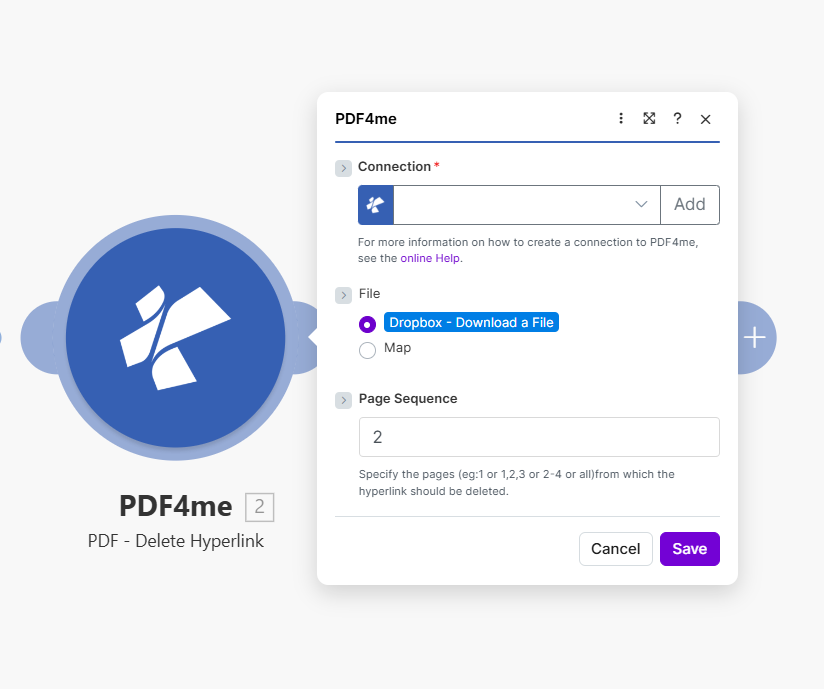
Complete list of parameters for the Delete Hyperlink module. Configure these parameters based on the Make module configuration shown in the image.
Important: Parameters marked with an asterisk (***) are required and must be provided for the module to function correctly.
| Parameter | Type | Description | Example |
|---|---|---|---|
| Connection*** | String | PDF4me API Connection • Select or add your PDF4me connection • Required for API authentication • Create connection via online Help if needed | testvarun20_prod |
| File*** | Binary/Map | Source PDF File • Dropbox - Download a File or Map from previous module • PDF document containing hyperlinks to delete • Source from Dropbox, Google Drive, HTTP | Dropbox - Download a File |
| Page Sequence*** | String | Pages to Process • Specify pages: 1 or 1,2,3 or 2-4 or all• Pages from which the hyperlink should be deleted | 2 |
Output
The PDF4me Delete Hyperlink module returns comprehensive output data for seamless Make scenario integration:
- Table
- JSON
- Scenario Integration
Table View
Response data in a structured table format:
| Parameter | Type | Description |
|---|---|---|
| Document Name | String | Output PDF filename with hyperlinks removed |
| Document Data | Buffer | PDF without hyperlinks in Buffer format |
JSON Response Format
The raw JSON response from the module:
{
  "Name": "document_no_links.pdf",
  "Doc Data": "[Buffer Data - Hyperlinks Removed]"
}
Make Scenario Usage
Use PDF with removed hyperlinks in subsequent modules:
- Secure Sharing: Share documents without external links
- Archive: Store sanitized document versions
- Print Preparation: Create link-free print versions
- Compliance: Remove links for regulatory requirements
- Further Processing: Apply additional PDF operations
Scenario Examples
The PDF4me Delete Hyperlink module in Make provides comprehensive scenario templates for hyperlink removal automation:
- Document Sanitization
- Print Preparation
Automated Document Link Sanitization Scenario
Secure your documents by removing external links:
Complete Scenario Steps:
- Trigger: Document ready for external sharing
- Get PDF: Download document from source
- Delete Hyperlinks: Remove links from page 2 (or all pages)
- Validate: Confirm links removed
- Upload Sanitized: Save to secure share folder
- Notify Recipient: Send link-free document
Business Benefits:
- Sanitizes 200+ documents monthly automatically
- Prevents accidental external link clicks
- Ensures document security for sharing
- Complies with link removal policies
Automated Print-Ready Document Creation Scenario
Create link-free documents for printing:
Complete Scenario Steps:
- Trigger: Document requested for print
- Get Document: Download PDF
- Delete Hyperlinks: Remove all hyperlinks (pages: all)
- Add Print Marks: Optional print preparation
- Upload Print Version: Save to print queue
- Send to Printer: Submit print job
Business Benefits:
- Prepares 150+ print documents monthly
- Eliminates non-functional links in print
- Streamlines print workflow
- Reduces print-related confusion
Industry Use Cases & Applications
- Security & Compliance
- Print & Publishing
- Document Management
- Document Sanitization: Remove links before external sharing
- Regulatory Compliance: Strip links for compliance requirements
- Secure Distribution: Share documents without external references
- Internal-Only Documents: Create link-free internal versions
- Print Preparation: Remove links for printed materials
- Archive Versions: Create static archive copies
- Legal Documents: Remove hyperlinks from legal filings
- Academic Submissions: Strip links for formal submissions
- Version Control: Create sanitized document versions
- Archive Management: Store link-free archive copies
- Audit Trails: Remove dynamic content for audit
- Quality Control: Ensure clean document output