PDF - Create Hyperlinks - Link Builder for Make
PDF4me Create Hyperlinks module delivers automated hyperlink creation in PDF documents within Make scenarios by converting specified text into clickable links. This essential link builder service adds URLs to text, supports custom display text, and applies links to specific pages or all pages—enabling document enhancement, web integration, interactive PDF creation, and automated link insertion workflows across cloud storage platforms and business applications.
Authenticating Your API Request
To access the PDF4me Web API through Make, every request must include proper authentication credentials. Authentication ensures secure communication and validates your identity as an authorized user, enabling seamless integration between your Make scenarios and PDF4me's powerful hyperlink creation services.
Key Features
- Text-to-Link Conversion: Convert specified text into clickable hyperlinks
- Custom Display Text: Optionally show different text than the linked URL
- Page Targeting: Apply links to specific pages, page ranges, or all pages
- URL Flexibility: Support any valid URL destination
- Batch Creation: Create multiple hyperlinks across documents
Parameters
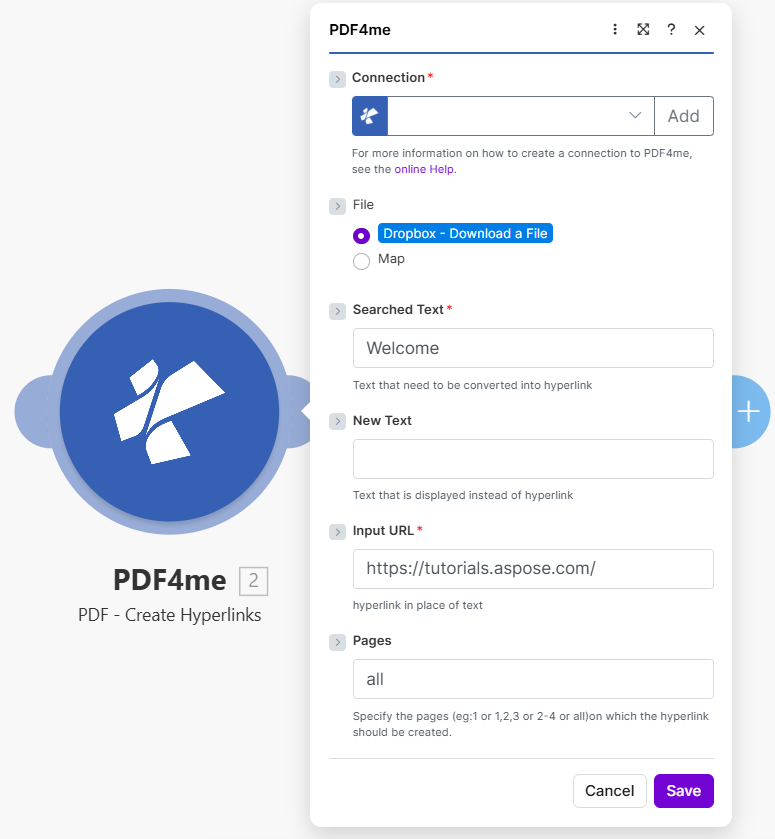
Complete list of parameters for the Create Hyperlinks module. Configure these parameters based on the Make module configuration shown in the image.
Important: Parameters marked with an asterisk (***) are required and must be provided for the module to function correctly.
| Parameter | Type | Description | Example |
|---|---|---|---|
| Connection*** | String | PDF4me API Connection • Select or add your PDF4me connection • Required for API authentication • Create connection via online Help if needed | testvarun_20_prod |
| File*** | Binary/Map | Source PDF File • Dropbox - Download a File or Map from previous module • PDF document where hyperlinks will be created • Source from Dropbox, Google Drive, HTTP | Dropbox - Download a File |
| Searched Text*** | String | Text to Convert to Hyperlink • Exact text in PDF that will become clickable • Text that needs to be converted into hyperlink | Welcome |
| New Text | String | Optional Display Text • Text displayed instead of hyperlink (optional) • If empty, searched text is shown as link | - |
| Input URL*** | String | Hyperlink Destination • The URL the link will point to • Hyperlink in place of text | https://tutorials.aspose.com/ |
| Pages | String | Page Selection • Specify pages: 1 or 1,2,3 or 2-4 or all• Pages on which the hyperlink should be created | all |
Output
The PDF4me Create Hyperlinks module returns comprehensive output data for seamless Make scenario integration:
- Table
- JSON
- Scenario Integration
Table View
Response data in a structured table format:
| Parameter | Type | Description |
|---|---|---|
| Document Name | String | Output PDF filename with created hyperlinks |
| Document Data | Buffer | PDF with new hyperlinks in Buffer format |
JSON Response Format
The raw JSON response from the module:
{
  "Name": "document_with_links.pdf",
  "Doc Data": "[Buffer Data with Created Hyperlinks]"
}
Make Scenario Usage
Use PDF with created hyperlinks in subsequent modules:
- Document Distribution: Share interactive PDFs with clickable links
- Web Publishing: Upload PDFs with working navigation links
- Cloud Storage: Store enhanced documents in Dropbox/Drive
- Client Delivery: Share documents with embedded URLs
- Further Processing: Apply additional PDF operations
Scenario Examples
The PDF4me Create Hyperlinks module in Make provides comprehensive scenario templates for hyperlink creation automation:
- Document Enhancement
- Catalog Links
Automated Document Link Enhancement Scenario
Transform your documents with automated hyperlink insertion:
Complete Scenario Steps:
- Trigger: New PDF uploaded to Dropbox
- Get PDF: Download document from Dropbox
- Create Hyperlinks: Convert "Welcome" text to tutorial link
- Create Additional Links: Add more links to product URLs
- Upload Enhanced: Save to shared folder
- Notify Team: Alert team of updated document
Business Benefits:
- Enhances 100+ documents monthly with interactive links
- Ensures consistent link placement across documents
- Improves document usability and navigation
- Reduces manual link insertion time by 95%
Automated Product Catalog Link Creation Scenario
Add product links to catalog PDFs automatically:
Complete Scenario Steps:
- Trigger: New product catalog PDF generated
- Get Catalog: Download catalog document
- Map Product URLs: Get product URLs from database
- Iterator: Process each product reference
- Create Hyperlinks: Convert product names to shop links
- Upload Catalog: Save interactive catalog
- Publish: Distribute to sales team
Business Benefits:
- Creates 500+ product links monthly automatically
- Enables one-click navigation to product pages
- Improves catalog conversion rates
- Maintains link consistency across catalogs
Industry Use Cases & Applications
- Document Publishing
- Marketing & Communications
- Education & Training
- Interactive Reports: Add links to external references and sources
- Catalogs: Create product links in sales catalogs
- Documentation: Link to tutorials and help resources
- Newsletters: Add clickable URLs to PDF newsletters
- Campaign Materials: Add tracking links to marketing PDFs
- Brochures: Create interactive brochure links
- Presentations: Add resource links to PDF presentations
- Case Studies: Link to relevant product pages
- Course Materials: Add reference links to learning resources
- Tutorials: Link to supplementary content
- Manuals: Create cross-reference links
- Certificates: Add verification URLs