使用以下方法更新 Word 中的目录 Zapier
更新目录 是一个 Zapier 采取行动 PDF4me 刷新或创建 TOC 在 Word 文档中检测一个字段,该字段已存在。 TOC 如果找不到匹配项,则生成一个新的。在报告编辑、手动发布或文档组装后触发此功能,以确保在发布文件之前标题级别、超链接和页码准确无误。
我如何验证我的身份 API 要求?
要访问 PDF4me 网站 API 通过 Zapier每个请求都必须包含正确的身份验证凭据。身份验证可确保通信安全,并验证您作为授权用户的身份,从而实现与您的系统之间的无缝集成。 Zapier 工作流程和 PDF4me的强大话语 TOC 管理服务。
您不容错过的重要事实
配置概览
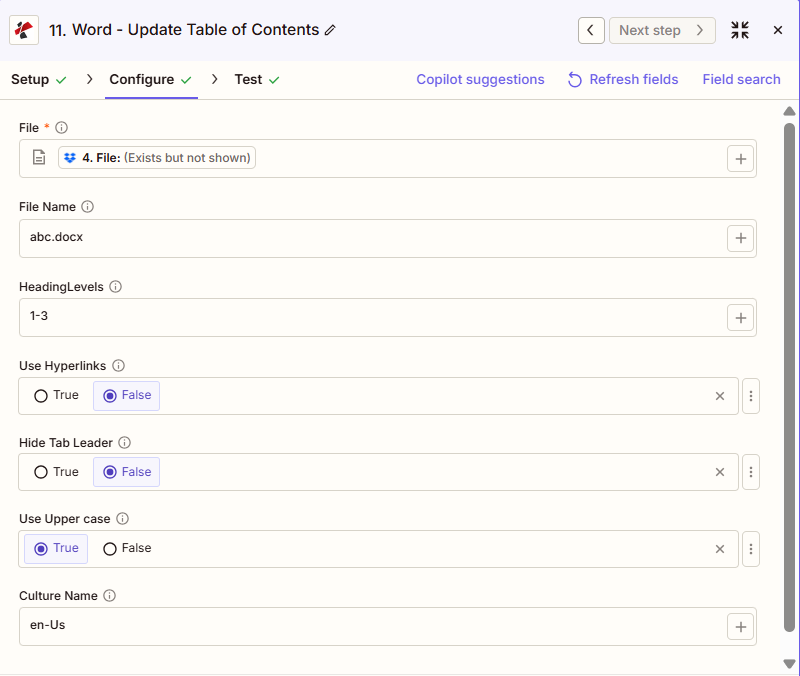
屏幕截图显示,文件映射自上一步,文件名“abc.docx”,标题级别“1-3”,使用超链接和隐藏制表符前导符设置为“否”,使用大写字母设置为“是”,区域名称为“en-Us”。
从步骤绘制地图
1-3
错误的
错误的
真的
:::提示:使用上一步中的映射文件
使用 + 旁边的按钮 文件 和 文件名 要从之前的 Zap 步骤(例如,Google 云端硬盘、Dropbox 或触发器)进行映射。Word 文件必须提供完整内容,而不是“存在但未显示”的引用。
:::
:::警告 文件:(存在但未显示)
如果在“文件”字段中看到“文件:(存在但未显示)”并出现错误,请选择提供相应选项的选项。 完整文件内容 相反。参见 Zapier & Power Automate 尖端 详情请见下文。
:::
参数
“更新目录”操作的完整参数列表。参数名称与……匹配。 Zapier 配置 UI。
必需 Zapier UI: 仅文件。文件名、标题级别、使用超链接、隐藏制表符前导符、使用大写字母和区域名称均为可选。
| 范围 | 必需的 | 它的作用 | 例子 |
|---|---|---|---|
| File | Required | Word document content, mapped from a previous step using full file content. | [4. File from Step 4] |
| File Name | Conditional | Filename with .docx or .doc extension, used for output naming. | abc.docx |
| HeadingLevels | Conditional | Range of heading levels to include in the TOC, from 1 through 6. | 1-3 |
| Use Hyperlinks | Conditional | Boolean toggle for clickable TOC entries that jump to each heading. | False |
| Hide Tab Leader | Conditional | Boolean toggle to hide the dot leaders between TOC text and page numbers. | False |
| Use Upper case | Conditional | Boolean toggle to render TOC entry text in uppercase. | True |
| Culture Name | Conditional | Culture or locale code affecting language and formatting conventions. | en-Us |
输出结果包含哪些字段?
该操作返回修改后的 Word 文档以及跟踪元数据。此输出格式在以下位置共享: PDF4me 词语动作 Zapier 返回一个文件。
| 场地 | 类型 | 它包含什么 |
|---|---|---|
Job Id | String | Unique identifier for the Zapier job execution. |
File Url | URL | API endpoint to download the Word file with the updated TOC. Map this to the next step, Drive, Dropbox, or another PDF4me Word action. |
Alternate File Url | URL | Alternate download URL with the filename in the path. |
File Name | String | Base filename without extension. |
Full File Name | String | Complete filename including extension. |
File Extension | String | File extension of the output, typically .docx. |
典型配置
工作流程示例Common Zapier workflow patterns using Update Table of Contents.
- 当生成的报告文档落入云端硬盘或 Dropbox 文件夹时,就会触发一个触发器。
- 更新目录时,标题级别设置为“1-3”,使用超链接设置为“真”,因此 TOC 页码和链接反映的是最终内容。
- 更新后的报告已上传至共享报告文件夹,供分发。
- 技术手册被标记为已准备好发布,触发了 Zap。
- 更新目录时,标题级别设置为“1-4”,以便进行更深层次的导航;使用大写字母设置为 True,以获得正式的印刷外观。
- 已准备好出版的手册将通过电子邮件发送给出版团队。
- 在 Zap 中,多个 Word 文档已使用以下方式合并: PDF4me 合并操作。
- 更新目录功能在合并后的文件上运行,标题级别设置为“1-2”,以便对合并后的部分进行概览。
- 包含准确信息的综合文件 TOC 已归档到存储文件夹。
实用技巧
速查表
| 场地 | 价值 |
|---|---|
| Action | Update Table of Contents |
| File | [mapped from previous step, full content] |
| File Name | abc.docx |
| HeadingLevels | 1-3 |
| Use Hyperlinks | False |
| Hide Tab Leader | False |
| Use Upper case | True |
| Culture Name | en-Us |
常见问题解答
相关操作
在其他平台上执行相同任务
行业应用案例及应用
- Publishing & Documentation
- Legal & Professional
- Corporate & Business
- Human Resources
- 技术手册出版: 更新 TOC 在出版前,技术手册中应包含 4 级导航。
- 图书出版: 刷新 TOC 最终编辑后的稿件中带有超链接
- 用户指南更新: 更新 TOC 用户指南在内容修订后
- 目录制作: 刷新 TOC 更新后,产品目录中带有标签页引导线。
- 报告发布: 更新 TOC 在年度报告分发前
- 简要总结: 更新 TOC 在提交法律文书之前,请使用大写字母填写相关条目。
- 合同 TOC刷新复杂多章节合同中的目录
- 法律意见 TOC: 更新 TOC 在法律分析修订后的意见书中
- 备忘录更新: 刷新 TOC 在法律备忘录中,论证经过完善
- 政策手册 TOC: 更新 TOC 监管变化后的合规政策手册
- 商业计划 TOC: 更新 TOC 经过平面图修改和完善后
- 提议 TOC: 刷新 TOC 在提交前的 RFP 回复中包含超链接
- 战略计划更新: 更新 TOC 战略规划文件修订后
- 板封装 TOC: 刷新 TOC 在分发前的董事会会议材料中
- 报告定稿: 更新 TOC 在公司报告中确保页码准确
- 员工手册 TOC: 更新 TOC 政策变更和新增内容
- 福利指南 TOC: 刷新 TOC 计划更新后的福利文件
- 培训手册更新: 更新 TOC 培训模块修订后
- 政策手册 TOC: 刷新 TOC 政策变更后的人力资源政策手册
- 入职资料包 TOC: 更新 TOC 在新员工材料中确保准确导航