合并文档 - 文档组装 Zapier
PDF4me 合并文档 是一个 Zapier 结合多种行动 Word 将多个文件合并成一个文档。使用“排序位置”控制合并顺序,“格式模式”选择样式组合方式,“合规级别”选择文档是否符合标准。返回一个合并后的文档。 Word 下一个 Zap 步骤的文件,无需手动复制粘贴。 Word。
此操作的作用
需要两个或两个以上 Word 它会将之前 Zap 步骤中的文档合并到一个文件中,并按照您通过“排序位置”设置的顺序进行排序。您可以使用“格式模式”选择每个文档的格式如何保留,还可以选择为合并后的输出设置合规级别和时区。此功能适用于组装多部门报告、编译提案章节或合并合同条款,而无需打开文件。 Word。
验证您的身份 API 要求
要访问 PDF4me 网站 API 通过 Zapier每个请求都必须包含正确的身份验证凭据。身份验证可确保通信安全,并验证您作为授权用户的身份,从而实现与您的系统之间的无缝集成。 Zapier 工作流程和 PDF4me的 Word 文档合并服务。
您不容错过的重要事实
:::提示:映射之前步骤中的文件1、文件2等
使用 + 按钮映射 文件1, 文件2 (以及来自先前 Zap 步骤的文件名 1、文件名 2)。设置 文件数量 首先显示文件字段。每个 Word 文件必须提供完整内容,不能仅提供“存在但未显示”的引用。
:::
:::警告 文件:(存在但未显示)
如果您看到“文件:(存在但未显示)”并遇到错误,请选择提供相应选项的选项。 完整文件内容。 看 Zapier & Power Automate 尖端 详情请见下文。
:::
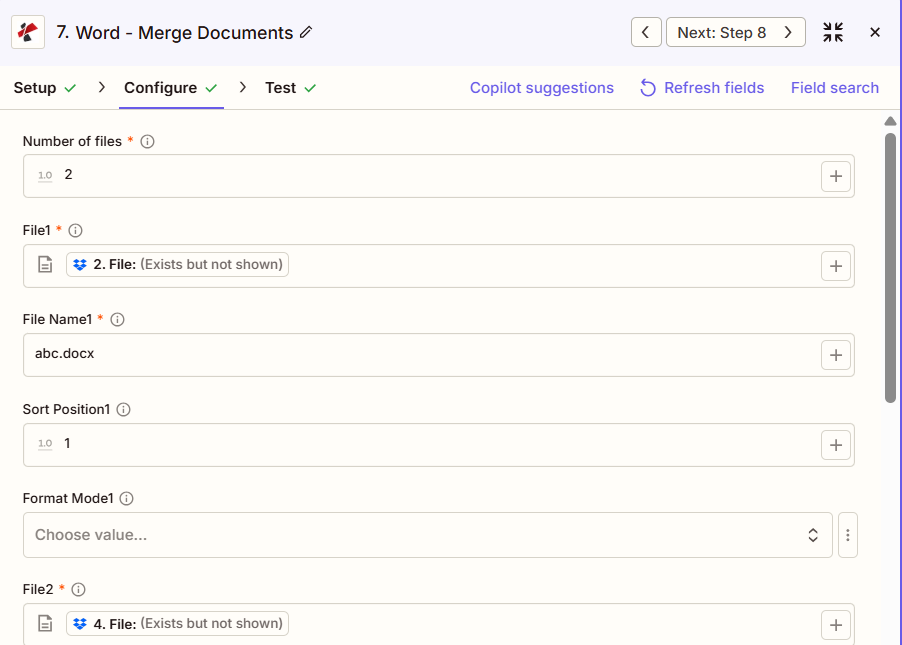
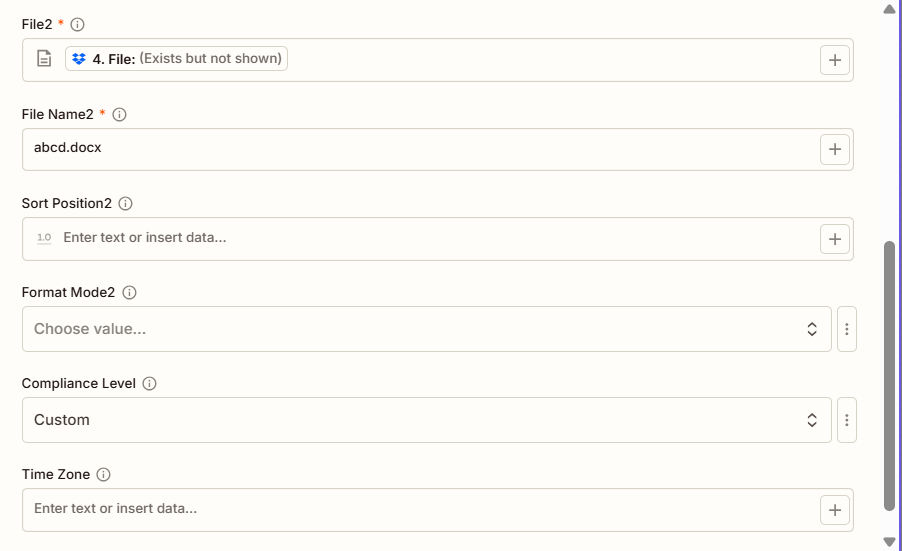
合并文档的主要功能有哪些?
- 多文档支持合并任意数量的 Word 文件合并成一个
- 灵活订购:通过每个文档的排序位置值控制合并顺序
- 格式选项:通过 3 种格式模式选项选择样式如何延续。
- 合规性设置应用 ECMA、过渡性或严格合规级别
- 时区元数据:可选择添加时区信息以进行文档跟踪
参数
合并文档操作的完整参数列表。参数名称和顺序与……一致 Zapier 配置 UI 如上图所示。
- 放 文件数量 (2、3 等)显示文件字段
- 地图 文件1, 文件名1, 文件2, 文件名2 (以及之后)从前几个步骤开始
- (可选) 排序位置 按文档合并顺序,先合并较低的文档。
- (可选) 格式化模式 每个文档和总体 合规级别/时区
| 范围 | 必需的 | 它的作用 | 例子 |
|---|---|---|---|
| Number of files | Required | How many documents to merge. Determines how many File/File Name/Sort Position/Format Mode field sets appear. | 2 |
| File1 | Required | First document. Map from a previous step. Must provide full file content. | [2. File from Step 2] |
| File Name1 | Required | Filename for the first document, with .docx or .doc extension. | abc.docx |
| Sort Position1 | Conditional | Merge order for the first document. Lower values merge earlier. | 1 |
| Format Mode1 | Conditional | Formatting for the first document: KeepSourceFormatting, KeepDifferentStyles, or UseDestinationStyles. | KeepSourceFormatting |
| File2 | Required | Second document. Map from a previous step. | [4. File from Step 4] |
| File Name2 | Required | Filename for the second document. | abcd.docx |
| Sort Position2, Format Mode2 | Conditional | Same pattern as document 1. Repeats for File3, File4, and so on if Number of files is greater than 2. | 2 |
| Compliance Level | Conditional | Document standard for the merged output: ECMA, Transitional, or Strict. | Custom |
| Time Zone | Conditional | Timezone applied to document metadata in the merged file. | UTC |
重要的: 文件数量, 和 文件/文件名 每个文件都需要。 排序位置, 格式化模式, 合规级别, 和 时区 这些都是可选的。
合并文档会返回什么结果?
这 PDF4me 合并文档 操作返回合并后的结果。 Word 该文件用于后续的 Zap 步骤。所有 Zap 步骤的输出格式均相同。 PDF4me Word 文件返回操作 Zapier。
关键输出字段(将这些字段映射到您的下一步)
API 下载合并文件的端点 Word 文件。将其映射到下一步的文件输入。
api.pdf4me.com/Zapier/GetDocument?d=...备用下载 URL 文件名包含在路径中。
api.pdf4me.com/Zapier/GetAltDocument/.../merged.docx| 场地 | 类型 | 它包含什么 |
|---|---|---|
Job Id | String | Unique identifier for the Zapier job execution. |
File Url | URL | API endpoint to download the merged Word file. |
Alternate File Url | URL | Alternate download URL with the filename in the path. |
File Name | String | Base filename without extension. |
Full File Name | String | Complete filename with extension. |
File Extension | String | File extension of the returned file, .docx. |
- JSON
- Zap Integration
例子 JSON 输出 (URL(仅显示格式,链接无效):
{
"Job Id": "...",
"File Url": "api.pdf4me.com/Zapier/GetDocument?d=...",
"Alternate File Url": "api.pdf4me.com/Zapier/GetAltDocument/.../merged.docx",
"File Name": "merged",
"Full File Name": "merged.docx",
"File Extension": ".docx"
}
使用 + 绘制地图 文件 URL 或者 备用文件网址 下一步,通过云端硬盘、Dropbox、电子邮件或其他方式。 PDF4me Word 行动。
典型配置
工作流程示例Common Zapier workflow patterns using Merge Documents.
- 当所有部门报告部分都提交完毕后,就会触发一个事件。
- PDF4me 合并文档会将封面、执行摘要和每个部门部分合并在一起,使用排序位置来控制最终顺序,并将格式模式设置为保持源格式,以保留每个部分自己的样式。
- 汇总报告上传至高管报告文件夹。
- 当所有提案部分都被标记为已批准时,触发器就会触发。
- PDF4me 合并文档将求职信、技术方案、定价和团队简介合并在一起,格式模式设置为 UseDestinationStyles,以使不同团队撰写的各个部分外观一致。
- 最终方案将上传至提交文件夹,供销售主管审核。
- 一旦协商的合同条款最终确定,触发机制就会启动。
- PDF4me 合并文档会将标准条款、自定义条款、附表和签名页合并在一起,并将格式模式设置为“保持不同样式”,以保留每个条款的原始格式差异。
- 合同草案完成后将送交法务团队进行最终审核。
实用技巧
速查表
| 场地 | 价值 |
|---|---|
| Action | Merge Documents |
| Number of files | 2 |
| File1 / File Name1 | [Mapped] / abc.docx |
| Sort Position1 | 1 |
| File2 / File Name2 | [Mapped] / abcd.docx |
| Sort Position2 | 2 |
| Format Mode | KeepSourceFormatting (optional) |
| Compliance Level | Transitional (optional) |
常见问题
相关操作
在其他平台上执行相同任务
行业应用案例及应用
- Legal & Professional
- Corporate & Business
- Human Resources
- Publishing & Documentation
- 合同组装将标准条款与自定义条款合并成完整的合同
- 法律简报汇编:将论点、证据和权威案例合并成最终的辩护状
- 发现文件汇编将权限日志与生产环境中的响应式文档合并
- 案件档案合并将案件备忘录、诉状和信函合并成案件摘要
- 意见书汇编将研究备忘录与意见模板合并到客户信函中。
- 提案汇编将求职信、技术方案、报价和个人简介合并到 RFP 回复中
- 报告组装将执行摘要与部门章节合并成综合报告。
- 商业计划整合将计划各部分(市场、运营、财务)合并成完整的计划。
- 板封装组件将议程、报告和决议整合到董事会会议资料包中。
- 战略计划汇编将愿景、目标和举措整合到全面的战略计划中
- 员工手册汇编将政策章节合并到完整的员工手册中
- 创建入职培训包将欢迎信、表格和政策文件整合到新员工入职资料包中。
- 福利指南汇编将福利计划说明合并成全面的福利指南
- 绩效考核大会将评估表与发展计划合并成审查文件
- 培训手册整合将培训模块合并成完整的培训手册
- 书籍手稿汇编将各章节文档合并成完整的稿件以供出版。
- 技术手册编写将技术章节合并成全面的用户手册
- 课程资料汇编将课程模块合并成完整的课程材料
- 文件整合将 API 文档、指南和教程合并成统一的文档。
- 报告发布将报告组件合并成可发布的文档