从中提取元数据 Word 在 Zapier
PDF4me 提取元数据 是一个 Zapier 读取标题、作者、主题、关键词、创建和修改日期、页数、字数以及任何自定义属性的操作 Word 无需打开文件即可获取文档。可用于文档编目、合规性跟踪、CMS 数据填充或基于元数据的路由。它返回的是结构化的元数据对象,而不是文件。
验证您的身份 API 要求
要访问 PDF4me 网站 API 通过 Zapier每个请求都必须包含正确的身份验证凭据。身份验证可确保通信安全,并验证您作为授权用户的身份,从而实现与您的系统之间的无缝集成。 Zapier 工作流程和 PDF4me的 Word 元数据提取服务。
您不容错过的重要事实
:::提示:使用上一步中的映射文件
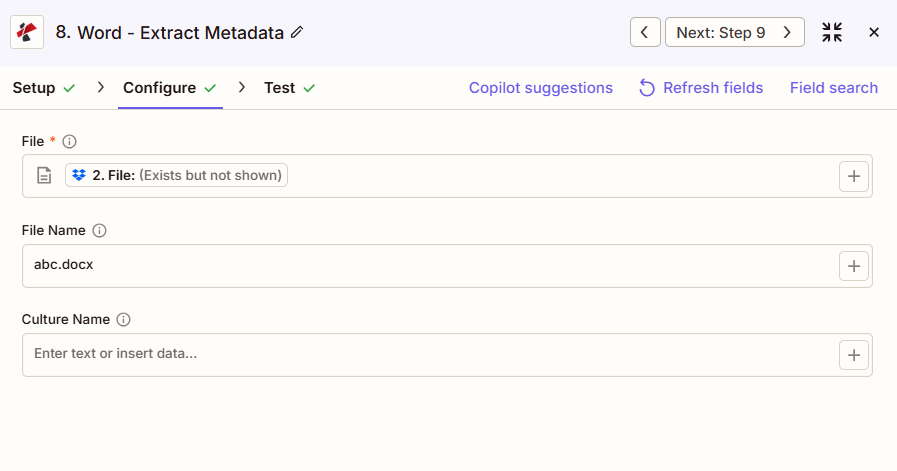
使用 + 旁边的按钮 文件 和 文件名 从之前的 Zap 步骤(例如,Google 云端硬盘、Dropbox 或触发器)进行映射。 Word 文件必须提供完整内容,不能仅提供“存在但未显示”的引用。
:::
:::警告 文件:(存在但未显示)
如果在“文件”字段中看到“文件:(存在但未显示)”并出现错误,请选择提供相应选项的选项。 完整文件内容 另见。 Zapier & Power Automate 尖端 详情请见下文。
:::
提取元数据的主要特点是什么?
- 内置属性标题、作者、主题、关键词、公司
- 日期信息创建日期、修改日期、最后打印日期
- 文档统计页数、字数、字符数
- 自定义属性提取用户自定义文档属性
- JSON 输出结构化的 JSON 便于集成的格式
参数
“提取元数据”操作的完整参数列表。参数名称与以下内容匹配: Zapier 配置 UI 如上图所示。
- 地图 文件 和 文件名 从上一步开始
- (可选) 文化名称 如果区域日期格式很重要
| 范围 | 必需的 | 它的作用 | 例子 |
|---|---|---|---|
| File | Required | Word document to read metadata from. Map from a previous step. Must provide full file content. | [4. File from Step 4] |
| File Name | Conditional | Word filename with .docx or .doc extension. | document.docx |
| Culture Name | Conditional | Locale used when interpreting region-specific values in the metadata. | en-US |
重要的: 仅有的 文件 需要地图 文件名 如果可以,则从上一步的文件名输出中获取。
提取元数据会返回什么?
这 PDF4me 提取元数据 操作返回一个 元数据 这是一个对象,而非文件,其中包含文档属性。将各个元数据字段映射到后续的 Zap 步骤,以便进行编目、合规性检查或 CMS 集成。
JSON 包含标题、作者、主题、关键词、创建日期、修改日期、页数、字数以及任何自定义属性的对象。将嵌套字段(例如 Metadata.Title 或 Metadata.Author)映射到后续步骤。
| 场地 | 类型 | 它包含什么 |
|---|---|---|
Job Id | String | Unique identifier for the Zapier job execution. |
Metadata | Object | JSON object with document properties. |
Metadata.Title | String | Document title. |
Metadata.Author | String | Document author. |
Metadata.Subject | String | Document subject. |
Metadata.Keywords | String | Document keywords. |
Metadata.CreatedDate | String | Creation date, in ISO 8601 format. |
Metadata.ModifiedDate | String | Last modification date. |
Metadata.PageCount | Number | Total page count. |
Metadata.WordCount | Number | Total word count. |
- JSON
- Zap Integration
例子 JSON 输出:
{
"Job Id": "...",
"Metadata": {
"Title": "Q4 Financial Report",
"Author": "John Doe",
"Subject": "Financial Analysis",
"Keywords": "finance, Q4, report",
"CreatedDate": "2024-01-15T10:30:00Z",
"ModifiedDate": "2024-01-20T15:45:00Z",
"PageCount": 25,
"WordCount": 5280
}
}
使用 + 绘制地图 元数据.标题, 元数据.作者, 元数据.修改日期或者将其他嵌套字段传递到下一步、数据库、CMS、Google Sheets 或筛选逻辑。
典型配置
工作流程示例Common Zapier workflow patterns using Extract Metadata.
- 当新文档上传到共享库时,会触发一个事件。
- PDF4me 从文件中提取元数据,包括标题、作者和关键词。
- 提取的字段将被插入到目录数据库或搜索索引中,以便后续查找。
- 计划触发器会列出合规文件夹中的受控文档。
- PDF4me 提取元数据循环读取每个文件的修改日期和作者信息。
- 过滤器会将修改日期或作者不符合政策规定的任何文档标记为需要人工审核。
- 文档在发布前会先放入暂存文件夹。
- PDF4me 从文件中提取元数据,包括标题、作者和关键词。
- 这些字段会发布到内容管理系统 (CMS) 中。 API 在编辑审核之前预先填写内容记录。
实用技巧
速查表
| 场地 | 价值 |
|---|---|
| Action | Extract Metadata |
| File | [Mapped from previous step] |
| File Name | document.docx |
| Culture Name | en-US (optional) |
| Core output | Metadata.Title, Metadata.Author, Metadata.CreatedDate, Metadata.WordCount, and more |
常见问题
相关操作
在其他平台上执行相同任务
行业应用案例及应用
- Compliance & Audit
- Content Management
- Legal & Professional
- Publishing & Documentation
- 文档审计跟踪提取修改日期和作者信息,以作合规性审计证据
- 版本控制跟踪:利用创建和修改时间戳监控文档版本
- 作者验证验证文档作者是否与授权人员名单相符
- 保留政策执行:对照保留期限表检查创建日期,以做出归档决定。
- 受控文档管理:跟踪文档属性,以符合 ISO 或质量管理规范
- CMS集成将文档标题、作者和关键词填充到内容管理系统中
- 搜索索引提取关键词和主题以进行全文搜索引擎索引
- 文件分类:根据主题和关键词元数据对文档进行分类
- 图书馆编目:使用提取的属性对公司文档库进行索引
- 标签生成:根据关键词和主题字段生成文档标签
- 案件文件跟踪提取法律事务文档管理系统的元数据
- 发现文档索引按作者、日期、主题对目录检索文档进行审核
- 合同管理提取合同当事方、日期、标的物,以填充合同数据库
- 特权日志生成使用文档元数据来支持权限日志条目
- 文件制作:跟踪诉讼数据库系统中的生产文档元数据
- 稿件跟踪提取作者、标题和字数,用于稿件管理系统
- 发布工作流程:根据作者和修改日期元数据路由文档
- 风格指南合规性检查文档属性是否符合发布样式指南要求
- 内容分析分析文档统计数据(字数、页数)以进行内容规划
- 多作者协调:在协作项目中跟踪文档作者和修改日期