删除页面 Word 使用 Zapier
删除页面 是一个 Zapier 采取行动 PDF4me 从某个页面或页面范围中移除特定页面或页面范围 Word 文档可使用起始页和结束页表示连续页码范围,或使用页码表示非连续页码,例如“2,4,6”。触发此操作可在交付客户前移除机密页面、删除封面页或在分发前清理模板。
我如何验证我的身份 API 要求?
要访问 PDF4me 网站 API 通过 Zapier每个请求都必须包含正确的身份验证凭据。身份验证可确保通信安全,并验证您作为授权用户的身份,从而实现与您的系统之间的无缝集成。 Zapier 工作流程和 PDF4me强大的 Word 页面删除服务。
您不容错过的重要事实
配置概览
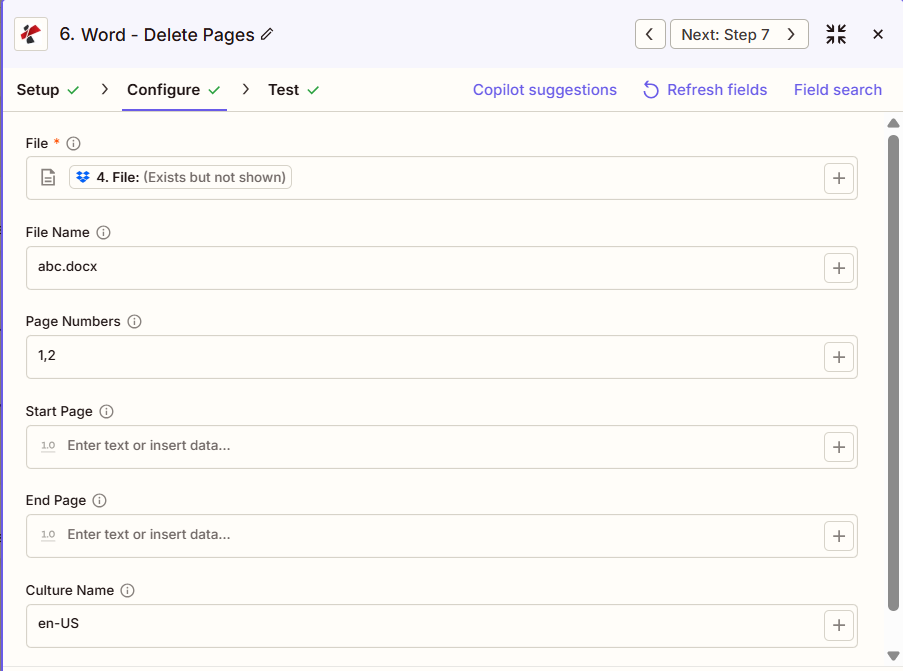
屏幕截图显示,文件映射自上一步,文件名为“abc.docx”,页码设置为“1,2”以删除第 1 页和第 2 页,起始页和结束页留空,区域名称为“en-US”。
从步骤绘制地图
1,2
范围,例如 2 到 5
美国英语
:::提示:使用上一步中的映射文件
使用 + 旁边的按钮 文件 和 文件名 从之前的 Zap 步骤(例如,Google 云端硬盘、Dropbox 或触发器)进行映射。 Word 文件必须提供完整内容,不能仅提供“存在但未显示”的引用。
:::
:::警告 文件:(存在但未显示)
如果在“文件”字段中看到“文件:(存在但未显示)”并出现错误,请选择提供相应选项的选项。 完整文件内容 相反。参见 Zapier & Power Automate 尖端 详情请见下文。
:::
参数
删除页面操作的完整参数列表。参数名称与……匹配 Zapier 配置 UI。
必需 Zapier UI: 仅限文件。要删除任何内容,必须同时设置起始页、结束页或页码中的至少一项。页码从 1 开始编号。
| 范围 | 必需的 | 它的作用 | 例子 |
|---|---|---|---|
| File | Required | Word document content, mapped from a previous step using full file content. | [4. File from Step 4] |
| File Name | Conditional | Filename with .docx or .doc extension, used for output naming. | abc.docx |
| Page Numbers | Conditional | Comma-separated list of specific pages to delete, 1-based. Can be combined with Start Page and End Page. | 2,4,6 |
| Start Page | Conditional | 1-based page number to begin deleting from. Must not exceed End Page or the document page count. | 2 |
| End Page | Conditional | 1-based page number to stop deleting at, inclusive. Used together with Start Page to define a range. | 5 |
| Culture Name | Conditional | Culture or locale code affecting language and formatting conventions during processing. | en-US |
输出结果包含哪些字段?
该操作返回修改后的结果。 Word 文档加上跟踪元数据。此输出格式在以下各项中共享: PDF4me Word 行动 Zapier 返回一个文件。
| 场地 | 类型 | 它包含什么 |
|---|---|---|
Job Id | String | Unique identifier for the Zapier job execution. |
File Url | URL | API endpoint to download the Word file with the pages removed. Map this to the next step, Drive, Dropbox, or another PDF4me Word action. |
Alternate File Url | URL | Alternate download URL with the filename in the path. |
File Name | String | Base filename without extension. |
Full File Name | String | Complete filename including extension. |
File Extension | String | File extension of the output, typically .docx. |
典型配置
工作流程示例Common Zapier workflow patterns using Delete Pages.
- 当内部文档被标记为可供客户分发时,会触发一个触发器。
- 删除页面时,起始页和结束页设置为仅包含内部分析的范围。
- 经过脱敏处理的文档上传到面向客户的文件夹,而原件则保留在内部存档中。
- 在发布到共享模板库之前,会检索包含示例内容的主模板。
- 删除页面时,页码设置为包含示例内容的特定页面,例如“3,7,10”。
- 清理后的模板已上传至模板库,供团队使用。
- 报告草稿获准发布后,报告定稿触发器就会触发。
- 删除页面功能会删除起始页和结束页,同时删除封面页,并结合页码功能,用于删除分散的内部笔记页。
- 已准备好发布的报告将通过电子邮件发送给利益相关者。
实用技巧
速查表
| 场地 | 价值 |
|---|---|
| Action | Delete Pages |
| File | [mapped from previous step, full content] |
| File Name | abc.docx |
| Page Numbers | 1,2 |
| Start Page / End Page | 2 / 5 (for a range instead) |
| Culture Name | en-US |
常见问题解答
相关操作
在其他平台上执行相同任务
行业应用案例及应用
- Legal & Professional
- Corporate & Business
- Finance & Accounting
- Human Resources
- 特权日志删除从非特权文档生成中删除特权日志页
- 机密页面编辑:在公开提交之前,删除包含机密和解条款的页面
- 草稿页面清理从客户交付物中删除律师笔记和工作页
- 展品准备:在向法院提交证据之前,请移除证据的封面页和分隔页。
- 发现消毒从发现文件中删除内部分析页面
- 提案清理从客户提案最终稿中移除内部定价分析页面
- 报告定稿从详细的分析报告中删除执行摘要封面页
- 演示文稿准备从演示文稿讲义版本中移除演讲者备注页
- 客户交付成果消毒在向客户交付文档之前删除内部审核页面。
- 档案准备从常青图书馆文档中删除有时效性的页面
- 客户报告清理从客户财务报告中移除内部假设页
- 审计文件编制从最终审计交付物中删除工作底稿页面
- 董事会方案最终确定从最终董事会会议资料包中移除会议纪要草稿页。
- 监管文件清理从监管申报最终稿中删除内部审查页面
- 预算文件清理从分布式预算中移除敏感性分析页面
- 政策分配:从员工手册最终版中删除开发说明页
- 福利登记从员工福利文件中删除内部成本分析页面
- 绩效考核最终定稿从分布式评论中移除校准页面
- 员工手册清理从标准员工手册中删除人力资源流程页面
- 入职资料包准备从员工入职资料包中移除人力资源管理页面。