比较 Word 使用文档 Zapier
比较文档 是一个 Zapier 采取行动 PDF4me 对原始版本和修订版本进行比较 Word 文件并返回一个带有跟踪更改的单个文档,输出结果相同。 Word自带的比较功能可以自动生成修改标记。忽略格式、大小写、注释、表格或字段,专注于修改标记。非常适合合同修改和版本控制,无需打开文件。 Word。
相关博客文章
目前尚无关于此功能的博客文章——敬请期待。
在此期间,您可以浏览 PDF4me 博客,查看适用于各平台的教程和工作流程。
访问博客 →
我如何验证我的身份 API 要求?
要访问 PDF4me 网站 API 通过 Zapier每个请求都必须包含正确的身份验证凭据。身份验证可确保通信安全,并验证您作为授权用户的身份,从而实现与您的系统之间的无缝集成。 Zapier 工作流程和 PDF4me强大的 Word 文件比对服务。
您不容错过的重要事实
仅需文件和第二份文件
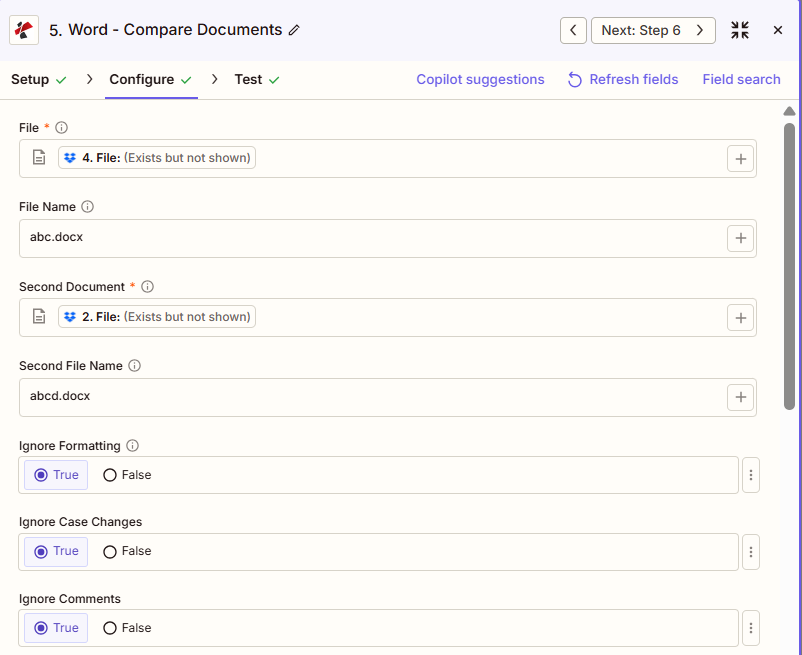
截图证实两者都带有星号。 Zapier UI文件名、第二个文件名、所有忽略开关和作者均为可选。
八个独立的忽略开关
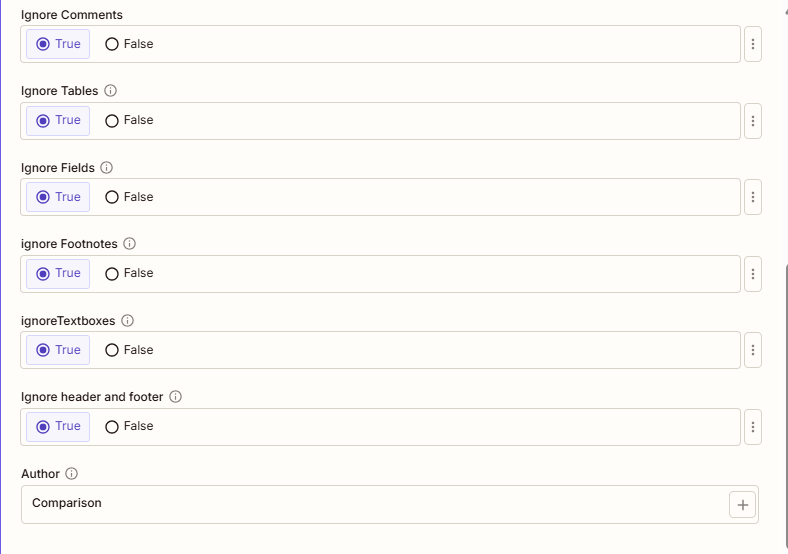
格式、大小写更改、注释、表格、字段、脚注、文本框以及页眉和页脚都可以单独忽略,因此您可以将批注重点放在真正重要的更改类型上。
两个文件都需要完整内容,而不是引用。
如果文件或第二个文档显示“存在但未显示”,请选择提供完整文件内容的映射选项,否则比较将失败。
配置概览
示例配置来自 Zapier 界面
文件和文件名(第一个/原始文件)以及第二个文档和第二个文件名(第二个/修订文件)已从之前的步骤中映射。例如:文件名 = abc.docx,第二个文件名 = abcd.docx。所有八个“忽略”开关均设置为“是”,作者比较保留默认设置。
文件
原始文件(abc.docx)
第二份文件
修订版(abcd.docx)
忽略格式
真的
作者
比较
参数
“比较文档”操作的完整参数列表。参数名称与……匹配。 Zapier 配置 UI。
必需 Zapier UI: 文件和第二文档。文件名、第二文件名、所有忽略开关以及作者均为可选。
| 范围 | 必需的 | 它的作用 | 例子 |
|---|---|---|---|
| File | Required | The original (baseline) document, mapped from a previous step with full file content. | abc.docx |
| File Name | Conditional | Filename with .docx or .doc extension for the original document. | abc.docx |
| Second Document | Required | The revised document. Changes from this file relative to File are marked in the output. | abcd.docx |
| Second File Name | Conditional | Filename with extension for the revised document. | abcd.docx |
| Ignore Formatting | Conditional | True skips bold, italic, font, and color differences. | True |
| Ignore Case Changes | Conditional | True treats "Hello" and "hello" as identical instead of flagging a case change. | True |
| Ignore Comments | Conditional | True skips comment additions and edits. | True |
| Ignore Tables | Conditional | True skips table structure and content changes. | True |
| Ignore Fields | Conditional | True skips auto-updating fields such as dates, preventing false positives. | True |
| Ignore Footnotes | Conditional | True skips footnote content changes. | True |
| Ignore Textboxes | Conditional | True skips textbox content and positioning changes. | True |
| Ignore Headers And Footers | Conditional | True skips header and footer content changes, focusing on the document body. | True |
| Author | Conditional | Name attributed to the tracked changes in the output document. Defaults to Comparison. | Comparison |
输出结果包含哪些字段?
该操作返回比较文档(包含修订痕迹)以及跟踪元数据。所有操作均采用此输出格式。 PDF4me Word 文件返回操作 Zapier。
| 场地 | 类型 | 它包含什么 |
|---|---|---|
Job Id | String | Unique identifier for the Zapier job execution. |
File Url | URL | API endpoint to download the comparison document. Map this to the next step, Drive, Dropbox, or another PDF4me Word action. |
Alternate File Url | URL | Alternate download URL with the filename in the path. |
File Name | String | Base filename without extension. |
Full File Name | String | Complete filename including extension. |
File Extension | String | File extension of the output, .docx. |
典型配置
工作流程示例Common Zapier workflow patterns using Compare Documents.
红线新合同版本
- 新版本的合同被添加到 Google 云端硬盘的合同文件夹中,触发 Zap。
- 比较文档时,文件设置为已存档的基准合同,第二个文档设置为新版本,忽略格式和忽略字段设置为 True,以便标注重点关注实质性文本更改。
- 作者设置为“法律审查”,修改稿将通过电子邮件发送给负责该交易的律师。
跟踪政策修订中的每一次变化
- 政策修订案已提交审核。 SharePoint 列表。
- 比较文档时,文件设置为当前已批准的策略,第二个文档设置为建议的修订版本,所有忽略开关均设置为“否”,以便进行全面跟踪。
- 对比结果已上传至评审委员会共享文件夹。
构建跨文档版本的审计跟踪
- 计划触发器会列出版本控制文件夹中受控文档的所有版本。
- “比较文档”功能会对每个连续的文档对运行,并将“忽略字段”设置为“真”,以防止自动更新的日期显示为错误的更改。
- 每次对比都会存储在审计文件夹中,作为版本间变更的证据。
实用技巧
Map full file content, not a reference
If File or Second Document shows "Exists but not shown", pick the mapping option that provides full file content, or the comparison fails.
Ignore Fields avoids false positives from dates
Auto-updating fields like today's date will otherwise show up as a change on every comparison run, even when nothing else changed.
Ignore Formatting isolates substantive edits
Turn this on when reviewers only care about wording changes, not font, color, or bold/italic differences between versions.
Author labels the tracked changes
Set Author to a reviewer name or team label, such as "Legal Review", so the redline shows who or what generated the comparison.
Leave all Ignore toggles False for a full audit
A comprehensive comparison with every toggle False is noisier to read but is the right choice for compliance or audit trail use cases.
速查表
| 场地 | 价值 |
|---|---|
| Action | Compare Documents |
| File | [mapped, original document] |
| File Name | abc.docx |
| Second Document | [mapped, revised document] |
| Second File Name | abcd.docx |
| Ignore Formatting | True |
| Ignore Case Changes | True |
| Ignore Fields | True |
| Author | Comparison |
常见问题解答
相关操作
合并 Word 文件
审核并接受标注修改后,将最终批准的版本合并成一个文件。
从文本中提取文本 Word
从任一版本中提取原始文本,用于搜索索引或单独的基于文本的差异比较步骤。
密码保护 Word 文档
在将最终定稿分发给审核团队以外的人员之前,务必锁定最终定稿版本。
在其他平台上执行相同任务
在比较文档中 Make
与以下操作相同 Make 模块,带有云存储触发器的可视化场景。
比较 Word 文档 n8n
配置与自托管或云中的节点相同的比较 n8n 工作流程。
在比较文档中 Power Automate
Microsoft 365 与……流动 SharePoint, Outlook以及 Teams 触发器。
比较文档 REST API
原始 PDF4me 用于自定义后端代码或 Postman 测试的端点。
行业应用案例及应用
- Legal & Professional
- Compliance & Regulatory
- Corporate & Business
- Publishing & Documentation
- 合同红线对比显示所有谈判变更和修订痕迹的合同草案
- 法律简报版本:比较简要草稿,追踪论点和引文的修改
- 和解协议审查比较不同版本的结算方案,找出所有协商变更。
- 法院文件对比:在提交前,将已提交的文件与草稿进行比对,确保准确性。
- 客户文件审核对比客户提交的文件与公司修改后的文件,以查看建议。
- 策略版本控制比较政策修订情况,追踪所有监管合规性变化
- 流程更新比较记录流程改进修改的标准操作规程版本
- 监管备案审查对比监管文件的草稿和最终版本,找出其中的差异
- 审计文件跟踪:比较审计文件版本,以确保合规性审计跟踪文档的完整性
- 受控文档管理跟踪质量管理体系受控文件的变更
- 提案审查比较 RFP 回复草稿,跟踪团队的修改和改进
- 报告修订比较包含分析师修正的财务报告版本
- 战略计划更新比较规划文件的不同版本,跟踪战略变化
- 董事会方案审查:在分发前比较电路板材料版本,识别更新内容。
- 供应商协议谈判在整个谈判过程中跟踪供应商合同变更
- 稿件编辑比较稿件版本,追踪作者和编辑的修改。
- 技术文档对比技术文档修订版,查看工程更新
- 用户手册更新跟踪产品版本间用户文档的更改
- 翻译审核:对比译文与原文,追踪翻译修改情况
- 风格指南执行对比文档与风格指南模板,找出偏差