添加水印 Word - 形象品牌塑造 Zapier
PDF4me 添加水印 是一个 Zapier 在图像上添加水印、徽标、“机密”标记或批准印章的操作 Word 自动生成文档。可控制缩放比例(0.1-10倍)或精确的宽度/高度、透明度以及居中或对角对齐方式。返回一个新的文档。 Word 将带有水印的文件用于下一个 Zap 步骤。
此操作的作用
需要 Word 文档和图像(PNG, JPG, JPEG从之前的 Zap 步骤中提取 BMP 或 GIF 格式的图像,并将其作为水印放置在文档文本的后面。您可以按比例缩放或以磅为单位精确设置宽度/高度,将其设置为半透明以获得微妙的效果,并选择将其居中或左上角对齐。此功能可用于在对外文档上添加徽标,或在分发前将敏感文件标记为机密、草稿或已批准。
验证您的身份 API 要求
要访问 PDF4me 网站 API 通过 Zapier每个请求都必须包含正确的身份验证凭据。身份验证可确保通信安全,并验证您作为授权用户的身份,从而实现与您的系统之间的无缝集成。 Zapier 工作流程和 PDF4me的 Word 水印服务。
您不容错过的重要事实
:::提示:使用前几步中的地图文件和水印文件
使用 + 按钮映射 文件 (Word), Word 文件名, 水印文件, 和 水印文件名 根据之前的 Zap 步骤。使用透明 PNG 格式的徽标。 Word 文件必须提供完整内容,不能只显示“存在但未显示”。
:::
:::警告 文件:(存在但未显示)
如果您看到“文件:(存在但未显示)”并遇到错误,请选择提供相应选项的选项。 完整文件内容。 看 Zapier & Power Automate 尖端 详情请见下文。
:::
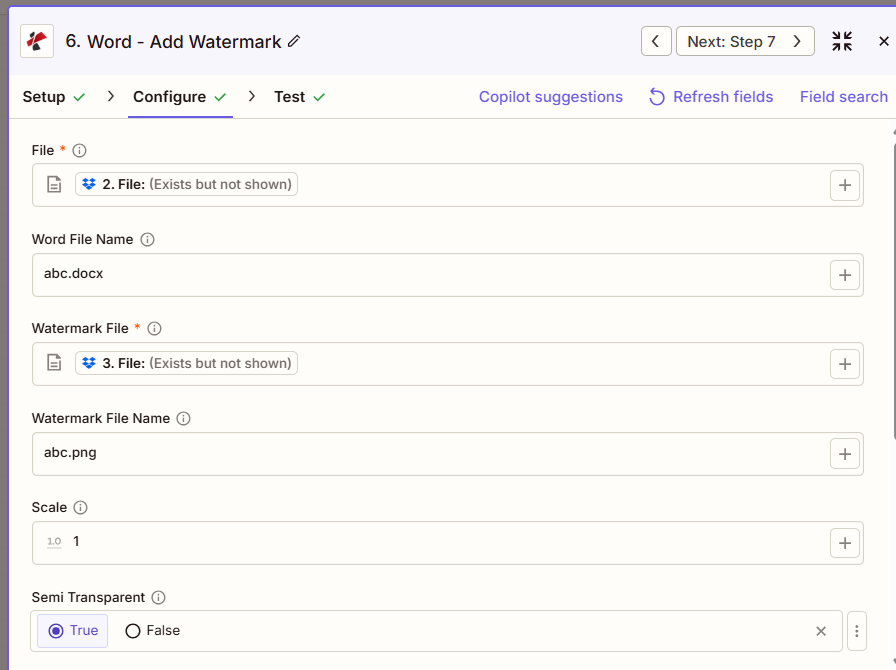
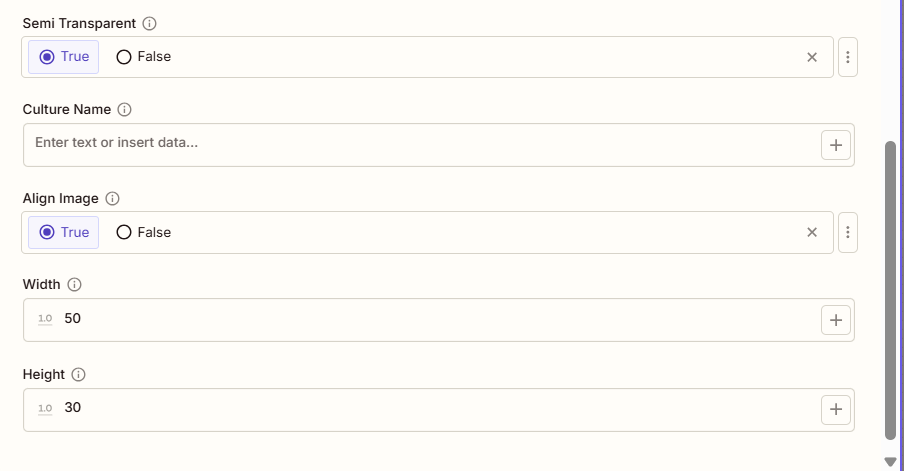
添加水印的主要功能有哪些?
- 图片水印支持使用水印 PNG, JPG, JPEG、BMP 或 GIF 格式
- 高级扩展:使用 Scale 参数进行精确缩放控制(0.1 至 10.0)
- 定制尺寸:使用精确的宽度和高度(以磅为单位)覆盖缩放比例
- 透明度控制:半透明选项,可实现微妙的水印效果
- 定位选项通过“对齐图像”功能实现居中或左上对齐。
- 文本后置水印位于文档内容的后面
- 保持宽高比:仅提供宽度或仅提供高度时自动执行
参数
添加水印操作的完整参数列表。参数名称与以下内容一致: Zapier 配置 UI 如上图所示。
- 地图 文件 (Word) 和 水印文件 从之前的步骤(PNG (推荐用于徽标)
- (可选)映射 Word 文件名 和 水印文件名
- 放 规模 (1.0 = 100%)或精确值 宽度/高度 以点数表示
- 放 半透明 和 对齐图像 根据需要
| 范围 | 必需的 | 它的作用 | 例子 |
|---|---|---|---|
| File | Required | Word document to watermark. Map from a previous step. Must provide full file content. | [2. File from Step 2] |
| Word File Name | Conditional | Word filename with .docx or .doc extension. | abc.docx |
| Watermark File | Required | Watermark image. PNG, JPG, JPEG, BMP, or GIF. Use a transparent PNG for logos. | [3. File from Step 3] |
| Watermark File Name | Conditional | Watermark image filename. | abc.png |
| Scale | Conditional | Scaling factor from 0.1 to 10.0. 1.0 is the original size. Overridden by Width/Height. | 1.5 |
| Semi Transparent | Conditional | True applies roughly 50% opacity for a subtle effect. False (default) keeps full opacity. | true |
| Culture Name | Conditional | Culture code affecting document metadata, such as en-US or de-DE. | en-US |
| Align Image | Conditional | True centers the watermark on the page (default). False aligns it to the top-left within margins. | true |
| Width | Conditional | Exact width in points, overrides Scale. If only Width is set, height is auto-calculated. | 200 |
| Height | Conditional | Exact height in points, overrides Scale. If only Height is set, width is auto-calculated. | 150 |
重要的: 文件 和 水印文件 仅需这些参数。尺寸调整的优先级顺序为:宽度/高度,其次是缩放比例,最后是图像的原始尺寸。
添加水印会返回什么结果?
这 PDF4me 添加水印 操作返回带水印的内容 Word 该文件用于后续的 Zap 步骤。输出格式在所有 Zap 步骤中都是通用的。 PDF4me Word 文件返回操作 Zapier。
关键输出字段(将这些字段映射到您的下一步)
API 下载带水印图片的端点 Word 文件。将其映射到下一步的文件输入。
api.pdf4me.com/Zapier/GetDocument?d=...备用下载 URL 文件名包含在路径中。
api.pdf4me.com/Zapier/GetAltDocument/.../document.docx| 场地 | 类型 | 它包含什么 |
|---|---|---|
Job Id | String | Unique identifier for the Zapier job execution. |
File Url | URL | API endpoint to download the watermarked Word file. |
Alternate File Url | URL | Alternate download URL with the filename in the path. |
File Name | String | Base filename without extension. |
Full File Name | String | Complete filename with extension. |
File Extension | String | File extension of the returned file, .docx. |
- JSON
- Zap Integration
例子 JSON 输出 (URL(仅显示格式,链接无效):
{
"Job Id": "...",
"File Url": "api.pdf4me.com/Zapier/GetDocument?d=...",
"Alternate File Url": "api.pdf4me.com/Zapier/GetAltDocument/.../document.docx",
"File Name": "document",
"Full File Name": "document.docx",
"File Extension": ".docx"
}
使用 + 绘制地图 文件 URL 或者 备用文件网址 下一步,通过云端硬盘、Dropbox、电子邮件或其他方式。 PDF4me Word 行动。
典型配置
工作流程示例Common Zapier workflow patterns using Add Watermark.
- 当文档定稿并准备离开组织时,会触发一个触发器。
- PDF4me 添加水印地图透明 PNG 将徽标设置为水印文件,并将“半透明”设置为“真”,“对齐图像”设置为“真”,以获得居中、微妙的标记。
- 上传步骤会将带有品牌标识的文档发送到云端硬盘、Dropbox 或直接发送给收件人。
- 当文档上传到受限访问存储文件夹时,会触发一个事件。
- PDF4me 添加水印时,会应用一个红色的“机密”印章图像,并将半透明设置为“否”以实现完全可见,并设置精确的宽度/高度以实现一致的印章尺寸。
- 盖章后的文件将发送给授权的收件人,分发过程将被记录。
- 当文档被标记为已批准时,审批工作流触发器就会触发。
- PDF4me 添加水印时,将“已批准”图像的半透明设置为“真”,图像对齐设置为“假”,并将其放置在左上角。
- 经批准并盖章的文件将被存档,并向团队发送通知。
实用技巧
速查表
| 场地 | 价值 |
|---|---|
| Action | Add Watermark |
| File | [Mapped from previous step] |
| Watermark File | [Mapped PNG/JPG from previous step] |
| Scale | 1.0 (100%) |
| Semi Transparent | True |
| Align Image | True (centered) |
| Width / Height | 200 / 150 (optional, overrides Scale) |
常见问题
相关操作
在其他平台上执行相同任务
行业应用案例及应用
- Corporate Branding
- Legal & Professional
- Finance & Accounting
- Human Resources
- 文档品牌化在所有面向外部的 Word 文档中添加公司徽标水印
- 提案品牌在提案和 RFP 回复中添加透明徽标水印
- 白皮书品牌推广在思想领导力文档上添加公司徽标水印
- 模板品牌:将徽标水印应用于公司文档模板
- 演示材料:在带有品牌图像的文档上添加水印
- 保密印章在敏感法律文件上加盖“机密”印章。
- 文件盖章在提交给法院的文件上添加“已提交 - [日期]”水印
- 邮票:在审核中的文件上添加“草稿”印章图像
- 特权标记:在特权文件上加盖律师-客户特权印章
- 客户事务印章为案件文件添加案件专属水印
- 机密报告在财务报告和报表上加盖“机密”印章
- 审计印章带有公司徽标和保密印章的水印审计文件
- 内部备忘录在内部财务通讯文件上添加“仅供内部使用”印章
- 板材在董事会会议资料包上加盖董事会保密印章
- 合规印章带有合规印章图像的水印监管文件
- 人力资源保密印章在人事文件上加盖“人力资源机密”印章
- 政策品牌在员工手册上添加公司标志水印
- 审查文件在绩效考核模板中添加保密印章
- 福利材料在福利登记文件上添加公司徽标水印
- 培训材料在培训文档上添加带有版权和徽标的水印