AI - 文档解析器 Zapier
此操作的作用
PDF4me AI - 文档解析器 运行已保存的 AI分析器 从 PDF4me 仪表盘可针对任何文档进行操作,并将提取的数据动态返回。 JSON 在 Zap 内部。一个操作涵盖发票、采购订单、收据、合同、自定义表单、实验室报告或您在架构中描述的任何内容。从以下位置选择分析器: AI 分析器 ID 下拉菜单(解析单个模式,分类多个文档变体)。字段在下游 6000 多个步骤中均以可单独映射的标记形式出现。 Zapier 应用程序。
测试发票样本
在将 Zap 指向真实数据之前,请使用此示例发票确认操作端到端运行正常。将其上传到 Dropbox、Google Drive 或任何存储连接器,并将文件映射到 文件连接 文件名 + 文件扩展名 (例如 sample_invoice + .pdf),并选择 default_invoice_extraction 从 AI 分析器 ID 下拉菜单。该操作返回一个已填充的下拉菜单。 文档文本 JSON 您可以向下游解析。
示例发票.pdf 并选择 默认发票提取 在 AI 分析器 ID。示例发票.pdf默认发票提取 分析器。如果您已经按照 Dropbox 智能重命名博客教程进行操作,请使用此功能。供应商发票示例.pdf验证您的身份 API 要求
要访问 PDF4me 网站 API 通过 Zapier每个 Zap 操作都需要一个有效的 PDF4me API 关键在于 PDF4me 连接。从开发者控制面板获取或轮换您的密钥。
首先设置分析器
- 分析器列表(步骤 1–2):
https://dev.pdf4me.com/dashboard/#/ai-document-parser/ - 分析器详细信息(步骤 3–5):
https://dev.pdf4me.com/ai-document-parser/?id=<analyzer-guid>
您不容错过的重要事实
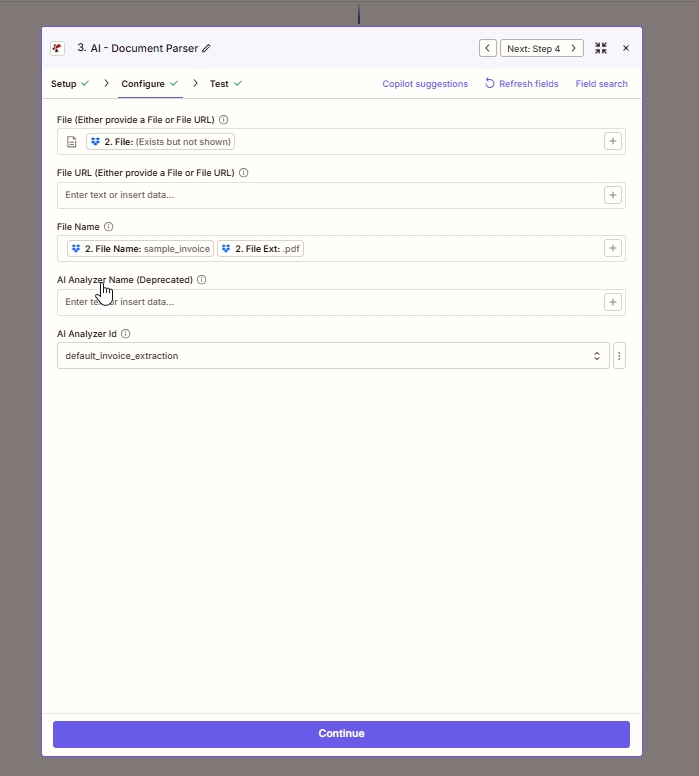
配置选项卡:地图 文件 从上一步出发,离开 文件 URL 空,建造 文件名 从文件名 + 文件扩展名标记中选择 AI 分析器 ID然后离开 AI 分析器名称(已弃用) 空的。
参数
- 分析器列表(步骤 1–2):
https://dev.pdf4me.com/dashboard/#/ai-document-parser/ - 分析器详细信息(步骤 3–5):
https://dev.pdf4me.com/ai-document-parser/?id=<analyzer-guid>
操作中需要: 文件 或者 文件 URL (两者之一),文件名(带扩展名),以及 AI 分析器 ID。 离开 AI 分析器名称(已弃用) 空的。
| 场地 | 必需的 | 它的作用 | 例子 |
|---|---|---|---|
| File | Conditional | Binary file from a previous Zap step. Map a file token from Dropbox, Google Drive, OneDrive, Gmail attachment, Slack file, Webhooks by Zapier, or any connector that exposes a file output. Required when File URL is not provided. In the screenshot, step 2 File is mapped from Dropbox. | 2. File |
| File URL | Conditional | Publicly reachable HTTPS URL to the document. Required when File is not provided. Use when the document lives on a public CDN, S3 bucket, or content host. Leave empty when File is mapped. | https://example.com/document.pdf |
| File Name | Yes | Source document filename with extension. Best practice is to concatenate the previous step File Name and File Ext tokens (for example sample_invoice + .pdf becomes sample_invoice.pdf). | sample_invoice.pdf |
| AI Analyzer Id | Yes | Dropdown of Analyzers saved in your PDF4me account. Create Analyzers at https://dev.pdf4me.com/dashboard/#/ai-document-parser/ (+ Add), then edit schemas on https://dev.pdf4me.com/ai-document-parser/?id=<analyzer-guid>. Sent to the API as customisationNote. Pick Parse for one schema or Classify for many variants. | default_invoice_extraction |
| AI Analyzer Name (Deprecated) | No | Legacy free-text field. Zapier marks this as deprecated. Leave empty and use AI Analyzer Id instead. | - |
AI 分析器 ID:分析器 ID 如何映射到行为
解析分析器 ID一种模式,提取您定义的字段字段 在分析仪上,包括 桌子 用于存储订单项的数组。分类分析器 ID一次调用中包含多个模式、路由和提取。默认发票提取内置发票模板输出
该操作返回动态 JSON分析器架构中定义的每个属性都会显示在 Zapier测试结果会作为可单独映射的标记,用于每个下游步骤。具体形式取决于您的分析器:
- 顶级键 匹配
fieldName您的模式中的值(字符串、数字、日期或table行项目数组)。 - 分类分析器 同时返回匹配的分类名称,以便您可以根据匹配的架构进行下游分支。
- 没有二进制文件 返回结果,AI解析器是一个 JSON仅行动。
根据模式的不同,您可能会看到以下一些常见的令牌名称:
| 令牌 | 类型 | 典型内容 |
|---|---|---|
invoiceNumber | 细绳 | 发票/账单/收据编号 |
invoiceDate | 日期 | 标准化日期(当 fieldMethod: "generate" 已设置) |
vendorName | 细绳 | 供应商或厂商名称(来自标题) |
totalAmount | 数字 | 以单据货币计价的总计 |
lineItems | 大批 | 重复行数据(每行一个对象,字段为您在嵌套中描述的字段)。 fields 大批) |
快速设置
- 首先构建分析器。打开 分析器列表, 点击 + 添加输入一个清晰的分析器 ID,选择 解析 或者 分类保存该行,然后在该行上添加文档架构。 分析器详情 请参阅页面。 解析设置指南 或者 分类设置指南 完整的模式规则(包括)
fieldType: "table"对于嵌套行和fieldMethod: "generate"对于导出值)。 - 在您的 Zap 点击中 +, 搜索 PDF4me, 挑选 AI - 文档解析器。
- 连接或重复使用您的 PDF4me 帐户。
- 地图 文件 来自上一步(Dropbox / Google Drive / Gmail 附件 / Webhook), 或者 粘贴公共 HTTPS 链接到 文件 URL。
- 地图 文件名 将上一步的文件名标记连接起来 文件名 + 文件扩展名 保留原名称及其正确的扩展名)。
- 从 AI 分析器 ID 选择你的分析器(例如)
default_invoice_extraction,client_invoices或者自定义解析器或分类分析器)。离开 AI 分析器名称(已弃用) 空的。 - 点击 测试操作检查退回的商品 JSON 在 Zapier 测试面板。
- 将返回的字段映射到下一个操作(Google Sheets 创建行、Airtable 创建记录、Gmail 发送电子邮件、Slack 发送频道消息,或 6000 多个其他操作)。 Zapier 应用程序)。
工作流程示例
工作流程示例Open by default. Four common AI - Document Parser patterns inside Zaps.
- 触发器:Gmail 新附件 在美联社收件箱中。
- AI文档解析器,文件映射来自附件,文件名来自Gmail令牌,AI分析器ID
默认发票提取(或您自定义的解析分析器)。 - Google 表格 创建行将发票号、供应商名称、总金额、发票日期映射到应付账款跟踪器中。
- 可选:Slack 发送频道消息 以价值观为导向进行融资,以提高知名度。
影响: 任何供应商均不得干预 AP 收款。
- 触发因素:Dropbox 文件夹中的新文件 在混合供应商文件夹上。
- AI - 文档解析器,带有指向分类分析器的 AI 分析器 ID(
客户发票每个供应商对应一个模式。 - Zapier 路径 根据返回的分类名称进行分支,并将每个结果发送到匹配的 Airtable 数据库。
影响: 一个 Zap 即可处理所有客户,无需单独的流程。
- 触发器:Webhooks Zapier 钩钩 收到来自您门户网站的文档链接。
- AI - 文件解析器 URL 设置为链接,AI 分析器 ID 设置为您的自定义表单分析器。
- Airtable 创建记录 通过映射字段创建 CRM 联系人。
影响: 通过门户网站上传的表单无需手动输入即可成为 CRM 数据。
- 触发器:Dropbox 新建文件 收件箱。
- AI - 文档解析器从架构中返回 vendorName 和 invoiceNumber。
- Dropbox 移动文件 到 档案/{{vendorName}} 并重命名为
{{vendorName}}_{{invoiceNumber}}.pdf。
影响: 干净、可搜索的存档,无需任何人工文件处理。
常见问题解答
相关操作
在其他平台上执行相同任务
/v2/FlowV2/AiDocumentParser 用于自定义后端代码或 Postman 测试。