文本高亮显示(Zapier)
此操作的作用
文本高亮显示 扫描 PDF 将你指定的每个单词或短语涂上你选择的颜色,全部集中在一个屏幕上。 Zapier 步骤,无需手动标记。提供一个 文本高亮列表 文本加十六进制颜色对,该步骤返回一个新的带注释的文本加十六进制颜色对。 PDF 随时可以路由到任何下游应用程序:Drive、Dropbox、电子邮件、Slack 或数据库。
相关博客文章
目前尚无关于此功能的博客文章——敬请期待。
在此期间,您可以浏览 PDF4me 博客,查看适用于各平台的教程和工作流程。
访问博客 →
连接 PDF4me
每一个 PDF4me 行动 Zapier 需要进行身份验证。请输入您的 API 只需输入一次,即可应用于所有情况。 PDF4me 登录您的账户。
供应文件或文件 URL两者不可兼得
使用 文件 当之前的 Zap 步骤给你一个 PDF 附件对象(例如) “2. 文件”)。 使用 文件 URL 当您只有直接下载链接时,请将您选择的任何一项与……搭配使用 文件名 因此,运行过程可以在日志中追踪。
配置步骤
打开 配置 标签页。地图 文件 从产生该步骤开始 PDF然后建造 文件名 从名称和扩展名标记中获取。 文本高亮列表, 点击 添加 插入每个文本-颜色对。
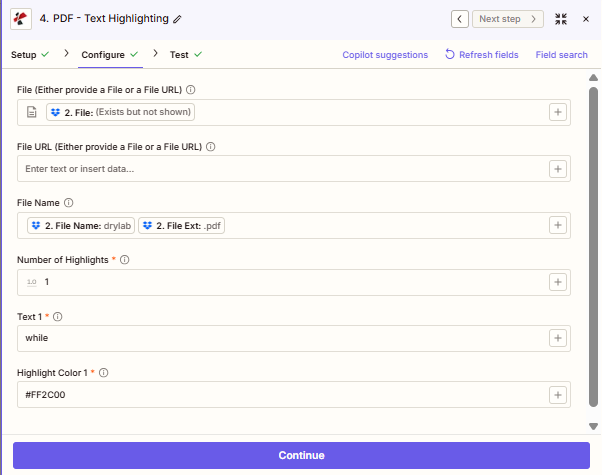
地图 文件 从产生你的步骤开始 PDF。 建造 文件名 从触发器中的名称和扩展字段中,将每个词-颜色对添加到 文本高亮列表。
重要事实
仅限原生 PDF
文本高亮显示功能适用于 PDF带有真实文本层的扫描图像 PDF需要一个 OCR 首先需要创建一个可搜索的图层,然后才能应用高亮显示。
每次调用可呈现多种颜色
尽可能多地添加物品 文本高亮列表 根据您的需要。每件商品都有其自身的 文本 和 高亮颜色黄色代表关键词,绿色代表日期,红色代表风险,所有信息一步处理完毕。
十六进制颜色格式
高亮颜色 接受标准的六位十六进制代码: #FFFF00 (黄色的), #90EE90 (绿色的), #FF2C00 (红色)哈希前缀是必需的。
字段参考
| 范围 | 通常 | 目的 | 示例地图 |
|---|---|---|---|
| File | Often used | Binary PDF from a prior Zap step when you have a file attachment object. | `2. File` |
| File URL | Optional | Public or signed URL to the PDF when you do not have a file attachment object. | n/a |
| File Name | Recommended | Filename with extension for logging. Combine name and extension tokens when your trigger splits them. | `2. File Name` + `2. File Ext` |
| TextHighlightList › Text | Required per item | The exact word or phrase to find and highlight inside the PDF. | `invoice`, `URGENT` |
| TextHighlightList › HighlightColor | Required per item | Six-digit hex color to paint matched text. Include the # prefix. | `#FFFF00`, `#FF2C00` |
如何在文本中高亮显示文本 PDF 和 Zapier
1
Open or create a Zap
Sign in to Zapier and open an existing Zap, or click Create Zap to start fresh.
2
Set up a Trigger
Pick any app that supplies a PDF: Dropbox, Google Drive, Gmail, Webhooks, or any cloud storage that fires when a file arrives.
3
Add a PDF4me action step
Click the + button, search for PDF4me, and choose Text Highlighting as the Event.
4
Connect your account
If prompted, enter your PDF4me API key. You only authenticate once per Zapier account.
5
Map File or File URL
On the Configure tab, map File from your trigger when it hands you a file object, or enter a File URL when you only have a download link. Use one input, not both.
6
Set File Name
Build File Name from the name and extension tokens your trigger provides, for example "2. File Name" + "2. File Ext". This keeps runs traceable in Zapier history.
7
Define your highlight list
Under TextHighlightList, click Add and enter the Text to find and the HighlightColor as a hex code. Repeat for every word-color pair you need.
8
Test and activate
Click Test step and check that the output shows a File URL pointing to the annotated PDF. Open the link to confirm colors are applied correctly, then turn the Zap on.
输出
测试或实际运行成功后,该步骤返回:
| 输出字段 | 它包含什么 |
|---|---|
File | The annotated PDF file object: map this into any upload or send step. |
File URL | Temporary signed URL to download the highlighted PDF. |
File Name | Filename of the returned file, typically matching what you provided. |
File Extension | Extension of the output file, usually pdf. |
工作流程模式
工作流程模式Real-world Zap patterns using Text Highlighting: swap apps to match your stack.
合同审查亮点
- 新的 PDF 合同已上传至谷歌云端硬盘。
- 文本高亮显示“责任”、“终止”、“赔偿”以红色标记。
- 上传突出显示 PDF 返回到云端硬盘中的审阅文件夹。
- 发送包含文件链接的 Slack 通知。
发票关键词审核
- 新发票电子邮件附件触发 Zap。
- 用黄色高亮显示“逾期”、“过期”和“最后通知”。
- 自动将标记后的发票通过电子邮件发送给财务团队。
合规文件注释
- 政策 PDF 保存到 Dropbox 文件夹中。
- 用蓝色突出显示监管术语,用绿色突出显示行动事项。
- 保存带注释的 PDF 到 SharePoint 用于合规性存档。
常见问题解答
相关行动
从文本中提取文本 PDF
从 A 中提取所有文本内容 PDF 用于下游处理或搜索索引。
PDF OCR
转换扫描件 PDF将扫描文件转换为可搜索的文本层文档,这是突出显示扫描文件的必要预步骤。
添加文字水印 PDF
在每一页上添加水印文字。 PDF 同时支持标注工作流程。