维修 PDF 文件恢复 Zapier
PDF4me 维修 PDF 是一个 Zapier 试图修复已损坏或结构受损的行动 PDF 并恢复其可读内容。映射损坏的文件或其 URL没有其他必填字段,即可获得修复后的结果。 PDF 下一步取决于恢复情况。恢复程度取决于损坏程度,有些文件可以完全修复,有些则只能部分修复。
此操作的作用
需要 PDF 如果文件因结构损坏而无法打开或显示错误,它会尝试重建其内部结构,并尽可能恢复可读的文本、图像和页面内容。可将其作为处理传输损坏的附件、老化的存档文件或任何其他此类问题的首选方案。 PDF 之前的某个工作流程步骤无法处理。结果是生成一个新文件,而不是直接修改原文件,因此如果您需要重试或调查,原始文件将保持不变。
相关博客文章
目前尚无关于此功能的博客文章——敬请期待。
在此期间,您可以浏览 PDF4me 博客,查看适用于各平台的教程和工作流程。
访问博客 →
验证您的 API 请求
要访问 PDF4me 网站 API 通过 Zapier每个请求都必须包含正确的身份验证凭据。身份验证可确保通信安全,并验证您作为授权用户的身份,从而实现与您的系统之间的无缝集成。 Zapier 工作流程和 PDF4me的 PDF 恢复服务。
您不容错过的重要事实
仅需文件
文件名是可选的。如果留空,则输出文件名将从“文件”字段或源文件中选取。 URL。
文件接受一个 URL不仅仅是一个映射文件
从上一步中获取地图文件,或粘贴指向可公开访问地图文件的直接链接。 PDF当损坏的文件已经位于某个位置时,此方法非常有用。 URL。
康复无法保证
修复成功与否取决于文件损坏的严重程度。在后续操作中使用修复后的文件之前,务必检查其内容。
维修 PDF 的主要特点是什么?
- 反腐败尝试从损坏的文件中恢复内容 PDFs
- 结构修复: 使固定 PDF 内部结构错误
- 内容抢救从损坏的文件中提取可读内容
- 自动恢复将修复功能集成到文档处理工作流程中,作为备用步骤
- URL 或文件输入:映射上一步中的文件或直接传递一个文件 URL
笔记: 恢复成功与否取决于恢复的程度 PDF 损坏。严重损坏可能会限制可恢复的内容。
参数
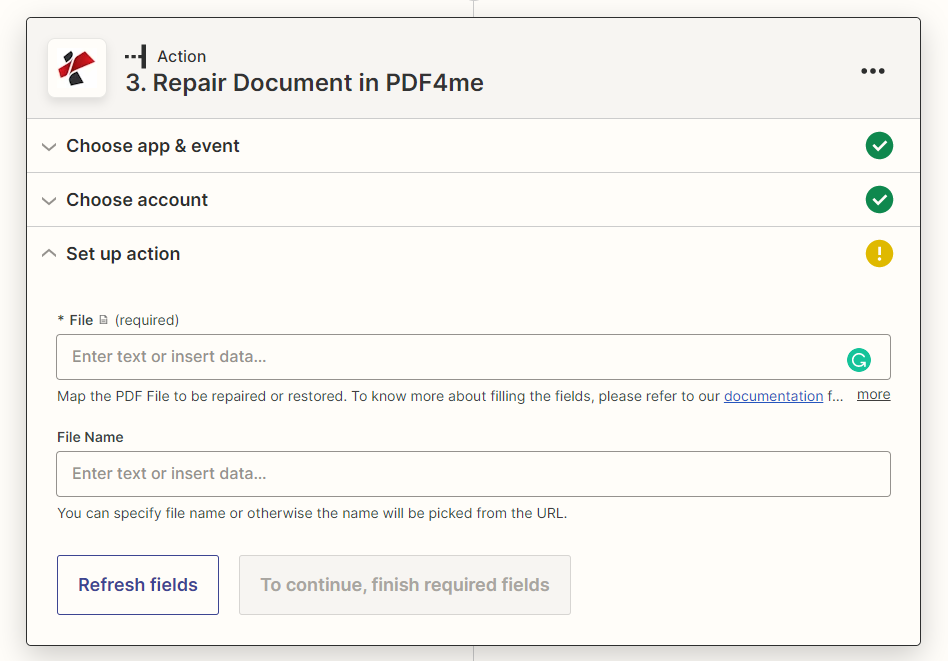
维修参数完整列表 PDF 操作。参数名称与 Zapier 配置 UI 如上图所示。
快速设置清单
- 地图 文件 (受损的) PDF从触发器或上一步中获取,或者直接粘贴 URL
- (可选) 文件名 对于修复后的输出
| 范围 | 必需的 | 它的作用 | 例子 |
|---|---|---|---|
| File | Required | The damaged or corrupted PDF to repair. Map from a previous step, or pass a direct URL to a publicly reachable PDF. | [Corrupted PDF from Step 2] |
| File Name | Conditional | Output filename for the repaired PDF. If not provided, the name is picked from the File field or URL. | repaired_document.pdf |
重要的: 仅有的 文件 是必需的。请使用 + 点击按钮从上一步映射,或直接粘贴 URL 一个公开可访问的 PDF。
修复 PDF 会返回什么?
这 PDF4me 维修 PDF 操作返回已修复的文件和标识元数据,以便进行下一步 Zap 步骤。
| 场地 | 类型 | 它包含什么 |
|---|---|---|
File | URL | Direct URL to access the repaired PDF file. |
File Name | String | The filename without extension. |
Full File Name | String | Complete filename with .pdf extension. |
File Extension | String | File extension (.pdf). |
Repair Status | String | Result status of the repair operation, indicating whether recovery was full, partial, or unsuccessful. |
- JSON
- Zap Integration
例子 JSON 回复:
{
"File": "https://...",
"File Name": "repaired_document",
"Full File Name": "repaired_document.pdf",
"File Extension": ".pdf",
"Repair Status": "Partial recovery successful"
}
使用 + 绘制地图 文件 下一步是上传文件、发送电子邮件附件或其他方式。 PDF4me 采取行动并检查 维修状态 在信任下游恢复的内容之前。
典型配置
工作流程示例Common Zapier workflow patterns using Repair PDF.
恢复损坏的电子邮件附件
- 当收到包含以下内容的电子邮件时,触发器会被触发: PDF 后续步骤中无法打开的附件。
- PDF4me 维修 PDF 将附件映射到文件并尝试恢复内容。
- 筛选步骤会在继续之前检查修复状态;如果修复失败,工作流程会通知发送方重新发送文件。
旧版归档迁移回退
- 在批量迁移过程中,当旧版归档文件被归档时,会触发一个触发器。 PDF 加载失败。
- PDF4me 维修 PDF 在迁移步骤重试之前,尝试修复文件结构。
- 修复后的文件会继续导入现代文档管理系统;修复失败的文件会被标记出来进行人工审核。
文档管道中的回退步骤
- 现有的 Zap 的 PDF 处理步骤(例如文本提取或转换)在处理特定文件时出现错误。
- 错误处理分支将文件路由到 PDF4me 维修 PDF 在重新尝试原步骤之前。
- 如果重试成功,工作流程将继续正常进行;否则,将通知管理员。
实用技巧
Always check Repair Status before trusting the output
A repaired file can come back with only partial content recovered. Branch on Repair Status rather than assuming success whenever the step completes without an error.
File Name is optional
Leave it empty and PDF4me picks a name from the File field or source URL, there is no need to construct one manually.
A URL input works as well as a mapped file
If the corrupted PDF is already reachable at a public URL, paste it directly into File instead of downloading and re-uploading it first.
Keep the original file until repair is confirmed
This action returns a new file rather than editing in place, so archive or log the original alongside the repaired version in case you need to retry with a different approach.
Not every corruption is recoverable
Severe structural damage can limit what this action can salvage. Treat it as a first response, not a guaranteed fix, for the most critical documents.
速查表
| 场地 | 价值 |
|---|---|
| Action | Repair PDF |
| File | [Mapped from previous step or a direct URL] |
| File Name | repaired_document.pdf (optional) |
| Output field to check | Repair Status |
常见问题
相关操作
得到 PDF 元数据
修复后的一个有用后续步骤是检查文件的元数据,以确认恢复的文档在结构上是否完好。
线性化 PDF
重组修复后的 PDF 一旦确认网页内容可恢复,即可快速逐页浏览网页。
证实 PDF/一个
检查修复后的档案文件是否仍然符合要求 PDF/A 合规要求。
在其他平台上执行相同任务
维修 PDF 在 Make
相同的数据损坏恢复模块,连接到视觉系统 Make 具有云存储触发条件的场景。
维修 PDF 文档 n8n
等效 n8n 面向开发者的节点 PDF 在自托管或代码密集型工作流程中进行恢复。
维修 PDF 文档 Power Automate
Microsoft 365 与……流动 SharePoint 对于已经标准化的组织,OneDrive 也已实现标准化。 Power Automate。
维修 PDF 文档 REST API
原始 PDF4me API 此操作背后的端点,用于自定义后端代码或 Postman 测试。
行业应用案例及应用
- Document Management & Archives
- File Transfer & Integration
- Workflow Automation
- Business Continuity
- 遗留系统恢复修复损坏的存档文件
- 迁移支持:在系统迁移期间修复PDF文件
- 档案保存恢复老化的数字文档
- 备份恢复修复损坏的备份文件
- 传输错误恢复修复传输损坏的PDF文件
- FTP错误处理修复 FTP 过程中损坏的文件
- API传输恢复API传输过程中损坏的PDF文件
- 电子邮件附件修复损坏的电子邮件附件
- 错误处理:将修复作为工作流程的备用方案
- 处理弹性保持工作流程的连续性
- 质量控制:在故障发生前自动尝试修复
- 系统集成:处理自动化流程中的腐败问题
- 关键文件恢复重要业务文件
- 灾难恢复从损坏的备份中恢复文档
- 数据保存从故障存储中抢救内容
- 紧急通道快速找回紧急文件