跳到主要内容

在 ZUGFeRD 中创建发票 Zapier

此操作的作用

PDF4me 创建 ZUGFeRD 发票 生成完全合规的 ZUGFeRD 混合电子发票,一个 PDF/A-3 文件结构化 XML 发票数据直接嵌入在您的发票数据中 Zapier 工作流程。转换 XMLJSON, 或者 CSV 将发票数据合并到一个混合文件中,以便于使用。 德国B2B电子发票强制令(2025年及以后)符合欧盟 EN 16931 标准或德国 XRECHNUNG 公共部门规范。支持 ZUGFeRD 1.0 至 2.x 版本以及所有合规级别(BASIC、COMFORT、EXTENDED、EN16931、XRECHNUNG),只需一次 Zap 操作即可完成。可直接替代手动 Adobe Acrobat、JustOn 或 ZUGFeRD Manager 工作流程。

相关博客文章(1)

验证您的身份 API 要求

要访问 PDF4me 网站 API 通过 Zapier所有操作都必须经过身份验证。点击 连接新帐户 第一次粘贴你的 PDF4me API 关键在于,后续的 Zap 会自动重用该连接。

您不容错过的重要事实
ZUGFeRD 2.0+ 是 2025 年德国 B2B 指令的必要条件。
《增长法》规定,自 2025 年 1 月 1 日起强制要求接收电子发票,并于 2028 年前全面强制发送。符合 EN16931 或 XRECHNUNG 标准的 ZUGFeRD 2.0 或更高版本满足此项要求:ZUGFeRD 1.0 不符合要求。部分系统默认使用 1.0 版本;生产环境中必须明确切换到 2.0 或更高版本。
每次运行只填写一个数据字段,绝不能填写两个。
地图 仅有的 与您的输入格式匹配的发票数据字段,发票 XML 数据 XML发票 JSON 数据 JSON发票 CSV 数据 CSV. “以防万一”填写多个字段会破坏验证,并在运行时导致 Zap 步骤失败。
对于 2.x 版本,EN16931 符合性等级是安全的默认值。
挑选 EN16931 适用于欧盟一般B2B发票(ZUGFeRD 2.x), XRECH 对于德国公共部门实体而言, 扩展 适用于特定行业领域。对于 ZUGFeRD 1.0,BASIC 是最低合法发票级别。MINIMUM 和 BASICWL 省略了明细项目,本身不属于合法发票。
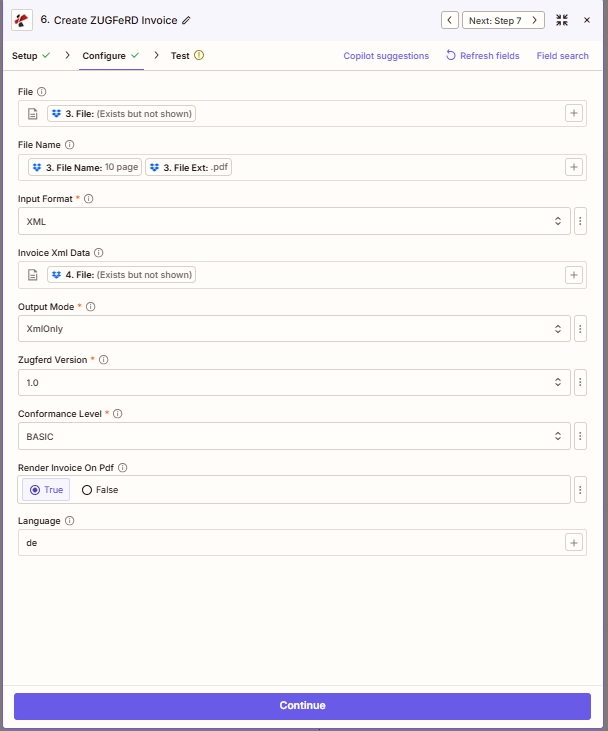
在配置步骤中使用 Zapier PDF4me 创建 ZUGFeRD 发票操作:文件和文件名来自之前的步骤,输入格式为 XML,发票 XML 数据来自之前的步骤,输出模式为 XmlOnly,Zugferd 版本为 1.0,一致性级别为 BASIC,启用“在 PDF 上渲染发票”,语言为 de

Zapier 行动 配置 标签页,地图 文件 / 文件名, 放 输入格式 以及匹配的发票数据字段,然后 输出模式祖格费尔德版本符合性级别在 PDF 上渲染发票, 和 语言

参数

必需 Zapier UI (带星号): 输入格式、输出模式、Zugferd 版本和一致性级别。 条件: 根据输入格式匹配发票数据字段(发票 XML 数据、发票 JSON 数据或发票 CSV 数据)。 对于 XmlWithPdf 输出: 即使并非每个布局都标有星号,连接器通常也需要文件和文件名(模板 PDF)。 选修的: 在 PDF 上渲染发票,语言。

范围必需的它的作用例子
FileConditionalTemplate/layout PDF that will hold the embedded XML in XmlWithPdf output. Map from a previous step (Dropbox, Google Drive, HTTP). Not required when Output Mode is XmlOnly.3. File: (Exists but not shown)
File NameConditionalFilename of the template PDF (filename + extension). Required alongside File for XmlWithPdf output. Map both `File Name` and `File Ext` from the prior step.3. File Name: 10 page + 3. File Ext: .pdf
Input FormatYesFormat of the invoice payload: XML, JSON, or CSV. Determines which invoice data field below must be filled. Asterisked in the Zapier UI.XML sampleXML 2.0 sampleJSON 2.0 EN16931 sampleJSON (basic)CSV sampleCSV 2.0 sample
Invoice Xml DataConditionalXML invoice payload. Required when Input Format is XML. Map from a previous file step that produced XML content. Leave empty for JSON/CSV inputs.XML sampleXML 2.0 sample4. File: (Exists but not shown)
Invoice Json DataConditionalJSON invoice payload. Required when Input Format is JSON. Best for webhook-driven or API-driven invoice data.JSON 2.0 EN16931 sampleJSON (basic)4. Body
Invoice Csv DataConditionalCSV invoice payload. Required when Input Format is CSV. Best for batch invoice exports from spreadsheets or legacy ERP exports.CSV sampleCSV 2.0 sample4. File
Output ModeYesXmlWithPdf produces the hybrid PDF/A-3 + embedded XML (canonical ZUGFeRD). XmlOnly produces pure XML with no PDF wrapper. Asterisked.XmlOnly
Zugferd VersionYesZUGFeRD specification version. 1.0 is legacy. 2.0+ aligns with EN 16931 and satisfies the German B2B mandate. Asterisked.1.0
Conformance LevelYesProfile controlling required invoice fields. For 1.0: BASIC, COMFORT, EXTENDED. For 2.x: MINIMUM, BASICWL, BASIC, EN16931, EXTENDED, XRECHNUNG. Asterisked.BASIC
Render Invoice On PdfNoToggle (True / False). When True, PDF4me visually renders invoice content on the PDF. When False, only the XML is embedded: useful when the template PDF already shows the invoice layout.True
LanguageNoTwo-letter locale code for printed invoice labels: de (German, default), en (English), fr (French), it (Italian), es (Spanish), nl (Dutch), pl (Polish), pt (Portuguese). The XML data itself remains language-neutral.de

输入格式选项

控制发票有效负载使用的数据格式,以及您必须在下面填写的发票数据字段。

XML预制件 XML 发票
最佳时机 ERP 已生产符合 ZUGFeRD 标准的产品。 XML 或 UBL XML 只需要用混合材料包裹起来即可 PDF将文件映射到 发票 XML 数据
JSON现代的 API来源数据
最适合 webhook 驱动的工作流程或 SaaS 发出计费系统的 JSONPDF4me 地图 JSON ZUGFeRD 的场 XML 自动映射到模式 发票 JSON 数据
CSV电子表格或批量导出
最适合从 Google Sheets、Excel、旧系统批量导出发票,或按行计费场景。 PDF4me 地图 CSV 列映射到模式。 发票 CSV 数据

输出模式选项

控制是生成规范的 ZUGFeRD 混合文件还是纯 XML 文件。

XmlWithPdf默认的完整 ZUGFeRD 混合文件
生产标准 ZUGFeRD 混合物: PDF/A-3 档案 PDF 结构化 XML 发票以附件形式嵌入其中。人们会阅读该发票。 PDF机器解析 XML这是B2B电子发票的标准输出格式。需要映射文件和文件名。
XmlOnly纯的 XML, 不 PDF 包装纸
仅生成结构化数据。 XML 发票。用于 XRechnung pure-XML 公共部门提交、EDI管道、数据层测试或仅接收数据的系统 XML 没有视觉呈现。

Zugferd 版本选项

生成的发票中嵌入了 ZUGFeRD 规范版本。它决定了下拉列表中显示的“一致性级别”选项。

1.0传统,EN 16931 之前的版本
2014 年原始规格。符合性选项: 基本款、舒适款、加长款不符合德国2025年及以后的B2B电子发票强制要求。仅适用于明确要求使用1.0版本的旧版接收方。
2.0+推荐,符合 EN 16931 标准
符合欧洲标准 EN 16931,并满足德国 B2B 要求。符合性选项包括 最低限度、基本工作负荷、基本、EN16931、扩展、XRECHNUNG. 2025 年及以后的生产发票和 Factur-X 互操作性的正确选择。

一致性级别选项

一致性规范控制哪些发票字段是必填项并需要验证。 可用选项取决于所选的 Zugferd 版本。

最低限度仅限 2.x 版本,仅头部信息
仅包含抬头数据,不包含明细项目。并非有效法律发票。仅供内部会计交接使用。
基本工作流仅限 2.x 版本,仅限增值税
添加增值税明细,但不包含明细项目。仅适用于与订单核对的预订场景。
基本的两种版本,最低法定发票
添加商品明细。符合欧盟电子发票指令的最低要求。适用于 1.0 和 2.x 版本。
舒适仅限 1.0 版本,扩展引用
在 BASIC 的基础上添加参考数据和附加字段。仅限 ZUGFeRD 1.0,相当于现代 2.x 中的 EN16931。
EN169312.x,推荐的 B2B 默认值
欧洲标准 EN 16931 完整规范。欧盟 B2B 发票的推荐默认规范,也是德国强制性规范所参考的级别。仅适用于 ZUGFeRD 2.x 版本。
扩展两个版本均包含行业额外内容
在基本字段的基础上增加了行业特定字段(物流、货运、行业特定参考信息)。1.0 和 2.x 版本均可用。
XRECH2.x,德国公共部门强制性
德国 XRechnung CIUS 规范,是向联邦、州和市政府开具发票的强制性要求。其验证标准比 EN16931 更为严格。仅适用于 ZUGFeRD 2.x 版本。

输出字段

场地类型它包含什么
File ContentBinaryGenerated ZUGFeRD invoice file: hybrid PDF/A-3 for XmlWithPdf output or pure XML for XmlOnly output. Map into the next Zap step (upload, email, ERP POST).
File UrlStringDirect URL to access the generated file: useful for sharing or downstream HTTP processing.
File NameStringOutput filename without extension.
Full File NameStringComplete output filename with extension (.pdf for hybrid, .xml for XmlOnly).

发票样本文件

在连接实际数据源之前,请使用这些示例文件测试每种输入格式的操作。对于德国 B2B 生产工作流程,请从以下示例文件开始: sample-invoice-zugferd-2.0-en16931.jsonZUGFeRD 2.0EN16931 符合性)。

ZUGFeRD XML 示例
ZUGFeRD 1.0 基本版 XML配合使用 输入格式:XML映射到 发票 XML 数据
ZUGFeRD-invoice-sample.xml
ZUGFeRD 2.0
ZUGFeRD 2.0 XML 示例 (EN16931)
ZUGFeRD 2.0 EN16931 XML 包含买卖双方信息、明细项目、增值税和金额汇总,采用跨行业发票格式。可与以下产品一起使用: 输入格式:XMLZUGFeRD 版本:2.0符合性:EN16931
ZUGFeRD-invoice-sample-2.0.xml
受到推崇的
JSON 2.0 EN16931 示例
完整结构化发票 ZUGFeRD 2.0EN16931 符合性。与……一起使用 输入格式: JSONZugferd 版本:2.0符合性等级:EN16931映射到 发票 JSON 数据
sample-invoice-zugferd-2.0-en16931.json
JSON 发票示例(基础版)
更简单 JSON 用于烟雾测试 ZUGFeRD 1.0基本的 符合性。
示例发票.json
CSV格式发票样本
平坦的 CSV输入格式:CSV映射到 发票 CSV 数据
测试发票.csv
ZUGFeRD 2.0
CSV 2.0 发票示例
扩展的 22 列 CSV:发票编号、开票日期、卖家/买家地址字段、卖家增值税号、产品编号、货币、付款参考号 IBAN,BIC。与 输入格式:CSVZUGFeRD 2.0
zugferd-invoice-2.0.csv

快速设置

  1. Zapier, 点击 + 添加新操作并选择 PDF4me
  2. 选择 创建 ZUGFeRD 发票 作为行动事件。
  3. 连接您的 PDF4me 帐户或粘贴您的 API 出现提示时按下按键。
  4. 为了 XmlWithPdf 输出,映射 文件文件名 到您的布局 PDF (通常是之前通过 Dropbox 或 Google Drive 下载文件的步骤)。 XmlOnly这些可以留空。
  5. 输入格式XMLJSON, 或者 CSV 取决于您的数据来源。
  6. 充满 仅有的 匹配的发票数据字段:发票 XML 数据、发票 JSON 数据或发票 CSV 数据。其他两个字段留空。
  7. 输出模式XmlWithPdf (混合文件,规范的 ZUGFeRD)或 XmlOnly (纯的 XML)。
  8. 选择 祖格费尔德版本2.0+ 针对2025年及以后的德国B2B强制性合规要求, 1.0 仅适用于旧款接收器。
  9. 选择 符合性级别EN16931 对于一般的 B2B(2.x), XRECHARGE 对于德国公共部门而言, 基本的 适用于 ZUGFeRD 1.0 旧版本。
  10. 切换 在 PDF 上渲染发票真的 如果你想 PDF4me 在屏幕上以可视化的方式呈现发票内容 PDF错误的 如果你的模板 PDF 已显示布局。
  11. 语言 匹配买家所在地区的区域代码(deenfritesnlplpt)。
  12. 点击 测试操作验证输出结果,然后打开 Zap。

工作流程示例

工作流程示例Common Zapier workflow patterns using Create ZUGFeRD Invoice.
SaaS webhook JSON → ZUGFeRD 2.x EN16931 → 电子邮件客户
  1. 你的 SaaS 计费系统向……发送 webhook Zapier 当向德国 B2B 客户开具发票时。
  2. PDF4me 创建 ZUGFeRD 发票运行:输入格式 = JSON,发票 JSON 数据映射自 webhook 有效负载,输出模式 = XmlWithPdf,Zugferd 版本 = 2.0,符合性 = EN16931,语言 = de。
  3. 混合型 PDF (人可读 + 机器可解析)附加到 Gmail 步骤并发送到客户的应付账款地址,满足 2025 年及以后的 B2B 电子发票要求。
  4. Google Sheets 中的一行记录发票 ID、客户、金额和时间戳,用于审计报告。
  5. A SharePoint 上传 ZUGFeRD 的副本存档 PDF 为了合规保留。
ERP CSV 导出 → XRECHNUNG → 德国公共部门门户网站
  1. 每个工作日 16:00 都会运行一个定时 Zap 程序来处理待处理的公共部门发票。
  2. Dropbox 触发器会获取最新内容 ERP CSV 导出和布局 PDF
  3. PDF4me 创建 ZUGFeRD 发票运行:输入格式 = CSV发票 CSV 数据 = CSV 文件,输出模式 = XmlWithPdf,Zugferd 版本 = 2.0,一致性 = XRACHNUNG,语言 = de。
  4. 符合规范的 XRECHNUNG 混合型 PDF 通过 Webhook 步骤向联邦 ZRE 门户或相关的州电子发票端点发送 POST 请求。
  5. 系统会向 AR 团队发送一封确认邮件,其中包含提交参考编号;PostgreSQL 日志会记录审计跟踪信息。
预构建 XML → 仅 XML → EDI 合作伙伴集成
  1. 你的 ERP 已生成符合 ZUGFeRD 标准的文档 XML 通过其导出模块导出发票并将其放入 Google 云端硬盘文件夹。
  2. Zapier 每个新触发器 XML 文件。 PDF4me 创建 ZUGFeRD 发票运行:输入格式 = XML发票 XML 数据 = XML 文件,输出模式 = XmlOnly,Zugferd 版本 = 2.0,符合性 = EN16931。
  3. 经过验证的纯-XML 发票通过SFTP发送到交易伙伴的EDI端点,没有。 PDF 系统间交接需要封装器。
  4. Slack 通知确认 EDI 交付;Airtable 记录更新,包含合作伙伴和提交时间戳。

常见问题解答

What is ZUGFeRD and how does it differ from XRechnung and Factur-X?+
ZUGFeRD is the German hybrid e-invoicing standard: a PDF/A-3 archival-grade PDF with structured XML invoice data embedded inside as an attachment. Humans can read the PDF in any viewer; ERP systems and accounting software extract and process the XML automatically without manual data entry. XRechnung is the German public-sector profile, mandatory when invoicing federal, state, or municipal authorities, it can be issued as pure XML or as a ZUGFeRD conformance level. Factur-X is the French sister format that uses the identical hybrid PDF/A-3 + XML structure as ZUGFeRD 2.x and is fully interoperable for cross-border French-German invoicing. Use ZUGFeRD 2.x with EN16931 for general EU B2B, XRECHNUNG conformance for German public sector, and ZUGFeRD/Factur-X for international DACH-FR workflows.
Which ZUGFeRD Version should I choose in Zapier for the 2025 German B2B e-invoicing mandate?+
The German Wachstumschancengesetz (Growth Opportunities Act) made e-invoice receipt mandatory for all B2B transactions from 1 January 2025, with full sending obligations phasing in through 2028. ZUGFeRD 2.0 or higher with EN16931 or XRECHNUNG conformance is required to satisfy the mandate. ZUGFeRD 1.0 is legacy and does not comply. The Zapier action exposes 1.0 as a default in some installations: explicitly switch to 2.0+ for compliant production workflows. Confirm the exact version your trading partner or invoicing portal accepts; some larger enterprises and government portals may require version 2.2 or 2.4 specifically.
What is the difference between XmlWithPdf and XmlOnly output modes?+
XmlWithPdf generates the standard ZUGFeRD hybrid invoice: a PDF/A-3 archival document with the structured XML invoice data embedded as an attachment inside the PDF. Humans read the PDF, machines parse the XML: one file serves both audiences and is the canonical ZUGFeRD format for B2B. XmlOnly generates a pure XML file with no PDF wrapper, used when the receiving system only ingests XML, typical for XRechnung pure-XML public-sector portals, EDI pipelines, or data-layer integration testing. Choose XmlWithPdf for production B2B invoicing; XmlOnly for pure-XML system integration or compliance submissions that explicitly require XML-only delivery.
Which Conformance Level should I pick: BASIC, COMFORT, EXTENDED, EN16931, or XRECHNUNG?+
Conformance levels differ by ZUGFeRD version. For ZUGFeRD 1.0: BASIC (minimum legal invoice with line items), COMFORT (additional reference data on top of BASIC), and EXTENDED (industry-specific fields beyond the baseline) are available. For ZUGFeRD 2.x: MINIMUM (header only, not a legal invoice: for internal use only), BASICWL (Basic Without Lines, adds VAT but no line items, for booking-only), BASIC (line items, minimum EU directive), EN16931 (European Standard full profile, recommended default for EU B2B), EXTENDED (industry-specific fields), and XRECHNUNG (German public-sector mandatory profile with stricter validation). Start with BASIC for ZUGFeRD 1.0 workflows and EN16931 for ZUGFeRD 2.x B2B. Switch to XRECHNUNG when invoicing German federal, state, or municipal authorities.
Can I generate ZUGFeRD invoices from CSV data, and how do CSV, JSON, and XML inputs compare?+
Yes. The Input Format parameter supports XML, JSON, and CSV: pick the format matching your data source. CSV is ideal for batch invoice exports from spreadsheets (Google Sheets, Excel), legacy ERP exports, or per-row billing workflows where each row represents one invoice. JSON is the modern choice when invoice data arrives from a webhook, REST API, or SaaS billing system that emits structured JSON payloads. XML is best when your ERP already produces ZUGFeRD or UBL XML that just needs wrapping in the hybrid PDF. The action automatically maps CSV columns or JSON fields to the ZUGFeRD XML schema before embedding in the output PDF, no manual XML construction is required for CSV or JSON paths. Critical: fill ONLY the data field matching your chosen Input Format. Mapping both Invoice Xml Data and Invoice Csv Data in the same run will fail the validation step.

相关操作

在其他平台上执行相同任务

获取帮助