合并多个 PDFs 在 Zapier
合并多个PDF文件 是一个 Zapier 采取行动 PDF4me 结合了多种 PDF 在 Zap 中,您可以按照提供的顺序将文件合并到一个文档中。每当有新文件到达时,都可以使用此功能自动组装合同包、月度报告包或贷款申请包,而无需手动将任何内容上传到 Web 工具。
相关博客文章
目前尚无关于此功能的博客文章——敬请期待。
在此期间,您可以浏览 PDF4me 博客,查看适用于各平台的教程和工作流程。
访问博客 →
此操作的作用
PDF4me 合并多个PDF文件 需要几个 PDF 文件并返回一个合并文档,该文档位于 Zap 中。映射 文件 从任何触发器或先前步骤,按您希望的合并顺序合并它们,并可选择设置 输出文件名非常适合用于合同包组装、月度报告编制、贷款申请打包和发票批量处理等各种场合。 PDFs 需要成为其中一员。
验证您的身份 API 要求
要访问 PDF4me 网站 API每个请求都必须包含正确的身份验证凭据。
您不容错过的重要事实
合并顺序与您添加文件的顺序一致
这 文件 字段是一个列表,您可以一次添加一个条目来构建它。 Zapier 用户界面。没有单独的排序或顺序字段,输出结果将完全按照条目列出的顺序排列。
仅需文件
输出文件名 此项为可选。留空则使用默认名称,或设置此项以精确控制合并后的名称。 PDF 被称为下游。
每次触发都会运行,而不是每次上传只运行一次
与每次都需要手动选择文件的单文件 Web 工具不同,此操作会在 Zap 触发器触发时自动重新运行,合并触发器和先前步骤提供的所有文件。
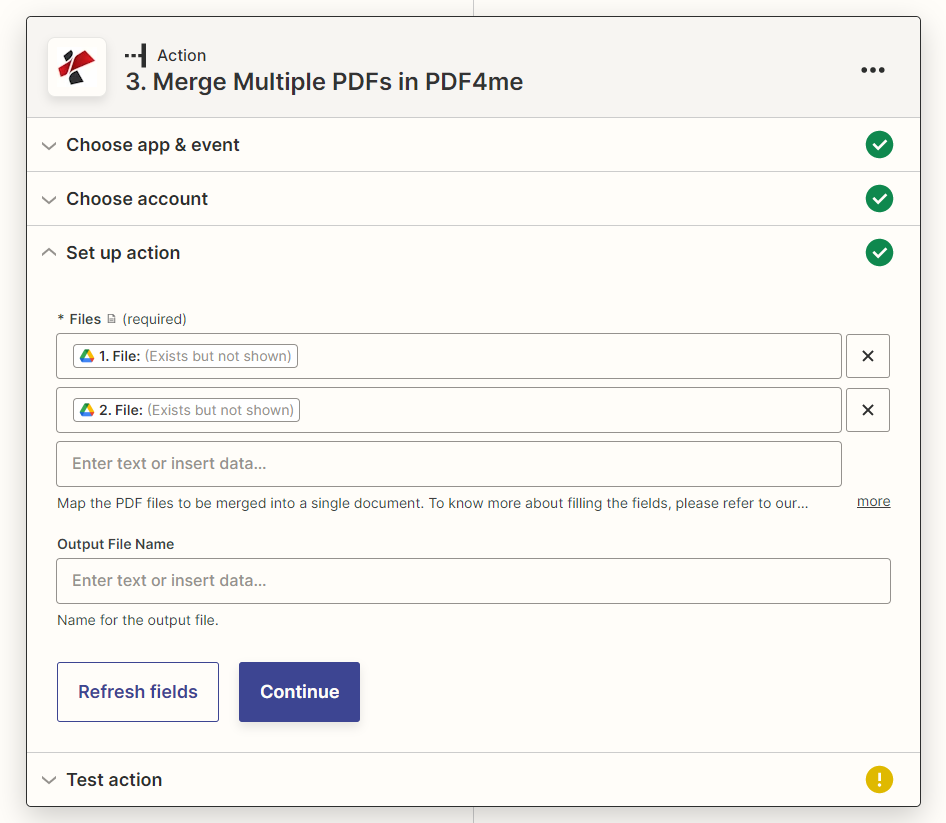
设置操作面板:“文件”为必填项,“输出文件名”为可选项
参数
必需 Zapier 用户界面: 文件。输出文件名是可选的。
| 范围 | 必需的 | 它的作用 | 例子 |
|---|---|---|---|
| Files | Required | List of PDF files to merge, added one entry at a time. Map from a trigger or previous steps, a URL to a file also works. Merges in the order listed. | 1. File, 2. File |
| Output File Name | Optional | Name for the merged output file, include the .pdf extension. If left blank, a default name is assigned. | merged_document.pdf |
输出
| 场地 | 类型 | 它包含什么 |
|---|---|---|
File | URL | Direct URL to the merged PDF document. |
File Name | String | Filename of the merged document, without extension. |
Full File Name | String | Complete filename including the .pdf extension. |
File Extension | String | Extension of the output file, .pdf. |
如何在 Zapier 中设置合并多个 PDF 文件?
- 添加 PDF4me 选择 Zap 中的操作应用程序并进行选择 合并多个PDF文件。
- 连接您的 PDF4me 创建一个帐户或选择现有连接。
- 地图 文件 每增加一个条目 PDF从你的触发器或之前的步骤开始,按照你希望合并的顺序进行合并。
- (可选) 输出文件名 与一个
.pdf扩大。 - 测试该步骤并确认返回结果 文件 URL 指向合并后的文档。
- 地图 文件 一个 上传文件通过电子邮件或存储操作来交付合并后的数据。 PDF。
两者之间有什么区别 Zapier 自动化和单文件网络工具?
Adobe Acrobat、iLovePDF 和 SmallPDF 都能在一次手动操作中解决文件合并问题:打开浏览器,上传文件,然后下载一次结果。合并多个 PDF 文件 Zapier 它将合并操作作为工作流程中的重复步骤,每当触发条件(例如文件夹中的新文件、表单提交、月末结算)触发时,该操作都会自动运行并将合并后的文件传递给系统。 PDF 进入下一步,无需浏览器,也无需手动上传。
典型配置
工作流程示例Common Zapier patterns using Merge Multiple PDFs.
合同包组装
- 当合同获得批准且其组成部分(主协议、附件、附录)均已准备就绪时,触发条件就会生效。 PDFs。
- 合并多个 PDF 文件,将它们与按以下顺序列出的文件合并:主协议、附件 A、附件 B。
- 通过上传文件或电子邮件步骤,即可将完整文件包发送给签署方。
部门月度报告汇总
- 当所有部门报告都已提交后,预定的触发器会在月底触发。
- 合并多个 PDF 文件会将封面页、执行摘要和每个部门的报告按顺序合并在一起。
- Gmail 会将汇总的月度报告通过电子邮件发送给领导层。
贷款申请文件包装
- 当贷款申请及其证明文件(身份证、收入证明、信用报告)齐全时,触发器就会启动。
- 合并多个 PDF 文件会先合并申请表,然后再合并辅助文件。
- 存储或数据库步骤会将合并后的数据包存档,以供承保审核。
发票批次合并
- 当付款到期时,预定的触发器会触发。
- 个人发票 PDFs 在 Zap 中先前生成的文件将合并到一个批处理文件中,用于支付运行。
- 合并后的批次将被归档或路由到审批工作流程中。
实用技巧
List order is merge order
There is no sort field. If your source data is not already in the right order, reorder it (Formatter, a sort step) before adding entries to Files.
A URL works as well as a mapped file
Files accepts a direct URL to a PDF, useful when a file lives at a public link rather than as binary data from a prior step.
Set Output File Name for predictable downstream naming
Leaving it blank works, but a predictable name makes the next step (Upload File, email attachment naming) easier to configure reliably.
This is document assembly, not page-level editing
Merge Multiple PDFs combines whole files. For splitting a document into parts or reordering the pages inside one file, use Split PDF instead.
Test with your real file count before relying on it in production
PDF4me does not publish a fixed file-count ceiling for this action. Confirm behavior with your actual batch size before wiring it into a critical workflow.
速查表
| 场地 | 价值 |
|---|---|
| Action | Merge Multiple PDFs |
| Files | Required, list built one entry at a time, merge order = list order |
| Output File Name | Optional, include .pdf extension |
| Output | File (URL), File Name, Full File Name, File Extension |
| Counterpart action | Split PDF (breaks one file into parts instead of combining several) |
常见问题
相关操作
拆分 PDF
相应的行动,打破了一个 PDF 将多个文件按页码分开,而不是合并成一个文件。
合并 PDF 叠加层
盖章一 PDF将页面叠加在另一个页面之上(水印或信头图层),而不是将文件首尾相连。
获取共享文件
首先将共享链接中的文件拉取到 Zap 中,然后将其与其他源文件一起导入到“合并多个 PDF”中。
在其他平台上执行相同任务
在 Make 中合并多个 PDF 文件
与以下操作相同的合并操作 Make 模块,用于具有云存储触发器的视觉场景。
合并多个 PDF 文件 n8n
等效物 n8n 节点,直接连接到自托管或云端 n8n 工作流程。
在 Power Automate 中合并多个 PDF 文件
Microsoft 365 与……流动 SharePoint, Outlook团队和 Dataverse 触发器。
合并多个 PDF REST API
原始 PDF4me API 用于自定义后端代码或 Postman 测试的端点。
行业应用案例及应用
- Legal & Professional Services
- Finance & Banking
- Human Resources
- Education & Publishing
- 合同包将合同与展览和日程安排合并
- 案件档案合并诉状、证据和展品
- 成交文件准备房地产交易结算文件包
- 尽职调查合并审查文件
- 贷款申请:将贷款文件与辅助材料打包
- 财务报告合并财务报表和附表
- 审计包合并审计文档和报告
- 合规文件:准备监管申报材料
- 员工档案整合入职文件
- 福利待遇合并福利文件以进行登记
- 绩效考核合并审查文件和反馈
- 离职补偿方案准备终止和离职文件
- 课程资料将多个讲义PDF文件合并成课程资料包
- 学生记录合并成绩单、证书和记录
- 出版大会:将各章节合并成完整的文稿
- 成绩单打包学生评估和报告