在 Zapier 中创建 Excel 独立工作表
Excel - 单独的工作表 这是一个 Zapier 操作,无需 VBA 或宏即可将一个 .xlsx 文件拆分成每个工作表一个单独的工作簿。该操作会读取源工作簿,遍历每个工作表,并返回一个数组,其中每个元素代表一个打包成独立文件的工作表。将其与循环工具配合使用,即可自动将每个工作表的文件保存到 Dropbox、Google 云端硬盘或 OneDrive。
验证您的 API 请求
Zapier 中的每个 PDF4me 模块都需要有效的连接。请创建或选择一个包含您的 PDF4me API 密钥的连接。
您不容错过的重要事实
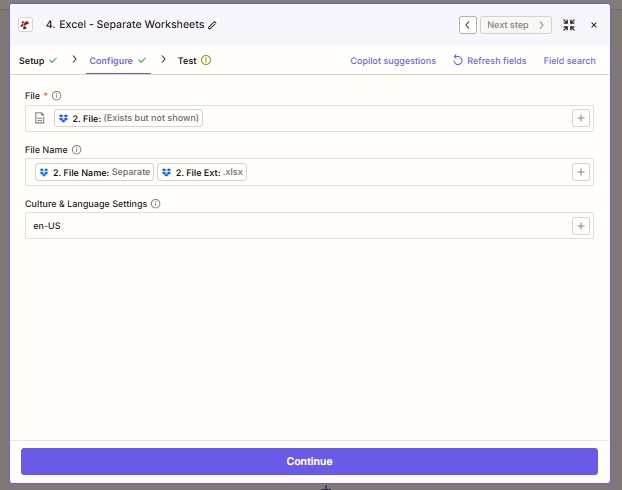
需要配置三个字段。“文件”字段包含源工作簿字节;“文件名”字段用于日志记录和下游命名;“区域和语言设置”字段控制如何解析数字和日期单元格以进行内部处理。
什么是 Zapier 中的 Excel - 分离工作表?
“Excel - 拆分工作表”是 Zapier 的 PDF4me 操作,用于将多工作表的 .xlsx 文件拆分成每个工作表对应一个工作簿。它接受单个文件,并返回一个文件数组,每个源工作表对应一个文件。与在 Excel 中交互式运行的桌面“移动或复制工作表”宏不同,此操作在云端通过任何 Zapier 触发器运行,因此凌晨 3 点上传到 Dropbox 的工作簿会在 3 点 15 分之前完成拆分。
参数
| 范围 | 必需的 | 它的作用 | 例子 |
|---|---|---|---|
| File | Required | The source .xlsx file. Map from a Dropbox / Drive / OneDrive Get File step (or any step that emits a file). | 2. File |
| File Name | Optional | Filename with extension. Passed through for logging and downstream mapping. Typically built by concatenating File Name and File Ext from the prior step. | Separate.xlsx |
| Culture & Language Settings | Optional | Locale used to parse date and numeric cells for internal processing. Does not modify stored values in the output workbooks. | en-US |
输出
| 场地 | 类型 | 它包含什么 |
|---|---|---|
| Splitted Worksheet[] | Array of files | One populated .xlsx per source worksheet. Each element has both File and File Name properties. Feed the whole array into a Zapier Looping utility to process one at a time. |
| File Name | String | Property on each array item. Set to the source worksheet name plus .xlsx, e.g. Q1.xlsx, Summary.xlsx. Use it as the destination filename in the Upload File step. |
| File | Binary | Property on each array item. The .xlsx bytes for that worksheet. Map into a Dropbox / Drive / OneDrive Upload File action. |
Zapier 中 Excel 的“分离工作表”功能是如何运作的?
Zapier 将源 .xlsx 文件字节传递给 PDF4me。 /api/v2/SplitWorksheet 端点。PDF4me 使用 Aspose Cells 打开工作簿,遍历每个工作表,将每个工作表打包成一个独立的 .xlsx 文件(保留标题、样式和公式),并以 Base64 编码返回。Zapier 将此集合公开为一个 Splitted Worksheet[] 数组输出。根据 Zapier 文档中关于循环的部分然后,将该数组通过 Zapier 的 Looping 工具进行处理,以便后续操作对每个元素运行一次。