密码保护 Excel 文件 Zapier
安全的 Excel 是一个 Zapier 采取行动 PDF4me 它对一个应用了三个独立密码保护级别的系统进行保护。 Excel 文件:文件加密,仅限授权用户打开;工作簿结构锁定,防止工作表被修改;工作表级保护,限制编辑但仍允许查看。请在分发财务报告、模板或机密数据前触发此功能。
我如何验证我的身份 API 要求?
要访问 PDF4me 网站 API 通过 Zapier每个请求都必须包含正确的身份验证凭据。身份验证可确保通信安全,并验证您作为授权用户的身份,从而实现与您的系统之间的无缝集成。 Zapier 工作流程和 PDF4me强大的 Excel 安保服务。
您不容错过的重要事实
配置概览
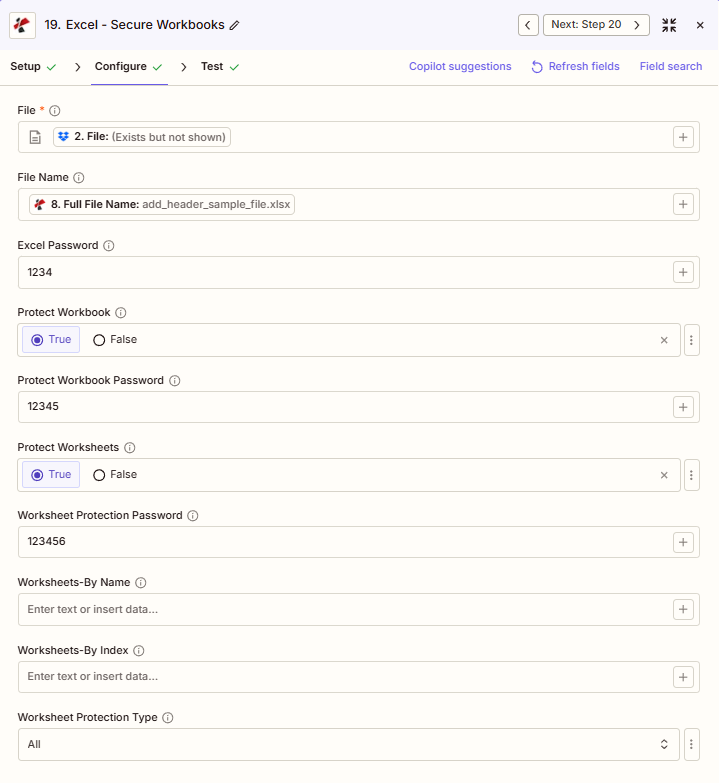
屏幕截图显示了从上一步映射的文件和文件名, Excel 密码“1234”,保护工作簿为真,保护工作簿密码为“12345”,保护工作表为真,工作表保护密码为“123456”,按名称保护工作表和按索引保护工作表为空,工作表保护类型为“全部”。
1234
真的
真的
全部
:::提示:从之前的步骤中获取映射文件和文件名
使用 + 旁边的按钮 文件 和 文件名 根据之前的 Zap 步骤进行映射。 Excel 文件必须提供完整内容,不能仅提供“存在但未显示”的引用。
:::
:::警告 文件:(存在但未显示)
如果在“文件”字段中看到“文件:(存在但未显示)”并出现错误,请选择提供相应选项的选项。 完整文件内容 相反。参见 Zapier & Power Automate 尖端 详情请见下文。
:::
参数
安全模式的完整参数列表 Excel 操作。参数名称与 Zapier 配置 UI。
必需 Zapier UI: 仅限文件。所有密码和保护开关均为可选,但至少启用一个保护级别才能确保操作安全。
| 范围 | 必需的 | 它的作用 | 例子 |
|---|---|---|---|
| File | Required | Excel file content, mapped from a previous step using full file content. | [2. File from Step 2] |
| File Name | Conditional | Filename with .xlsx or .xls extension, used for output naming. | add_header_sample_file.xlsx |
| Excel Password | Conditional | File encryption password required to open the file. Also used as the fallback for Protect Workbook Password and Worksheet Protection Password if those are left empty. | 1234 |
| Protect Workbook | Conditional | Boolean toggle to lock the workbook structure, preventing sheets from being added, deleted, or renamed. | True |
| Protect Workbook Password | Conditional | Password required to unlock workbook structure protection. Falls back to Excel Password if left empty. | 12345 |
| Protect Worksheets | Conditional | Boolean toggle to restrict editing on the targeted worksheets. | True |
| Worksheet Protection Password | Conditional | Password required to unlock worksheet protection. Falls back to Excel Password if left empty. | 123456 |
| Worksheets-By Name | Conditional | Comma-separated worksheet names to protect. Leave empty to protect every worksheet. | Sheet1,Summary |
| Worksheets-By Index | Conditional | Comma-separated worksheet indexes to protect. Leave empty to protect every worksheet. | 0,2 |
| Worksheet Protection Type | Conditional | What is restricted on protected worksheets: All, Contents, Objects, or Scenarios. | All |
输出结果包含哪些字段?
该操作返回受保护的对象。 Excel 文件加上跟踪元数据。此输出格式在以下位置共享: PDF4me Excel 行动 Zapier 返回一个文件。
| 场地 | 类型 | 它包含什么 |
|---|---|---|
Job Id | String | Unique identifier for the Zapier job execution. |
File Url | URL | API endpoint to download the protected Excel file. Map this to the next step, Drive, Dropbox, or another PDF4me Excel action. |
Alternate File Url | URL | Alternate download URL with the filename in the path. |
File Name | String | Base filename without extension. |
Full File Name | String | Complete filename including extension. |
File Extension | String | File extension of the output. |
Document Id | String | Unique identifier for the processed document. |
File Size | Number | Size of the output file in bytes. |
典型配置
工作流程示例Common Zapier workflow patterns using Secure Excel.
- 当月度财务报告在云端硬盘中最终定稿时,会触发一个触发器。
- 安全的 Excel 跑步 Excel 为文件打开加密设置密码,并启用“保护工作簿”和“保护工作表”功能,以实现全面的结构和内容保护。
- 受保护的报告会上传到受限的高级文件夹,密码会通过单独的安全通道共享。
- 从共享模板库中检索已批准的模板,从而触发 Zap。
- 安全的 Excel 运行时,“保护工作表”设置为“真”,“按名称选择工作表”仅针对公式表,而数据输入表仍可编辑。
- 受保护的模板将上传回共享库,供团队使用。
- 每周绩效报告生成完毕,触发 Zap。
- 安全的 Excel 运行时,“保护工作表”设置为“是”,但“工作表保护密码”留空,因此会回退到单个共享工作表。 Excel 密码。
- 报告会连同共享密码一起通过电子邮件发送给团队其他成员。
实用技巧
速查表
| 场地 | 价值 |
|---|---|
| Action | Secure Excel |
| File | [mapped from previous step, full content] |
| File Name | add_header_sample_file.xlsx |
| Excel Password | 1234 |
| Protect Workbook / Password | True / 12345 |
| Protect Worksheets / Password | True / 123456 |
| Worksheet Protection Type | All |
常见问题解答
相关操作
在其他平台上执行相同任务
行业应用案例及应用
- Finance & Accounting
- Legal & Professional
- Human Resources
- Operations
- 薪资文件加密在人力资源部门分发工资和薪酬文件之前,对文件进行加密。
- 财务模板保护保护财务模型模板中的结构和公式表
- 审计工作底稿安全在归档存储之前,使用密码对审计文件进行加密。
- 预算模板保护锁定预算公式表,同时允许部门数据输入。
- 板级封装加密:对董事会会议资料包应用文件加密,以确保保密性
- 客户文件保护使用案件专属密码加密客户案件文件
- 模板公式保护保护法律模板计算表免遭修改
- 发现材料安全对财务报表应用工作表保护,使其仅供只读审核。
- 特权文档加密对律师-客户特权Excel文件进行加密
- 结算工作表保护锁定结算计算表,防止未经授权的更改
- 绩效考核保护保护评论模板参考表和评分公式
- 补偿文件加密对薪资调查和薪酬分析文件进行加密
- 福利模板保护保护福利计算表,同时允许输入参保数据
- 员工数据安全对人事记录和组织结构图应用文件加密
- 人员编制计划保护保护人员编制模型公式,同时允许输入场景数据
- 生产计划保护保护主生产计划公式免受未经授权的更改
- 库存模板安全性锁定库存计算表,同时允许输入盘点数据
- 质量仪表盘保护将质量控制仪表盘图表和计算表设置为只读。
- 设备日志加密对包含资产和成本信息的维护日志进行加密
- 容量模型保护锁定产能规划公式,同时允许更新需求数据