在 Zapier 中填充 Excel 文件
Excel - 填充 这是一个 Zapier 操作,它使用 JSON 数据填充 .xlsx 模板,并返回填充后的工作簿,同时保留所有单元格样式、公式和合并区域。如果您已有品牌化的 Excel 布局,并希望自动将新数据填充到其中,请使用此操作。该操作接受一个模板文件和一个 JSON 有效负载,并返回一个填充后的工作簿。 .xlsx这样,您就可以通过电子邮件发送、上传或存档,而无需手动粘贴。
验证您的 API 请求
Zapier 中的每个 PDF4me 模块都需要有效的连接。请创建或选择一个包含您的 PDF4me API 密钥的连接。
您不容错过的重要事实
&=Items.ItemName 或者将其放置在 Excel 表格中,表格的列标题与 JSON 字段名称匹配。空白表格将生成空输出。2. 文件 从 Dropbox/Google Drive/OneDrive 的“获取文件”步骤中获取模板 URL。模板 URL 仅适用于通过 HTTPS 公开提供的模板,如果您传递的是映射文件,则该 URL 为空。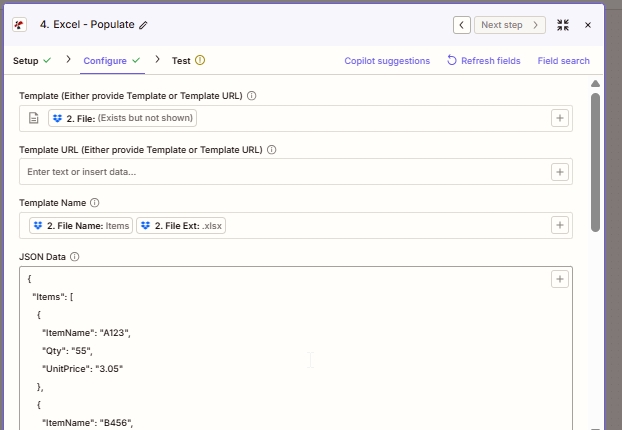
配置顶部。从上一步的文件输出映射模板,然后通过连接文件名和文件扩展名来构建模板名称。JSON 数据是 PDF4me 写入模板的有效负载。
什么是 Zapier 中的 Excel - Populate?
“Excel - Populate”是Zapier的PDF4me操作,用于将JSON有效负载中的数据填充到预先设计的.xlsx模板中。它接受一个模板文件和一个JSON对象,并返回一个填充后的工作簿文件。与将所有内容扁平化为原始网格的在线JSON转Excel转换器不同,“Populate”会保留模板的布局,因此每次触发时都可以重新生成带有品牌标识的报告、发票和仪表板,而不会出现格式偏移。
参数
| 范围 | 必需的 | 它的作用 | 例子 |
|---|---|---|---|
| Template | Conditional | The .xlsx template file. Map from a Dropbox / Drive / OneDrive Get File step. Required unless Template URL is set. | 2. File |
| Template URL | Conditional | Public HTTPS URL to fetch the template. Used only when Template is blank. | https://example.com/tpl.xlsx |
| Template Name | Required | Filename with extension. Used for output naming and downstream mapping. Typically built by concatenating File Name and File Ext from the prior step. | Items.xlsx |
| JSON Data | Required | Data payload to write into the template. Object keys must match Smart Markers or table column headers. | {"Items":[{"ItemName":"A123","Qty":"55","UnitPrice":"3.05"}]} |
| Strict JSON Strings | Optional | When True, quoted numbers stay as strings in the output cells. When False, they auto-convert to numeric cells. | True |
| Culture & Language Settings | Optional | Locale used to parse date and numeric cells. Does not modify stored values. | en-US |
| Calculate Formulas | Optional | When True, formulas in the template are evaluated after population so totals open pre-computed. | True |
| Worksheet Indexes | Optional | 1-based index of the worksheet(s) to populate. Comma-separated for multiple sheets in one call. | 1 (or 1,3) |
| Quote Prefix To Style | Optional | When True, cells beginning with a single quote are styled as text rather than treated as a prefix character. | False |
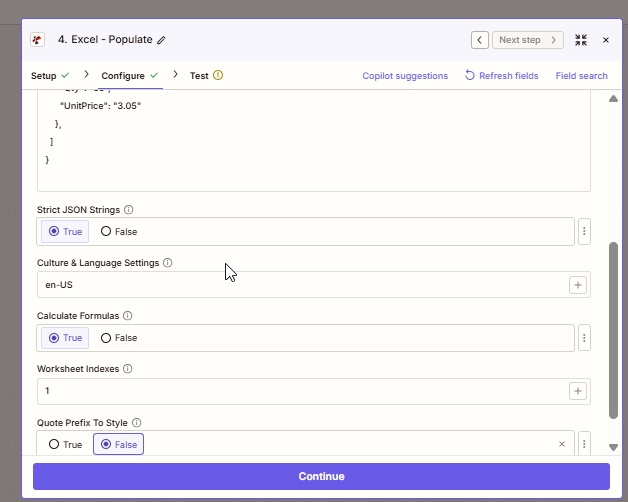
高级选项。“严格 JSON”和“计算公式”是两个默认设置,几乎永远不需要更改。仅当模板的数据区域位于除第一个工作表之外的其他工作表时,才需要调整工作表索引。
输出
| 场地 | 类型 | 它包含什么 |
|---|---|---|
| File | Binary | The populated .xlsx workbook. Map into a Dropbox / Drive / OneDrive Upload File step, or attach it in Gmail / Outlook Send Email. |
| File Name | String | The Template Name you provided in the Configure tab. Useful when the upload step needs both file bytes and a filename separately. |
Zapier 中的 Excel - Populate 功能是如何工作的?
Zapier 将模板文件字节和 JSON 有效负载传递给 PDF4me。 /api/v2/PopulateExcelTemplate 端点。PDF4me 使用 Aspose Cells 打开模板,解析每个智能标记或表格绑定到 JSON,计算所有依赖公式,并将填充后的 .xlsx 文件作为 Base64 编码的字节流返回,Zapier 会将其显示为端点。 File 输出。根据 Zapier 文件字段文档这样,该文件输出就可以直接放入任何接受文件输入的后续操作中,而无需手动进行编码或解码步骤。