合并 Excel 文件 Zapier
PDF4me 合并文件 是一个 Zapier 结合两种或多种动作 Excel 将多个工作簿合并到一个文件中,自动重命名重复的工作表名称,避免数据被覆盖。可用于合并月度部门报告、汇总区域数据或组装多文件数据集。选择要从每个文件中包含的工作表,并输出为 XLSX、XLS、PDF 或 CSV 格式。
此操作的作用
需要两个或两个以上 Excel 将之前 Zap 步骤中的工作簿合并到一个输出文件中。设置文件数量以匹配要合并的工作簿数量,然后映射每个文件和文件名对。“要合并的工作表”允许您仅包含每个文件中的特定工作表,“排序位置”控制文件的合并顺序,与每个文件映射到的文件槽无关。输出格式为 XLSX、XLS、PDF 或 CSV。
验证您的身份 API 要求
要访问 PDF4me 网站 API 通过 Zapier每个请求都必须包含正确的身份验证凭据。身份验证可确保通信安全,并验证您作为授权用户的身份,从而实现与您的系统之间的无缝集成。 Zapier 工作流程和 PDF4me的 Excel 文件合并服务。
您不容错过的重要事实
:::提示:映射之前步骤中的文件1、文件2等
使用 + 旁边的按钮 文件1, 文件2以及相应的 文件名1, 文件名2 要映射来自先前 Zap 步骤的字段。设置 文件数量 要与您要合并的文件数量相匹配。每个文件都必须提供完整内容。
:::
:::警告 文件:(存在但未显示)
如果您看到“文件:(存在但未显示)”并遇到错误,请选择提供相应选项的选项。 完整文件内容 相反。参见 Zapier & Power Automate 尖端 详情请见下文。
:::
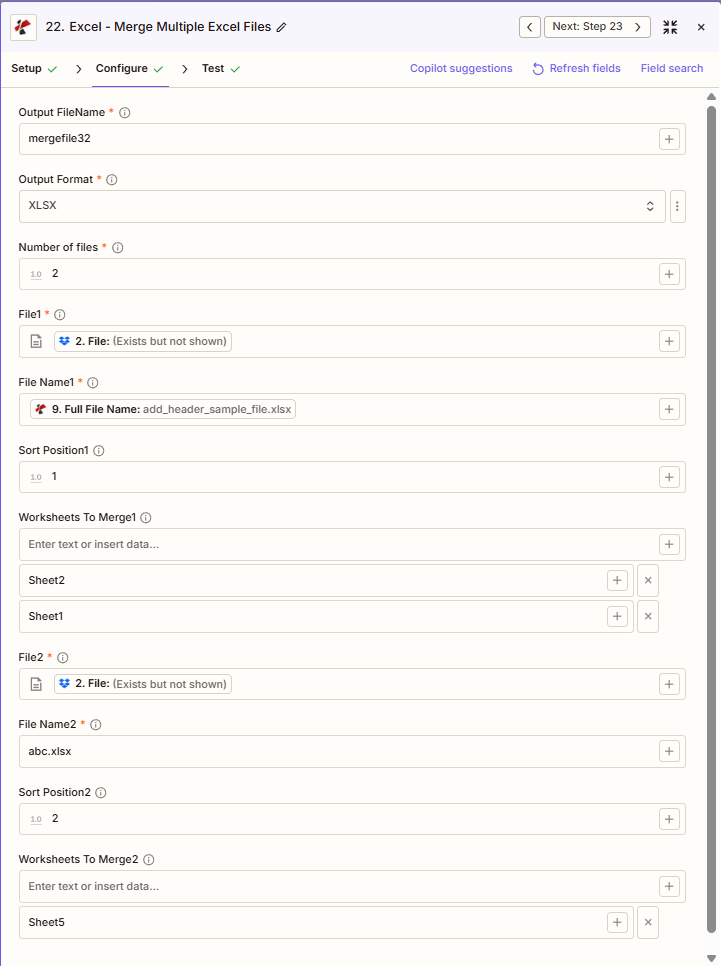
合并文件的主要功能有哪些?
- 多文件合并:组合 2 个或多个 Excel 将多个文件合并到一个工作簿中(文件数量)
- 选择性工作表:要合并的工作表1,要合并的工作表2,请为每个文件选择工作表,或留空以全部合并。
- 排序控制排序位置1,排序位置2,先合并较小的数字
- 输出格式XLSX、XLS、PDF 或 CSV
- 重复名称处理重复的工作表名称会自动重命名并添加后缀
参数
合并文件操作的完整参数列表。参数名称与以下内容一致: Zapier 配置 UI 如上图所示。 UI 显示文件1、文件2等,每个文件一组,基于文件数量。
- 放 输出文件名 (无扩展名) 输出格式 (XLSX、XLS、PDF 或 CSV 格式)
- 放 文件数量 (例如,2 代表文件 1 + 文件 2)
- 地图 文件1, 文件名1; 文件2, 文件名2; ETC。
- (可选) 要合并的工作表1, 要合并的工作表2 (或者所有页面都留空)
- 放 排序位置1, 排序位置2 合并顺序(1、2、3……)
| 范围 | 必需的 | 它的作用 | 例子 |
|---|---|---|---|
| Output FileName | Required | Merged output filename, no extension. The extension is added based on Output Format. | mergefile32 |
| Output Format | Required | Output format for the merged file: XLSX, XLS, PDF, or CSV. | XLSX |
| Number of files | Required | Count of files to merge. Determines how many File, File Name, Sort Position, and Worksheets To Merge slots appear. | 2 |
| File1 | Required | First Excel file to merge, mapped from a previous step. Must provide full file content. | [2. File from Step 2] |
| File Name1 | Required | First file's filename, mapped from a previous step. | add_header_sample_file.xlsx |
| Sort Position1 | Conditional | Merge order for the first file. Lower numbers are merged earlier. | 1 |
| Worksheets To Merge1 | Conditional | Comma-separated sheet names to include from File1. Empty includes all sheets. | Sheet1, Sheet2 |
| File2 | Required | Second Excel file to merge, mapped from a previous step. | [2. File from Step 2] |
| File Name2 | Required | Second file's filename. | abc.xlsx |
| Sort Position2 | Conditional | Merge order for the second file. | 2 |
| Worksheets To Merge2 | Conditional | Comma-separated sheet names to include from File2. Empty includes all sheets. | Sheet5 |
合并超过 2 个文件
放 文件数量 到 3、4 等。 Zapier 将显示文件3、文件名3、排序位置3、要合并的工作表3等等。映射每个文件并设置合并顺序的排序位置。
重要的: 仅有的 文件 和 文件名 每个文件,加上 输出文件名, 输出格式, 和 文件数量是必填项。重复的工作表名称会自动重命名(例如,Summary_1,Summary_2)。
合并文件会返回什么?
这 PDF4me 合并文件 操作返回合并后的结果。 Excel 该文件用于后续的 Zap 步骤。输出格式在所有 Zap 步骤中都是通用的。 PDF4me Excel 行动 Zapier。
API 用于下载合并文件的端点。将其映射到下一步的文件输入。
api.pdf4me.com/Zapier/GetDocument?d=...备用下载 URL 文件名包含在路径中。
api.pdf4me.com/Zapier/GetAltDocument/.../mergefile32.xlsx| 场地 | 类型 | 它包含什么 |
|---|---|---|
Job Id | String | Unique identifier for the Zapier job execution. |
File Url | URL | API endpoint to download the merged file. |
Alternate File Url | URL | Alternate download URL with the filename in the path. |
File Name | String | Base filename without extension. |
File Extension | String | File extension of the returned file, e.g. .xlsx. |
Full File Name | String | Complete filename with extension. |
Document Id | String | Unique identifier for the processed document. |
File Size | Number | Size of the output file in bytes. |
Doc Text | String | Extracted text, typically empty for Excel operations. |
- JSON
- Zap Integration
例子 JSON 输出 (URL(仅显示格式,链接无效):
{
"Job Id": "969f2da3-f10a-49bf-b084-6fc4759991ec",
"File Url": "api.pdf4me.com/Zapier/GetDocument?d=...",
"Alternate File Url": "api.pdf4me.com/Zapier/GetAltDocument/.../mergefile32.xlsx",
"File Name": "mergefile32",
"File Extension": ".xlsx",
"Full File Name": "mergefile32.xlsx",
"Document Id": "07386627-184a-44b2-a040-5ea2712a4bc5",
"File Size": 212764,
"Doc Text": ""
}
使用 + 绘制地图 文件 URL 或者 备用文件网址 下一步,通过云端硬盘、Dropbox、电子邮件或其他方式。 PDF4me Excel 行动。
此输出结构在以下各项中共享: 合并文件, 添加行, 删除行以及其他 PDF4me Excel 行动 Zapier。 这 URL这些是临时的,请在过期前在下一步中使用它们。
典型配置
工作流程示例Common Zapier workflow patterns using Merge Files.
- 预定触发器会在每月的第一天触发。
- PDF4me 合并文件将每个部门的报告映射到 File1 到 File10,并为每个报告设置排序位置,以便它们按一致的顺序合并。
- 合并后的工作簿已上传到领导层共享的云端硬盘文件夹。
- 每周触发一次,从区域 Dropbox 文件夹中检索销售报告。
- PDF4me 合并文件功能会将每个文件的“要合并的工作表”设置为仅包含“摘要”和“详细信息”工作表,而将其他工作表排除在合并文件之外。
- 合并后的报告将通过电子邮件发送给销售副总裁。
- 每季度触发一次,检索每个月的数据。 Excel 文件来自 SharePoint。
- PDF4me 将三个月的文件合并在一起,输出格式设置为 PDF,排序位置设置为按时间顺序。
- 不可修改的 PDF 存档已上传至合规性存储。
实用技巧
速查表
| 场地 | 价值 |
|---|---|
| Action | Merge Files |
| Output FileName | mergefile32 |
| Output Format | XLSX |
| Number of files | 2 |
| File1 / File2 | [Mapped from previous steps] |
| Sort Position1 / 2 | 1 / 2 |
| Worksheets To Merge1 | Sheet1, Sheet2 (or empty for all) |
常见问题
相关操作
在其他平台上执行相同任务
行业应用案例及应用
- Finance & Accounting
- Sales & Marketing
- Human Resources
- Operations & Supply Chain
- 期间合并将月度损益表、资产负债表和现金流量表文件合并到季度工作簿中
- 实体汇总将子公司财务报表合并到合并报告工作簿中
- 预算汇总将各部门预算文件合并到公司主预算工作簿中
- 审计文件集将多个审计领域的工作底稿文件合并到一个审计文件中
- 差异报告将实际结果与预算或预测文件合并,以生成差异分析工作簿。
- 区域销售整合将区域销售报告合并到带有区域标签的全国销售工作簿中
- 频道表现将直接渠道、合作伙伴渠道和在线渠道的报告合并到全渠道工作簿中
- 活动聚合:将各个营销活动的结果合并到一份综合营销绩效工作手册中
- 区域报告将区域经理报告合并到区域副总裁报告工作簿中
- 季度商业评论将月度销售文件合并到季度回顾工作簿中,以便召开季度业务回顾会议。
- 工资合并将地点或部门的工资文件合并到主工资工作簿中
- 福利登记将多个时期的福利选择文件合并到年度登记工作簿中
- 人员编制报告将各部门的人员统计文件合并到公司整体的人员统计报告中
- 培训记录:将各部门的培训完成文件汇总到主培训日志中
- 绩效考核将个人考核文件合并到公司范围内的绩效管理工作簿中
- 多站点运营将站点运营报告合并到公司运营工作簿中
- 库存整合将仓库库存文件合并到主库存工作簿中
- 生产聚合将工厂生产报告合并到制造绩效工作簿中
- 质量报告:将多条生产线的质量控制检验文件整合到质量仪表盘工作簿中
- 物流整合将承运商绩效文件合并到综合物流报告工作簿中