从工作表中提取工作表 Excel 使用 Zapier
PDF4me 从工作表中提取工作表 Excel 是一个 Zapier 从某个位置导出一个或多个工作表的操作 Excel 工作簿结构 JSON按工作表名称筛选。可按名称、索引选择工作表,或两者都留空以提取所有工作表。返回一个 Base64 编码的 JSON 文档,可用于下一个 Zap 步骤。
此操作的作用
需要 Excel 从之前的 Zap 步骤中读取工作簿,读取您指定的(或全部)工作表,并将每个工作表转换为 JSON 以第一行作为标题行。结果是一个以工作表名称为键的字典,因此,包含“汇总”和“销售”工作表的工作簿将返回一个字典。 JSON 同时包含两个键的对象。可用于将多页报表导入到其他系统中。 API数据库或下游自动化步骤需要结构化数据而不是电子表格文件。
验证您的身份 API 要求
要访问 PDF4me 网站 API 通过 Zapier每个请求都必须包含正确的身份验证凭据。身份验证可确保通信安全,并验证您作为授权用户的身份,从而实现与您的系统之间的无缝集成。 Zapier 工作流程和 PDF4me的 Excel 工作表提取服务。
您不容错过的重要事实
:::提示:从之前的步骤中获取映射文件和文件名
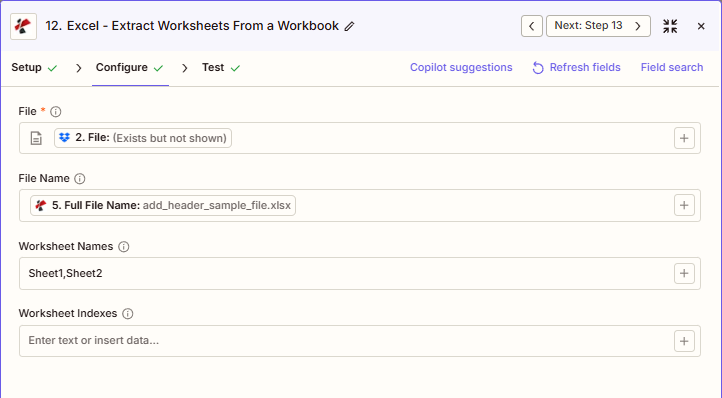
使用 + 旁边的按钮 文件 和 文件名 例如,从之前的 Zap 步骤进行映射, 完整文件名 来自前 PDF4me Excel 行动。 Excel 文件必须提供完整内容,不能仅提供“存在但未显示”的引用。
:::
:::警告 文件:(存在但未显示)
如果在“文件”字段中看到“文件:(存在但未显示)”并收到“文件为空”错误,请选择提供相应选项的选项。 完整文件内容 相反。参见 Zapier & Power Automate 尖端 详情请见下文。
:::
提取工作表的主要特点是什么?
- 完整工作表提取 到 JSON 自动报头检测
- 灵活选择:按工作表名称、工作表索引或两者(并集)提取
- 多页支持 一次操作提取多个工作表
- 字典输出 按工作表名称筛选,方便访问
- 基于 1 的索引 工作表索引
参数
“提取工作表”操作的完整参数列表。参数名称与以下内容匹配: Zapier 配置 UI 如上图所示。
- 地图 文件 (Excel)来自您的触发器或上一步
- (可选)映射 文件名 (例如,上一步中的完整文件名)
- 进入 工作表名称 和/或 工作表索引或者将两者都留空以提取所有工作表
| 范围 | 必需的 | 它的作用 | 例子 |
|---|---|---|---|
| File | Required | Excel file to extract worksheets from. Map from a previous step. Must provide full file content. | [2. File from Step 2] |
| File Name | Conditional | Excel filename, used for output file identification. | add_header_sample_file.xlsx |
| Worksheet Names | Conditional | Comma-separated worksheet names to extract. Combines (union) with Worksheet Indexes if both are set. Empty with Indexes = all worksheets. | Sheet1, Sheet2 |
| Worksheet Indexes | Conditional | Comma-separated 1-based worksheet positions to extract. 1 = first worksheet. Combines with Worksheet Names. | 1,3 |
提取工作簿中的所有工作表
两者都保留 工作表名称 和 工作表索引 空提取 所有工作表 在工作簿中输入到输出字典中。
重要的: 仅有的 文件 是必需的。请使用 + 每个字段旁边都有一个按钮,用于映射先前步骤中的数据。工作表索引从 1 开始(1 = 第一个工作表)。
提取工作表会返回什么?
这 PDF4me 从工作表中提取工作表 Excel 操作会将工作表数据以 Base64 编码的形式返回。 JSON 这是一个文档,不是可下载的文件,可以直接在 Zap 逻辑中使用。
| 场地 | 类型 | 它包含什么 |
|---|---|---|
document | Base64 | JSON byte array. Decodes to a dictionary keyed by worksheet name, each value an array of row objects. |
FileName | String | Output filename assigned to the JSON payload, e.g. report.txt. |
Success | Boolean | Whether the extraction completed without error. |
- JSON
- Zap Integration
例子 JSON 回复:
{
"document": "[Base64 JSON]",
"FileName": "report.txt",
"Success": true
}
提取 JSON 结构(从文档解码):
{
"Summary": [
{"Month": "January", "Revenue": 50000, "Expenses": 30000},
{"Month": "February", "Revenue": 55000, "Expenses": 32000}
],
"Sales": [
{"Product": "Widget A", "Quantity": 100, "Price": 10.50},
{"Product": "Widget B", "Quantity": 150, "Price": 15.75}
]
}
使用 + 映射解码结果 文档 JSON 到格式化步骤、数据库写入或直接 API 调用 Zap 的下一部分。
典型配置
工作流程示例Common Zapier workflow patterns using Extract Worksheets.
- 当合并报表工作簿进入 Google 云端硬盘文件夹时,会触发一个触发器。
- PDF4me 提取工作表映射文件和文件名,将工作表名称和工作表索引留空,以便将每个工作表作为一个整体提取。 JSON 字典。
- 格式化步骤会对 Base64 文档进行解码,然后各个步骤会将每个工作表的数据路由到各自的目标位置。 API。
- 表单提交触发器用于捕获客户希望从共享主工作簿中选择哪些工作表。
- PDF4me 提取工作表会将工作表名称设置为请求的工作表列表(例如,“Q1,Q2”),以便只提取这些工作表。
- 解码 JSON 经过消毒处理后,将文件发送到客户门户网站或以附件形式通过电子邮件发送。
- 每月最后一天会触发一个定时事件。
- PDF4me 提取工作表会将工作表索引设置为汇总标签的已知位置(例如,“1,2”),跳过详细信息表。
- 提取 JSON 写入数据库或 blob 存储步骤以进行长期保留。
实用技巧
速查表
| 场地 | 价值 |
|---|---|
| Action | Extract Worksheets |
| File | [Mapped from previous step] |
| File Name | add_header_sample_file.xlsx |
| Worksheet Names | Sheet1, Sheet2 (optional) |
| Worksheet Indexes | 1,3 (optional, 1-based) |
| Output format | Base64-encoded JSON dictionary |
常见问题
相关操作
在其他平台上执行相同任务
行业应用案例及应用
- IT & Integration
- Finance & Accounting
- Operations
- Education
- 多API数据源自动将不同的工作表提取到不同的系统 API。
- 数据仓库加载将多工作表财务工作簿加载到数据仓库表中
- 系统迁移:将完整的 Excel 工作簿提取为 JSON 格式,以便迁移到云系统
- 数据备份将多工作表操作手册归档为 JSON 格式,以便进行灾难恢复
- ETL管道在多步骤转换管道中,以中间格式提取工作表
- 期末结算将月度损益表、资产负债表和现金流量表提取到财务系统中
- 合并出口从合并工作簿中提取用于总账过账的实体级工作表
- 预算分配提取部门预算工作表并分发到相应的系统
- 审计文件归档:将完整的审计工作簿提取为 JSON 格式,以符合保留期限要求
- 管理报告提取不同利益相关者系统的执行摘要和详细信息工作表
- 多站点数据从合并后的运营工作簿中提取特定站点的工作表
- 仪表盘信息流将运营Excel中的KPI工作表提取到BI仪表板API
- 库存同步将仓库库存工作表提取到WMS系统
- 生产报告将生产工作簿中的班次工作表提取到 MES 系统
- 质量数据将产品线的检验工作表提取到质量管理体系平台
- 课程数据导出将课程注册工作表从注册处工作簿提取到学生信息系统 (SIS) 中。
- 成绩分布将学期成绩单提取到学习管理系统
- 学生记录提取学生数据工作表,以便向州教育系统报告
- 经济援助将助学金工作表从主工作簿中提取到助学金平台
- 评估数据:按科目提取测试成绩工作表,供分析平台使用