从 Excel - JSON 出口 Zapier
PDF4me 提取行 是一个 Zapier 转换一系列操作 Excel 将行和列结构化 JSON设置工作表和行/列范围,或提取所有内容,并选择值是保留为原生类型还是导出为文本。返回一个可供使用的 RowData 数组。 APIs、数据库或下一个 Zap 步骤。
此操作的作用
从……读取工作表 Excel 在之前的 Zap 步骤中映射的文件,应用您设置的行/列范围和筛选选项,并将每一行作为结果返回。 JSON RowData 数组中的对象。使用“包含表头行”选项,可将每个对象的键命名为第一行的名称;使用“排除”选项,可跳过隐藏行或空行;还可以选择是否保留数字和日期的原始格式。 JSON 输入或导出为纯文本。
验证您的身份 API 要求
要访问 PDF4me 网站 API 通过 Zapier每个请求都必须包含正确的身份验证凭据。身份验证可确保通信安全,并验证您作为授权用户的身份,从而实现与您的系统之间的无缝集成。 Zapier 工作流程和 PDF4me强大的 Excel 数据提取服务。
您不容错过的重要事实
:::提示:从之前的步骤中获取映射文件和文件名
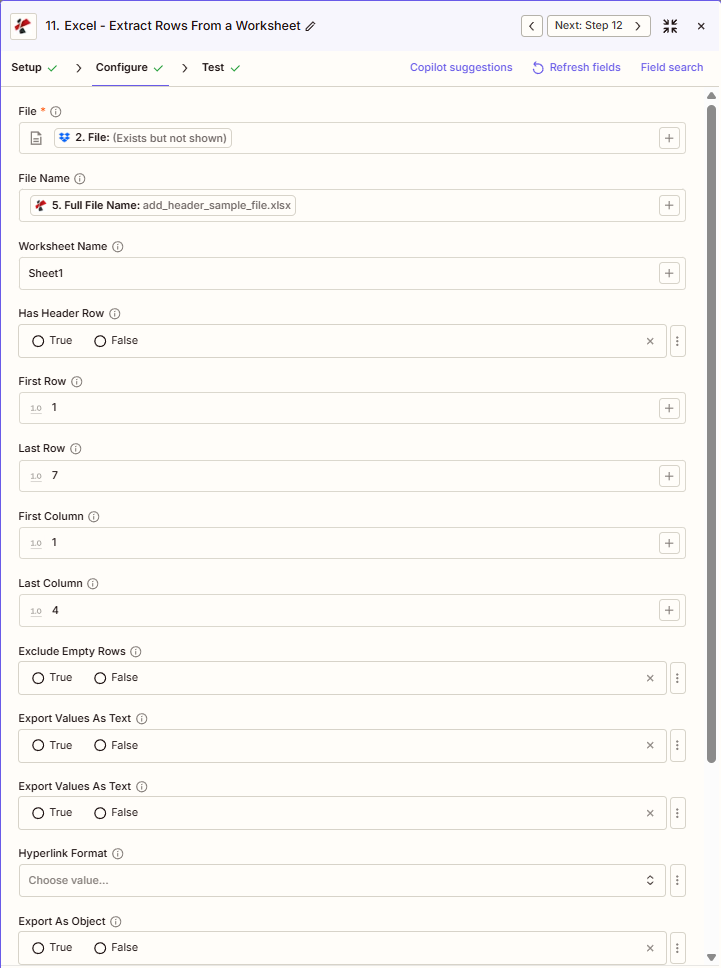
使用 + 旁边的按钮 文件 和 文件名 例如,从之前的 Zap 步骤进行映射, 完整文件名 来自前 PDF4me Excel 行动。 Excel 文件必须提供完整内容,不能仅提供“存在但未显示”的引用。
:::
:::警告 文件:(存在但未显示)
如果在“文件”字段中看到“文件:(存在但未显示)”并收到“文件为空”错误,请选择提供相应选项的选项。 完整文件内容 另见。 Zapier & Power Automate 尖端 详情请见下文。
:::
提取行的主要特点是什么?
- JSON 输出: 提炼 Excel 结构化数据 JSON (RowData 数组)
- 灵活范围:指定第一行/最后一行和第一列/最后一列 Excel自己的基于 1 的数字
- 标题行支持:带有标题行,使用第一行作为 JSON 钥匙
- 过滤排除隐藏行、隐藏列和空行
- 数据类型控制:将值导出为文本,以输出全部文本。
- 导出为对象:结构输出为 JSON 对象或数组
参数
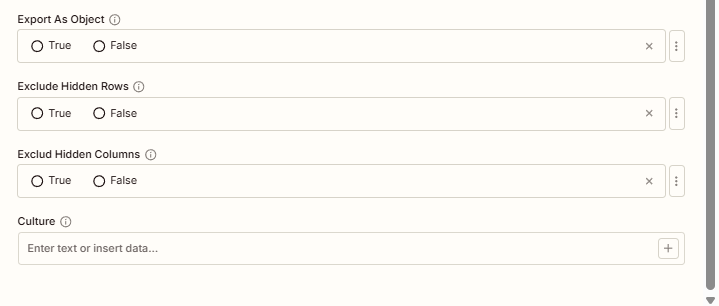
“提取行”操作的完整参数列表。参数名称与以下内容匹配: Zapier 配置 UI 如上图所示。
- 地图 文件 (Excel来自您的触发器或上一步
- (可选)映射 文件名 并设置 工作表名称 (例如,Sheet1)
- 放 第一排, 最后一行, 第一栏, 最后一列 (从 1 开始计数;-1 表示结束)
- 放 包含标题行, 导出为对象以及其他必要的选项
| 范围 | 必需的 | 它的作用 | 例子 |
|---|---|---|---|
| File | Required | Excel file to extract rows from. Map from a previous step. Must provide full file content. | [2. File from Step 2] |
| File Name | Conditional | Excel filename, used for output file identification. | add_header_sample_file.xlsx |
| Worksheet Name | Conditional | Target worksheet to extract from. Empty extracts from the first worksheet. | Sheet1 |
| Has Header Row | Conditional | True uses the first row in the range as JSON property names. | True |
| First Row | Conditional | Starting row, 1-based. 1 = Excel row 1. | 1 |
| Last Row | Conditional | Ending row, 1-based. -1 = last row with data. | 7 |
| First Column | Conditional | Starting column, 1-based. 1 = column A. | 1 |
| Last Column | Conditional | Ending column, 1-based. -1 = last column with data. | 4 |
| Exclude Empty Rows | Conditional | True skips rows with no data. | False |
| Export Values As Text | Conditional | True exports every value as a string; False preserves native types. | False |
| Hyperlink Format | Conditional | How to represent cell hyperlinks in the output. | - |
| Export As Object | Conditional | Controls whether the output is structured as a JSON object or array. | True |
| Exclude Hidden Rows | Conditional | True skips rows hidden in the worksheet. | False |
| Exclude Hidden Columns | Conditional | True skips columns hidden in the worksheet. Zapier labels this field "Exclud Hidden Columns". | False |
| Culture | Conditional | Locale for date/number formatting. | en-US |
重要的: 仅有的 文件 是必需的。请使用 + 每个字段旁边都有一个按钮,用于映射数据。可以使用“首行/末行”和“首列/末列”功能。 Excel自己的 基于 1 的 编号(第 1 行,A 列 = 1),而不是从零开始的索引。
提取行会返回什么?
这 PDF4me 从 Excel 行动回报全面 JSON 无缝输出数据 Zapier 工作流程集成。
| 场地 | 类型 | 它包含什么 |
|---|---|---|
document | Base64 | JSON data as a byte array (serialized RowData). |
RowData | Array | Extracted rows as an array of objects, keyed by column name when Has Header Row is True. |
Success | Boolean | Whether the extraction completed without error. |
- JSON
- Zap Integration
例子 JSON 回复:
{
"document": "[Base64 JSON Data]",
"RowData": [
{
"Name": "John Doe",
"Age": 30,
"Salary": 50000.50
},
{
"Name": "Jane Smith",
"Age": 28,
"Salary": 55000.00
}
],
"Success": true
}
使用 + 绘制地图 行数据 将数组转换为循环步骤、数据库写入或直接写入。 API 调用 Zap 的下一部分。
典型配置
工作流程示例Common Zapier workflow patterns using Extract Rows.
- 定时触发器按固定时间间隔运行。
- PDF4me 提取行映射文件和文件名,将“有标题行”设置为 True,将“导出值作为文本”设置为 False,以保留原生数字和日期类型。
- 循环步骤遍历 RowData 数组,并将每个行对象 POST 到目标位置。 REST API 终点。
- 当一个新的 Excel 文件已上传至存储文件夹。
- PDF4me “提取行”将“第一行”设置为 2 以跳过标题行,“最后一行”设置为 -1 以提取其余数据,“排除空行”设置为 True。
- 数据库步骤将 RowData 数组批量插入到 SQL 桌子。
- 每日触发器会在下游处理作业之前运行。
- PDF4me “提取行”将“导出值作为文本”设置为 True,以便每个值(包括日期和数字)都以纯字符串的形式出现,用于模式检查。
- 在数据继续处理之前,过滤器或代码步骤会根据预期格式验证每一行的文本。
实用技巧
速查表
| 场地 | 价值 |
|---|---|
| Action | Extract Rows |
| File | [Mapped from previous step] |
| Worksheet Name | Sheet1 |
| First Row / Last Row | 1 / 7 (1-based, -1 = to end) |
| First Column / Last Column | 1 / 4 (1-based, -1 = to end) |
| Has Header Row | True |
| Export Values As Text | False (preserve types) |
常见问题
相关操作
在其他平台上执行相同任务
行业应用案例及应用
- IT & Integration
- Finance & Accounting
- Sales & Marketing
- Operations
- API数据源按计划将 Excel 行提取为 JSON 格式,并通过 POST 请求发送到 REST API,以实现系统集成。
- ETL管道将 Excel 数据加载到数据仓库,并保留数据类型和转换关系
- 系统迁移将旧版 Excel 数据提取为 JSON 格式,以便迁移到现代云系统。
- 数据同步将 Excel 主数据提取并同步到多个下游系统
- 日志分析将 Excel 中的操作日志提取到分析平台进行监控
- 交易导入从 Excel 导出文件中提取交易行以进行对账和加载
- 总账科目加载将会计科目表从 Excel 模板提取到会计系统中
- 预算数据集成:提取预算行并保留数值类型,以供 BI 工具使用。
- 费用报销处理提取员工费用明细数据,以JSON格式用于审批工作流程
- 财务报表导出提取损益表和资产负债表行以用于合并系统
- 活动数据导出:将广告系列效果数据提取到分析和归因平台
- 潜在客户名单整合:通过 API 从 Excel 导入的数据中提取潜在客户信息行到 CRM 系统
- 销售渠道出口将商机数据提取为 JSON 格式,以便用于外部预测工具
- 客户数据导入提取保留数据类型的客户行以用于营销自动化
- 产品目录加载将 Excel 中的产品行提取到电子商务系统
- 库存数据提取:从 Excel 中提取库存水平行,用于仓库管理系统
- 生产日志导出提取生产运行数据,以 JSON 格式用于制造分析
- 质量数据集成提取质量管理平台所需的QC检验行
- 设备数据加载将 Excel 中的资产行提取到 CMMS 和 EAM 系统
- 物流数据导出提取包含日期和编号的货运单行,以便与 TMS 集成