删除工作表 Excel 使用 Zapier
删除工作表 是一个 Zapier 采取行动 PDF4me 从……中移除不需要的床单 Excel 工作簿使用工作表名称、工作表索引或两者结合的联合逻辑进行选择。内置的安全机制始终至少保留一个工作表,因此即使选择错误也不会清空工作簿。触发此功能可在分发前从模板中移除示例工作表或删除内部计算标签页。
我如何验证我的身份 API 要求?
要访问 PDF4me 网站 API 通过 Zapier每个请求都必须包含正确的身份验证凭据。身份验证可确保通信安全,并验证您作为授权用户的身份,从而实现与您的系统之间的无缝集成。 Zapier 工作流程和 PDF4me的 Excel 工作表管理服务。
您不容错过的重要事实
配置概览
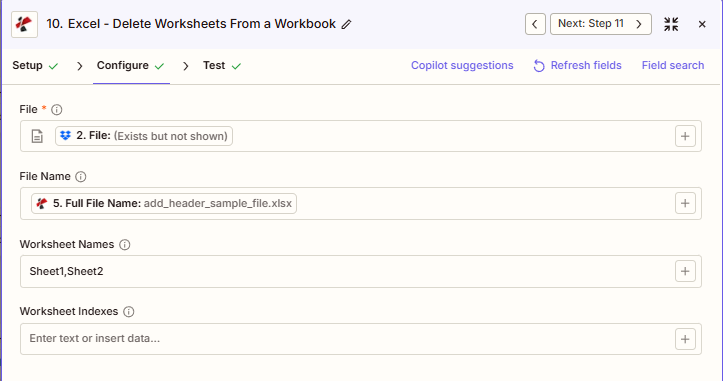
屏幕截图显示,文件是从上一步映射的,文件名为“add_header_sample_file.xlsx”,工作表名称设置为“Sheet1,Sheet2”,工作表索引为空。
添加标题样本文件.xlsx
Sheet1,Sheet2
可选(从 1 开始)
:::提示:从之前的步骤中获取映射文件和文件名
使用 + 旁边的按钮 文件 和 文件名 例如,从之前的 Zap 步骤进行映射, 完整文件名 来自前 PDF4me Excel 行动。 Excel 文件必须提供完整内容,不能仅提供“存在但未显示”的引用。
:::
:::警告 文件:(存在但未显示)
如果在“文件”字段中看到“文件:(存在但未显示)”并收到“文件为空”错误,请选择提供相应选项的选项。 完整文件内容 另见。 Zapier & Power Automate 尖端 详情请见下文。
:::
参数
删除工作表操作的完整参数列表。参数名称与……匹配 Zapier 配置 UI。
必需 Zapier UI: 仅文件。文件名、工作表名称和工作表索引均为可选,但要删除任何内容,至少需要工作表名称或工作表索引中的一个。
| 范围 | 必需的 | 它的作用 | 例子 |
|---|---|---|---|
| File | Required | Excel file content, mapped from a previous step using full file content. | [2. File from Step 2] |
| File Name | Conditional | Filename with .xlsx or .xls extension, used for output naming. | add_header_sample_file.xlsx |
| Worksheet Names | Conditional | Comma-separated, case-sensitive list of worksheet names to delete. Combines with Worksheet Indexes via union logic. | Sheet1,Sheet2 |
| Worksheet Indexes | Conditional | Comma-separated, 1-based list of worksheet positions to delete. Combines with Worksheet Names via union logic. | 1,3 |
同时使用名称和索引时的联合逻辑
当你同时指定两者时 工作表名称 和 工作表索引该操作会删除两个集合的并集。例如,“Sheet1,Sheet2”和“3”会删除 Sheet1、Sheet2 和第三个工作表。重复选择(名称和索引都相同的工作表)的情况也会得到妥善处理。
输出结果包含哪些字段?
该操作返回修改后的结果。 Excel 文件加上跟踪元数据。此输出格式在以下位置共享: PDF4me Excel 行动 Zapier 返回一个文件。
| 场地 | 类型 | 它包含什么 |
|---|---|---|
Job Id | String | Unique identifier for the Zapier job execution. |
File Url | URL | API endpoint to download the processed Excel file. Map this to the next step, Drive, Dropbox, or another PDF4me Excel action. |
Alternate File Url | URL | Alternate download URL with the filename in the path. |
File Name | String | Base filename without extension. |
File Extension | String | File extension of the output. |
Full File Name | String | Complete filename including extension. |
Document Id | String | Unique identifier for the processed document. |
File Size | Number | Size of the output file in bytes. |
Doc Text | String | Extracted text, typically empty for Excel worksheet deletion output. |
典型配置
工作流程示例Common Zapier workflow patterns using Delete Worksheets.
- 当内容库中的主模板被标记为可分发时,会触发一个触发器。
- 删除工作表时,工作表名称设置为示例和说明表名称,但工作表保持不变。
- 清理后的模板已上传回共享模板库。
- 每周的执行报告生成完毕,其中包含多个计算表,从而触发 Zap。
- 删除工作表时,工作表索引设置为内部计算表的位置,保留演示表。
- 最终报告将通过电子邮件发送给领导层。
- 每月维护触发器会触发,以清理从以下位置检索到的滚动 12 个月报告: SharePoint。
- 删除工作表功能会动态生成工作表名称,列出已超出保留期限的月份工作表。
- 精简后的滚动报告已上传回。 SharePoint。
实用技巧
速查表
| 场地 | 价值 |
|---|---|
| Action | Delete Worksheets |
| File | [mapped from previous step, full content] |
| File Name | add_header_sample_file.xlsx |
| Worksheet Names | Sheet1,Sheet2 |
| Worksheet Indexes | 1,3 (alternative or combined) |
常见问题解答
相关操作
在其他平台上执行相同任务
行业应用案例及应用
- Finance & Accounting
- Sales & Marketing
- Human Resources
- Operations & IT
- 客户报告定稿从客户财务报告中移除内部计算和假设工作表
- 预算模板清理从新财年的预算模板中删除上一年的工作表
- 审计文件编制:在审计文件归档前,移除草稿和工作底稿。
- 滚动预测维护从12个月滚动预测工作簿中删除过时的月份工作表
- 整合清理创建合并表后,删除各个实体的工作表。
- 提案最终定稿从客户提案中删除定价计算和利润分析工作表
- 模板分发从营销模板中移除示例活动和示例数据工作表
- 区域报告清理从区域绩效报告中删除不活跃的区域工作表
- 竞选档案从已存档的活动工作簿中删除测试和草稿活动工作表
- CRM导出清理从 CRM 数据导出中删除元数据和映射工作表
- 福利模板清理从福利登记模板中移除上一年的计划工作表
- 工资报告最终定稿从已分发的工资报告中删除计算和验证工作表
- 绩效考核清理从最终版的复习工作簿中移除校准和评分工作表
- 人员编制报告维护删除保留期限超过 18 个月的历史月份工作表。
- 培训日志清理从主培训日志中删除过时的培训课程工作表
- 仪表盘最终定稿从已发布的仪表板中移除数据源和 ETL 工作表
- 库存模板清理从多站点库存模板中删除示例仓库工作表
- 生产报告清理从每周生产汇总表中移除班次明细工作表
- 文件大小优化删除未使用的和隐藏的工作表以提高工作簿性能
- 系统导出清理从系统数据导出中移除技术元数据工作表