删除行 Excel 使用 Zapier
删除行 是一个 Zapier 采取行动 PDF4me 从指定列表中删除单行、范围或混合组合。 Excel 工作表使用类似“1-5,10,15-20”这样的范围语法。行会自动从下往上处理,这样可以防止因删除行的顺序错误而导致的索引偏移错误,从而避免公式出错。
相关博客文章
目前尚无关于此功能的博客文章——敬请期待。
在此期间,您可以浏览 PDF4me 博客,查看适用于各平台的教程和工作流程。
访问博客 →
我如何验证我的身份 API 要求?
要访问 PDF4me 网站 API 通过 Zapier每个请求都必须包含正确的身份验证凭据。身份验证可确保通信安全,并验证您作为授权用户的身份,从而实现与您的系统之间的无缝集成。 Zapier 工作流程和 PDF4me的 Excel 行删除服务。
您不容错过的重要事实
文件名是可选的,并非必填项。
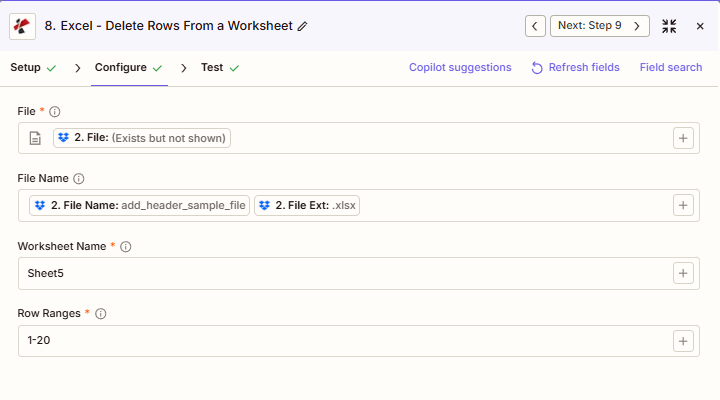
屏幕截图证实,文件、工作表名称和行范围都带有星号。 Zapier UI但文件名并非如此。它用于输出命名,而不是用于定位文件。
行从 1 开始,从下往上处理。
第 1 行是第一行,与你在……中看到的内容一致 Excel删除操作会自动从范围底部向上执行,因此以任何顺序指定行都不会导致索引移动错误。
每次运行一个工作表名称
每次操作调用都只针对一个工作表,且必须通过区分大小写的精确名称进行匹配。要清理多个工作表,请串联执行多个“删除行”步骤。
参数
删除行操作的完整参数列表。参数名称与……匹配 Zapier 配置 UI。
必需 Zapier UI: 文件名、工作表名称和行范围。文件名是可选的。
| 范围 | 必需的 | 它的作用 | 例子 |
|---|---|---|---|
| File | Required | Excel file content, mapped from a previous step using full file content. | [2. File from Step 2] |
| File Name | Conditional | Filename with .xlsx or .xls extension, used for output naming. | add_header_sample_file.xlsx |
| Worksheet Name | Required | Exact, case-sensitive name of the worksheet to delete rows from. | Sheet5 |
| Row Ranges | Required | Comma-separated row numbers and ranges. 1-based indexing, processed bottom-to-top automatically. | 1-20 |
行范围语法示例
单行: “5,10,15”删除第5行、第10行和第15行。
范围: “1-20”删除第1行到第20行。
混合: “1-3,25”删除第 1 行到第 3 行以及第 25 行,例如内部注释和计算行。
输出结果包含哪些字段?
该操作返回修改后的结果。 Excel 文件加上跟踪元数据。此输出格式在“删除行”、“添加行”、“更新行”和其他操作之间共享。 PDF4me Excel 行动 Zapier。
| 场地 | 类型 | 它包含什么 |
|---|---|---|
Job Id | String | Unique identifier for the Zapier job execution. |
File Url | URL | API endpoint to download the processed Excel file. Map this to the next step, Drive, Dropbox, or another PDF4me Excel action. |
Alternate File Url | URL | Alternate download URL with the filename in the path. |
File Name | String | Base filename without extension. |
File Extension | String | File extension of the output, .xlsx or .xls. |
Full File Name | String | Complete filename including extension. |
Document Id | String | Unique identifier for the processed document. |
File Size | Number | Size of the output file in bytes. |
Doc Text | String | Extracted text, typically empty for Excel row-deletion output. |
典型配置
工作流程示例Common Zapier workflow patterns using Delete Rows.
在向客户发送报告之前,删除内部笔记。
- 每周生成报告的步骤会完成并从 Google 云端硬盘检索完整的内部报告。
- 删除行操作将工作表名称设置为“报表”,行范围设置为 1-3,25,删除标题/内部注释行和计算行。
- 清理后的报告会上传到面向客户的云端硬盘文件夹,而原始报告则会保留在内部存档中。
对事务日志强制执行数据保留策略
- 每月定期触发的事件会从以下位置检索交易日志: SharePoint。
- 先前的步骤确定哪些行号包含超过保留窗口的数据,然后“删除行”操作将工作表名称设置为“事务”,并从该范围动态构建行范围。
- 更新后的日志已上传回。 SharePoint 合规性摘要将通过电子邮件发送给数据保留负责人。
从分布式模板中删除示例行
- 在内容管理工具中,模板被标记为可分发,并检索其主版本。
- 删除行操作将工作表名称设置为 Sheet1,行范围设置为 2-10,删除示例数据,同时保留标题行和公式。
- 清理后的模板已上传至共享模板库。
实用技巧
Map full file content, not a reference
If File shows "Exists but not shown", pick the mapping option that provides full file content, or the action returns a File Is Empty error.
Row Ranges order does not matter
Because deletion happens bottom-to-top internally, you can list ranges in any order, such as 15-20,1-5, without causing index-shifting mistakes.
Worksheet Name is case-sensitive
A typo or wrong case, like "sheet5" instead of "Sheet5", will not match and the action errors instead of silently doing nothing.
One worksheet per action call
To delete rows from multiple sheets, chain a second Delete Rows step and feed the first step's output file into it.
Preserve the header row deliberately
Since row 1 is included in 1-based numbering, double-check your Row Ranges does not accidentally include row 1 when you want to keep column headers.
速查表
| 场地 | 价值 |
|---|---|
| Action | Delete Rows |
| File | [mapped from previous step, full content] |
| File Name | add_header_sample_file.xlsx |
| Worksheet Name | Sheet5 |
| Row Ranges | 1-20 |
常见问题解答
相关操作
添加行 Excel
相反的操作,使用此方法在清理旧数据行后追加新数据行。
更新行 Excel
修改现有行的值,而不是完全删除行。
合并行
将来自不同来源的行合并到一个工作表中,这是清理工作之前或之后常见的配套步骤。
在其他平台上执行相同任务
删除行 Make
与以下操作相同 Make 模块,带有云存储触发器的可视化场景。
删除行 n8n
配置与自托管或云环境中的节点相同的行删除操作 n8n 工作流程。
删除行 Power Automate
Microsoft 365 与……流动 SharePoint, Outlook以及 Teams 触发器。
删除行 REST API
原始 PDF4me 用于自定义后端代码或 Postman 测试的端点。
行业应用案例及应用
- Finance & Accounting
- Sales & Marketing
- Human Resources
- Operations
- 客户报告清理:在外部分发之前,移除内部注释行(1-3)和计算行
- 数据保留合规性根据保留策略,删除超过 7 年的交易记录。
- 审计跟踪修剪归档前从审计日志中删除测试/样本条目
- 预算模板编制:从新周期的预算模板中删除上一年的数据行
- 对账清理从月度对账工作簿中删除已解决的差异行
- 活动结果清理在最终效果报告发布前删除测试活动数据。
- CRM导出修剪从 CRM 导出数据中移除不活跃/已删除的潜在客户行
- 价格表更新删除客户价格表中过时的产品行
- 销售报告定稿:在管理分发之前删除内部计算行
- 预测清理删除超过 12 个月滚动窗口的历史预测行
- 模板样本移除:在分发之前,从人力资源模板中删除示例员工行。
- 离职员工清理从活跃员工名册电子表格中删除单独的员工行
- 训练日志修剪删除超过 3 年的已完成培训课程记录
- 薪资档案准备:在季度工资归档之前删除测试工资行
- 福利登记清理从新的招生模板中删除上一年的招生记录
- 生产日志保留删除早于保留期的生产运行行
- 设备日志修剪从设备日志中删除旧的维护事件行
- 质量控制清理从质量控制检验日志中删除测试/校准行
- 库存历史记录修剪从库存日志中删除超过 24 个月的交易记录
- 交班报告最终定稿:在运营审查分发之前删除内部主管备注行