从中移除超链接 PDF 在 Zapier
PDF - 删除超链接 是一个 Zapier 采取行动 PDF4me 它会从……中移除可点击的链接 PDF可以针对特定页面范围或整个文档进行操作。在对外共享合同、归档记录或准备打印文档之前触发此操作,以避免内部或过时的情况发生。 URLs 永远不要携带文件出行。
相关博客文章
目前尚无关于此功能的博客文章——敬请期待。
在此期间,您可以浏览 PDF4me 博客,查看适用于各平台的教程和工作流程。
访问博客 →
此操作的作用
PDF - 删除超链接 从链接中移除可点击的链接注释 PDF针对特定页面范围或整个文档,可以执行页面删除操作。内部草稿、合同和报告通常包含指向内部维基、案例系统或仪表盘的链接,此操作会在对外交付、长期存档或打印分发之前移除这些链接,而不会影响可见页面内容本身。
验证您的身份 API 要求
每一个 PDF4me 行动 Zapier 需要关联账户。请使用您的账户进行连接。 PDF4me API 首次添加操作时需要输入密钥。
您不容错过的重要事实
仅链接,不显示文本。
此操作会移除可点击的注释,而不是其下方的文本。 URL 打印出来的可见文本会原样保留在页面上;它只是不再是可点击的链接。
页面顺序功能可以精确定位您选择的页面。
可以使用单页(1)、页码范围(1-5)或逗号分隔的列表。留空则会移除所有页面中的链接,这在只需要清理求职信或简介部分时非常有用。
PDF 文件和文件名都是必填项
根据触发器的文件名和扩展名标记映射文件名,以保留原始名称,或为清理后的输出设置自定义名称。
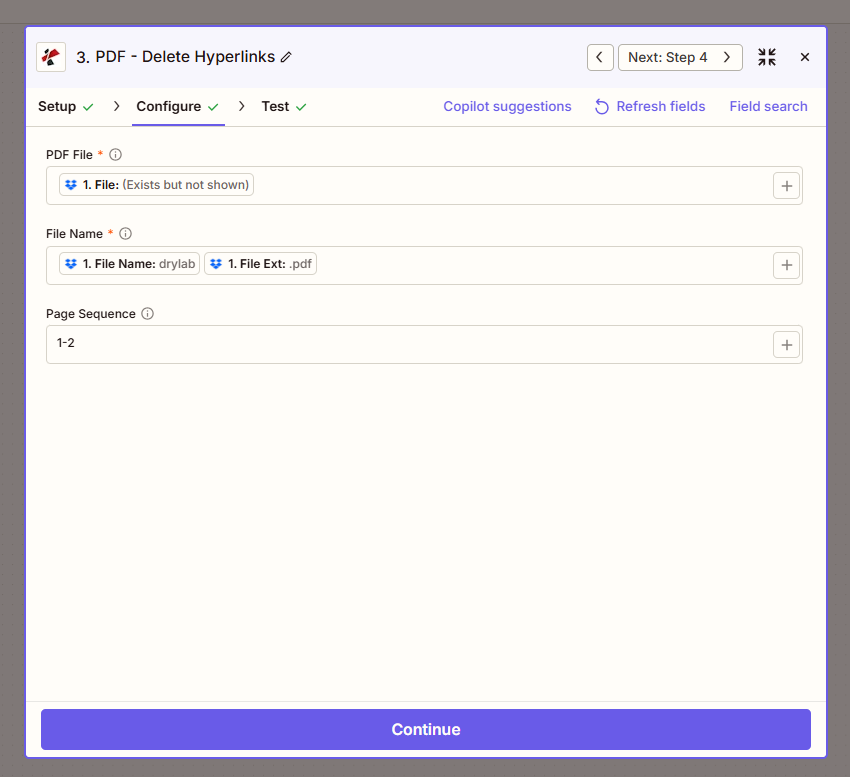
地图 PDF 文件和文件名,然后可以选择设置页面顺序来限制要清理的页面。
参数
必需的: PDF 文件 和 文件名页面顺序是可选的。
| 范围 | 必需的 | 它的作用 | 例子 |
|---|---|---|---|
| PDF File | Required | The input PDF to sanitize. Map the binary file output from a previous trigger or action step. | (binary PDF from trigger) |
| File Name | Required | Output filename. Map the File Name and File Ext tokens from the trigger to preserve the original name, or set a custom value. | drylab.pdf |
| Page Sequence | Optional | Pages to remove hyperlinks from: a single page, a range, or a comma-separated list. Leave blank to process every page. | 1-2 |
输出结果包含哪些字段?
| 场地 | 类型 | 它包含什么 |
|---|---|---|
File Content | Binary | The sanitized PDF with hyperlinks removed. |
File Url | String | Direct URL to access the sanitized PDF. |
File Name | String | Output filename without extension. |
Full File Name | String | Complete filename with the .pdf extension. |
如何设置删除超链接 PDF 在 Zapier?
- 在您的 Zap 中,点击 + 添加新操作并搜索 PDF4me。
- 选择 PDF - 删除超链接 作为事件。
- 连接您的 PDF4me 使用您的帐户 API 钥匙。
- 地图 PDF 文件 返回前一个触发器或操作步骤的二进制输出。
- 地图 文件名 从触发器的文件名和扩展名标记中获取名称,或者设置自定义名称。
- (可选) 页面顺序 (例如。
1-2) 限制删除范围至特定页面;留空则清理所有页面。 - 点击 测试操作 确认清理后的输出后,发布 Zap。
典型配置
工作流程示例Common Zapier patterns using Delete Hyperlinks from PDF.
客户交付无需内部链接
- 合同或报告已准备好交付给客户。
- PDF - 删除超链接 运行时将页面序列留空,以删除每个页面中的链接。
- 经过清理的版本会上传或通过电子邮件发送给客户,不涉及内部信息。 URLs 暴露。
档案准备
- 文件获准长期存档。
- PDF - 删除超链接 移除所有链接,以便存档副本即使在外部攻击后也能保持稳定。 URLs 打破或改变。
- 无链接版本已保存。 SharePoint 或者法律保留制度。
对封面页进行选择性清理
- 一份多页文件包括一封封面信和一份技术附录。
- 页面顺序已设置为
1因此,只有封面页的链接丢失了,附录的引用仍然保留。 URLs。 - 文档通过精细的链接控制进行合并或分发。
实用技巧
Text stays, only the click goes away
If a page shows a URL as visible text, that text remains after processing. Only the clickable annotation layer is removed.
Use a page range for partial sanitization
Set Page Sequence to just the pages that need it (e.g. 1 for a cover letter) instead of stripping links from the entire document by default.
Map File Name tokens to preserve naming
Combine the trigger’s File Name and File Ext tokens so the sanitized output keeps a predictable filename pattern for downstream steps.
Run Extract Hyperlinks first to audit
Before deleting, use Extract Hyperlinks from PDF to see exactly which links exist and on which pages, useful for deciding your Page Sequence value.
Test on a real document before production use
Confirm the sanitized file looks correct in a PDF viewer before wiring this into a live client-delivery or archival Zap.
速查表
| 场地 | 价值 |
|---|---|
| Action event | PDF - Delete Hyperlinks |
| PDF File | Binary PDF mapped from a previous step |
| File Name | drylab.pdf (from File Name + File Ext tokens) |
| Page Sequence | 1-2 (optional, blank = all pages) |
| Output | File Content, File Url, File Name, Full File Name |
| Connection | PDF4me API key |
常见问题
行业应用案例及应用
- Legal
- Healthcare
- Government
- Finance
- Education
- 客户交付在将合同发送给客户或对方律师之前,请移除内部案件系统链接。
- 特权保护在对外披露之前,移除指向特权内部资源的链接
- 选择性消毒仅删除求职信中的链接,保留附录中的参考文献链接。
- 发现准备生成用于证据开示文件的无链接版本
- 患者沟通在对外共享之前,请对患者病历摘要和转诊单进行消毒处理。
- 隐私保护删除指向内部电子病历系统或员工目录的链接
- 遵守:遵守限制共享健康信息中外部链接的政策
- 提供者交接为外部供应商和保险公司准备不包含链接的报告
- 信息自由法案回应为公共记录请求生成不包含链接的文档
- 归档合规性满足记录保存标准,要求提供稳定、无链接的副本。
- 公开发布准备无需依赖外部URL即可发布的报告
- 历史参考减轻长期存档中断链维护的负担
- 客户报表在向客户发送报表之前,移除内部仪表盘链接。
- 监管文件在向监管机构提交披露信息之前,请删除非公开链接。
- 顾问报告在向客户分发之前对报告进行清理。
- 选择性去除保留技术附录链接,同时删除封面页引用
- 印刷发行打印讲义前,请移除打印后无法点击的LMS链接。
- 离线材料为没有校园门户网站访问权限的学生生成干净版本
- 课程大纲准备从课程资料中移除失效或过期的链接。
- 选择性清理:从摘要页面移除链接,同时保留附录中的引用
相关操作
在 PDF 中创建超链接
添加可点击链接 PDF与删除链接相反的操作是建立链接。
从PDF中提取超链接
在决定清理哪些页面之前,请审核每个链接及其页面位置。
更新超链接注释
更改链接的目标地址而不是完全删除它,这在以下情况下很有用: URL 只需更新一下。