读取 SwissQR 代码 Zapier
读取 SwissQR 码 是一个 Zapier 采取行动 PDF4me 解码瑞士 QR-账单嵌入在 PDF 并向债权人、债务人返还款项 IBAN金额和参考数据 JSON. 使用此功能可以自动重命名发票、将付款与会计记录匹配,或按金额或参考编号路由文档,而无需手动输入数据。
相关博客文章(1)
此操作的作用
PDF4me 读取 SwissQR 码 需要一 PDF 包含一个 瑞士 QR-账单 (QR-发票) 并在 Zap 中返回其结构化支付数据。映射 文件并且该操作返回 文档文本,一个 JSON 字符串 IBAN债权人、最终债权人、债务人、金额、货币和参考字段。使用代码解析它 Zapier 实现发票重命名、付款匹配或会计自动化的步骤。
验证您的身份 API 要求
要访问 PDF4me 网站 API 通过 Zapier每个请求都必须包含正确的身份验证凭据。
您不容错过的重要事实
文档文本是 JSON 字符串,而不是单个字段
该操作返回一个字段,
文档文本,将整个解码后的有效载荷保存为 JSON 字符串。您需要一个代码。 Zapier (运行 JavaScript)步骤 JSON解析 在映射单个值之前,例如 国际银行账户 或者 ud_Name。字段名称使用 cr_/ucr_/ud_ 前缀
cr_ 是债权人, ucr_ 是最终债权人(通常为空),并且 出去_ 是最终债务人,符合瑞士支付标准(SPC字段命名。 cr_Name 和 ud_Name 这两个字段是大多数工作流程都会用到的。使用原始文件 PDF而不是此操作的输出
读取 SwissQR 代码会返回有关数据的信息 PDF它没有通过 PDF 继续向前发展。不断引用。 文件 从您的触发器中触发任何上传文件、电子邮件或存储步骤。
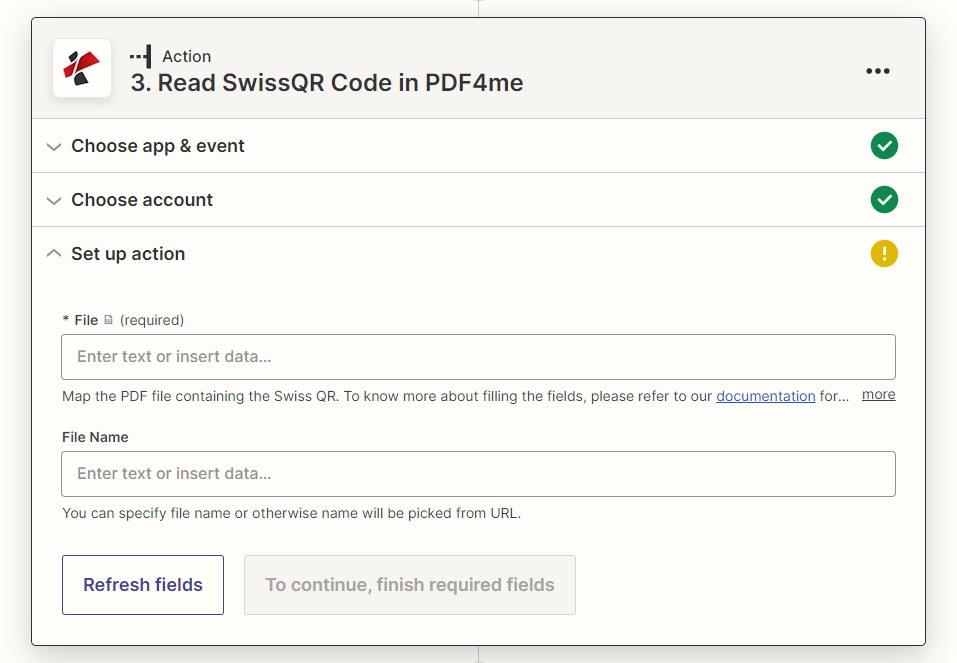
设置操作面板:仅“文件”为必填项,“文件名”为可选项。
参数
必需 Zapier UI: 文件。文件名是可选的。
| 范围 | 必需的 | 它的作用 | 例子 |
|---|---|---|---|
| File | Required | The PDF containing the Swiss QR-bill to decode. Map from your trigger or a previous step. | 1. File |
| File Name | Optional | Name for the response file. If left blank, the name is picked from the source URL. | invoice.pdf |
输出
该操作返回文件元数据以及一个有效负载字段, 文档文本,一个 JSON 字符串。解析该字符串以获取单个瑞士人的信息。 QR-表格下方列出的账单字段。
| 场地 | 类型 | 它包含什么 |
|---|---|---|
File Name | String | Name of the generated response file, from File Name or picked from the source URL. |
File Extension | String | Extension of the response file, .json. |
Full File Name | String | Complete filename including extension. |
File Alternate Url | String | URL to the generated JSON response file. |
Document Id | String | Unique identifier for this processing run. |
File Size | Number | Size of the response file in bytes. |
Doc Text | String (JSON) | The decoded Swiss QR-bill payload as a JSON string. Parse it to reach IBAN, creditor, debtor, amount, currency, and reference fields. |
文档文本字段(之后) JSON.解析)
| 场地 | 它包含什么 |
|---|---|
QRType, Version, CodingType | Swiss Payment Standards header data identifying this as an SPC QR payload and its version. |
IBAN | Creditor IBAN the payment settles to. |
cr_Name, cr_StreetOrAddressLine1, cr_PostalCode, cr_City, cr_Country | Creditor (biller) name and address. |
ucr_Name, ucr_StreetOrAddressLine1, ucr_PostalCode, ucr_City, ucr_Country | Ultimate creditor fields, populated only when the creditor differs from the ultimate payee. |
Amount, Currency | Payment amount and currency (CHF or EUR). |
ud_Name, ud_StreetOrAddressLine1, ud_PostalCode, ud_City, ud_Country | Ultimate debtor (payer) name and address. |
ReferenceType, Reference | Reference type (QRR, SCOR, or NON) and the reference number itself. |
UnstructuredMessage, BillingInfo | Free-text payment message and structured billing information, when present on the bill. |
如何在设置中读取 SwissQR 码 Zapier?
- 添加 PDF4me 选择 Zap 中的操作应用程序并进行选择 读取 SwissQR 码。
- 连接您的 PDF4me 创建一个帐户或选择现有连接。
- 地图 文件 瑞士 QR-账单 PDF 从触发器或上一步开始。(可选)映射 文件名。
- 测试步骤并检查 文档文本 在“数据输出”面板中,它是一个 JSON 细绳。
- 添加一个 代码 Zapier (运行 JavaScript) 接收文档文本的步骤,运行
JSON解析并返回您需要的特定字段(ud_Name,cr_Name,国际银行账户,参考或其他)。 - 将解析后的值映射到 上传文件 (用于重命名) 筛选 或者 路径 步骤(用于路由),或电子表格/会计操作。
瑞士是什么? QR-比尔和它为什么需要特殊读者?
瑞士人 QR-账单 (QR-Rechnung)是瑞士支付标准格式,自2022年9月30日起成为瑞士唯一有效的支付单据,取代了旧的橙色和红色支付单据。它对债权人、债务人、 IBAN、金额和参考数据在 QR 使用的代码 SPC (瑞士支付代码)结构,一种固定的字段顺序,类似于通用条形码或 QR 扫描器读取的是原始文本,但无法映射到命名字段。读取 SwissQR 代码可以解码该内容。 SPC 结构并按名称返回它 JSON 字段。
典型配置
工作流程示例Common Zapier patterns using Read SwissQR Code.
按债务人姓名自动重命名发票
- 文件夹中的新文件触发(Dropbox、Google Drive、 SharePoint)向新的瑞士开火 QR-账单 PDF。
- 读取 SwissQR 代码,文件和文件名从触发器映射而来,返回文档文本。
- 代码 Zapier 该步骤解析文档文本并返回 ud_Name(债务人)。
- 上传文件保存相同内容 PDF 包含已解析名称的内容,以便按付款人搜索文件。
将收到的款项与会计记录进行核对
- 电子邮件或文件夹触发器会发送一个瑞士 QR-账单 PDF。
- 读取 SwissQR 代码提取文档文本,然后是代码 Zapier 步骤解析 IBAN金额和参考信息。
- 会计系统(QuickBooks、Xero 或自定义数据库)中的查找步骤将参考信息与未结发票进行匹配。
- 后续步骤会将发票标记为已付款并记录交易。
按金额或参考类型路由
- 读取 SwissQR 代码,处理收到的账单并返回文档文本。
- 代码 Zapier 步骤解析金额和参考类型。
- Paths 步骤会将高价值付款分支到人工审批队列中, QRR-将参考付款自动记账。
实用技巧
Doc Text always needs a parse step
There is no built-in field mapping for individual Swiss QR-bill values. Budget for a Code by Zapier step in every Zap that uses this action.
cr_ vs ud_ vs ucr_ is easy to mix up
cr_ is the creditor (who gets paid), ud_ is the ultimate debtor (who is paying), ucr_ is the ultimate creditor and is usually blank. Double-check which prefix your workflow actually needs.
ReferenceType tells you the reference format
QRR means a 27-digit QR reference, SCOR means a Creditor Reference (ISO 11649), NON means no structured reference, only UnstructuredMessage. Branch your parsing logic on ReferenceType if you support more than one format.
Amount can be null for open-amount bills
Some Swiss QR-bills are issued without a fixed Amount, letting the payer enter it. Handle a null or missing Amount in your Code by Zapier step rather than assuming it is always present.
The action reads, it does not validate compliance
This action decodes whatever SPC data is embedded in the QR code. It does not certify Swiss banking regulatory compliance, that responsibility stays with however the bill was originally issued.
速查表
| 场地 | 价值 |
|---|---|
| Action | Read SwissQR Code |
| File | Required, Swiss QR-bill PDF |
| File Name | Optional |
| Output payload | Doc Text (JSON string) |
| Common parsed fields | IBAN, cr_Name, ud_Name, Amount, Currency, Reference |
| Parse step needed | Code by Zapier, JSON.parse(Doc Text) |
| Counterpart action | Create SwissQR Bill (generates the QR-bill instead of reading it) |
常见问题
相关操作
创建 SwissQR 账单
相应的行动会产生瑞士 QR-账单 PDF 从 IBAN,债权人,以及金额数据,而不是只读取一个数据。
分类文件
对传入内容进行排序 PDFs 首先按类型分类,然后仅对分类为瑞士二维码的二维码运行“读取瑞士二维码”命令。 QR账单。
解析文档
对于没有瑞士税号的发票 QR-bill,改用映射解析模板提取行项目和标题数据。
行业应用案例及应用
- Swiss Banking & Financial Services
- Swiss Business & Professional Services
- Swiss E-commerce & Retail
- Swiss Government & Public Sector
- 支付处理读取 SwissQR 码,实现自动支付处理和交易处理
- 交易管理提取支付数据以进行全面的交易处理和对账
- 合规报告:将解码后的参考数据和金额数据输入内部审计跟踪记录
- 客户服务使用自动化的 SwissQR 码识别功能处理客户付款和咨询。
- 发票处理读取发票上的 SwissQR 码,实现自动支付处理和会计核算。
- 客户管理提取客户账单和付款跟踪所需的付款信息
- 财务管理:实现 SwissQR 码自动读取,以进行全面的财务管理
- 文档自动化:通过集成 SwissQR 码读取功能,简化业务文档处理流程
- 订单处理读取 SwissQR 码,实现订单自动处理和收款。
- 支付跟踪提取支付数据,以实现全面的订单和支付跟踪
- 客户体验通过自动化的 SwissQR 码处理提升客户支付体验
- 库存管理将支付数据与库存管理和订单履行关联起来
- 公共服务阅读 SwissQR 码,了解政府服务和公共部门支付处理信息
- 税务管理提取税款支付和政府收费处理的支付数据
- 档案管理将解码后的支付数据导入公共部门会计的内部记录系统。
- 数字服务利用 SwissQR 码自动化实现公共部门支付处理的现代化