创造瑞士 QR 比尔 Zapier
此操作的作用
PDF4me 创建 SwissQR 账单 生成瑞士支付标准(SPS符合 瑞士 QR-账单(QR-发票) 在你里面 Zapier 工作流程。转换来自 Bexio、Sage、Abacus、QuickBooks、Xero、Microsoft Dynamics 或任何其他系统的发票数据。 Zapier将连接的源文件转换为可直接打印的瑞士格式 QR-账单 IBAN,结构化债权人和最终债务人详情, QR 参考 (QRR)或债权人参考(SCOR金额、货币和多语言标签。输出格式为: PDF, PNG, JPEG, 或者 TIFF瑞士所有银行均接受此卡。 PostFinance以及自那时起使用的瑞士银行应用程序 QR-账单于2022年9月30日成为瑞士唯一有效的支付凭证。
验证您的身份 API 要求
要访问 PDF4me 网站 API 通过 Zapier所有操作都必须经过身份验证。点击 连接新帐户 第一次粘贴你的 PDF4me API 关键在于,后续的 Zap 操作会自动重用该连接。
您不容错过的重要事实
配置 Zapier
在 配置 步骤,字段按以下顺序出现。 格式类型, IBAN, 债权人地址类型, 和 债权人名称 必填项(标有星号) Zapier其他字段为可选或条件字段。
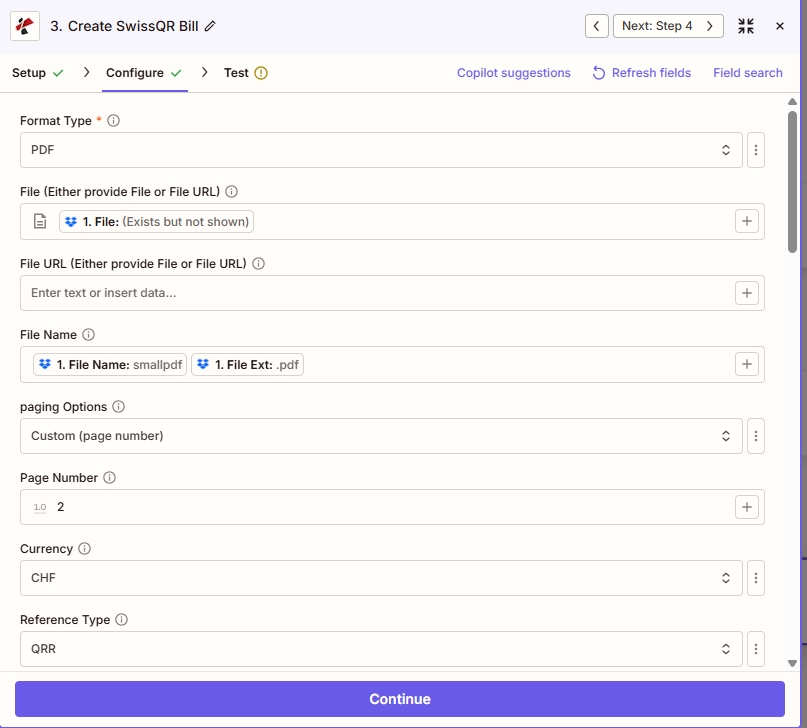
输出和 PDF 位置: 放 格式类型 (PDF/PNG/JPEG/TIFF),地图可选 文件 或者 文件 URL 和 文件名, 选择 分页选项 (这里 自定义(页码) 和 页码 2), 然后 货币 和 参考类型 (例子: CHF 和 QRR)。
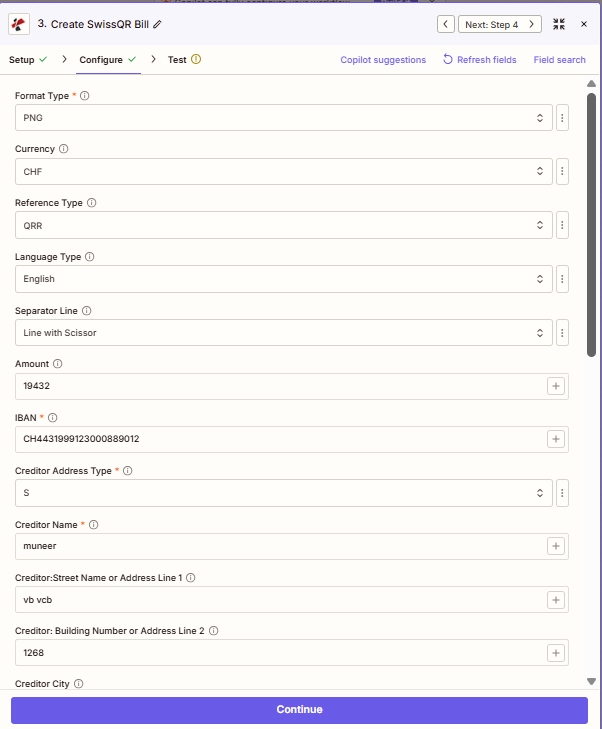
付款方和债权人: 货币, 参考类型, 数量, IBAN以及结构化的 债权人 地址字段(S = 结构化)。
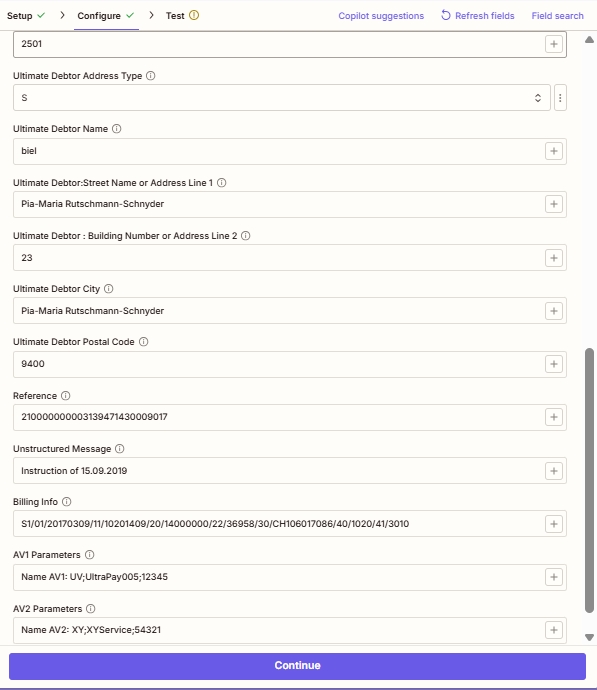
债务人、推荐人和高级字段: 选修的 最终债务人 细节, 参考 (为了 QRR/SCOR), 非结构化消息, 账单信息 (Swico)和 AV1 / AV2 参数。
参数
创建 SwissQR 账单操作会显示 26 个字段,这些字段以如下方式呈现: Zapier UI 分为五个可滚动区块。以下屏幕截图反映了字段的确切顺序,并截取了实际运行中验证过的示例值。
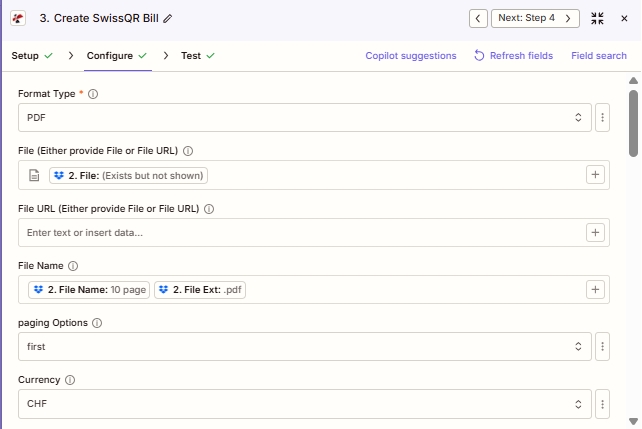
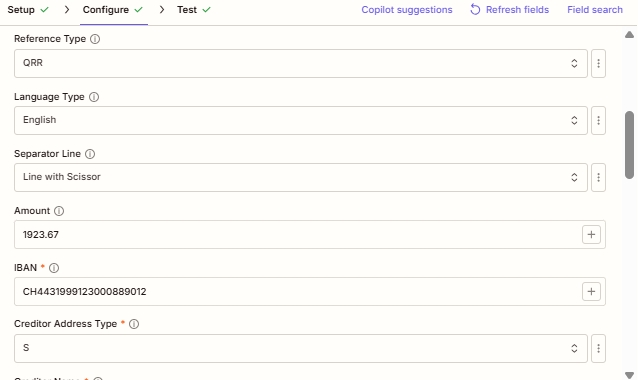
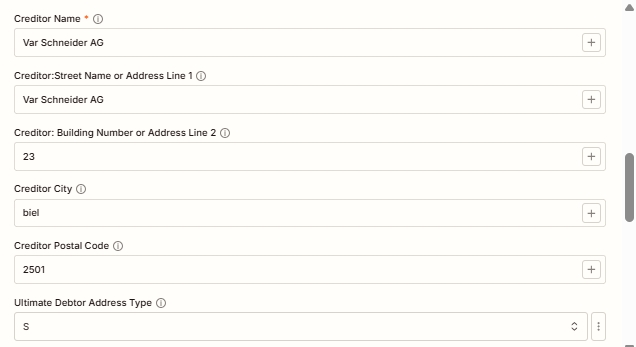
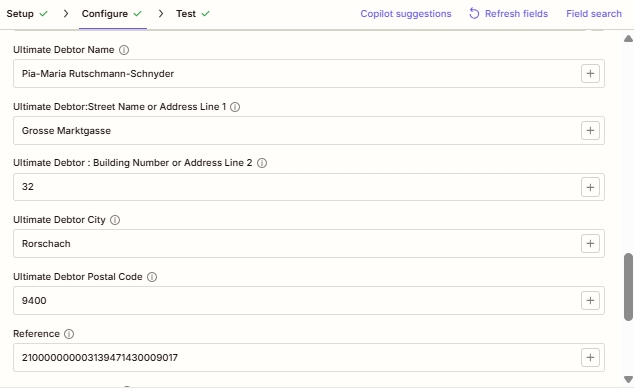
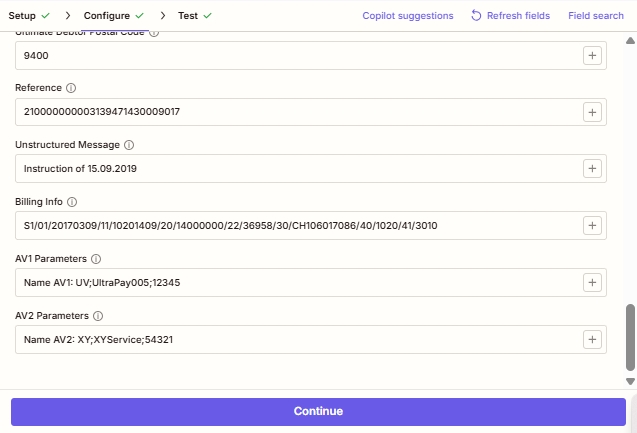
必需 Zapier UI (带星号): 格式类型 IBAN债权人地址类型,债权人名称。 条件: 文件或文件 URL (二选一,用于嵌入时) QR-现有账单 PDF); 页码(当分页选项为自定义时)。 强烈推荐使用有效的瑞士 QR账单: 所有债权人地址字段和最终债务人字段。瑞士支付标准规范要求提供完整的地址数据,即使…… Zapier UI 不加星号。
| 范围 | 必需的 | 它的作用 | 例子 |
|---|---|---|---|
| Format Type | Yes | Output file format. PDF for print-ready Swiss QR-bills (default), PNG/JPEG for digital web or email embedding, TIFF for archival quality, Empty/null for raw data. Asterisked in the Zapier UI. | PDF |
| File | Conditional | Base PDF where the Swiss QR-bill will be embedded. Either provide File or File URL, not both. Map binary content from a previous step (Dropbox, Google Drive, HTTP). Hint: "Either provide File or File URL". | Input sample (sample.pdf)1. File |
| File URL | Conditional | Public URL to the base PDF. Either provide File or File URL. PDF4me downloads the file and embeds the QR-bill onto it. | Input sample (sample.pdf)1. File |
| File Name | No | Output filename for the generated Swiss QR-bill document. Include the extension matching Format Type (.pdf, .png, .jpg, .tiff). | Output sample (sample.swissqr.pdf) |
| paging Options | No | Controls where the QR-bill is placed in the output PDF. First (top of doc), Last (final page), Add Page At End (appends a new dedicated QR-bill page), Custom (specific page index; requires Page Number below). | Custom (page number) |
| Page Number | Conditional | Specific page index for the QR-bill placement. Required when paging Options is Custom. Page index starts at 1. | 3 |
| Currency | No | Currency for the QR-bill payment amount. Only CHF (Swiss Franc, default for Swiss domestic) and EUR (cross-border) are valid per SPS specification. | CHF |
| Reference Type | No | Sent as code: NON (No Reference, for simple payments), QRR (27-digit QR Reference for QR-IBAN auto-reconciliation), or SCOR (ISO 11649 Creditor Reference for SEPA-compatible cross-border). | QRR |
| Language Type | No | Display language for printed QR-bill labels. Options: English, German, French, Italian. Match the recipient's Swiss region. | English |
| Separator Line | No | Visual separator between invoice body and QR-bill tear-off section. Options: "Line with Scissor" (Swiss standard for printed bills), Simple Line, No Line. | Line with Scissor |
| Amount | No | Payment amount in the chosen Currency. Enter as a number with up to two decimal places. Leave blank if the customer fills in the amount themselves. | 19432 |
| IBAN | Yes | Creditor's Swiss IBAN. Must start with CH and have 19 digits total. For QRR reference type, use a QR-IBAN (with QR-IID 30000-31999). Asterisked in the Zapier UI. | CH4431999123000889012 |
| Creditor Address Type | Yes | Address format for creditor information. Sent as code S (Structured, recommended for Swiss banking) or K (Combined, two free-form lines). Asterisked. | S |
| Creditor Name | Yes | Full name of the creditor (company or individual) as registered with the bank. Printed on the generated QR-bill. Asterisked. | muneer |
| Creditor: Street Name or Address Line 1 | No | Street name for the creditor (Structured) OR first free-form address line (Combined). Strongly recommended for valid SPS output. | vb vcb |
| Creditor: Building Number or Address Line 2 | No | House/building number (Structured) OR second free-form address line (Combined). | 1268 |
| Creditor City | No | Swiss city for the creditor. Must correspond to the Postal Code. | Zurich |
| Creditor Postal Code | No | Valid 4-digit Swiss postal code for the creditor. | 2501 |
| Ultimate Debtor Address Type | No | Address format for the party who will pay the bill. S (Structured) or K (Combined). Use S for automated processing. | S |
| Ultimate Debtor Name | No | Full name of the party who will pay. Appears in the payment section of the printed QR-bill. | Pia-Maria Rutschmann-Schnyder |
| Ultimate Debtor: Street Name or Address Line 1 | No | Debtor street name (Structured) or first free-form line (Combined). | Grosse Marktgasse |
| Ultimate Debtor: Building Number or Address Line 2 | No | Debtor house/building number or secondary address line. | 23 |
| Ultimate Debtor City | No | Swiss city of the debtor. | Rorschach |
| Ultimate Debtor Postal Code | No | Valid 4-digit Swiss postal code for the debtor. | 9400 |
| Reference | No | The actual reference value embedded in the QR code. Required content when Reference Type is QRR (27-digit numeric) or SCOR (ISO 11649 starting with RF). Empty when Reference Type is NON. | 210000000003139471430009017 |
| Unstructured Message | No | Free-form payment note printed on the QR-bill. Combined with Billing Info, max 140 characters total. Useful for invoice references when Reference Type is NON. | Instruction of 15.09.2019 |
| Billing Info | No | Structured billing information per Swiss QR-bill specification (Swico syntax). Encodes invoice number, date, VAT details. Combined with Unstructured Message, max 140 characters total. | S1/01/20170309/11/10201409/20/14000000/22/36958/30/CH106071086/40/1020/41/3010 |
| AV1 Parameters | No | Alternative procedure parameter 1 (AV1). Reserved for future Swiss payment alternative procedures and bilateral agreements between sender and receiver. | Name AV1: UV;UltraPay005;12345 |
| AV2 Parameters | No | Alternative procedure parameter 2 (AV2). Reserved for future Swiss payment alternative procedures. | Name AV2: XY;XYService;54321 |
格式类型选项
控制生成的瑞士国旗的输出文件格式 QR-账单。
PDF默认(可直接打印)PNG网络和数字嵌入JPEG便于电子邮件发送的压缩图像多伦多国际电影节档案级品质空(null)原始数据输出参考类型选项
控制嵌入其中的支付参考标准。 QR 代码。这将直接影响收款方银行对账单中付款的核对方式。
非无需参考资料(简单付款)QRRQR 参考号(27 位瑞士对账码)得分债权人参考(ISO 11649 SEPA)地址类型选项
适用于两者 债权人地址类型 和 最终债务人地址类型。
S结构化(推荐)K合并(两条自由曲线)分页选项
控制位置 QR-账单被放置在输出中 PDF 当格式类型为 PDF。
第一的最后的在末尾添加页面自定义(页码)示例文件
使用这些文件进行测试 创建 SwissQR 账单 在连接带电的 Zap 之前。 sample.pdf 是 输入平原 PDF 你映射到 文件 (或主办方) 文件 URL)。 sample.swissqr.pdf 是 输出同一份文档 PDF4me 瑞士人补充道 QR-账单支付部分,包含您配置的信息。 IBAN债权人、参考字段。
示例.pdf示例.swissqr.pdf输出字段
| 场地 | 类型 | 它包含什么 |
|---|---|---|
File Content | Binary | Generated Swiss QR-bill file (PDF/PNG/JPEG/TIFF). Map into the next step for upload, email, or further processing. See sample.swissqr.pdf for a PDF example. |
File Url | String | Direct URL to access the generated QR-bill, useful for sharing or downstream HTTP processing. |
File Name | String | Output filename without extension (for example sample.swissqr when the full name is sample.swissqr.pdf). |
Full File Name | String | Complete output filename with extension matching the chosen Format Type (for example sample.swissqr.pdf). |
快速设置
- 在 Zapier, 点击 + 添加新操作并选择 PDF4me。
- 选择 创建 SwissQR 账单 作为行动事件。
- 连接您的 PDF4me 帐户或粘贴您的 API 出现提示时按下按键。
- 放 格式类型: PDF 对于打印的发票, PNG/JPEG 用于网页/电子邮件 TIFF 仅供存档。
- 如果嵌入 QR-现有账单 PDF, 地图 文件 或者 文件 URL (两者不可兼得)并选择 分页选项 (自定义要求) 页码)。
- 进入 货币 (
CHF对于瑞士国内而言,EUR(跨境) 数量, 参考类型 (QRR/SCOR/NON), 语言类型, 和 分离线。 - 进入 IBAN (有效的瑞士瑞士法郎) IBAN; 为了 QRR 引用类型使用 QR-IBAN 和 QR-IID 30000: 31999)。
- 填写所有 债权人 字段:姓名、地址类型(建议使用 S)、街道名称、楼号、城市、邮政编码。
- 充满 最终债务人 包含付款方详细信息的字段(采用相同的结构化/组合模式)。
- 对于更复杂的情况,请添加 参考 (27 位) QRR 或射频... SCOR), 非结构化消息, 账单信息 (Swico语法) AV1, AV2。
- 使用示例数据测试该操作,验证输出,然后启用 Zap。
工作流程示例
工作流程示例Common Zapier workflow patterns using Create SwissQR Bill.
- 当瑞士客户的新 B2B 发票最终确定时,Bexio、Sage 或 Abacus webhook 会触发。
- PDF4me 创建 SwissQR 账单:格式类型 = PDF货币 = CHF,参考类型 = QRR (和 QR-IBAN),语言类型 = 德语,金额和 IBAN 从 webhook 有效负载映射而来。
- 债权人字段来自您的公司记录;最终债务人字段来自源系统中的客户记录。
- Gmail 或 Outlook 步骤发送 QR-账单 PDF 以电子邮件附件的形式发送到客户的账单邮件中。该文件已完全加载。 SPS符合规定,可通过任何瑞士银行应用程序进行即时支付。
- Google Sheets 或 Airtable 日志记录发票 ID、客户、金额、 QR 应收账款核对的参考编号和时间戳。
- 当瑞士客户选择“通过银行转账付款”而不是使用银行卡付款时,Shopify、WooCommerce 或 Stripe 的结账 webhook 就会触发。
- PDF4me 创建 SwissQR 账单:格式类型 = PNG (图像嵌入),货币 = CHF,参考类型 = QRR,金额取自订单总额,语言类型与客户的语言区域匹配。
- 这 PNG 图片以内嵌方式嵌入在……中 HTML 订单确认电子邮件,以便客户可以直接在银行应用程序中扫描进行支付。
- 已收到款项 → 银行对账单匹配 QR 自动追溯到原订单。
- Shopify订单标记为已付款后,无需人工核对或猜测发票号码即可开始发货。
- 时间表 Zapier 每月1日触发月度订阅计费。 CHF。
- Google Sheets 或 Airtable 的查找功能可以检索所有活跃订阅者及其信息。 IBAN地址、金额和 QR 参考模板。
- 循环 Zapier 遍历每个订阅者。 PDF4me 创建 SwissQR 账单会生成一个 QR每行账单 QRR 参考页和页尾添加页码。
- 每个 QR-账单 PDF 邮件会通过 Gmail 发送给订阅者,并存档在 Microsoft 数据库中。 SharePoint 使用类似这样的文件名模式
qrbill_{customerId}_{YYYY-MM}.pdf。 - 每月向财务团队发送的汇总电子邮件会报告总发票金额、订阅用户数量和异常数量,以便从第一天起就能清晰了解现金流情况。