EPC QR Code 生成器 Zapier
创造 EPC QR Code 是一个 Zapier 采取行动 PDF4me 由此产生了欧洲支付委员会 QR 代码 SEPA 信用转账付款。地图受益人 BIC, IBAN发票上的金额和参考编号 CRM 客户只需扫描二维码,即可使用任何欧洲银行应用程序立即付款,无需人工操作。 IBAN 入口。
相关博客文章
目前尚无关于此功能的博客文章——敬请期待。
在此期间,您可以浏览 PDF4me 博客,查看适用于各平台的教程和工作流程。
访问博客 →
此操作的作用
创造 EPC QR Code 生成可扫描的内容 QR 编码代码 SEPA 信用转账支付数据,受益人 BIC, IBAN金额、业务代码和参考编号,均遵循欧洲支付委员会规范。嵌入生成的 QR 发票 PDFs通过电子邮件或付款提醒,欧元区各地的客户可以使用手机银行应用程序扫描付款,而无需输入密码。 IBAN。
验证您的身份 API 要求
每一个 PDF4me 行动 Zapier 需要关联账户。请使用您的账户进行连接。 PDF4me API 首次添加操作时需要输入密钥。
您不容错过的重要事实
10 个字段中只需填写 2 个
受益人的 BIC 受益人姓名是唯一必填字段。 IBAN金额、业务代码、参考编号、汇款信息和提示文字均为可选,但这些信息足以构成可用的付款方式。 QR 通常需要 IBAN 数量也很多。
V2 是目前推荐的版本。
指定 EPC 面板中默认版本为 V1,但 V2 是欧洲支付委员会目前针对新实施方案的建议版本。V1 版本仍然可用,以兼容旧版银行应用程序。
名称中若包含重音字符,请使用 UTF-8 编码。
指定 EPC 当收款人姓名或汇款文本包含重音字母或非拉丁字符时,字符集应设置为 UTF8,以避免扫描代码时出现编码错误。
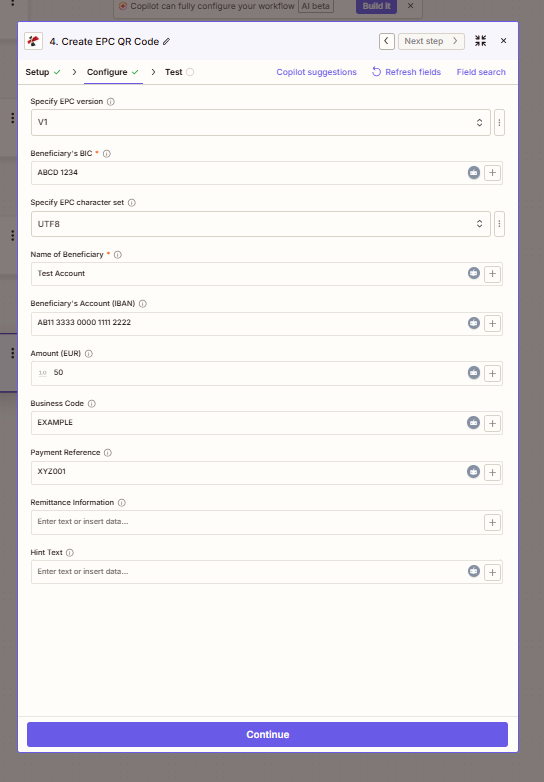
映射两个必需的受益人字段,然后添加 IBAN付款金额、付款参考信息 QR 代码。
参数
必需的: 受益人的 BIC 和 受益人姓名其他字段均为选填项。
| 范围 | 必需的 | 它的作用 | 例子 |
|---|---|---|---|
| Specify EPC version | Optional | EPC QR specification version. V2 is recommended for new implementations; V1 remains for compatibility. | V1 |
| Beneficiary's BIC | Required | Bank Identifier Code (SWIFT) of the beneficiary's bank. | ABCD 1234 |
| Specify EPC character set | Optional | Character encoding for the QR payload. Use UTF8 for international names and accented characters. | UTF8 |
| Name of Beneficiary | Required | Recipient or company name for the payment. | Test Account |
| Beneficiary's Account (IBAN) | Optional | International Bank Account Number the payment settles into. | AB11 3333 0000 1111 2222 |
| Amount (EUR) | Optional | Payment amount in euros. | 10.50 |
| Business Code | Optional | SEPA purpose code for the payment. | EXAMPLE |
| Payment Reference | Optional | Invoice or reference number shown to the payer. | XYZ001 |
| Remittance Information | Optional | Free-text payment description, maximum 140 characters. | Invoice #4521 - March services |
| Hint Text | Optional | Additional instructions displayed to the payer in supporting apps. | Scan to pay your invoice |
输出结果包含哪些字段?
| 场地 | 类型 | 它包含什么 |
|---|---|---|
File Content | Base64/Binary | The generated EPC QR code image, ready for embedding or storage. |
File Url | String | Direct URL to access the generated QR code image, when applicable. |
File Name | String | Output file identifier for downstream steps. |
如何设置创建 EPC QR Code 在 Zapier?
- 在您的 Zap 中,点击 + 添加新操作并搜索 PDF4me。
- 选择 创造 EPC QR Code 作为事件。
- 连接您的 PDF4me 使用您的帐户 API 钥匙。
- 地图 受益人的 BIC 和 受益人姓名两个必填字段。
- 添加 受益人账户(IBAN), 数量 (EUR), 和 付款参考 来自您的发票或账单数据。
- 放 指定 EPC 版本 新版本升级到 V2,并且 指定 EPC 字符集 国际名称采用UTF-8编码。
- 点击 测试操作 确认生成的 QR 编写代码,然后发布 Zap。
典型配置
工作流程示例Common Zapier patterns using Create EPC QR Code.
欧洲发票,可扫描付款 QR
- 在 Xero 或 QuickBooks 等会计系统中创建新发票。
- 创造 EPC QR Code 映射发票金额、受益人 IBAN以及参考编号。
- 这 QR 发票中嵌入了代码。 PDF 或作为电子邮件附件发送。
- 顾客使用银行应用程序扫描此卡,即可在几秒钟内完成支付。
订阅续费提醒
- 订阅续订或定期计费事件在计费系统中触发。
- 客户姓名 IBAN,并且数量被提取并映射到 创造 EPC QR Code。
- 生成的 QR 验证码将通过电子邮件或自助服务门户发送给客户。
- 顾客扫描商品并付款,减少了人工付款录入和续费流失。
捐赠 QR 筹款活动代码
- 新的捐赠者或活动注册会触发 Zap。
- 创造 EPC QR Code 生成 QR 捐款金额可以是固定的,也可以是可变的。
- 这 QR 已包含在感谢邮件中,方便您进行银行转账。
- 这 CRM 日志显示 QR 已发送代码用于捐赠者后续跟进。
实用技巧
Check BIC and IBAN formatting
BIC should be 8 or 11 characters. IBAN must be valid for the SEPA zone; watch for grouped-format spacing some banks use, e.g. AB11 3333 0000 1111 2222.
Map dynamic data from earlier steps
Use the field-mapping button next to any parameter to insert values from a trigger or earlier action, invoice amount from a form, beneficiary details from a CRM record.
Prefer V2 for new automations
V2 is the current European Payments Council recommendation. Only use V1 if a specific downstream banking app requires it.
Keep Remittance Information under 140 characters
The EPC QR spec caps remittance text at 140 characters; longer text may be truncated by the receiving bank app.
Test scans with your customers’ typical banking apps
EPC QR support varies by bank and app version. Confirm the generated code scans correctly on the apps your actual customer base uses before rolling out broadly.
速查表
| 场地 | 价值 |
|---|---|
| Action event | Create EPC QR Code |
| Beneficiary's BIC | ABCD 1234 (required) |
| Name of Beneficiary | Test Account (required) |
| IBAN / Amount / Reference | Optional but typical for a usable payment QR |
| EPC version | V2 recommended |
| Character set | UTF8 for international names |
| Output | File Content, File Url, File Name |
| Connection | PDF4me API key |
常见问题
行业应用案例及应用
- Invoicing & Accounting
- E-commerce
- Subscription Services
- Professional Services
- Nonprofits
- 即时支付在发票中嵌入EPC二维码,实现一次扫描即可完成SEPA支付
- 误差减少消除支付过程中手动输入IBAN的错误
- 更快的结算利用扫码支付发票加速现金流
- B2B计费简化专业服务和批发发票流程
- 货到付款为手动银行转账结账流程生成支付二维码
- 订单确认在确认邮件中添加可扫描的支付二维码
- 市场支付支持买家选择银行转账而非信用卡支付
- 装箱单二维码:在装箱单上添加支付二维码,以便进行送货上门计费
- 续订提醒在订阅续订邮件中发送可扫描的二维码
- 降低客户流失率降低支付摩擦,提高续费完成率
- 计费系统集成连接 Stripe Billing、Chargebee 或 Recurly 数据
- 会员费通过二维码自动收取定期会员费
- 品牌发票将EPC二维码嵌入品牌PDF发票中
- 预付费账单加快固定费用项目和预付款的收款速度
- 一键支付无需客户手动复制 IBAN 或提供参考信息。
- 实践管理整合:连接基于 CRM 的发票工具
- 捐赠二维码在筹款邮件中添加可扫描的捐款二维码
- 会员续费自动发送会员费支付提醒
- 减少弃置降低对未完成银行转账的行政跟进力度
- 活动注册支持基于转账的活动费用收取
相关操作
创建 SwissQR 账单
生成瑞士等值付款 QR 代码,用于以瑞士SIX集团SPC格式结算的发票,而不是 SEPA。
添加条形码或 QR Code 到 PDF
嵌入生成的 EPC QR 将代码图像直接插入发票 PDF 页。
生成单个文档
从数据源构建发票模板本身,然后添加 EPC QR 编写代码作为后续步骤。