AI收据解析器 Power Automate
AI收据解析器 是一个 Power Automate 采取行动 PDF4me 上面写着收据 PDF 或者将图像和退货商家详情、明细项目、财务总额和支付方式作为结构化数据。使用它来自动捕获费用、馈送 Excel 或者使用 Power BI 进行费用跟踪,或者直接将交易记入 Dynamics 365 无手动输入。
此操作的作用
PDF4me AI收据解析器 阅读收据(PDF, PNG, JPG, 或者 JPEG)并返回 商家信息, 明细项目, 财务总额, 和 付款方式 结构化 JSON它还认可专业领域。 酒店, 燃料和能源, 卫生保健, 和 训练 收据,并可提取额外信息 自定义字段 超出标准模式。
我如何验证我的身份 Power Automate 流动?
致电 PDF4me 通过 Power Automate流程需要一个有效的 PDF4me API 关键在于 PDF4me 连接 连接器。身份验证可确保通信安全,并验证您作为授权用户的身份。
您不容错过的重要事实
文件内容 和 主体/文件/名称不是“收据文件内容”或“收据名称”。将收据字节映射到 文件内容。正文/收据类型, 正文/分析项目, 正文/提取商户信息, 正文/计算总计, 和 正文/自定义字段键 全部都在高级参数下,截图中显示“显示 5/5”。成功:是 人口稠密 警告 数组或 fallbackUsed: true将这些分支改为人工审核,而不是自动发布总计。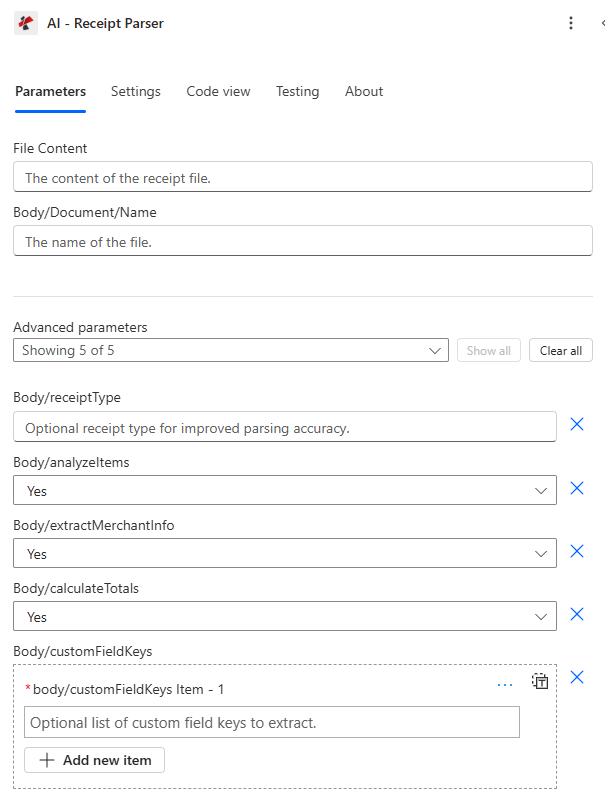
主面板仅显示 文件内容 和 主体/文件/名称; 每个提取开关都是一个高级参数。
参数
操作中需要: 文件内容 和 主体/文件/名称其他所有字段均为可选的高级参数,并具有默认值。
| 范围 | 必需的 | 它的作用 | 例子 |
|---|---|---|---|
| File Content | Required | Binary content of the receipt file, mapped from a previous action (Get file content, SharePoint, OneDrive, email attachment). Supports .pdf, .png, .jpg, .jpeg. | body('Get_file_content') |
| Body/Document/Name | Required | Filename of the receipt including its extension. Used for format detection and processing. | receipt_2026_07_07.pdf |
| Body/receiptType (Advanced) | Optional | Improves parsing accuracy for a known category: meal, supplies, hotel, fuel and energy, transportation, communication, subscriptions, entertainment, training, healthcare, or generic. | hotel |
| Body/analyzeItems (Advanced) | Optional | Yes extracts individual line items with name, quantity, price, category, and item code. No skips line-item detail. | Yes |
| Body/extractMerchantInfo (Advanced) | Optional | Yes extracts merchant name, address, phone, website, store number, and cashier name. | Yes |
| Body/calculateTotals (Advanced) | Optional | Yes extracts and calculates subtotal, tax amount, total amount, and payment method. | Yes |
| Body/customFieldKeys (Advanced) | Optional | Array of additional field names to extract beyond the standard schema. Returned inside additionalInfo. | ['loyaltyNumber'] |
如何在 AI 收据解析器中设置 AI 收据解析器 Power Automate?
- 添加 AI收据解析器 将你的工作流程增加一个新的步骤。
- 登录 PDF4me 连接 你的 API 钥匙。
- 地图 文件内容 从之前的操作(从……获取文件内容) SharePoint, OneDrive(例如 Dropbox 或电子邮件附件)。
- 放 主体/文件/名称 带有匹配的扩展名(
.pdf,.png,.jpg, 或者.jpeg)。 - 在下面 高级参数, 放 正文/收据类型 如果你知道类别,然后切换 正文/分析项目, 正文/提取商户信息, 正文/计算总计 根据需要。
- 运行流程。检查 成功 在下游使用提取的字段之前。
- 路线 商家名称, 分析项目, 总金额以及相关领域 Excel, SharePoint, Dynamics 365 或 Power BI。
输出
响应包括核心交易字段、用于项目/商家/财务的嵌套数组、每种收据类型的专用字段以及处理元数据。
| 场地 | 类型 | 描述 |
|---|---|---|
| receiptType | String | Type of receipt extracted (supplies, retail, restaurant, hotel, fuel, healthcare, training). |
| transactionDateStr | String | Transaction date in ISO 8601 (YYYY-MM-DD). |
| transactionTime | String | Transaction time (HH:MM:SS). |
| receiptNumber | String | Receipt number or transaction identifier. |
| analyzeItems | Array | Line items with name, quantity, unit price, total price, category, description, item code, brand, size, color, SKU. |
| merchantInfoList | Array | Merchant objects with name, address, phone, website, cashier name, store number. |
| financialInfoList | Array | Financial objects with subtotal, tax amount, total amount, payment method, card last four. |
| merchantName / merchantAddress / merchantPhone / merchantWebsite | String | Flattened merchant details for quick access without indexing into merchantInfoList. |
| subtotal / taxAmount / totalAmount | Number | Flattened financial totals with precise decimal handling. |
| paymentMethod / cardLastFour | String | Payment method used and last four digits of the card, if applicable. |
| roomNumber / checkInDate / checkOutDate | String | Hotel-specific fields, populated when receiptType is hotel. |
| fuelType / fuelQuantity / fuelUnit / vehicleNumber | String/Number | Fuel-specific fields, populated when receiptType is fuel and energy. |
| trainingProvider / courseName | String | Training-specific fields, populated when receiptType is training. |
| healthcareProvider / patientName / insuranceInfo | String | Healthcare-specific fields, populated when receiptType is healthcare. |
| additionalInfo | Object | Dictionary containing any Body/customFieldKeys values that were found. |
| warnings | Array | Warning messages for potential data-quality issues encountered during extraction. |
| fallbackUsed | Boolean | True when a fallback extraction method was used, a signal to review manually. |
| success | Boolean | True if extraction succeeded. |
| message | String | Descriptive result message. |
典型配置
- 当收据通过电子邮件发送或上传时触发 SharePoint。
- 运行 AI-Receipt Parser,启用 extractMerchantInfo 和 calculateTotals 功能。
- 将 merchantName、totalAmount 和 transactionDateStr 追加为新项 Excel 排。
- 将原始收据与提取的数据关联存档。
- 启用 analyzeItems 功能后,在收据上传时触发。
- 对 analyzeItems 中的每个项目应用此操作,并按返回的 category 字段进行分类。
- 将超过政策阈值的项目提交给经理审批。
- 已批准的物品将发布到 Dynamics 365 金融。
- 上传收据时触发;如果类别已知,则设置 Body/receiptType。
- 检查退回的收据类型和分支,例如酒店、燃料和能源或医疗保健。
- 将房间号/入住日期、燃料类型/车辆编号或病人姓名发送到匹配系统。
- 记录所有警告信息以供人工审核。
实用技巧
如果警告数组已填充或 fallbackUsed: true,则表示提取结果的置信度较低。应将这些结果提交人工审核,而不是自动发布到费用或会计系统中。
即使不设置,通用提取仍然有效,但匹配 receiptType 可以提高房间号或燃料类型等特定类别字段的准确性。
如果您只需要总金额,请将 analyzeItems 和 extractMerchantInfo 设置为 No,以减少响应大小并集中处理。
扩展名不匹配(例如,将一个扩展名命名为“a”) JPG 文件 receipt.pdf)可能会影响格式检测和提取的准确性。
收据上打印的会员编号、促销代码或内部参考信息可以通过 Body/customFieldKeys 捕获,而无需等待架构更新。
速查表
| 目标 | 收据类型 | 关键输出字段 |
|---|---|---|
| General expense capture | generic | merchantName, totalAmount, transactionDateStr |
| Line-item expense report | supplies or retail | analyzeItems (name, category, price) |
| Travel expense reconciliation | hotel | roomNumber, checkInDate, checkOutDate, totalAmount |
| Fleet fuel tracking | fuel and energy | fuelType, fuelQuantity, vehicleNumber |
| Healthcare expense/insurance | healthcare | healthcareProvider, patientName, insuranceInfo |