AI-结婚证书解析器 Power Automate
PDF4me AI-结婚证解析器 是一个 Power Automate 读取结婚证书的行动 PDF 或生成图像,并返回超过 30 个结构化字段,涵盖配偶详细信息、证婚人信息和证书标识符。无需手动输入数据,即可使用此功能将重要记录数字化、验证身份文件或筛查证书是否存在欺诈。
此操作的作用
PDF4me AI-结婚证解析器 从结婚证中提取结构化数据 PDFs 并将图像直接放在您的……中 Power Automate 流程。向其提供二进制内容。 SharePoint, OneDrive通过电子邮件附件或 Dropbox 发送,并接收回复 30 多个结构化字段 涵盖证书标识符、夫妻双方的个人信息、证婚人和见证人的详细信息、官方印章和签名,以及可选信息 AI强大的欺诈和真实性检测功能结构化输出槽直接插入 SharePoint 列表, Dynamics 365 条记录, Excel 练习册, SQL 数据库或任何下游 Power Automate 无需手动输入数据即可完成此步骤。
相关博客文章(1)
我如何验证我的身份 Power Automate 流动?
每一个 PDF4me 行动 Power Automate 需要有效 API 密钥。在密钥中创建一个。 PDF4me 开发者控制面板,并在需要时输入 PDF4me 连接器在首次使用时会提示输入凭据。
您不容错过的重要事实
即使是二进制输入,文件名也必须包含扩展名。
务必将结婚证名称设置为实际文件名,包括其扩展名,例如:
证书。pdf 或者 扫描.png该操作使用此字符串进行格式检测,并且 AI 模型选择。省略扩展名或使用通用占位符名称会降低提取精度。真实性验证会增加处理时间,但可以检测欺诈行为。
环境
验证真实性 到 是的 激活欺诈和篡改检测流程,填充 真实性问题, 欺诈指标, 和 真实性推荐 在响应中。对于吞吐量至关重要且真实性在下游验证的大批量数据流,请保留此设置。 不。在写入记录系统之前,请检查警告数组。
当 AI 遇到置信度低的字段或难以辨认的字迹时,它会填充
警告 数组和集合 备用方案 到 真的. 在此操作之后添加一个条件步骤,将带有非空警告的证书路由到人工审核批准流程,然后再将提取的数据提交到您的记录系统。参数
必填字段: 结婚证文件内容和结婚证名称是所有请求的必填项。Body/verifyAuthenticity 和 Body/customFieldKeys 是可选的;如果不需要它们的功能,可以完全省略。
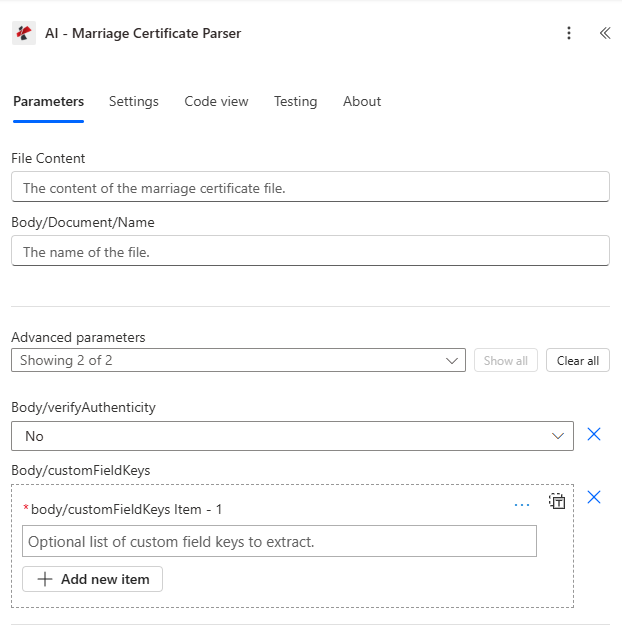
满的 参数 视野 AI-结婚证书解析器操作 Power Automate。
| 范围 | 必需的 | 它的作用 | 例子 |
|---|---|---|---|
| Marriage Certificate File Content | Required | Binary data of the marriage certificate. Map from the output of a preceding step such as Get file content (SharePoint), Get file content (OneDrive), or an email attachment retrieval. Accepts PDF, PNG, JPG, and JPEG formats. | body('Get_file_content') |
| Marriage Certificate Name | Required | Filename of the certificate including its extension. Used for format detection and AI model selection. Must include the correct extension matching the actual file type: .pdf, .png, .jpg, or .jpeg. | marriage_certificate_2024.pdf |
| Body/verifyAuthenticity | Optional | Enable AI-powered authenticity and fraud detection. When Yes, the response includes authenticityIssues, fraudIndicators, and authenticityRecommendation. Adds processing time. Omit or set to No when speed is the priority. | No |
| Body/customFieldKeys | Optional | Optional array of custom field keys to extract beyond the standard certificate fields. Each string names a custom field the AI will attempt to locate and return inside the extractedFields object of the response. | ["registrationRegion", "notaryId"] |
真实性验证选项
控制该操作是否运行 AI-增强证书的欺诈和篡改检测能力。
不默认:跳过身份验证检查跳过真实性验证。此操作提取所有证书字段,而不进行欺诈分析。适用于大批量处理流程,或文档真实性由下游独立步骤验证的情况。响应速度更快。
是的启用欺诈和篡改检测功能激活完整的真实性分析流程。响应包括
真实性问题 (发现的具体问题), 欺诈指标 (检测到欺诈信号),以及 真实性推荐 (总体评估)。适用于身份验证、法律文件处理、移民和保险工作流程,在这些流程中需要确认证书的合法性。输出字段
| 场地 | 类型 | 它包含什么 |
|---|---|---|
certificateNumber | String | Unique certificate or registration number extracted from the document. |
dateOfMarriage | String | Date the marriage ceremony took place. Returned in ISO 8601 format (YYYY-MM-DD). |
placeOfMarriage | String | Location or venue where the marriage ceremony was conducted. |
dateIssued | String | Date the certificate was issued by the authority. Returned in ISO 8601 format (YYYY-MM-DD). |
issuingAuthority | String | Name of the government body or agency that issued the certificate. |
spouse1FullName | String | Full legal name of the first spouse as it appears on the certificate. |
spouse1Age | Number | Age of the first spouse at the time of marriage. |
spouse1BirthDate | String | Birth date of the first spouse in ISO 8601 format (YYYY-MM-DD). |
spouse1Birthplace | String | Birthplace of the first spouse as extracted from the certificate. |
spouse1ResidenceBeforeMarriage | String | Residential address of the first spouse prior to the marriage. |
spouse2FullName | String | Full legal name of the second spouse as it appears on the certificate. |
spouse2Age | Number | Age of the second spouse at the time of marriage. |
spouse2BirthDate | String | Birth date of the second spouse in ISO 8601 format (YYYY-MM-DD). |
spouse2Birthplace | String | Birthplace of the second spouse as extracted from the certificate. |
spouse2ResidenceBeforeMarriage | String | Residential address of the second spouse prior to the marriage. |
officiantName | String | Full name of the officiant who performed the ceremony. |
officiantTitle | String | Title or role of the officiant, for example Minister, Judge, or Registrar. |
officiantLicenseNumber | String | License or registration number of the officiant, where present on the certificate. |
witnesses | String | Names and details of witnesses present at the ceremony. |
officialSeal | String | Description or indicator of the official seal or stamp on the certificate. |
signaturesPresent | String | Indicator of which signatures are present: spouses, officiant, and witnesses. |
authenticityIssues | Array | Issues found during authenticity verification. Populated only when verifyAuthenticity is Yes. |
fraudIndicators | Array | Potential fraud or tampering indicators detected by the AI model. Populated only when verifyAuthenticity is Yes. |
authenticityRecommendation | String | Overall recommendation on certificate authenticity from the AI analysis. |
extractedFields | Object | Key-value pairs of any custom fields requested via Body/customFieldKeys. |
warnings | Array | Warning messages for fields that had low confidence or could not be parsed reliably. |
fallbackUsed | Boolean | True when a secondary extraction method was used due to limitations of the primary method. |
rawOcrText | String | Full raw OCR text extracted from the document before structured field parsing. |
jobId | String | Unique identifier for the AI processing job. Use for support and debugging. |
jobIdExt | String | External job identifier for linking to third-party tracking or case management systems. |
success | Boolean | True when the extraction completed successfully; false when a processing error occurred. |
message | String | Human-readable summary of the extraction result or description of any error encountered. |
我该如何设置? AI-结婚证书解析器 Power Automate?
- 登录 Power Automate 访问 make.powerautomate.com 并创建新流程或打开现有流程。
- 选择用于传递证书文件的触发器: SharePoint (当创建文件时), Outlook (当收到新邮件时) 用于依附式摄入,或 OneDrive (当创建文件时) 用于文件夹式收件。
- 添加一个 获取文件内容 步 (SharePoint, OneDrive(例如使用 Dropbox 等)来检索证书文件的二进制内容,或者使用 获取附件内容 适用于基于电子邮件的流程。
- 点击 新步骤搜索 PDF4me并选择 AI-结婚证解析器 操作。输入您的 PDF4me API 当连接器提示输入凭据时,请输入密钥。
- 放 结婚证文件内容 使用动态内容选择器,将上一步“获取文件内容”步骤的二进制输出转换为二进制输出。
- 放 结婚证姓名 例如,证书文件名(包括其扩展名)
certificate.pdf或者使用触发器中的动态表达式自动提取文件名。 - 放 正文/验证真实性 到 是的 如果您的工作流程需要进行欺诈或篡改检测,请保留此设置。 不 适用于吞吐量更高的批量流程,其中真实性并非主要考虑因素。
- (可选) 正文/自定义字段键 如果您需要提取标准证书数据之外的字段,可以使用自定义字段名称数组。
- 添加使用动态内容的下游步骤,这些步骤会使用提取的输出字段: 证书编号, 配偶1全名, 结婚日期, 真实性推荐以及其他必要人员。
- 添加一个 健康)状况 检查步骤是否 警告 数组非空,并将这些证书路由到人工审核批准流程,然后再写入您的记录系统。
- 使用结婚证书样本测试流程,并在流程运行历史记录中验证提取的字段。
工作流程示例
工作流程示例Common Power Automate flow patterns using AI-Marriage Certificate Parser.
结婚证已上传 SharePoint → 提取数据 → 创建重要记录条目 → 归档
- A SharePoint 当向传入证书文档库添加新证书时,触发器会触发。
- “获取文件内容”步骤从文件中检索证书二进制文件。 SharePoint。
- AI-结婚证书解析器提取所有 verifyAuthenticity 设置为 Yes 的字段。
- 条件步骤会检查警告数组是否为空。如果警告数组不为空,则会触发审批请求,并将该请求路由至记录主管。
- “创建项目”步骤会在生命记录中添加新行。 SharePoint 包含 certificateNumber、spouse1FullName、spouse2FullName、dateOfMarriage、placeOfMarriage、issuingAuthority 和 authenticityRecommendation 的列表,这些内容均来自输出。
- 移动文件步骤将原始证书归档到已处理证书库,并使用提取的证书编号作为元数据对其进行标记。
- 发送电子邮件步骤会通知记录管理团队提取摘要,其中包括用于审计参考的 jobId。
通过电子邮件收到证书 → 身份验证 → 交叉引用身份系统 → 审批流程
- 一个 Outlook 当验证邮箱收到带有结婚证附件的电子邮件时,触发器就会触发。
- “获取附件内容”步骤从电子邮件中检索证书二进制文件。
- AI-结婚证书解析器提取配偶姓名、出生日期和证书详细信息,并将 verifyAuthenticity 设置为 Yes。
- 一个 HTTP action 会使用 spouse1FullName 和 spouse1BirthDate 查询身份管理系统,以检查是否存在匹配的身份记录。
- 条件步骤基于身份验证建议进行分支。存在问题的证书将通过审批连接器路由到安全团队进行审批请求。
- 创建项目步骤会将提取的数据和身份匹配结果记录在日志中。 SharePoint 验证日志列表。
- “发送电子邮件”步骤会将验证结果返回给请求者。
证书批次接收 → 欺诈风险评分 → 警报生成 → 欺诈监控仪表盘更新
- 手动或定时触发器会处理一批证书。 SharePoint 队列文件夹。
- “Apply to each”循环遍历文件夹中的每个证书文件。
- AI-结婚证书解析器处理每份证书,并将 verifyAuthenticity 设置为 Yes。
- 条件步骤会评估 fraudIndicators 数组的长度。如果指标数量过多,则将风险等级变量设置为“高”。
- 对于高风险级别,“发送电子邮件”步骤会立即向反欺诈团队发送提取的证书编号和欺诈指标列表。
- “创建项目”步骤会将调查记录添加到欺诈案件中。 SharePoint 列出所有提取的字段和计算出的风险等级。
- 一个 HTTP 该操作会将欺诈筛查结果发布到 Power BI 流式数据集,以便实时监控仪表板更新。
法律文件接收 → 合规性验证 → 法律记录系统录入 → 安全存档
- A SharePoint 当证书上传到法律文件库时,触发器会触发。
- 获取文件内容步骤会检索证书二进制文件。
- AI-结婚证书解析器提取所有 verifyAuthenticity 设置为 Yes 的字段。
- 条件步骤会验证颁发机构、证人姓名和证人执照号码是否均不为空。如果缺少字段,则会触发路由操作,将案件移交给法律助理进行人工审核。
- 条件步骤检查结婚日期是否在存储在特定司法管辖区的有效期内。 SharePoint 配置列表。
- “创建项目”步骤会将证书添加到法律文件管理中。 SharePoint 列出所有已提取的字段。
- “追加到数组变量”步骤会添加一个带有时间戳的审计日志条目,其中包括作业 ID 和处理结果,用于合规性审计跟踪。
- 移动文件步骤将原始证书放置在安全归档库中,并将提取的证书编号和签发日期作为元数据标签。
常见问题解答
相关操作
AI-发票解析器
从发票中提取供应商详细信息、明细项目、金额、税务数据和付款条款 PDFs. 与结婚证解析功能结合使用,实现身份和财务文档的综合工作流程。
AI-健康卡解析器
从医疗保险卡中提取会员ID、计划详情和承保日期。结合结婚证解析,用于受抚养人参保资格验证流程。
AI-合约解析器
从法律合同中提取当事人、生效日期和关键条款。可与结婚证解析功能配合使用,用于法律和合规文件接收流程。
在其他平台上执行相同任务
AI-办理结婚证(n8n)
相同的 AI 提取作为一种 n8n node,非常适合开发者构建的自动化工作流程,可连接 Google Drive、Airtable、数据库和自定义 API。
AI-办理结婚证(Make)
提取方法相同 Make 该模块非常适合用于连接 Dropbox、Google Sheets、Airtable 和 SaaS 应用程序的可视化场景构建器。
AI-结婚证书解析器(Zapier)
提取方法相同 Zapier 该操作非常适合连接 Gmail 的 SaaS 驱动和 webhook 触发的证书处理管道, Salesforce以及记录系统。