AI - 文档解析器 Power Automate
此操作的作用
PDF4me AI - 文档解析器 运行已保存的 分析器 从 PDF4me 仪表板可针对任何文档返回提取的数据,如下所示 已解析文档数据 动态的 JSON 在 Power Automate 流程。一个操作即可涵盖发票、采购订单、收据、合同、实验室报告、身份证或任何自定义表单,只需点击即可。 定制说明 在匹配中 分析器 ID (解析单个模式,分类多个文档变体)。字段以可单独映射的标记形式存在,您可以将其拖放到 SharePoint, Excel数据宇宙 Outlook或任何下游 Microsoft 365 步。
测试发票样本
在将流程指向真实数据之前,请使用此供应商发票示例确认操作端到端运行正常。将其上传至 SharePoint, OneDrive或者 Dropbox,地图 文件内容 从 获取文件内容, 放 文件名 到 供应商发票示例.pdf,并输入 默认发票提取 在 定制说明操作返回 已解析文档数据 例如以下字段 发票号, 供应商名称, 和 记账到。
验证您的身份 API 要求
致电 PDF4me 通过 Power Automate流程需要一个有效的 PDF4me API 关键在于 PDF4me Connect 连接器。从开发者控制面板获取或轮换您的密钥。
首先设置分析器
- 分析器列表(步骤 1–2):
https://dev.pdf4me.com/dashboard/#/ai-document-parser/ - 分析器详细信息(步骤 3–5):
https://dev.pdf4me.com/ai-document-parser/?id=<analyzer-guid>
您不容错过的重要事实
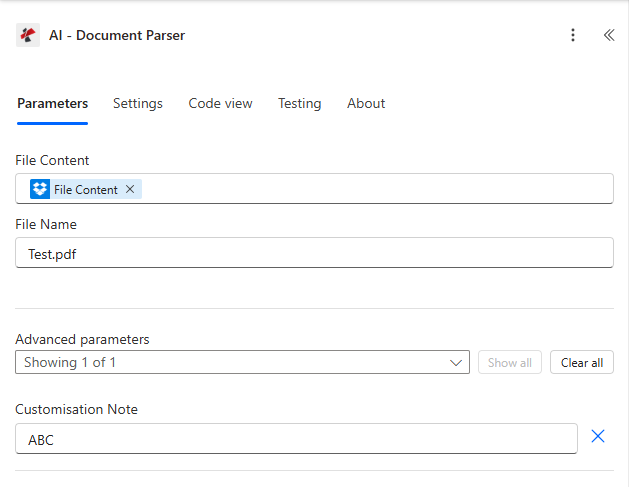
参数选项卡:地图 文件内容 来自前 获取文件内容 步骤,设置 文件名 (使用 供应商发票示例.pdf (使用推荐的样品) 扩展 高级参数然后设置 定制说明 到 默认发票提取 或者您自定义的分析器 ID。
参数
- 分析器列表(步骤 1–2):
https://dev.pdf4me.com/dashboard/#/ai-document-parser/ - 分析器详细信息(步骤 3–5):
https://dev.pdf4me.com/ai-document-parser/?id=<analyzer-guid>
操作中需要: 文件内容(二进制)、文件名(带扩展名的字符串)和自定义说明(来自分析器 ID) PDF4me 仪表板位于“高级参数”下,但实际上是必需的(如果没有它,操作将无法提取任何数据)。
| 范围 | 必需的 | 它的作用 | 例子 |
|---|---|---|---|
| File Content | Yes | Binary content of the source document. Map from a previous Get file content step (SharePoint, OneDrive, Outlook attachment, Dropbox, or any cloud-storage connector that exposes raw bytes). Try the sample-vendor-invoice.pdf above for your first run. | File Content |
| File Name | Yes | Source document filename with extension. Used for format detection and for tracking the call in logs. Accepts .pdf, .png, .jpg, .jpeg. Match the name of the file you uploaded (for example sample-vendor-invoice.pdf). | sample-vendor-invoice.pdf |
| Customisation Note | Yes (Advanced) | The Analyzer Id from the PDF4me dashboard. Create Analyzers at https://dev.pdf4me.com/dashboard/#/ai-document-parser/ (+ Add), then edit schemas on https://dev.pdf4me.com/ai-document-parser/?id=<analyzer-guid>. Use default_invoice_extraction for invoices, a Parse Analyzer Id for one schema, or a Classify Analyzer Id for several variants. | default_invoice_extraction |
自定义说明:分析器 ID 如何映射到行为
解析分析器 ID一种模式,提取您定义的字段字段 在分析仪上。分类分析器 ID一次调用中包含多个模式、路由和提取。默认发票提取内置发票分析器发票号, 供应商名称, 记账到无需事先构建自定义架构,即可获取日期和相关标头字段。输出
动作返回 已解析文档数据 作为动态 JSON分析器架构中定义的每个属性都会作为可单独映射的令牌显示在每个下游操作的动态内容面板中。响应标头也包含标准信息。 Power Automate 路由元数据。
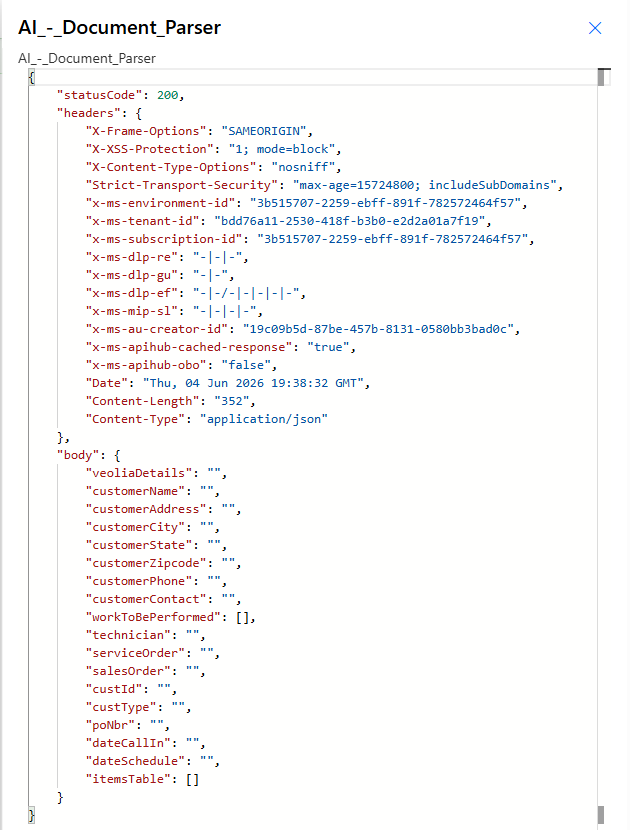
已成功对示例供应商发票进行运行 默认发票提取。 状态码 200; 已解析文档数据 每个分析器字段公开一个属性,用于下游映射。
| 现场(样本运行) | 示例值 |
|---|---|
invoiceNumber | INV-3337 |
invoiceDate | January 25, 2016 |
vendorName | DEMO - Sliced Invoices |
vendorEmail | [email protected] |
billTo | Test Business |
billToEmail | [email protected] |
paymentDeadline | January 31, 2016 |
| 输出 | 类型 | 它包含什么 |
|---|---|---|
statusCode | Integer | 200 on success, 400 for a malformed request body, 500 on a server-side error. |
headers | Object | Standard Power Automate / Microsoft routing headers, including Content-Type application/json. |
Parsed Document Data | Dynamic JSON | The body object. One property per field defined in your Analyzer schema (string, number, date, or nested table). For Classify Analyzers, the Classification Name of the matched Schema is also present. |
快速设置
- 首先构建分析器。打开 分析器列表, 点击 + 添加输入一个清晰的分析器 ID,选择 解析 或者 分类保存该行,然后在该行上添加文档架构。 分析器详情 请参阅页面。 解析设置指南 或者 分类设置指南 完整攻略请见下文。
- 在你的 Power Automate 流程点击 + 新步骤, 搜索 PDF4me, 挑选 AI - 文档解析器。
- 登录 PDF4me 与您的 API 钥匙。
- 文件内容. 前期地图 获取文件内容 步 (SharePoint, OneDrive, Outlook 附件、Dropbox 或任何云存储连接器)。
- 文件名将源文件名与扩展名进行映射(
sample-vendor-invoice.pdf,invoice.png, ETC)。 - 高级参数 → 定制说明输入步骤 1 中的分析器 ID(例如)。
default_invoice_extraction,client_invoices, 或者purchase order parser)。 - 保存流程并进行测试。操作返回 已解析文档数据 架构中每个字段对应一个属性。使用动态内容面板将字段映射到下一步。
工作流程示例
工作流程示例Open by default. Four common AI - Document Parser patterns in a 2x2 grid.
- 触发新文件 SharePoint 收到的发票 图书馆。
- 获取新文件的内容 PDF。
- 跑步 AI - 文档解析器 自定义备注设置为您的解析分析器 ID
发票解析器。 - SharePoint 创建项目 在 AP 列表中,将发票编号、供应商名称、总金额和到期日映射到动态数据。 JSON。
影响: 手动数据录入被零接触式AP数据采集取代。
- Outlook 当收到新邮件时 带附件触发器。
- 以二进制格式获取附件内容。
- 运行 AI - 文档解析器,自定义说明设置为分类分析器 ID(
客户发票每个供应商持有一个模式。 - 启用返回的分类名称,并将客户端 ABC 字段路由到一个 Dataverse 表,将客户端 XYZ 路由到另一个 Dataverse 表。
影响: 一 Power Automate 流程会自动处理所有供应商,无需人工筛选。
- 新的触发器 PDF 在 Dropbox 中 邮政信箱。
- 获取文件内容。
- 运行 AI - 文档解析器,自定义说明设置为
采购订单解析器。 - Excel 向表中添加一行 从响应中映射出 SalesOrderNumber、AgentName、OrderDate 和 TotalAmount。
影响: 运营团队无需创建任何采购订单即可查看所有采购订单。 PDF。
- Power Automate 当收到 HTTP 请求时 从您的门户网站触发。
- 解码上传的文件 PDF。
- 运行 AI - 文档解析器,并将自定义说明设置为您为自定义入职表单创建的解析分析器 ID。
- 数据宇宙 添加新行 对于联系人,直接映射公司名称、联系人、电子邮件、税务识别号、账单地址。
影响: 客户自助注册,无需手动录入CRM信息。
常见问题解答
相关操作
在其他平台上执行相同任务
/v2/FlowV2/AiDocumentParser 用于自定义后端代码或 Postman 测试。