AI信用卡解析器 Power Automate
AI信用卡解析器 是一个 Power Automate 采取行动 PDF4me 读取信用卡图像、扫描或 PDF 利用人工智能技术,以结构化字段字典的形式返回卡号、有效期、持卡人姓名和卡品牌等信息。无需手动输入数据,即可自动执行费用跟踪、卡片记录或对账等操作。
此操作的作用
PDF4me AI信用卡解析器 读取信用卡文件或图像(PDF, PNG, JPG, 或者 JPEG)并返回一个 字段 可以包含的字典 卡号, 到期日, 持卡人姓名, 卡片类型, 卡品牌, 发卡银行以及生效日期(起始日期/终止日期)。(可选) 正文/自定义字段键 提取标准集之外的其他字段。
相关博客文章(1)
我如何验证我的身份 Power Automate 流动?
每一个 PDF4me 行动 Power Automate 需要有效的连接。创建或选择一个包含您数据的连接。 PDF4me API 关键在于确保流程能够安全地验证 AI 信用卡处理请求。
您不容错过的重要事实
始终需要填写两个字段。
文件内容(文档字节)和正文/文档/名称(带扩展名的文件名)。正文/自定义字段键位于“高级参数”下,是可选的。
输出是一个灵活的字段字典
提取的值存储在一个字段对象中,该对象以字段名称为键,而不是固定的模式。在映射到后续流程操作时,请引用所需的每个键。
这是文档提取,不是支付处理。
该操作读取静态文档或图像中的文本。它不会处理实时交易、授权付款或连接到卡组织网络。
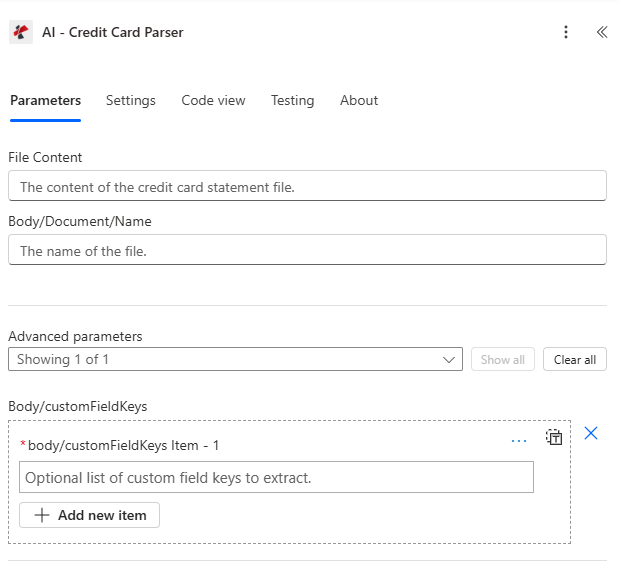
映射文件内容和正文/文档/名称,然后展开正文/自定义字段键的高级参数。
参数
必需的: 文件内容和正文/文档/名称必须始终提供。正文/自定义字段键是可选的高级参数。
| 范围 | 必需的 | 它的作用 | 例子 |
|---|---|---|---|
| File Content | Required | Binary content of the credit card document or image, mapped from a previous action (Get file content, SharePoint, OneDrive, email attachment). Supports .pdf, .png, .jpg, .jpeg. | body('Get_file_content') |
| Body/Document/Name | Required | Filename of the credit card document including its extension. Used for format detection and processing. | card_scan_2024.jpeg |
| Body/customFieldKeys | Optional | Advanced parameter. Array of additional field names to extract beyond the standard credit card data set. | ["customField1", "customField2"] |
输出字段
| 场地 | 类型 | 它包含什么 |
|---|---|---|
success | Boolean | true if the credit card document was processed successfully, false if extraction failed. |
message | String | Descriptive message describing the result of the extraction run. |
fields | Object | Dictionary of extracted credit card fields, where each key is a field name and each value holds the extracted text. |
fields.bankName | String | The name of the bank issuing the credit card, if present on the source document. |
fields.cardNumber | String | The account number printed on the credit card, often partially masked in the source document. |
fields.expiryDate | String | The expiration date of the credit card, typically in MM/YY format. |
fields.cardholderName | String | The name of the cardholder as it appears on the credit card. |
fields.cardType | String | The type of credit card, for example Visa, MasterCard, or American Express. |
fields.issuingBank | String | The name of the bank that issued the credit card. |
fields.cardBrand | String | The brand of the credit card, for example Visa, MasterCard, or Discover. |
fields.accountNumber | String | The associated bank account number, if available on the source document. |
fields.validFrom | String | The valid-from date of the credit card, typically in MM/YY format. |
fields.validThru | String | The valid-through date of the credit card, often the same as expiryDate. |
warnings | Array | Warning messages indicating potential data quality issues encountered during processing. |
fallbackUsed | Boolean | true if fallback extraction methods were used to process the document. |
jobId | String | Unique identifier for the AI processing job, used for tracking and debugging. |
jobIdExt | String | External job identifier for integration with third-party systems, if applicable. |
- Sample JSON Response
- Flow Integration
{
  "fields": {
    "bankName": { "value": "Chase Bank" },
    "cardNumber": { "value": "XXXX-XXXX-XXXX-1234" },
    "expiryDate": { "value": "12/25" },
    "cardholderName": { "value": "JOHN MICHAEL SMITH" },
    "cardType": { "value": "Visa" },
    "issuingBank": { "value": "Chase Bank" },
    "cardBrand": { "value": "Visa" },
    "accountNumber": { "value": "1234567890" },
    "validFrom": { "value": "01/22" },
    "validThru": { "value": "12/25" },
    "customField1": { "value": "Value for Custom Field 1" }
  },
  "warnings": [],
  "fallbackUsed": false,
  "jobId": "87654321-4321-4321-4321-210987654321",
  "jobIdExt": "CC-2024-001",
  "success": true,
  "message": "Credit card data extracted successfully using AI technology"
}
将提取的路径 fields 字典 Microsoft 365 以及金融体系:
- 费用跟踪将持卡人姓名、卡品牌和到期日期写入 SharePoint 清单或费用系统。
- 卡片记录保存:将 cardNumber(已屏蔽)和 issuingBank 与卡片主列表进行匹配。
- 和解将账号和卡号输入到 Excel 或 SQL 对账工作簿。
- 有效期追踪计算距离到期日还有多少天,并触发续订提醒。
如何在系统中设置AI信用卡解析器 Power Automate?
- 添加 PDF4me → AI信用卡解析器 致你 Power Automate 流动。
- 地图 文件内容 来自之前的操作(SharePoint, OneDrive(例如 Dropbox 或电子邮件附件)。
- 放 主体/文件/名称 文件扩展名(.pdf、.png、.jpg 或 .jpeg)。
- (可选)扩展 高级参数 并设置 正文/自定义字段键 对于标准集之外的任何字段。
- 运行流程。解析后的结果将以如下形式返回: 字段 包含卡片、持卡人和银行详细信息的词典,以及 警告 和 备用方案 旗帜。
典型配置
工作流程示例Common Power Automate flow patterns using AI-Credit Card Parser.
费用跟踪记录
- 当信用卡账单或收据上传到指定位置时,流程将被触发。 SharePoint 或通过电子邮件接收。
- AI信用卡解析器提取持卡人姓名、信用卡品牌和到期日期。
- 提取的字段被写入一个 SharePoint 清单或费用管理系统。
- 条件标记带有警告的行,以便在批准前进行人工审核。
卡片记录管理
- 当通过电子邮件收到新的卡片文档时,流程就会触发。 SharePoint 上传。
- AI信用卡解析器提取卡号、发卡银行和有效期至。
- 在某个系统中,卡片记录被创建或更新。 SharePoint 列表,并设置到期提醒。
财务对账
- 当信用卡账单上传到对账文件夹时,流程就会触发。
- AI信用卡解析器提取账号和持卡人姓名。
- 提取的字段为 Excel 或者用于与会计记录进行匹配的 SQL 对账工作表。
实用技巧
Reference fields by key, not by fixed position
The fields dictionary is keyed by field name, so read each value with its key rather than assuming a fixed field order.
Always branch on success and warnings
Check success before writing extracted data downstream, and inspect the warnings array for any fields the parser flagged as uncertain.
Custom fields extend, they do not replace
Body/customFieldKeys adds extra entries alongside the standard fields, it does not narrow or filter the standard set.
Treat card numbers as sensitive by default
Mask or restrict access to cardNumber and accountNumber in downstream storage; this action extracts text, it does not apply its own masking.
Match the file extension to the real format
Body/Document/Name must carry the true extension (.pdf, .png, .jpg, .jpeg) of the mapped File Content, a mismatched extension can affect processing.
速查表
| 场地 | 价值 |
|---|---|
| Action | AI-Credit Card Parser |
| Required fields | File Content, Body/Document/Name |
| Optional advanced field | Body/customFieldKeys |
| Supported file types | .pdf, .png, .jpg, .jpeg |
| Output root | fields (dictionary) |
| Key output fields | cardNumber, expiryDate, cardholderName, cardType, cardBrand, issuingBank, accountNumber, validFrom, validThru, warnings, fallbackUsed |
常见问题
行业应用案例及应用
- Finance & Accounting
- Banking & Financial Services
- Retail & E-commerce
- Corporate Finance
- Compliance & Security
财务与会计应用案例
- 费用处理自动从信用卡中提取费用数据
- 财务对账核对信用卡交易与会计记录
- 费用报告根据提取的信用卡数据生成费用报告
- 审计合规性维护结构化的信用卡数据以进行审计跟踪
- 预算跟踪:使用提取的信用卡信息跟踪支出
银行和金融服务应用案例
- 卡片处理:实现信用卡处理和数字化自动化
- 信用卡验证使用提取的卡片详细信息验证信用卡信息
- 账户管理使用提取的卡片数据管理信用卡账户
- 欺诈检测利用提取的卡片模式检测欺诈活动
- 客户服务通过自动提取卡片数据,提供更快捷的客户服务。
零售和电子商务应用案例
- 支付处理使用提取的信用卡信息处理付款
- 费用跟踪利用提取的信用卡数据跟踪业务支出
- 供应商付款使用提取的卡片信息处理供应商付款
- 财务分析分析从提取的信用卡数据中得出的消费模式
- 库存管理将费用跟踪与库存管理系统关联起来
企业融资应用案例
- 企业卡管理使用提取的卡片数据管理公司信用卡
- 员工费用跟踪利用提取的信用卡信息跟踪员工支出
- 差旅费用管理使用提取的银行卡信息管理差旅费用
- 费用审批工作流程使用提取的卡片数据路由费用以进行审批
- 财务报告:根据提取的信用卡交易生成财务报告
合规与安全用例
- PCI DSS 合规性支持信用卡数据处理的 PCI DSS 合规性工作
- 数据安全安全提取和存储信用卡数据
- 审计跟踪维护信用卡数据访问和处理的审计跟踪
- 访问控制:对提取的信用卡信息实施访问控制
- 合规报告:根据提取的卡片数据生成合规性报告
相关操作
AI银行对账单解析器
从银行对账单中提取结构化数据,这是与银行卡交易记录进行对账的常见方法。
AI收据解析器
在费用工作流程中,提取与信用卡账单明细项目相符的收据数据。
AI工资单解析器
提取与企业财务流程中信用卡支出跟踪相匹配的工资数据。
在其他平台上执行相同任务
Make人工智能处理信用卡
与人工智能信用卡提取相同的 Make 模块(在本平台上名为 AI-Process 信用卡)。
n8n人工智能处理信用卡
用于相同 AI 信用卡提取节点 n8n 工作流程,自托管或云端。
Zapier人工智能信用卡解析器
相同的AI信用卡提取步骤 Zapier您可以从任何已连接的应用程序触发它。