准备打印 Power Automate
准备打印 是一个 Power Automate 采取行动 PDF4me 转换任何 PDF 转换成可直接打印的格式 PDF 通过标准化纸张尺寸、颜色模式和页面布局,您可以利用此功能创建多页联排的讲义,在邮寄前将发票或报告转换为灰度模式,或在文档送交打印机或印刷供应商之前将其调整为非标准纸张尺寸。
此操作的作用
PDF4me 准备打印 重写 PDF 对于实体打印:选择标准纸张尺寸或自定义宽度和高度,选择 颜色 或者 灰度并安排多个来源 pages 每张印刷纸 每页列数 和 每页行数最终生成一个可直接用于印刷的单个文件,您的流程可以直接将其发送到打印机、印刷供应商或存档库,无需桌面设计工具。
我如何验证我的身份 Power Automate 流动?
致电 PDF4me 通过 Power Automate流程需要一个有效的 PDF4me API 关键在于 PDF4me 连接 连接器。身份验证可确保通信安全,并验证您作为授权用户的身份。
您不容错过的重要事实
纸张尺寸 到 风俗 连接器显露出 页面高度(毫米) 和 页面宽度(毫米)这些规则仅适用于纸张尺寸为“自定义”的情况;对于 A4 或 Letter 等标准尺寸,这些规则将被忽略。文件内容 被标记为必填项 Power Automate 用户界面。每页列数:3 和 每页行数:2 放入 6 个源 pages 在一张打印纸上,即可快速制作紧凑的讲义或缩略图校样。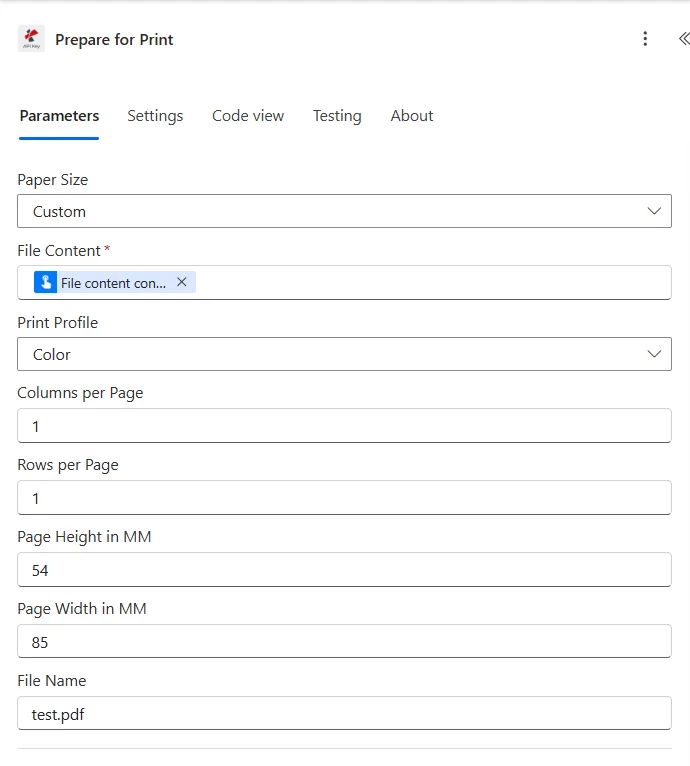
和 纸张尺寸 设置为 风俗小组补充道 页面高度(毫米) 和 页面宽度(毫米) 标准字段下方。
参数
操作中需要: 文件内容 仅有的。 页面高度(毫米) 和 页面宽度(毫米) 这些字段是条件性的,仅当纸张尺寸设置为“自定义”时才适用。其他所有字段均为可选字段,并带有默认值。
| 范围 | 必需的 | 它的作用 | 例子 |
|---|---|---|---|
| File Content | Required | The source PDF's binary content, mapped from a previous action such as Get file content (SharePoint, OneDrive) or an email attachment. | File Content from Get file content |
| Paper Size | Optional | Output paper format. Standard ISO A-series (A0-A6), ISO B5, North American Letter, Legal, Ledger, Tabloid (11x17), or Custom to set exact dimensions. | A4 |
| Print Profile | Optional | Color mode for the output. Color preserves original colors; GrayScale converts all content to grayscale to reduce ink or toner cost. | Color |
| Columns per Page | Optional | Number of source-page columns placed on one printed sheet. Combine with Rows per Page for n-up layouts. Defaults to 1. | 1 |
| Rows per Page | Optional | Number of source-page rows placed on one printed sheet. Combine with Columns per Page for n-up layouts. Defaults to 1. | 1 |
| Page Height in MM | Conditional | Custom sheet height in millimeters. Applies only when Paper Size is set to Custom. | 54 |
| Page Width in MM | Conditional | Custom sheet width in millimeters. Applies only when Paper Size is set to Custom. | 85 |
| File Name | Optional | The source file's name including the .pdf extension. Used for processing context and trace logging. | test.pdf |
标准纸张尺寸选项
| 团体 | 价值观 | 典型用途 |
|---|---|---|
| ISO A-series | A0, A1, A2, A3, A4, A5, A6 | General documents, most international print shops default here. |
| ISO B-series | B5 | Books and some brochure formats. |
| North American | Letter, Legal, Ledger | US and Canada standard office and legal formats. |
| Tabloid | 11x17 | Posters, spreadsheets, and oversized handouts. |
| Custom | Set via Page Height in MM / Page Width in MM | Receipt rolls, non-standard brochure trims, or any size not covered above. |
如何在“准备打印”中设置? Power Automate?
- 添加 准备打印 将你的工作流程增加一个新的步骤。
- 登录 PDF4me 连接 你的 API 钥匙。
- 地图 文件内容 从之前的操作(从……获取文件内容) SharePoint 或者 OneDrive)。
- 选择 纸张尺寸标准格式,或 风俗 加 页面高度(毫米) 和 页面宽度(毫米)。
- 放 打印配置文件 到 颜色 或者 灰度。
- 放 每页列数 和 每页行数 对于 n 合 1 的布局(如果每张纸只打印一页,则两者都设置为 1)。
- 放 文件名 和
.pdf扩大。 - 运行流程。路由返回结果 文件内容 发送到打印机、打印供应商或存档库。
输出
| 场地 | 类型 | 描述 |
|---|---|---|
| File Content | Binary | Print-ready PDF with the chosen paper size, color mode, and page layout applied. |
| File Name | String | Name of the output print-ready PDF file. |
典型配置
- 当安排训练课程时触发。
- 获取幻灯片 PDF 从 SharePoint。
- 运行“准备打印”命令,每页列数为 3,每页行数为 2,打印配置文件为灰度,纸张尺寸为 A4。
- 将输出结果保存到打印队列文件夹并通知培训师。
- 按夜间定时触发。
- 获取已排队等待打印的文档列表。
- 对每项应用:准备打印,纸张尺寸为 Letter,打印配置文件为灰度。
- 将该批次上传到网络打印队列并更新跟踪列表。
- 当市场部批准营销素材时触发。
- 获取数字版 PDF 从 SharePoint。
- 使用自定义纸张尺寸和供应商提供的精确页面高度(毫米)/页面宽度(毫米)运行“准备打印”。
- 将输出发送到印刷供应商的上传端点。
实用技巧
除非纸张尺寸设置为“自定义”,否则页面高度(毫米)和页面宽度(毫米)将被忽略。在选择标准格式时设置这些参数无效。
请向您的印刷供应商或印刷商索取精确的毫米尺寸,而不是猜测;自定义尺寸的微小误差会导致意想不到的边距或裁剪。
对于标准的单页打印,请将每页列数和每页行数都设置为 1。只有当您需要多页联打印的讲义或校样时,才需要提高这些值。
使用灰度模式可以降低内部草稿和宣传单的打印成本。对于需要保持清晰可辨的品牌颜色或颜色编码内容(例如图表、高亮区域),则应保留彩色。
在将设置连接到夜间批处理流程之前,先在单个测试文件上运行每页列数/每页行数组合,这样就不会出现无法阅读的布局导致完整的打印运行。
速查表
| 目标 | 纸张尺寸 | 打印配置文件 | 列数 x 行数 |
|---|---|---|---|
| Standard single-page print | A4 or Letter | Color | 1 x 1 |
| 6-up training handout | A4 | GrayScale | 3 x 2 |
| 4-up thumbnail proof sheet | Letter | Color | 2 x 2 |
| Non-standard receipt or ticket | Custom (set MM fields) | Color | 1 x 1 |