解析文档 Power Automate
此操作的作用
PDF4me 解析文档 使用您保存的解析模板对 PDF 在 Power Automate 流程并返回跟踪 ID 以及提取的字段数据,这些数据可直接用作动态内容。管道文件内容来自 SharePoint, Outlook, OneDrive或者,在 Dataverse 中,通过以下方式引用模板: 模板名称(TemplateId)并将解析后的值直接路由到 SharePoint 列表更新,Dataverse 行创建,一个 Outlook 电子邮件或 Teams 通知。一个操作,一个模板,所有 Microsoft 365 工作流程。
相关博客文章(1)
执行此操作之前: 在解析模板中创建解析模板 PDF4me 仪表板。定义您的捕获密钥并选择 正则表达式 对于稳定模式或 JavaScript 表达 用于条件逻辑。 Power Automate 操作引用该模板 模板 ID。 看 准备文档解析信息 完整设置请参见正则表达式示例(INV-\d{6,10}, \d{2}/\d{2}/\d{4}),以及两个工作单位 JavaScript 表达式分类器样本。
验证您的身份 API 要求
这 PDF4me 将连接器连接到 Power Automate 需要有效 联系 握着你的 PDF4me API 关键在于:在创建流程时创建一次连接,然后每次都创建连接。 PDF4me 租户中的操作会重用它。
您不容错过的重要事实
模板名称接受模板 ID GUID
请从控制面板粘贴 GUID TemplateId,而不是人类可读的模板名称。GUID 在重命名后保持不变,是安全的生产环境值。
用于稳定模式的正则表达式 JavaScript 用于条件逻辑
捕获规则位于模板中。使用正则表达式来指定发票编号、日期和金额。 JavaScript 用……表达
文本 用于分类和回退规则的变量,然后根据条件或开关进行路由。本国的 Microsoft 365 来源
文件内容映射清晰 SharePoint 获取文件内容 Outlook 获取附件, OneDrive 获取文件内容,并从 Dataverse 下载文件。相同的 TemplateId 也适用于此。 Make, n8n, Zapier以及直接 REST。
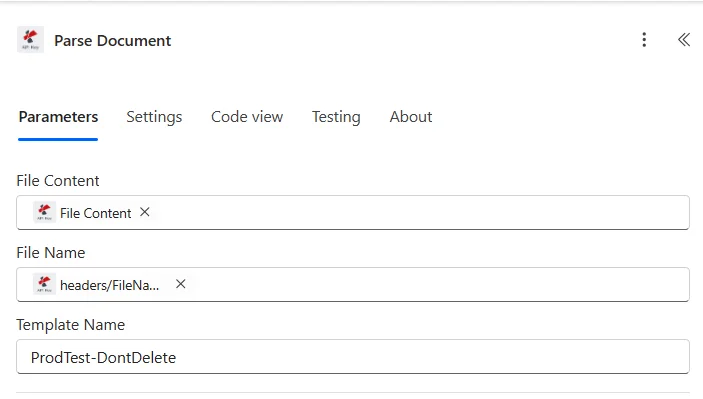
参数
| 范围 | 必需的 | 它的作用 | 例子 |
|---|---|---|---|
| File Content | Yes | Binary PDF as dynamic content from a prior Microsoft 365 action: SharePoint Get file content, Outlook Get attachments, OneDrive Get file content, Dataverse Download file. Must be a valid PDF. | @triggerOutputs()?['body'] |
| File Name | Yes | Source filename including .pdf extension. Usually mapped as dynamic content from the same upstream action File Name output. | Invoice_12345.pdf |
| Template Name | Yes | TemplateId GUID from the PDF4me dashboard. Identifies which parse template (capture keys + extraction rules) the action should apply. | 12345678-1234-1234-1234-123456789abc |
解析模板中的表达式类型
正则表达式稳定模式发票号码(
INV-\d{6,10}),日期(\d{2}/\d{2}/\d{4}),金额($?\d{1,3}(?:,\d{3})*(?:.\d{2})?约 80% 的生产捕获密钥。JavaScript 表达条件逻辑和分类器捕获区域文本以如下方式传递:
文本返回一个字符串。支持多标记分类、回退规则和日期规范化。参见 准备文档解析信息 提供两个工作样品。输出
该操作返回跟踪 ID 以及解析后的字段数据,作为动态内容供每个下游操作使用。
| 场地 | 类型 | 它包含什么 |
|---|---|---|
Trace-Id | String | Unique identifier for the parse operation. Log it to a SharePoint list or Dataverse table for audit and troubleshooting. |
Parsed fields | Object | One dynamic-content field per capture key in your template (invoiceNumber, totalAmount, invoiceDate, etc). Reference them directly in any downstream action. |
流程示例
常见的 Power Automate 流程模式Typical ways to chain Parse Document into a Power Automate flow.
Outlook 向 Dataverse 开具发票
- Outlook 当收到新邮件时,收件箱/AP 上的触发器会启动。
- 对每个附件应用过滤器 PDFs 仅有的。
- 解析文档时,会根据附件运行发票模板。
- Dataverse 添加新行会将 invoiceNumber、totalAmount 和 vendorName 写入 Invoices 表。
- 团队在聊天或频道中发布消息即可通知 AP 团队。
SharePoint 库列表更新
- SharePoint 当在文件夹 /Documents/Invoices 中创建文件时,触发器会触发。
- SharePoint 获取文件内容加载 PDF 二进制。
- 解析文档提取发票字段。
- SharePoint 更新项会将解析后的值写回同一项的元数据中。
分类和路由流
- 通过表单或 Power Apps 提交的内容 PDF。
- 解析文档会运行一个带有模板的程序 JavaScript 返回文档类型的表达式键。
- 根据类型字段(发票/订单/合同)切换操作路线。
- 每个分支都会将解析后的值发布到正确的目标位置(Dynamics, SharePoint, Outlook 赞同)。
常见问题解答
相关行动
准备文档解析信息
模板设置详解,包含正则表达式示例和两个可运行的示例。 JavaScript 表达式分类器样本。
设置文档分类
仅针对类别输出的配套指南。在“解析文档”之前用作预路由。
解析文档 REST API
通过原始数据使用相同的引擎 REST 端点。从以下位置调用时使用: Power Automate 桌面端或自定义代码。
在其他平台上执行相同的任务
解析文档 Make
带有云存储模块的可视化场景构建器。模板 ID 相同。
解析文档 n8n
具有相同 TemplateId 的自托管、对开发者友好的节点。
解析文档 Zapier
可从 6000 多个触发器中任选一个触发 Zapier 应用程序。相同的模板 ID。